


- Posts: 222
- Thank you received: 3
3 Post Moderation Rule for New Boarders (25 Jan 2021)
New boarders will have their posts moderated - Don't worry if you cannot see your post immediately.
Color Correcting
15 Jul 2013 17:50 #28577
by Rbelfi
Color Correcting was created by Rbelfi
Does anyone have any suggestions for a good color correcting plugin for FCPX?
I've tried liking the color board, but it seems to be the one thing I just can't get flowing.
I've tried liking the color board, but it seems to be the one thing I just can't get flowing.
Please Log in to join the conversation.
15 Jul 2013 19:35 #28578
by canelson
--
Matias Canelson
www.canelson.us
Replied by canelson on topic Color Correcting
Have you seen HyColour PRO? Has a lot of tweaks and can work together with the colorboard.
www.hyfx.tv/hycolourpro
www.hyfx.tv/hycolourpro
--
Matias Canelson
www.canelson.us
Please Log in to join the conversation.

15 Jul 2013 19:47 #28579
by cseeman
Replied by cseeman on topic Color Correcting
Hawaiki Color available in Noiseindustries FXFactory store looks interesting.
hawaiki.co
Looks like good implementation traditional color wheels with fine control.
hawaiki.co
Looks like good implementation traditional color wheels with fine control.
Please Log in to join the conversation.
- Simon Ubsdell
-

- Offline
- Platinum Member
-

Less
More
- Posts: 350
- Thank you received: 337
15 Jul 2013 19:48 - 15 Jul 2013 19:55 #28580
by Simon Ubsdell
Replied by Simon Ubsdell on topic Color Correcting
What Craig said 
Last edit: 15 Jul 2013 19:55 by Simon Ubsdell.
Please Log in to join the conversation.
16 Jul 2013 00:06 #28588
by Rbelfi
Replied by Rbelfi on topic Color Correcting
Thanks for the info guys! I ended up going with HyColour PRO, I liked the options with the plugin better.
Please Log in to join the conversation.
16 Jul 2013 02:06 #28591
by ddixon
Replied by ddixon on topic Color Correcting
+1 on HyColor Pro - very powerful, but not overwhelming for mere mortals :lol:
Please Log in to join the conversation.
- Scrubelicious
-

- Offline
- Platinum Member
-
Less
More
- Posts: 1228
- Thank you received: 114
16 Jul 2013 04:53 #28593
by Scrubelicious
Replied by Scrubelicious on topic Color Correcting
If you don't mind looking down your edit and moving it over to get corrected I would suggest taking a look at the DaVinci Resolve. The free version works up to HD resolution anything above will require the purchased version.
Please Log in to join the conversation.
- Simon Ubsdell
-
- Offline
- Platinum Member
-
Less
More
- Posts: 350
- Thank you received: 337
16 Jul 2013 09:28 - 16 Jul 2013 09:30 #28598
by Simon Ubsdell
Replied by Simon Ubsdell on topic Color Correcting
In defence of Hawaiki Color, which Craig mentioned above, to compare it to either HyColor or Resolve is rather missing the point.
Resolve is of course a world class option if you have the time to round-trip and also are not intimidated by its steepish learning curve, which is likely to be off-putting if you're an inexperienced colorist.
HyColor on the other hand, which has quite a few enthusiastic devotees here, is not really a color correction tool in the conventional sense insofar as I understand it. It appears to offer a Tint function which will globally color your picture, as well as some color bias adjustments options among a few other clearly useful features.
What it shares with many other FCP X color-based offerings including the equally excellent (or possibly even more excellent) Color Precision from Lawn Road (which is a true color correction tool), is that it relies for its interface on the small, fiddly, unergonomic, insufficiently fine-grained controls in the FCP X Inspector window. And none of these type of products offer traditional color wheels, which is a downside for editors who can't get along with the Color Board, as in the case of the original poster above.
This is not to disparage these products which definitely have their uses in any editor's toolbox, but to point out where the difference lies with Hawaiki Color.
Hawaiki Color comes with its own dedicated grading interface complete with large industry standard color wheels, along with precision sliders for Low, Mid, High and Global luminance and saturation, plus Hue, Contrast, Blur and Sharpness.
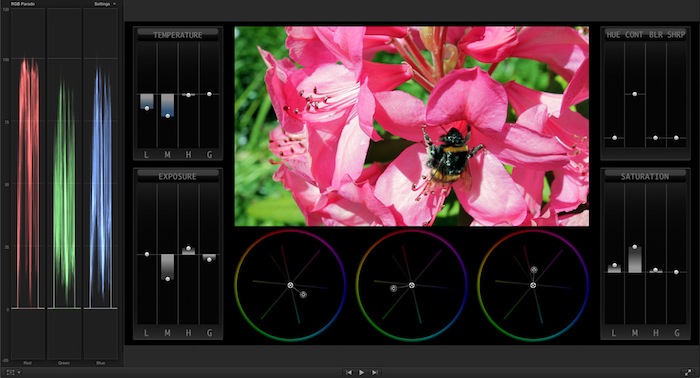
The fine-grained scale of the controls, the ergonomics of the layout, and the fact that they are onscreen right below the images that you are grading makes for a completely different grading experience which is genuinely immersive and very different from the experience of trying to find the right Inspector controls and adjust them with enough granularity.
In this respect Hawaiki Color fills the large gap between the many Inspector-based color tools on the market and the full-on round-tripping experience offered by Resolve. (I should in fairness mention here Yanobox Moods and Nattress Curves and Levels both of which are outstanding and well-established tools this category but which are not strictly comparable with Hawaiki Color.) In fact, the experience is as close to that of grading in a dedicated app as you can currently get.
I should of course declare an interest here as I was involved in the development of Hawaiki Color, but I genuinely believe it's a great product that lots of FCP X editors will enjoy using. Go and buy HyColor or Color Precision certainly, but do go and give Hawaiki a look as it really offers something different and extra that is well worth adding to your toolbox.
And since it's available through FxFactory there's a fully functional free trial version that you can try out for as long as you want, so there really is nothing to lose in giving it a go.
Resolve is of course a world class option if you have the time to round-trip and also are not intimidated by its steepish learning curve, which is likely to be off-putting if you're an inexperienced colorist.
HyColor on the other hand, which has quite a few enthusiastic devotees here, is not really a color correction tool in the conventional sense insofar as I understand it. It appears to offer a Tint function which will globally color your picture, as well as some color bias adjustments options among a few other clearly useful features.
What it shares with many other FCP X color-based offerings including the equally excellent (or possibly even more excellent) Color Precision from Lawn Road (which is a true color correction tool), is that it relies for its interface on the small, fiddly, unergonomic, insufficiently fine-grained controls in the FCP X Inspector window. And none of these type of products offer traditional color wheels, which is a downside for editors who can't get along with the Color Board, as in the case of the original poster above.
This is not to disparage these products which definitely have their uses in any editor's toolbox, but to point out where the difference lies with Hawaiki Color.
Hawaiki Color comes with its own dedicated grading interface complete with large industry standard color wheels, along with precision sliders for Low, Mid, High and Global luminance and saturation, plus Hue, Contrast, Blur and Sharpness.
The fine-grained scale of the controls, the ergonomics of the layout, and the fact that they are onscreen right below the images that you are grading makes for a completely different grading experience which is genuinely immersive and very different from the experience of trying to find the right Inspector controls and adjust them with enough granularity.
In this respect Hawaiki Color fills the large gap between the many Inspector-based color tools on the market and the full-on round-tripping experience offered by Resolve. (I should in fairness mention here Yanobox Moods and Nattress Curves and Levels both of which are outstanding and well-established tools this category but which are not strictly comparable with Hawaiki Color.) In fact, the experience is as close to that of grading in a dedicated app as you can currently get.
I should of course declare an interest here as I was involved in the development of Hawaiki Color, but I genuinely believe it's a great product that lots of FCP X editors will enjoy using. Go and buy HyColor or Color Precision certainly, but do go and give Hawaiki a look as it really offers something different and extra that is well worth adding to your toolbox.
And since it's available through FxFactory there's a fully functional free trial version that you can try out for as long as you want, so there really is nothing to lose in giving it a go.
Last edit: 16 Jul 2013 09:30 by Simon Ubsdell.
Please Log in to join the conversation.

20 Jul 2013 10:18 - 20 Jul 2013 10:19 #28874
by stewpid
Replied by stewpid on topic Color Correcting
Just bought Hawaiki Color and can thoroughly recommend it. I especially like having the color wheels. Never could get on with the color board.
It's a bit small on my MB Pro 15" screen but on a dual screen setup it's great.
Should add I have no connection with the originators, other than as a happy user.
It's a bit small on my MB Pro 15" screen but on a dual screen setup it's great.
Should add I have no connection with the originators, other than as a happy user.
Last edit: 20 Jul 2013 10:19 by stewpid. Reason: extra clarity
Please Log in to join the conversation.
- Simon Ubsdell
-
- Offline
- Platinum Member
-
Less
More
- Posts: 350
- Thank you received: 337
20 Jul 2013 13:05 - 20 Jul 2013 21:45 #28877
by Simon Ubsdell
Many thanks for the feedback - it's very much appreciated.
I think that once users experience the Hawaiki way of working they'll very quickly discover how different it is - and how this is not just another standard color correction filter (of which it is true there are probably too many already).
We put a lot of work not just into giving you some really powerful tools, but more importantly into creating a grading environment that just works - I'm primarily a working editor and colorist so I know what I want and I've made something that I am really happy with using, and believe me, I'm very fussy
The color wheels were the one big thing that I obviously wanted to have (it's really the only way to grade) and the color temperature features are a huge benefit for me as well, but ultimately it was always about creating the ultimate grading environment - and that's about lot more than just a snazzy interface, though I like snazzy interfaces too!
It's invidious to make comparisons and of course Resolve is the gold standard in terms of top-end features but I think these two screenshots tell an interesting story.
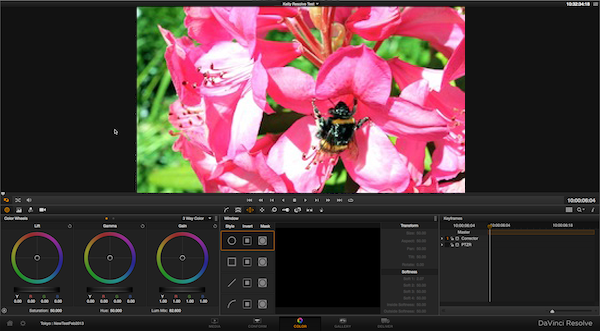
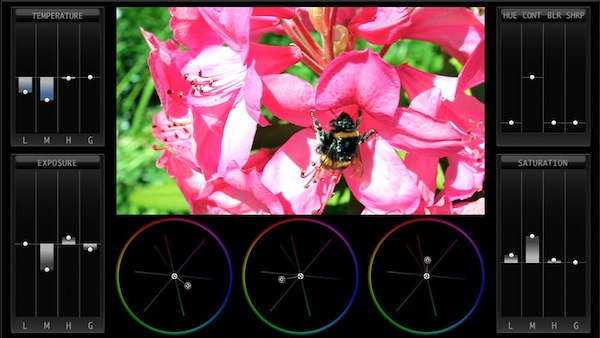
The Hawaiki interface gives you vastly more fine-grained control than you get with Resolve - and a bigger preview picture as well. I love Resolve but without the dedicated hardware I find those controls way too small and unresponsive. And let's not even begin to compare it with the Color Board, which really is much too coarse-grained for anything but the crudest corrections - sorry, Apple.
Hawaiki is a great grading tool and it's only going to get better with the updates that are in the pipeline (watch out for the Auto White Balance feature coming soon), but the fundamental advantage is there right now for anyone to see.
Check out the free trial if you want to experience it for yourself. (That's the great thing about FxFactory plug-ins which you don't get elsewhere - you get to try out a fully functional demo before needing to commit to a purchase.)
Finally, I'd like to quote Ben Balser's comment from the product review right here on fcp.co:
Hawaiki Color should have been what Apple did originally instead of the horrible color board with mega-limited control. Great plugin, bravo!
Thanks, Ben
Replied by Simon Ubsdell on topic Color Correcting
stewpid wrote: Just bought Hawaiki Color and can thoroughly recommend it. I especially like having the color wheels. Never could get on with the color board.
Many thanks for the feedback - it's very much appreciated.
I think that once users experience the Hawaiki way of working they'll very quickly discover how different it is - and how this is not just another standard color correction filter (of which it is true there are probably too many already).
We put a lot of work not just into giving you some really powerful tools, but more importantly into creating a grading environment that just works - I'm primarily a working editor and colorist so I know what I want and I've made something that I am really happy with using, and believe me, I'm very fussy
The color wheels were the one big thing that I obviously wanted to have (it's really the only way to grade) and the color temperature features are a huge benefit for me as well, but ultimately it was always about creating the ultimate grading environment - and that's about lot more than just a snazzy interface, though I like snazzy interfaces too!
It's invidious to make comparisons and of course Resolve is the gold standard in terms of top-end features but I think these two screenshots tell an interesting story.
The Hawaiki interface gives you vastly more fine-grained control than you get with Resolve - and a bigger preview picture as well. I love Resolve but without the dedicated hardware I find those controls way too small and unresponsive. And let's not even begin to compare it with the Color Board, which really is much too coarse-grained for anything but the crudest corrections - sorry, Apple.
Hawaiki is a great grading tool and it's only going to get better with the updates that are in the pipeline (watch out for the Auto White Balance feature coming soon), but the fundamental advantage is there right now for anyone to see.
Check out the free trial if you want to experience it for yourself. (That's the great thing about FxFactory plug-ins which you don't get elsewhere - you get to try out a fully functional demo before needing to commit to a purchase.)
Finally, I'd like to quote Ben Balser's comment from the product review right here on fcp.co:
Hawaiki Color should have been what Apple did originally instead of the horrible color board with mega-limited control. Great plugin, bravo!
Thanks, Ben
Last edit: 20 Jul 2013 21:45 by Simon Ubsdell.
Please Log in to join the conversation.
20 Jul 2013 17:14 #28879
by sidderke
Replied by sidderke on topic Color Correcting
Hi Simon,
just a quick question: correct me if I'm wrong, but Hawaiki does not have secondary color correction features, right?
Thanks and best regards,
just a quick question: correct me if I'm wrong, but Hawaiki does not have secondary color correction features, right?
Thanks and best regards,
Please Log in to join the conversation.
- Simon Ubsdell
-
- Offline
- Platinum Member
-
Less
More
- Posts: 350
- Thank you received: 337
20 Jul 2013 17:49 #28881
by Simon Ubsdell
Not yet, but we're certainly working on it.
There was a version of this ready in the early part of this year that had Primary In, Secondary One, Secondary Two and Primary Out, with keying as well as masking on the secondaries - it really was quite something!
Unfortunately the release of 10.0.8 was a major setback to its development. Previously it had been running really well in realtime and rendering very satisfactorily. The FCP X update made a serious dent in the rendering performance (although the realtime performance remained excellent) and we decided against releasing it at the time as we didn't want users to be disappointed.
Hawaiki Color was rebuilt from scratch to get around this performance issue and development is ongoing so we may be able to offer secondaries in the near future. There are certainly some new features coming very shortly,
Thanks for your interest.
All the best,
S.
Replied by Simon Ubsdell on topic Color Correcting
sidderke wrote: just a quick question: correct me if I'm wrong, but Hawaiki does not have secondary color correction features, right?
Not yet, but we're certainly working on it.
There was a version of this ready in the early part of this year that had Primary In, Secondary One, Secondary Two and Primary Out, with keying as well as masking on the secondaries - it really was quite something!
Unfortunately the release of 10.0.8 was a major setback to its development. Previously it had been running really well in realtime and rendering very satisfactorily. The FCP X update made a serious dent in the rendering performance (although the realtime performance remained excellent) and we decided against releasing it at the time as we didn't want users to be disappointed.
Hawaiki Color was rebuilt from scratch to get around this performance issue and development is ongoing so we may be able to offer secondaries in the near future. There are certainly some new features coming very shortly,
Thanks for your interest.
All the best,
S.
Please Log in to join the conversation.
- TrixTrax9000
-
- Offline
- Platinum Member
-
Less
More
- Posts: 1213
- Thank you received: 142
21 Jul 2013 08:15 #28887
by TrixTrax9000
Replied by TrixTrax9000 on topic Color Correcting
Fascinating thread. Even though I've not extensive experience with color correction beyond a few rudimentary projects, I must chime in here with appreciation for Simon's expert commentary. Whether you worked on the project or not, the insightful articulate reasoning & rationale is something sadly lacking in most internet discourse. Refreshing here.
Though at first I was a bit chuffed at the slightly wacky name, Hawaiki Color seems to have some clear advantages one can hardly argue with. Also, the promo video which had a bit too much jump zooms in & out for my tastes, did show a feature which has me agreeing with Ben; the fullscreen mode with transparent controls! This is such a no brainer, I predict they'll all be copying it soon.
For that reason alone (even without Simon's testimonial), I offer an unsolicited endorsement.

Though at first I was a bit chuffed at the slightly wacky name, Hawaiki Color seems to have some clear advantages one can hardly argue with. Also, the promo video which had a bit too much jump zooms in & out for my tastes, did show a feature which has me agreeing with Ben; the fullscreen mode with transparent controls! This is such a no brainer, I predict they'll all be copying it soon.
For that reason alone (even without Simon's testimonial), I offer an unsolicited endorsement.
Please Log in to join the conversation.
- Simon Ubsdell
-
- Offline
- Platinum Member
-
Less
More
- Posts: 350
- Thank you received: 337
21 Jul 2013 09:12 - 21 Jul 2013 09:12 #28888
by Simon Ubsdell
Thanks for the generous endorsement.
If you want to see Hawaiki Color in operation in lot more detail than you can get from the very short promo, you can check out the tutorial video which takes you through the details and how you'd actually work on grading a shot:
Replied by Simon Ubsdell on topic Color Correcting
TrixTrax9000 wrote: Hawaiki Color seems to have some clear advantages one can hardly argue with. Also, the promo video which had a bit too much jump zooms in & out for my tastes, did show a feature which has me agreeing with Ben; the fullscreen mode with transparent controls! This is such a no brainer, I predict they'll all be copying it soon.
Thanks for the generous endorsement.
If you want to see Hawaiki Color in operation in lot more detail than you can get from the very short promo, you can check out the tutorial video which takes you through the details and how you'd actually work on grading a shot:
Last edit: 21 Jul 2013 09:12 by Simon Ubsdell.
Please Log in to join the conversation.
- Mark Dobson
-
- Offline
- Junior Member
-

Less
More
- Posts: 22
- Thank you received: 2
21 Jul 2013 11:14 #28889
by Mark Dobson
Replied by Mark Dobson on topic Color Correcting
I've bought lots of color plugins and image grading plugins in the 2 + years since FCPX was introduced.
These include Magic Bullet Looks, Magic Bullet Mojo, Irudis, Color Assist ( now defunct ), Finisher and Cineflare White Balancer. I've also tried the free version of Resolve.
Potentially all of these plugins have the ability to fix problems, enhance the image, legalise a shot or provide a look.
But I normally end up removing the effect and reverting to the color corrector that Apple provides with FCPX.
Whilst it takes a while to learn how to use this effectively, working in conjunction with the scopes, it is actually a very powerful correction tool.
The trick is to not try and fix or achieve all your problems or goals with with one correction but to, if necessary, apply multiple corrections and work with the shape and color masks.The Shape masks are key framable, and whilst it would be nice to have bezier control over these masks, they enable very subtle corrections to be applied.
The most useful external plugin I use is White Balance from Cineflare, others are now also offering a similar plugin. This can quickly correct or give you an indication of how the white balance is out. But of course you can also fix this issue through correct use of the scopes.
The main complaint with FCPX color correction is the rectangular color board, but once you get over the fact that it is not a color wheel it is ridiculously easy and logical to use.
I've tried the Hawaiki Color plugin and won't be buying it. Despite the work that's gone into this plugin I can't see what it offers over the inbuilt corrector and other bundled Apple FCPX plugins such as Blur/ Sharpen. Not having the ability to achieve key framable secondary corrections is a severe limitation and I would encourage others to spend time exploring the potential and power of the FCPX corrector.
These include Magic Bullet Looks, Magic Bullet Mojo, Irudis, Color Assist ( now defunct ), Finisher and Cineflare White Balancer. I've also tried the free version of Resolve.
Potentially all of these plugins have the ability to fix problems, enhance the image, legalise a shot or provide a look.
But I normally end up removing the effect and reverting to the color corrector that Apple provides with FCPX.
Whilst it takes a while to learn how to use this effectively, working in conjunction with the scopes, it is actually a very powerful correction tool.
The trick is to not try and fix or achieve all your problems or goals with with one correction but to, if necessary, apply multiple corrections and work with the shape and color masks.The Shape masks are key framable, and whilst it would be nice to have bezier control over these masks, they enable very subtle corrections to be applied.
The most useful external plugin I use is White Balance from Cineflare, others are now also offering a similar plugin. This can quickly correct or give you an indication of how the white balance is out. But of course you can also fix this issue through correct use of the scopes.
The main complaint with FCPX color correction is the rectangular color board, but once you get over the fact that it is not a color wheel it is ridiculously easy and logical to use.
I've tried the Hawaiki Color plugin and won't be buying it. Despite the work that's gone into this plugin I can't see what it offers over the inbuilt corrector and other bundled Apple FCPX plugins such as Blur/ Sharpen. Not having the ability to achieve key framable secondary corrections is a severe limitation and I would encourage others to spend time exploring the potential and power of the FCPX corrector.
Please Log in to join the conversation.

21 Jul 2013 15:29 #28890
by pollux
Replied by pollux on topic Color Correcting
Wow Mark you beat me in the plug in purchase :lol:
I too first didn't like the color board but after watching the free tutorial from Color Grading Central I began using the CB and I do majority of color correction in CB these days. I use Hy Color Pro for specific stuff (something that can't be easily done in CB such as highlight "rescue"). As for white balance I find the one from FCP effects works really well and it's cheap.
I no longer use magic bullet looks now because it just way toooooooo slow to render. I like Cinestyle and Luster grade from Color Grading Central and I use them a lot too
I too first didn't like the color board but after watching the free tutorial from Color Grading Central I began using the CB and I do majority of color correction in CB these days. I use Hy Color Pro for specific stuff (something that can't be easily done in CB such as highlight "rescue"). As for white balance I find the one from FCP effects works really well and it's cheap.
I no longer use magic bullet looks now because it just way toooooooo slow to render. I like Cinestyle and Luster grade from Color Grading Central and I use them a lot too
Please Log in to join the conversation.
- Simon Ubsdell
-
- Offline
- Platinum Member
-
Less
More
- Posts: 350
- Thank you received: 337
21 Jul 2013 20:53 - 21 Jul 2013 21:59 #28893
by Simon Ubsdell
Replied by Simon Ubsdell on topic Color Correcting
As regards White Balance plug-ins, both the products you guys have mentioned, from FCPXEffects and CineFlare, use plain old RGB scaling to get their results which means they are optically distinctly imprecise though I am sure they are serviceable products.
Both also seem to me to substantially over-correct while at the same time creating quite muddy whites and blacks. The goal of a proper white balancer is surely to deliver nice clean neutral blacks and whites and both of these seem to me to be missing the mark in that respect. Maybe with the manual controls you can compensate for these issues but that seems to me to rather defeat the object of an automatic correction tool. You're paying good money for the automatic part - the manual bit you could achieve yourself anyway.
To see what I mean, look at these framegrabs of the AFTER images from their respective websites:
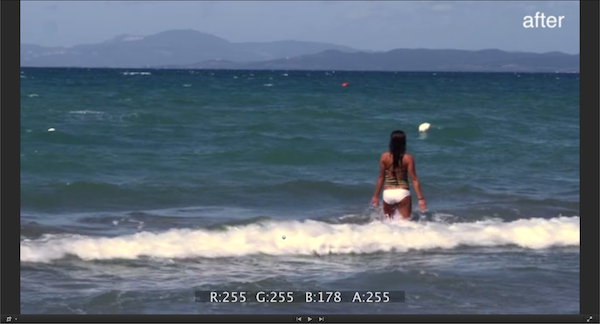
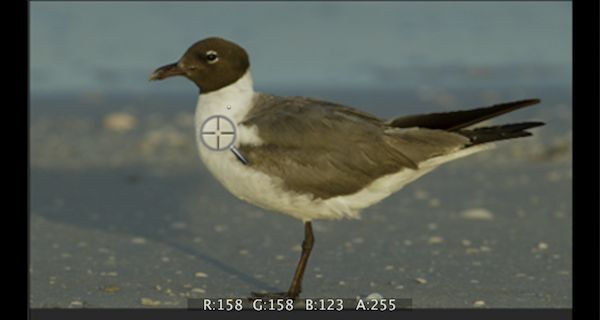
In the FCPXEffects version the crests of the waves are clearly yellow not white and in the CIneFlare version the bird's feathers are also yellow not white despite this being designated as the picked area (and I think I'd expect the tail feathers to be a nice clean black). Check the RGBA reader at the bottom of the frame to see the actual values although it's pretty obvious to the naked eye.
When using products such as these it's always best to check your scopes to see what they are actually doing to the image. I'm not all sure sure that either of these products would be improving my image in the way that I'd like. You also want to make sure that there are no clipping artifacts from using this kind of tool as this would mean you are throwing away essential colour information that you can't get back.
An ideal white balancer would also include Auto Levels and the ability to sample blacks as well as whites. Sometimes there is simply not enough information in the whites to achieve a result and in that case the blacks can provide the necessary information for a good result. Both of these products offer a white selection only - and no Auto Levels function.
Both also seem to me to substantially over-correct while at the same time creating quite muddy whites and blacks. The goal of a proper white balancer is surely to deliver nice clean neutral blacks and whites and both of these seem to me to be missing the mark in that respect. Maybe with the manual controls you can compensate for these issues but that seems to me to rather defeat the object of an automatic correction tool. You're paying good money for the automatic part - the manual bit you could achieve yourself anyway.
To see what I mean, look at these framegrabs of the AFTER images from their respective websites:
In the FCPXEffects version the crests of the waves are clearly yellow not white and in the CIneFlare version the bird's feathers are also yellow not white despite this being designated as the picked area (and I think I'd expect the tail feathers to be a nice clean black). Check the RGBA reader at the bottom of the frame to see the actual values although it's pretty obvious to the naked eye.
When using products such as these it's always best to check your scopes to see what they are actually doing to the image. I'm not all sure sure that either of these products would be improving my image in the way that I'd like. You also want to make sure that there are no clipping artifacts from using this kind of tool as this would mean you are throwing away essential colour information that you can't get back.
An ideal white balancer would also include Auto Levels and the ability to sample blacks as well as whites. Sometimes there is simply not enough information in the whites to achieve a result and in that case the blacks can provide the necessary information for a good result. Both of these products offer a white selection only - and no Auto Levels function.
Last edit: 21 Jul 2013 21:59 by Simon Ubsdell.
Please Log in to join the conversation.
- Mark Dobson
-
- Offline
- Junior Member
-
Less
More
- Posts: 22
- Thank you received: 2
22 Jul 2013 07:07 #28905
by Mark Dobson
Replied by Mark Dobson on topic Color Correcting
Sure the White Balance Plugin by Cineflare has it's faults, sometimes I resample 3 or 4 times before I feel it has given me a correct indication of how things should look. But then when one is out on location setting white balance is also sometimes problematic dependant on what you balance your camera with. If I'm organised I've got a flip out white / grey reflector, but how this is held in the light will result in different results.
I spent a fair while looking for a white balancing tool when I first got FCPX as it was something I had become accustomed to using in FCP7. So I learnt how to white balance using the scopes and isolating a white object through cropping. But this is fiddly and takes some time.
To my knowledge Cineflare were the first plugin company to come to market with a white balance tool and I've found it really useful. But it is by no means perfect. And you are right that sometimes you have to manually compensate, there is an mix slider that enable you to dial back the effect. I don't have a technical background so when you say that it uses 'plain old RGB scaling' to achieve it's results I don't really understand what you mean as I understood that FCPX was based on RGB rather than YUV.
It's a shame that applications such as Hawaiki Color don't have a white balancing tool. In your demo you show white balance being corrected in a very subjective way, but I suppose that at the end of the day Color correcting is one of the most subjective arts.
Really I think that I should take some time off and lock myself away to learn how to use DaVinci Resolve.
I spent a fair while looking for a white balancing tool when I first got FCPX as it was something I had become accustomed to using in FCP7. So I learnt how to white balance using the scopes and isolating a white object through cropping. But this is fiddly and takes some time.
To my knowledge Cineflare were the first plugin company to come to market with a white balance tool and I've found it really useful. But it is by no means perfect. And you are right that sometimes you have to manually compensate, there is an mix slider that enable you to dial back the effect. I don't have a technical background so when you say that it uses 'plain old RGB scaling' to achieve it's results I don't really understand what you mean as I understood that FCPX was based on RGB rather than YUV.
It's a shame that applications such as Hawaiki Color don't have a white balancing tool. In your demo you show white balance being corrected in a very subjective way, but I suppose that at the end of the day Color correcting is one of the most subjective arts.
Really I think that I should take some time off and lock myself away to learn how to use DaVinci Resolve.
Please Log in to join the conversation.
- Simon Ubsdell
-
- Offline
- Platinum Member
-
Less
More
- Posts: 350
- Thank you received: 337
22 Jul 2013 15:35 - 04 Aug 2013 13:23 #28917
by Simon Ubsdell
Hi Mark
Thanks for your perspective on this. Just to clarify what I was talking about:
Although on the surface it all looks pretty straightforward, the color science behind white balancing is insanely complicated, and I should know because I've spent the last 9 months wrestling with it - I can tell you, some of the outer reaches of it make my brain bleed. Apologies to any PhD students who find that I'm grossly over-simplifying here.
Most of the issues come down to the eccentricities of our human optical system - what may be "mathematically" correct does not appear optically correct because of those factors.
This means that simple RGB scaling, which seems as though it should work just fine - identify the colour there's too much of, take some of it out, add back in its opposite, to summarise it crudely - doesn't actually deliver good looking results in the "real world" of our colour vision.
Without going into too much detail, you need to be performing the calculations in a non-RGB colour space (typically LMS) as well as applying the requisite optical compensation factors - and so on.
And this is one of the reasons I think that neither of the two CineFlare nor the FCPXEffects white balancers is delivering clean whites. They are both using versions of the RGB scaling method from what I can see of the results. I don't think I'm mistaken in saying that they are both built exclusively in Motion and it is pretty hard to address all the color science issues with the toolset available there.
I really don't want to be seen to be disparaging CineFlare here and all credit to Tracey for having delivered a plug-in that a lot of users have found gives very effective results but as you say it's not entirely perfect. Just as a word of warning though: do take a look at the scopes when you next use it - you'll find that the filter clips the blacks at zero IRE potentially losing you picture information that you can't then retrieve.
I must in fairness also declare an interest here - I didn't just spend 9 months trying to get an understanding of this issue exclusively for the fun it and a lot of the time it was anything but fun! As I mentioned previously in this thread, there is a Hawaiki AutoGrade white balance plug-in coming very shortly which I hope will address some of the problems I have discussed here. Will it be perfect? Far from it. But it will I hope be slightly less imperfect.
It will have the ability to sample black and/or grey as well as white which can make a lot of difference with tricky shots and I hope that you will be able to get very acceptable results from just your first pick (or picks) without having to do any complex manual adjustment, which means it should be fast and simple to use. And it will provide auto levels adjustment as well to really help speed things up.
And then Tracey can pick holes in it in his turn
Anyway, apologies for the blatant product plug - but you did ask!
All the best,
S.
Replied by Simon Ubsdell on topic Color Correcting
Mark Dobson wrote: To my knowledge Cineflare were the first plugin company to come to market with a white balance tool and I've found it really useful. But it is by no means perfect. And you are right that sometimes you have to manually compensate, there is an mix slider that enable you to dial back the effect. I don't have a technical background so when you say that it uses 'plain old RGB scaling' to achieve it's results I don't really understand what you mean as I understood that FCPX was based on RGB rather than YUV.
Hi Mark
Thanks for your perspective on this. Just to clarify what I was talking about:
Although on the surface it all looks pretty straightforward, the color science behind white balancing is insanely complicated, and I should know because I've spent the last 9 months wrestling with it - I can tell you, some of the outer reaches of it make my brain bleed. Apologies to any PhD students who find that I'm grossly over-simplifying here.
Most of the issues come down to the eccentricities of our human optical system - what may be "mathematically" correct does not appear optically correct because of those factors.
This means that simple RGB scaling, which seems as though it should work just fine - identify the colour there's too much of, take some of it out, add back in its opposite, to summarise it crudely - doesn't actually deliver good looking results in the "real world" of our colour vision.
Without going into too much detail, you need to be performing the calculations in a non-RGB colour space (typically LMS) as well as applying the requisite optical compensation factors - and so on.
And this is one of the reasons I think that neither of the two CineFlare nor the FCPXEffects white balancers is delivering clean whites. They are both using versions of the RGB scaling method from what I can see of the results. I don't think I'm mistaken in saying that they are both built exclusively in Motion and it is pretty hard to address all the color science issues with the toolset available there.
I really don't want to be seen to be disparaging CineFlare here and all credit to Tracey for having delivered a plug-in that a lot of users have found gives very effective results but as you say it's not entirely perfect. Just as a word of warning though: do take a look at the scopes when you next use it - you'll find that the filter clips the blacks at zero IRE potentially losing you picture information that you can't then retrieve.
I must in fairness also declare an interest here - I didn't just spend 9 months trying to get an understanding of this issue exclusively for the fun it and a lot of the time it was anything but fun! As I mentioned previously in this thread, there is a Hawaiki AutoGrade white balance plug-in coming very shortly which I hope will address some of the problems I have discussed here. Will it be perfect? Far from it. But it will I hope be slightly less imperfect.
It will have the ability to sample black and/or grey as well as white which can make a lot of difference with tricky shots and I hope that you will be able to get very acceptable results from just your first pick (or picks) without having to do any complex manual adjustment, which means it should be fast and simple to use. And it will provide auto levels adjustment as well to really help speed things up.
And then Tracey can pick holes in it in his turn
Anyway, apologies for the blatant product plug - but you did ask!
All the best,
S.
Last edit: 04 Aug 2013 13:23 by Simon Ubsdell.
Please Log in to join the conversation.
22 Jul 2013 15:44 #28918
by parkerhqj
Replied by parkerhqj on topic Color Correcting
Just bought Hawaiki Color and I really like it. I don't suppose there is any way to save presets the way we can in the Color Adjustment tool in fcpx. Or some way to save the settings in Hawaiki? It seems that the only way to use the same settings is to copy and paste from one clip to another. thx
Please Log in to join the conversation.
