


- Posts: 3
- Thank you received: 0
3 Post Moderation Rule for New Boarders (25 Jan 2021)
New boarders will have their posts moderated - Don't worry if you cannot see your post immediately.
Audio Clip Deletion
- OminousFlare
-
 Topic Author
- Offline
- New Member
-

Less
More
06 Jul 2013 20:19 #28286
by OminousFlare
Audio Clip Deletion was created by OminousFlare
First off, nice forum.
Second, when I'm editing my clips in the timeline and tries to delete an audio clip, the audio clip that's next to it (to the right side to be specific) gets deleted as well. Anyone have any idea why?
All my clip items were previously 'broken apart' using "Break Apart Clip Items." Does that have anything to do with this?
Thanks for the help and I'll see you around.
Second, when I'm editing my clips in the timeline and tries to delete an audio clip, the audio clip that's next to it (to the right side to be specific) gets deleted as well. Anyone have any idea why?
All my clip items were previously 'broken apart' using "Break Apart Clip Items." Does that have anything to do with this?
Thanks for the help and I'll see you around.
Please Log in to join the conversation.
- Tom Wolsky
-

- Offline
- Moderator
-

06 Jul 2013 20:25 #28287
by Tom Wolsky
Replied by Tom Wolsky on topic Audio Clip Deletion
You'd better post a screen shot of your timeline.
Please Log in to join the conversation.
- OminousFlare
-
Topic Author
- Offline
- New Member
-
Less
More
- Posts: 3
- Thank you received: 0
06 Jul 2013 20:58 #28288
by OminousFlare

In this shot, I've cut up the selected clips (as highlighted in yellow) with the blade tool. I'm going to delete them by hitting the "Delete" button.

This is what happens instead. As you can see, instead of the selected audio clip, all the audio clips following the selected ones have been deleted.
Replied by OminousFlare on topic Audio Clip Deletion
In this shot, I've cut up the selected clips (as highlighted in yellow) with the blade tool. I'm going to delete them by hitting the "Delete" button.
This is what happens instead. As you can see, instead of the selected audio clip, all the audio clips following the selected ones have been deleted.
Please Log in to join the conversation.
- Tom Wolsky
-
- Offline
- Moderator
-
06 Jul 2013 21:10 #28289
by Tom Wolsky
Replied by Tom Wolsky on topic Audio Clip Deletion
I don't see why that would happen. You have the video and audio selected and if you delete them the project should close up. I don't see why you broke the clips apart. That's very rarely necessary.
Please Log in to join the conversation.
- OminousFlare
-
Topic Author
- Offline
- New Member
-
Less
More
- Posts: 3
- Thank you received: 0
06 Jul 2013 21:22 - 06 Jul 2013 21:24 #28290
by OminousFlare
Replied by OminousFlare on topic Audio Clip Deletion
I broke the clips apart so that it was easier to edit the video/audio separately, giving me more control over the editing of my video.
And no, the project didn't close up... nor do I see why it would. I'm just deleting clips using the "Delete" button... unless you're saying that I did something wrong that I shouldn't have.
Still doesn't explain why the entire audio clip would disappear on me, though, when the video clip deletion works properly.
And no, the project didn't close up... nor do I see why it would. I'm just deleting clips using the "Delete" button... unless you're saying that I did something wrong that I shouldn't have.
Still doesn't explain why the entire audio clip would disappear on me, though, when the video clip deletion works properly.
Last edit: 06 Jul 2013 21:24 by OminousFlare.
Please Log in to join the conversation.
- Tom Wolsky
-
- Offline
- Moderator
-
06 Jul 2013 21:38 #28291
by Tom Wolsky
Replied by Tom Wolsky on topic Audio Clip Deletion
The project closes up because the storyline is magnetic.
I can't reproduce what you're seeing. If I have the video and audio selected as you do

and press the delete key I get this
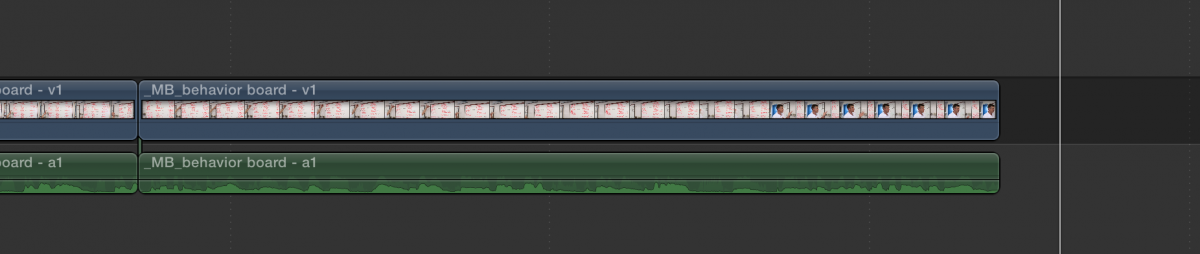
Everything downstream should not be deleted if the audio has been cut and is not selected.
Generally the audio is simple to manipulate simply by expanding rather than breaking apart.
I can't reproduce what you're seeing. If I have the video and audio selected as you do
and press the delete key I get this
Everything downstream should not be deleted if the audio has been cut and is not selected.
Generally the audio is simple to manipulate simply by expanding rather than breaking apart.
Please Log in to join the conversation.
