


- Posts: 69
- Thank you received: 1
3 Post Moderation Rule for New Boarders (25 Jan 2021)
New boarders will have their posts moderated - Don't worry if you cannot see your post immediately.
The Horror only Nightmares are made of
01 Jul 2013 19:36 #28020
by ivannoel
The Horror only Nightmares are made of was created by ivannoel
Hi guys (saviours?)
In very brief: macbook crashed, and large event file got corrupted.
On trying to open fcpx tells me file is corrupt and cannot use it.
There was NO BACKUP made (wtf?). An empty 'backup' folder!
I personally made all necessary backups of the event file - but not ONE will open, they are all also (or have been made) 'corrupt'.
I tried Digital Rebellion software to fix the file: it said after 30mins that the file was 'too corrupt' to fix.
We are talking almost two years of work. A 2h feature film that me and 10 others paid for.
400 actors in all. I have the metallic taste of my heart in my mouth...
This is almost too big to happen.
Can anyone suggest someone I could contact who might be able to look at the event file, and perhaps 'un'corrupt it?
Does anyone know who/how I could contact at Apple (rather than just posting and hoping: I can't find the appropriate place to post).
Many thanks
In very brief: macbook crashed, and large event file got corrupted.
On trying to open fcpx tells me file is corrupt and cannot use it.
There was NO BACKUP made (wtf?). An empty 'backup' folder!
I personally made all necessary backups of the event file - but not ONE will open, they are all also (or have been made) 'corrupt'.
I tried Digital Rebellion software to fix the file: it said after 30mins that the file was 'too corrupt' to fix.
We are talking almost two years of work. A 2h feature film that me and 10 others paid for.
400 actors in all. I have the metallic taste of my heart in my mouth...
This is almost too big to happen.
Can anyone suggest someone I could contact who might be able to look at the event file, and perhaps 'un'corrupt it?
Does anyone know who/how I could contact at Apple (rather than just posting and hoping: I can't find the appropriate place to post).
Many thanks
Please Log in to join the conversation.
02 Jul 2013 00:32 - 02 Jul 2013 00:33 #28027
by plysat
Can't sleep? Try this: fcpxpert.net ;-)
Replied by plysat on topic The Horror only Nightmares are made of
Not sure I can help but I have a couple questions...
Where are your cuts (sequences)? In the project library? Or in CC's in the event?
How big is the Event?
Where were your backups stored, and how were they created?
Did you try and "fix" the actual event, or did you copy it first?
Where are your cuts (sequences)? In the project library? Or in CC's in the event?
How big is the Event?
Where were your backups stored, and how were they created?
Did you try and "fix" the actual event, or did you copy it first?
Can't sleep? Try this: fcpxpert.net ;-)
Last edit: 02 Jul 2013 00:33 by plysat.
Please Log in to join the conversation.

02 Jul 2013 01:51 - 02 Jul 2013 01:51 #28031
by BenB
Replied by BenB on topic The Horror only Nightmares are made of
Apple doesn't do database repair, sorry.
My backups are done every night. I have a Mac Pro with 4 drive bays. Bays 1 and 2 are my 2TB OS drive, and the backup drive. Bays 3 and 4 are my 4TB media drive and it's backup drive. The backup drives stay unmounted so FCP never sees them. I use Carbon Copy Cloner which mounts, backs up, and unmounts them every night.
See my blog post here.
No clue how to fix a corrupted Event database. The "Project" is in the Project database, not the Event. Compound Clip data is in the Event it is stored in.
Working without a backup drive is simply asking for a disaster. It is not an question of "if" but "when".
My backups are done every night. I have a Mac Pro with 4 drive bays. Bays 1 and 2 are my 2TB OS drive, and the backup drive. Bays 3 and 4 are my 4TB media drive and it's backup drive. The backup drives stay unmounted so FCP never sees them. I use Carbon Copy Cloner which mounts, backs up, and unmounts them every night.
See my blog post here.
No clue how to fix a corrupted Event database. The "Project" is in the Project database, not the Event. Compound Clip data is in the Event it is stored in.
Working without a backup drive is simply asking for a disaster. It is not an question of "if" but "when".
Last edit: 02 Jul 2013 01:51 by BenB.
Please Log in to join the conversation.
- TrixTrax9000
-

- Offline
- Platinum Member
-

Less
More
- Posts: 1213
- Thank you received: 142
02 Jul 2013 02:42 #28035
by TrixTrax9000
Replied by TrixTrax9000 on topic The Horror only Nightmares are made of
From the gist of your post, it appears you were keeping your project & events on the same hard drive as your OS & FCPX. Is this the case? If so, it's a basic no-no we reiterate here at least once a week.
OS & FCPX go on your system drive, all projects, media & events on a high speed external drive.
Thank you for providing a cautionary tale for those who take this kind of advice lightly.
Sorry to hear of your misfortune, hopefully you'll find welcomed respite. Perhaps some of the more experienced here will be able to prompt you in some sort of salvage operation.
Until then, everyone else, take note.
OS & FCPX go on your system drive, all projects, media & events on a high speed external drive.
Thank you for providing a cautionary tale for those who take this kind of advice lightly.
Sorry to hear of your misfortune, hopefully you'll find welcomed respite. Perhaps some of the more experienced here will be able to prompt you in some sort of salvage operation.
Until then, everyone else, take note.
Please Log in to join the conversation.
02 Jul 2013 03:02 #28037
by ivannoel
Replied by ivannoel on topic The Horror only Nightmares are made of
Many thanks for those useful comments/questions, and perhaps less thanks to those who use the opportunity to lecture and list here how very well they do things themselves.
In response to various queeries above, yes, I do make a backup every night of the ENTIRE project, and all event files, yes I do use a separate firewire hard disc where the events live, and have yet another backup disc for all captures and files. In fact I use a total of three backups for everything.
And I also regularly read this forum/website.
This is not exactly a little amateur affair, but a 2 year project of a feature film with tens of investors, and my 6th feature as director/editor with FCP.
As mentioned, EVERY SINGLE event file of the project that I backed up is' corrupt' now - yes, even the ones i made 3 months ago. I can only assume that they BECAME corrupt when I tried opening them due to some sort of worse problem.
And can anyone of those who work so beautifully explain how it is that, just this time, the backup folder remained empty, and no backup made by fcpx?
Or is it just that this software should NEVER have been issued when it did?
In response to various queeries above, yes, I do make a backup every night of the ENTIRE project, and all event files, yes I do use a separate firewire hard disc where the events live, and have yet another backup disc for all captures and files. In fact I use a total of three backups for everything.
And I also regularly read this forum/website.
This is not exactly a little amateur affair, but a 2 year project of a feature film with tens of investors, and my 6th feature as director/editor with FCP.
As mentioned, EVERY SINGLE event file of the project that I backed up is' corrupt' now - yes, even the ones i made 3 months ago. I can only assume that they BECAME corrupt when I tried opening them due to some sort of worse problem.
And can anyone of those who work so beautifully explain how it is that, just this time, the backup folder remained empty, and no backup made by fcpx?
Or is it just that this software should NEVER have been issued when it did?
Please Log in to join the conversation.
- Tom Wolsky
-

- Offline
- Moderator
-

02 Jul 2013 03:25 #28039
by Tom Wolsky
Replied by Tom Wolsky on topic The Horror only Nightmares are made of
Can you post an email or send it to me? Use info at fcpxbook.com.
Please Log in to join the conversation.
02 Jul 2013 03:26 - 02 Jul 2013 03:44 #28040
by plysat
Can't sleep? Try this: fcpxpert.net ;-)
Replied by plysat on topic The Horror only Nightmares are made of
Shot in the dark... I assume your project in in the project library separate from the event. I also assume you have event manager from intellegent assistance, if not... get it. 
Make sure none of your media is online by unmounting your media drive. try opening the event *only* , not the project file. Does it open? (with everything showing as offline) IF yes... a corrupt media file is the culprit. If no...
Go into the event folder, Delete all render files (quit fcpx first!) in the 3 folders within the Render Files folder (High Quality Media, Peaks Data, Thumbnail Media) Just trash all the subfolders within each of those 3... Empty the trash, try opening the event in FCPX. Does it open? if yes, corrupt render file. If no... Well, try those and report back. Also, if your project is seperate from the event (hopefully) If so, try opening just the project (sequence) without any event (X will create a new empty event. Does it open (timeline intact, all media offline)
If yes, and the Event still won't open, just start reimporting and relinking media... MAke sense?Tom can probably explain it better...
edit, just realized that I'm assuming you reference media from the event, meaning your master clips are not in your event folder, but referenced from an external drive(s).Is this correct?
Make sure none of your media is online by unmounting your media drive. try opening the event *only* , not the project file. Does it open? (with everything showing as offline) IF yes... a corrupt media file is the culprit. If no...
Go into the event folder, Delete all render files (quit fcpx first!) in the 3 folders within the Render Files folder (High Quality Media, Peaks Data, Thumbnail Media) Just trash all the subfolders within each of those 3... Empty the trash, try opening the event in FCPX. Does it open? if yes, corrupt render file. If no... Well, try those and report back.
Also, if your project is seperate from the event (hopefully) If so, try opening just the project (sequence) without any event (X will create a new empty event. Does it open (timeline intact, all media offline)If yes, and the Event still won't open, just start reimporting and relinking media... MAke sense?Tom can probably explain it better...
edit, just realized that I'm assuming you reference media from the event, meaning your master clips are not in your event folder, but referenced from an external drive(s).Is this correct?
Can't sleep? Try this: fcpxpert.net ;-)
Last edit: 02 Jul 2013 03:44 by plysat.
Please Log in to join the conversation.
02 Jul 2013 03:44 #28042
by ivannoel
Replied by ivannoel on topic The Horror only Nightmares are made of
plysat,
thanks for your help.
Answers are these:
even with unmounted media files, the event cannot be opened, as no sooner do I try to open fcpx that a warning window appears and says the event file is corrupt and has to be discarded. Once it is done away with, fcpx opens normally.
I also deleted all render files, all prefs, reinstalled fcpx, but it is determines: the event file is corrupt.
my project file is separate from the other folders.
I notice that most problems with others appear to be due to fcpx just not opening, due usually to some problem file/plugin etc.
In this case it all works fine, just that it tells me my event file is corrupt, and bizarrely fcpx ahd to made a backup file, and it then appears ot have corrupted all the backups of that event file afterwwards...
thanks for your help.
Answers are these:
even with unmounted media files, the event cannot be opened, as no sooner do I try to open fcpx that a warning window appears and says the event file is corrupt and has to be discarded. Once it is done away with, fcpx opens normally.
I also deleted all render files, all prefs, reinstalled fcpx, but it is determines: the event file is corrupt.
my project file is separate from the other folders.
I notice that most problems with others appear to be due to fcpx just not opening, due usually to some problem file/plugin etc.
In this case it all works fine, just that it tells me my event file is corrupt, and bizarrely fcpx ahd to made a backup file, and it then appears ot have corrupted all the backups of that event file afterwwards...
Please Log in to join the conversation.
02 Jul 2013 03:51 #28043
by plysat
Gotcha, so you've done the "normal" steps. The fact that non of your backups will open is odd, as there really is no way for them to have become corrupted if they've not been opened. Leads me to believe it's something else, bad media file... something. Is there any way for you to try opening the event on another computer that has no connection to this gig? a friends or something? Also, if the project file is in the project library does it open without the associated event? Again, do you use event manager, or know how to manually hide/show/ projects and events? sorry if this is a basic question...
Can't sleep? Try this: fcpxpert.net ;-)
Replied by plysat on topic The Horror only Nightmares are made of
ivannoel wrote: plysat,
thanks for your help.
I also deleted all render files, all prefs, reinstalled fcpx, but it is determines: the event file is corrupt.
my project file is separate from the other folders.
...
In this case it all works fine, just that it tells me my event file is corrupt, and bizarrely fcpx ahd to made a backup file, and it then appears ot have corrupted all the backups of that event file afterwwards...
Gotcha, so you've done the "normal" steps. The fact that non of your backups will open is odd, as there really is no way for them to have become corrupted if they've not been opened. Leads me to believe it's something else, bad media file... something. Is there any way for you to try opening the event on another computer that has no connection to this gig? a friends or something? Also, if the project file is in the project library does it open without the associated event? Again, do you use event manager, or know how to manually hide/show/ projects and events? sorry if this is a basic question...
Can't sleep? Try this: fcpxpert.net ;-)
Please Log in to join the conversation.
02 Jul 2013 03:58 #28044
by ivannoel
Replied by ivannoel on topic The Horror only Nightmares are made of
plysat,
the fact that my backup event files won't open suggests something truly odd like that they are being corrupted no sooner do I try to open them... they seem to open or nearly open once, then ...are then corrupted.
i don't use event manager but i regularly and manually 'hide' projects and events.
Of note that using that software i mentioned earlier, it 'fixed' a small corrupt event file, but with this one it says 'too corrupt to fix'.
btw, the entire corruption took place after my mac crashed for no apparent reason.
the fact that my backup event files won't open suggests something truly odd like that they are being corrupted no sooner do I try to open them... they seem to open or nearly open once, then ...are then corrupted.
i don't use event manager but i regularly and manually 'hide' projects and events.
Of note that using that software i mentioned earlier, it 'fixed' a small corrupt event file, but with this one it says 'too corrupt to fix'.
btw, the entire corruption took place after my mac crashed for no apparent reason.
Please Log in to join the conversation.
02 Jul 2013 04:00 - 02 Jul 2013 04:01 #28045
by plysat
Can't sleep? Try this: fcpxpert.net ;-)
Replied by plysat on topic The Horror only Nightmares are made of
Have you run disk warrior, or at least disk utility on your system drive? What OS version are you running? Also, what is the file size of the event?
Can't sleep? Try this: fcpxpert.net ;-)
Last edit: 02 Jul 2013 04:01 by plysat.
Please Log in to join the conversation.
02 Jul 2013 04:09 #28046
by ivannoel
Replied by ivannoel on topic The Horror only Nightmares are made of
yep, run disc worrior, disc utility, permissions, etc
I'm got the very latest moutain installed.
the event is 300mb
I'm got the very latest moutain installed.
the event is 300mb
Please Log in to join the conversation.
02 Jul 2013 04:13 #28047
by plysat
Can't sleep? Try this: fcpxpert.net ;-)
Replied by plysat on topic The Horror only Nightmares are made of
Cool... kinda big to email, I'd offer to try and open it here... You still have backuos that you haven't tried to open correct? I'd suggest making copies of them if you're going to keep trying so you don't use them all up!. Will the project open on it's own? Hide all the events and all the projects but the one containing your cut (a *copy* of the project ideally, keep the original safe just in case) and open FCP X (it will make a new empty event)
Can't sleep? Try this: fcpxpert.net ;-)
Please Log in to join the conversation.
02 Jul 2013 04:21 #28048
by ivannoel
Replied by ivannoel on topic The Horror only Nightmares are made of
I had three backups, and I tried opening all three...
And they all produced the 'corrupt' warning as i opened fcpx.
(not so with any other event file that open without problem).
I did try to individually open the sesion without any other events, projects etc. but, again, still gives 'corrupt event file' message.
I maybe have to accept that, indeed, the file was corrupted, and that fcpx kept no backup in the folder.
Ideally one would know where usally the corruption lies within the file.
What a horror story this is...
In my film, and in real life.
And they all produced the 'corrupt' warning as i opened fcpx.
(not so with any other event file that open without problem).
I did try to individually open the sesion without any other events, projects etc. but, again, still gives 'corrupt event file' message.
I maybe have to accept that, indeed, the file was corrupted, and that fcpx kept no backup in the folder.
Ideally one would know where usally the corruption lies within the file.
What a horror story this is...
In my film, and in real life.
Please Log in to join the conversation.
02 Jul 2013 04:30 #28050
by plysat
When you try to open the project it says corrupt event? That makes no sense if the event is hidden. How big is the "CurrentVersion.fcpproject" file?
Can't sleep? Try this: fcpxpert.net ;-)
Replied by plysat on topic The Horror only Nightmares are made of
ivannoel wrote: I had three backups, and I tried opening all three...
And they all produced the 'corrupt' warning as i opened fcpx.
(not so with any other event file that open without problem).
I did try to individually open the sesion without any other events, projects etc. but, again, still gives 'corrupt event file' message.
I maybe have to accept that, indeed, the file was corrupted, and that fcpx kept no backup in the folder.
Ideally one would know where usally the corruption lies within the file.
What a horror story this is...
In my film, and in real life.
When you try to open the project it says corrupt event? That makes no sense if the event is hidden. How big is the "CurrentVersion.fcpproject" file?
Can't sleep? Try this: fcpxpert.net ;-)
Please Log in to join the conversation.
- ronny courtens
-

- Offline
- Moderator
-
Less
More
- Posts: 4455
- Thank you received: 962
02 Jul 2013 05:44 #28051
by ronny courtens
Replied by ronny courtens on topic The Horror only Nightmares are made of
Sorry to hear about your problem. Let's take this step by step.
Shut down FCPX.
Go to the drive where your problematic Event and its associated Projects are located.
Manually hide the problematic Event (you know how).
Make sure that on your entire system (including your internal drive) you have no Events or Projects that FCPX can see, EXCEPT the Projects related to the problematic Event. Only these Projects should not be hidden.
Now launch FCPX.
Do you see your Projects in the Project Browser?
Shut down FCPX.
Go to the drive where your problematic Event and its associated Projects are located.
Manually hide the problematic Event (you know how).
Make sure that on your entire system (including your internal drive) you have no Events or Projects that FCPX can see, EXCEPT the Projects related to the problematic Event. Only these Projects should not be hidden.
Now launch FCPX.
Do you see your Projects in the Project Browser?
Please Log in to join the conversation.

02 Jul 2013 06:37 #28052
by wdevn
LLAP,
James
Taipei, Taiwan
Replied by wdevn on topic The Horror only Nightmares are made of
Also, as you have the media on an external drive, please try to load up the event on another system that has the latest FCPX installed. It sound to me that this maybe a local system issue.
Anyway, FCP.co has a great group of FCPX users that are willing to levy their experience to help fine a solution.
Anyway, FCP.co has a great group of FCPX users that are willing to levy their experience to help fine a solution.
LLAP,
James
Taipei, Taiwan
Please Log in to join the conversation.
02 Jul 2013 12:48 #28077
by BenB
Replied by BenB on topic The Horror only Nightmares are made of
Have we tried using "FCS Remover", then reinstalling FCP X?
Please Log in to join the conversation.
02 Jul 2013 13:56 #28085
by ivannoel
Replied by ivannoel on topic The Horror only Nightmares are made of
Dear all,
Yes, stressful times.
As you can see, it has it's importance for others also since, so far, we have seen I have done EVERYTHING according to the book. The only untoward thing was that my mac crashed for an unknown reason.
To answer the above: yes I did use fully uninstall fcpx, then reinstalled it.
I did try WDEVN suggestion, but the same happens: its informs me of corrupt file
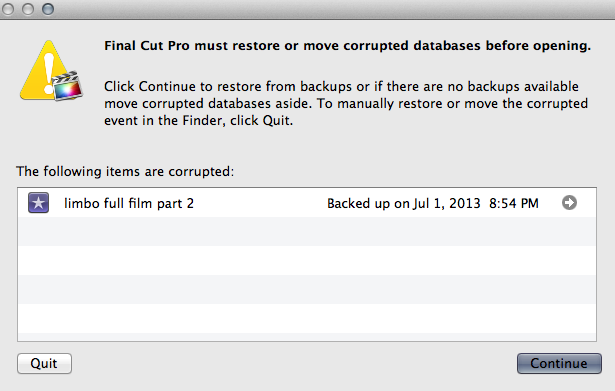
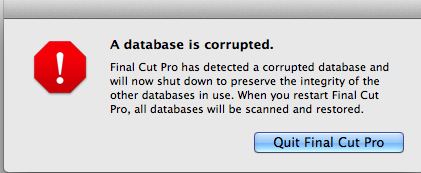
In fact let me attach them here, the two warnings, one prior to a fcpx reboot, one after.
Many thanks to those who are able to help.
Yes, stressful times.
As you can see, it has it's importance for others also since, so far, we have seen I have done EVERYTHING according to the book. The only untoward thing was that my mac crashed for an unknown reason.
To answer the above: yes I did use fully uninstall fcpx, then reinstalled it.
I did try WDEVN suggestion, but the same happens: its informs me of corrupt file
In fact let me attach them here, the two warnings, one prior to a fcpx reboot, one after.
Many thanks to those who are able to help.
Please Log in to join the conversation.
- Duncan Craig
-
- Offline
- Senior Member
-

- duncancraig.co.uk
02 Jul 2013 18:34 #28095
by Duncan Craig
Replied by Duncan Craig on topic The Horror only Nightmares are made of
Stick the current project and a few version from the last few days onto Dropbox. Then we can try opening them for you.
Please Log in to join the conversation.
