


- Posts: 59
- Thank you received: 1
3 Post Moderation Rule for New Boarders (25 Jan 2021)
New boarders will have their posts moderated - Don't worry if you cannot see your post immediately.
Cutting a documentary - advice needed
26 Jun 2013 15:05 #27750
by frandu
Cutting a documentary - advice needed was created by frandu
Hello all,
I need an advice regarding organization in FCPX. I am cutting a full feature documentary. Lots of interviews (40+), lots of brolls and tons of photos. All shot with a Canon 5d Mark II and audio recorded in Zoom H4N.
My workflow:
1. Create events based on the day of the shooting. For example: an event named 2013-06-24_Interview_Person_A;
2. Then I put all the files (MOV's and WAV's) inside this event;
3. I create a project called "pluraleyes_Person_A" and put both video and audio;
4. Export XML and sync in Pluraleyes 3;
5. Pluraleyes create a project in FCPX with everything synced. I copy the timeline and then create a Compound Clip;
6. I create a Keyword Collection called "Interview_Person_A" and associate the Compound Clip (this workaround is for preventing the creation of several projects that may increase the projects size).
So far, so good. I did this workflow for all the days that I shot. Everything seens to be organised.
NOW THE ADVICE NEEDED:
I need to create more keyword collections based on themes from the interviews. For example, the "Person A" talks about philosophy and meditation. The "Person B" talks about meditation and vegetarianism.
How can I do this working with Compound Clips? To join "Person A & B" organised by the theme meditation... If I just do "in and out" inside Compound Clip and create a new Smart Collection, this can be done for others CC too?
I really appreciate any help.
I need an advice regarding organization in FCPX. I am cutting a full feature documentary. Lots of interviews (40+), lots of brolls and tons of photos. All shot with a Canon 5d Mark II and audio recorded in Zoom H4N.
My workflow:
1. Create events based on the day of the shooting. For example: an event named 2013-06-24_Interview_Person_A;
2. Then I put all the files (MOV's and WAV's) inside this event;
3. I create a project called "pluraleyes_Person_A" and put both video and audio;
4. Export XML and sync in Pluraleyes 3;
5. Pluraleyes create a project in FCPX with everything synced. I copy the timeline and then create a Compound Clip;
6. I create a Keyword Collection called "Interview_Person_A" and associate the Compound Clip (this workaround is for preventing the creation of several projects that may increase the projects size).
So far, so good. I did this workflow for all the days that I shot. Everything seens to be organised.
NOW THE ADVICE NEEDED:
I need to create more keyword collections based on themes from the interviews. For example, the "Person A" talks about philosophy and meditation. The "Person B" talks about meditation and vegetarianism.
How can I do this working with Compound Clips? To join "Person A & B" organised by the theme meditation... If I just do "in and out" inside Compound Clip and create a new Smart Collection, this can be done for others CC too?
I really appreciate any help.
Please Log in to join the conversation.
- Carsten Orlt
-

- Offline
- Platinum Member
-

Less
More
- Posts: 422
- Thank you received: 82
26 Jun 2013 23:25 #27759
by Carsten Orlt
Replied by Carsten Orlt on topic Cutting a documentary - advice needed
Hi there,
First tip is that you can do all the syncing inside FCP. I'm working with dual recordings as well and FCP is flawless at synching. Even with clips were I had audio distortion on the cam mic it was able to sync.
I'm not sure what plural eyes creates (compounds?) but FCP creates special 'compounds' which behave just as normal clips, but I can still open them in the timeline to adjust audio to video overlaps etc.
Now for the keyword and compound clips. Not sure why you need compound clips?
I keyword my clips and than use favourite or reject to make selections within keyword selections.
If I want to assemble shots or interview parts I just create projects to do so. From projects you can copy and paste into your final projects to your hearts delight.
Happy editing
First tip is that you can do all the syncing inside FCP. I'm working with dual recordings as well and FCP is flawless at synching. Even with clips were I had audio distortion on the cam mic it was able to sync.
I'm not sure what plural eyes creates (compounds?) but FCP creates special 'compounds' which behave just as normal clips, but I can still open them in the timeline to adjust audio to video overlaps etc.
Now for the keyword and compound clips. Not sure why you need compound clips?
I keyword my clips and than use favourite or reject to make selections within keyword selections.
If I want to assemble shots or interview parts I just create projects to do so. From projects you can copy and paste into your final projects to your hearts delight.
Happy editing
Please Log in to join the conversation.
27 Jun 2013 01:43 #27763
by Seanus
Sean Lander - Editing since 1982 - AVID 1991 - FCP 1999 - FCPX 2011
Replied by Seanus on topic Cutting a documentary - advice needed
Totally agree with Cofe on this one.
I'm cutting a huge documentary shot with the 5D MkII and H4N plus a tonne of archival footage and action cams. I've had no issue with syncing anything at all so I'm not sure why you'd use pluraleyes.
Also not sure why you want compound clips. I only use them when I absolutely have to. Compound clips just over complicate everything and slow your system down I find.
Much prefer to do all my editing within projects, that way I can back things up easily each day.
I'm cutting a huge documentary shot with the 5D MkII and H4N plus a tonne of archival footage and action cams. I've had no issue with syncing anything at all so I'm not sure why you'd use pluraleyes.
Also not sure why you want compound clips. I only use them when I absolutely have to. Compound clips just over complicate everything and slow your system down I find.
Much prefer to do all my editing within projects, that way I can back things up easily each day.
Sean Lander - Editing since 1982 - AVID 1991 - FCP 1999 - FCPX 2011
Please Log in to join the conversation.
27 Jun 2013 02:52 #27765
by frandu
Replied by frandu on topic Cutting a documentary - advice needed
Thank you Cofe and Seanus,
I chose Compound clips in order to avoid creating lots of projects.
In the documentary, I'll have more than 40 people interviewed, plus Brolls. In the way you're saying, I will have more than 40 projects. Is this a good workflow?
Thanks
I chose Compound clips in order to avoid creating lots of projects.
In the documentary, I'll have more than 40 people interviewed, plus Brolls. In the way you're saying, I will have more than 40 projects. Is this a good workflow?
Thanks
Please Log in to join the conversation.

27 Jun 2013 02:59 - 27 Jun 2013 03:02 #27766
by BenB
Replied by BenB on topic Cutting a documentary - advice needed
Just throwing this out there FYI. I'm in the middle of a full week long filmmaking bootcamp for high school teenagers at LSU here. 15 kids all at once, its just me wrangling them, and it has my brain very fuzzy at the moment. So if I'm being redundant or stupid, just ignore the post...
Make only one Event for your project.
1- Keywords can be applied to whole clips, and/or just one or more ranges of a clip.
2- More than one keyword can be assigned to clips.
3- You can create smart search collections based on physical attributes of clips, also.
4- You can create Folders inside of an Event to group keyword & smart search collections together.
Here is an example off the top of my head:
I'd make independent Projects for each Scene of the film. Then when you're done and each scene is locked down, with each project create on Master Project to assembly them all in. Only then would I go to each Project, Select All, Create Compound (name it appropriately), then drop those into my Master Project for output.
Make only one Event for your project.
1- Keywords can be applied to whole clips, and/or just one or more ranges of a clip.
2- More than one keyword can be assigned to clips.
3- You can create smart search collections based on physical attributes of clips, also.
4- You can create Folders inside of an Event to group keyword & smart search collections together.
Here is an example off the top of my head:
- Find all of the clips from Interview number 1, make that a keyword collection to all "Interview 1" clips.
- Find the "Science" subject matter, assign that keyword to those clips/ranges inside of clips.
- Find the "Art" subject matter, assign that keyword to those clips/ranges inside of clips.
- Create a folder called "Interview 1" and put all those keyword collections inside of it.
I'd make independent Projects for each Scene of the film. Then when you're done and each scene is locked down, with each project create on Master Project to assembly them all in. Only then would I go to each Project, Select All, Create Compound (name it appropriately), then drop those into my Master Project for output.
Last edit: 27 Jun 2013 03:02 by BenB.
Please Log in to join the conversation.
- Carsten Orlt
-
- Offline
- Platinum Member
-
Less
More
- Posts: 422
- Thank you received: 82
27 Jun 2013 03:02 #27767
by Carsten Orlt
Replied by Carsten Orlt on topic Cutting a documentary - advice needed
Hi there,
Yes I think it's better to have a hundred projects than 100 compound clips in one or more events.
You can organise projects into folder with subfolders without limits on how deep your folder tree goes (at least I didn't get there yet
Basically how I see it is that an Event is my library that I want to use into the future on possible more than one project. Could be B-roll shots in there that might come handy one day. So I only have footage and no edits in events. Keeps them lean. I also import all footage into the event. I don't see the point to have 2 sets of organising levels, finder and FCP. FCP is a database so it should handle where my original footage goes. This way to backup an event I grab one folder and put it on my LTO. Done.
When editing I use projects only. They do need the events they come from that's true. But they are as the name says specific to the project I'm working on. So in 1 year time I'm not likely to open them to find footage but go back to the event.
my 2 cents
Yes I think it's better to have a hundred projects than 100 compound clips in one or more events.
You can organise projects into folder with subfolders without limits on how deep your folder tree goes (at least I didn't get there yet
Basically how I see it is that an Event is my library that I want to use into the future on possible more than one project. Could be B-roll shots in there that might come handy one day. So I only have footage and no edits in events. Keeps them lean. I also import all footage into the event. I don't see the point to have 2 sets of organising levels, finder and FCP. FCP is a database so it should handle where my original footage goes. This way to backup an event I grab one folder and put it on my LTO. Done.
When editing I use projects only. They do need the events they come from that's true. But they are as the name says specific to the project I'm working on. So in 1 year time I'm not likely to open them to find footage but go back to the event.
my 2 cents
Please Log in to join the conversation.
27 Jun 2013 03:55 #27770
by Seanus
Sean Lander - Editing since 1982 - AVID 1991 - FCP 1999 - FCPX 2011
Replied by Seanus on topic Cutting a documentary - advice needed
Was trying to figure out what Brolls was. :lol: I don't understand why you'd need to have 40 projects for each interview if it's one documentary. But hey we each have different methods of working.
With mine I catalogue each interview with markers and favourites. That way with one glance I can see the complete content of the interview. Much easier than having a compound clip IMHO.
Here's a little snapshot of my events with my IV Keywords.
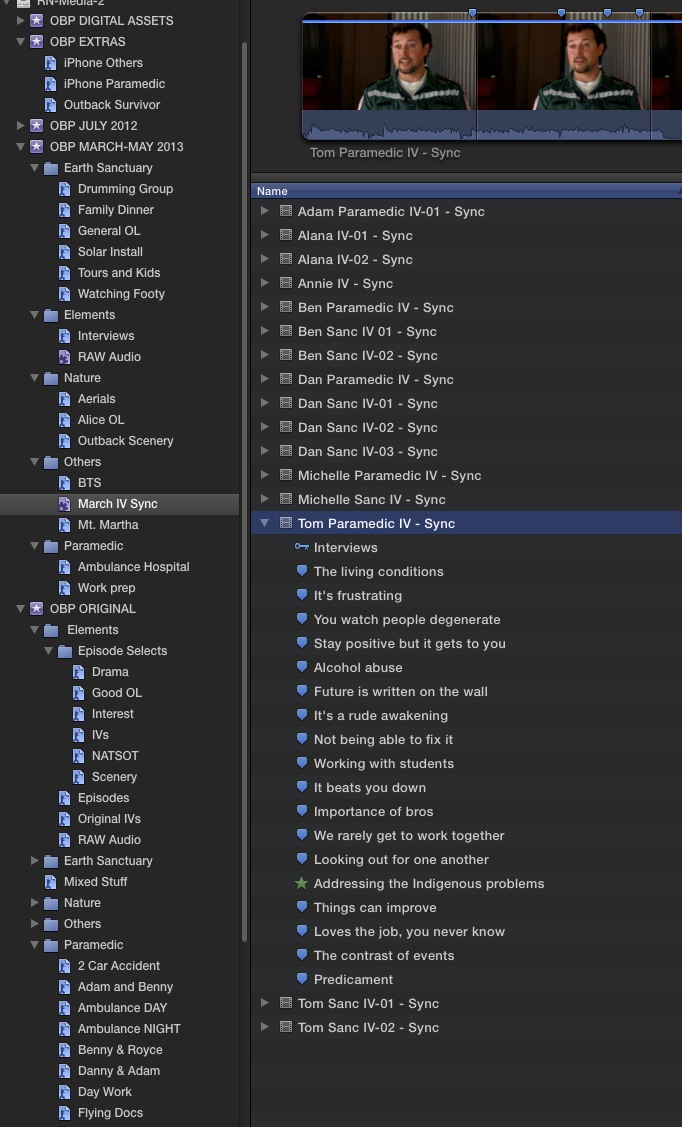
With mine I catalogue each interview with markers and favourites. That way with one glance I can see the complete content of the interview. Much easier than having a compound clip IMHO.
Here's a little snapshot of my events with my IV Keywords.
Sean Lander - Editing since 1982 - AVID 1991 - FCP 1999 - FCPX 2011
Please Log in to join the conversation.

27 Jun 2013 08:34 - 27 Jun 2013 08:34 #27780
by robertdee
Replied by robertdee on topic Cutting a documentary - advice needed
I'd agree with a lot of the above. Do your syncing in FCPX. No need to go via Pluraleyes. Keep it all in one event which acts as your top level for the job. Keyword and folders within that. If you are doing a feature doc, I'd suggest some decent training in media management. Worth a day or two of your time. I watched the Larry Jordan tutorials when I first got FCPX and it was invaluable as there's a lot of functionality and power, particularly with media management that isn't obvious. I think (not all) but some of the flak when it was released was because editors - including myself - though they should somehow intuitively know how FCPX worked just by opening it and couldn't see anything so thought it had been dumbed down.
Last edit: 27 Jun 2013 08:34 by robertdee.
Please Log in to join the conversation.

27 Jun 2013 08:54 #27781
by Dawar
Replied by Dawar on topic Cutting a documentary - advice needed
Maybe he wants to use Plural Eyes to do batch syncing, and avoid to sync one clip at a time ?
Please Log in to join the conversation.
- TrixTrax9000
-

- Offline
- Platinum Member
-
Less
More
- Posts: 1213
- Thank you received: 142
27 Jun 2013 09:34 - 27 Jun 2013 09:36 #27782
by TrixTrax9000
Replied by TrixTrax9000 on topic Cutting a documentary - advice needed
Someone else was typing it as "brolls" & confusing everyone in another thread here.
But don't get me started on internet spelling, we're still trying to elucidate people on the difference between "there, their & they're."
He means B-Roll footage.

But don't get me started on internet spelling, we're still trying to elucidate people on the difference between "there, their & they're."
He means B-Roll footage.
Last edit: 27 Jun 2013 09:36 by TrixTrax9000 .
Please Log in to join the conversation.
27 Jun 2013 10:40 - 27 Jun 2013 11:05 #27784
by ronfya
I too use PE to batch sync and have some issues with it
www.fcp.co/forum/4-final-cut-pro-x-fcpx/...io-clips-in-an-event
Is FCPX capable of batch syncing clips ?
Even when audio of multiple video files must be replaced with audio coming from one and only audio file that recorded all long ?
Because the real problem is that even with FCPX sync, the resulting synced clip has the length of the longest file between video and audio (usually audio) hence leaving plenty of black video in the clip.
Thus, is there any way to batch cut black video from clips in the event ?
Thanks
Replied by ronfya on topic Cutting a documentary - advice needed
Dawar wrote: Maybe he wants to use Plural Eyes to do batch syncing, and avoid to sync one clip at a time ?
I too use PE to batch sync and have some issues with it
www.fcp.co/forum/4-final-cut-pro-x-fcpx/...io-clips-in-an-event
Is FCPX capable of batch syncing clips ?
Even when audio of multiple video files must be replaced with audio coming from one and only audio file that recorded all long ?
Because the real problem is that even with FCPX sync, the resulting synced clip has the length of the longest file between video and audio (usually audio) hence leaving plenty of black video in the clip.
Thus, is there any way to batch cut black video from clips in the event ?
Thanks
Last edit: 27 Jun 2013 11:05 by ronfya. Reason: question rephrased
Please Log in to join the conversation.
- Carsten Orlt
-
- Offline
- Platinum Member
-
Less
More
- Posts: 422
- Thank you received: 82
27 Jun 2013 11:17 #27786
by Carsten Orlt
Replied by Carsten Orlt on topic Cutting a documentary - advice needed
Hi there,
FCP can't batch sync clips. One at a time. But I don't see how batch synching would work anyway. So often one audio clip belongs to 2 or more video clips or one video clip needs 2 audio clips because the video kept running while the audio was restarted. Key is to tell the crew to sync the clocks for audio and video devices as close as possible and sort your footage by time created.
I manually open each clip after synching and trim either audio or video to fit or to what I want. Might be a bit of work BUT I get clips that have no lengthy black bits or lengthy silent bits. This way I can also make separate clips if I have a case like above with 1 video and 2 audio's. I just create xxxA and xxxB.
Very little work for a long term doc. If you need fast turn around record audio in camera!
Happy editing
FCP can't batch sync clips. One at a time. But I don't see how batch synching would work anyway. So often one audio clip belongs to 2 or more video clips or one video clip needs 2 audio clips because the video kept running while the audio was restarted. Key is to tell the crew to sync the clocks for audio and video devices as close as possible and sort your footage by time created.
I manually open each clip after synching and trim either audio or video to fit or to what I want. Might be a bit of work BUT I get clips that have no lengthy black bits or lengthy silent bits. This way I can also make separate clips if I have a case like above with 1 video and 2 audio's. I just create xxxA and xxxB.
Very little work for a long term doc. If you need fast turn around record audio in camera!
Happy editing
Please Log in to join the conversation.
- Carsten Orlt
-
- Offline
- Platinum Member
-
Less
More
- Posts: 422
- Thank you received: 82
27 Jun 2013 11:29 #27787
by Carsten Orlt
Replied by Carsten Orlt on topic Cutting a documentary - advice needed
PS to my previous post:
If you have a long audio clip that belongs to several video clips it takes a long time if you always select the whole audio clip with any of the video clips.
What I do to speed up the synching dramatically is to find the first video and see roughly how long it is. Then I select an out point in the audio roughly to the length of the video length. This way FCP only analyses the actual marked length of the audio clip in relation to the video. After synching the first one I open it in the timeline, trim the audio exactly and then match frame the audio which marks the range as I have it for the first sync clip. I then set a new in point past this range so FCP will not waste analysing the bit I already sync to video. And so on.
Hope that makes some sense
If you have a long audio clip that belongs to several video clips it takes a long time if you always select the whole audio clip with any of the video clips.
What I do to speed up the synching dramatically is to find the first video and see roughly how long it is. Then I select an out point in the audio roughly to the length of the video length. This way FCP only analyses the actual marked length of the audio clip in relation to the video. After synching the first one I open it in the timeline, trim the audio exactly and then match frame the audio which marks the range as I have it for the first sync clip. I then set a new in point past this range so FCP will not waste analysing the bit I already sync to video. And so on.
Hope that makes some sense
Please Log in to join the conversation.

27 Jun 2013 18:30 #27803
by smg669
<Inigo Montoya>You keep using that word. I do not think it means what you think it means.</Inigo Montoya>
Replied by smg669 on topic Cutting a documentary - advice needed
TrixTrax9000 wrote: we're still trying to elucidate people
<Inigo Montoya>You keep using that word. I do not think it means what you think it means.</Inigo Montoya>
Please Log in to join the conversation.
27 Jun 2013 19:43 #27808
by ptrush
Replied by ptrush on topic Cutting a documentary - advice needed
i just want to add something here..
for interviews I will usually distill the best dialog into it's own project from each interviewee, then "lift" key points that i think are most powerful into a secondary storyline.
this method gives me a 'visual representation' that helps me revisit clips on a timeline as opposed to a bunch of clips in the event browser with keywords and data input... unless it's scripted of course.
i leave the keywords and favorites for b-roll.
works for me-
for interviews I will usually distill the best dialog into it's own project from each interviewee, then "lift" key points that i think are most powerful into a secondary storyline.
this method gives me a 'visual representation' that helps me revisit clips on a timeline as opposed to a bunch of clips in the event browser with keywords and data input... unless it's scripted of course.
i leave the keywords and favorites for b-roll.
works for me-
Please Log in to join the conversation.
28 Jun 2013 12:25 #27837
by frandu
Replied by frandu on topic Cutting a documentary - advice needed
Thank you all for the tips. Very very helpful. I think it's time to reorganise the doc. If anyone can share screenshots of documentary organisation, I think will benefit other people with doubts like me.
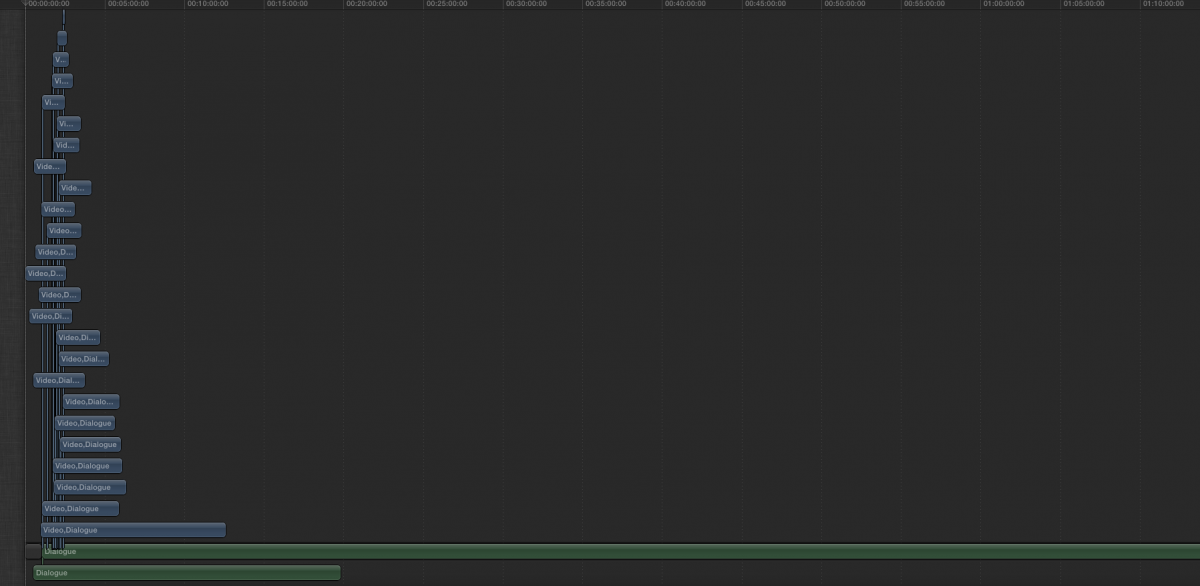
The reason that I don't use the FCPX's sync function is that it doesn't work for several clips. For example, I have an interview of 26 clips of video and 2 of audio. When I try to select them all and sync, I got a monster (see image attached).
That's why I went to Pluraleyes.
The reason that I don't use the FCPX's sync function is that it doesn't work for several clips. For example, I have an interview of 26 clips of video and 2 of audio. When I try to select them all and sync, I got a monster (see image attached).
That's why I went to Pluraleyes.
Please Log in to join the conversation.
28 Jun 2013 13:50 - 28 Jun 2013 14:02 #27841
by ptrush
Replied by ptrush on topic Cutting a documentary - advice needed
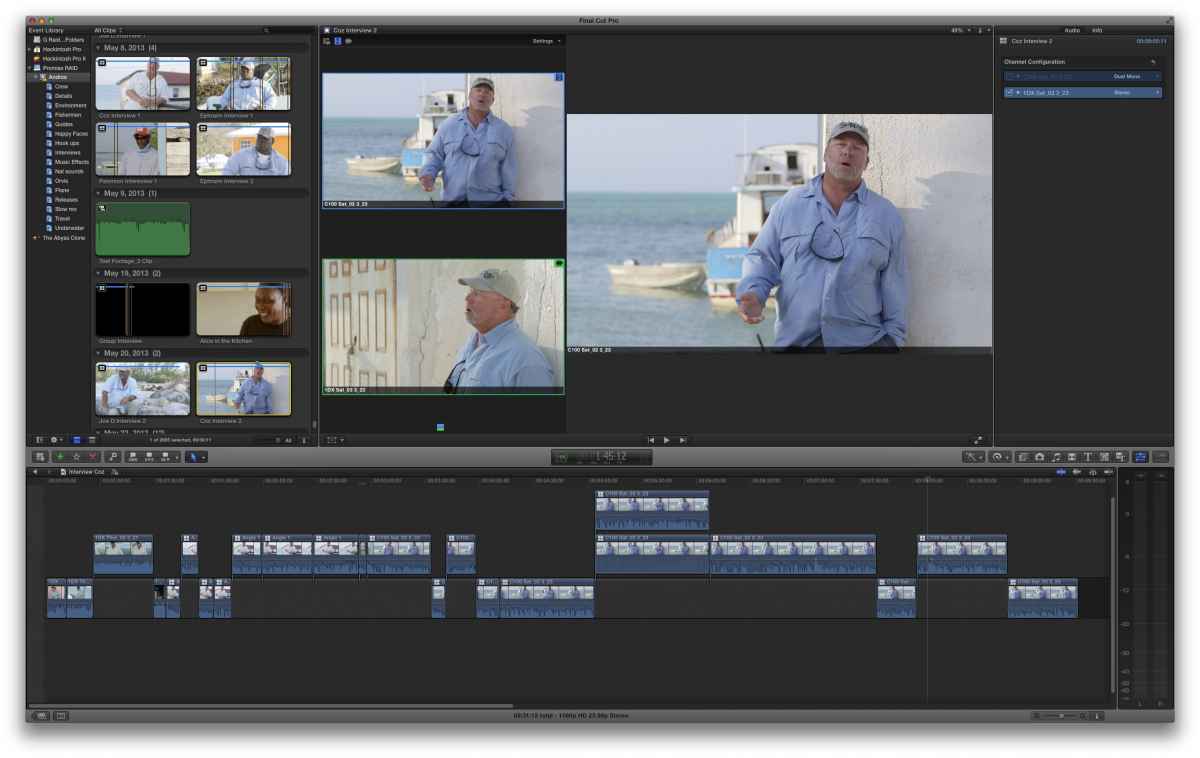
here's a quick look at the current state of one of my projects-
as you can see, i've got multicam clips for multiple camera angles and multiple audio tracks. the multicam viewer open so i can see them to the left of my canvas. check out the organization in the event browser to see how i like to work. also, the my storyline and the visual way i work to distill my dialog those are multicam clips in there too.
hope this helps
~enjoy
Pippin
as you can see, i've got multicam clips for multiple camera angles and multiple audio tracks. the multicam viewer open so i can see them to the left of my canvas. check out the organization in the event browser to see how i like to work. also, the my storyline and the visual way i work to distill my dialog those are multicam clips in there too.
hope this helps
~enjoy
Pippin
Last edit: 28 Jun 2013 14:02 by ptrush.
Please Log in to join the conversation.
28 Jun 2013 13:58 #27842
by frandu
Replied by frandu on topic Cutting a documentary - advice needed
Hello Pippin,
I think you forgot the attachment. I can't see it.
I think you forgot the attachment. I can't see it.
Please Log in to join the conversation.
28 Jun 2013 14:12 - 28 Jun 2013 14:37 #27844
by ptrush
Replied by ptrush on topic Cutting a documentary - advice needed
oh. here it is-
just checked the compression, and the resolution on my upload is hideous..
so hard to see-
private message me your email address and i can send you a higher res version so you can see my workspace, if you want to.
just checked the compression, and the resolution on my upload is hideous..
so hard to see-
private message me your email address and i can send you a higher res version so you can see my workspace, if you want to.
Last edit: 28 Jun 2013 14:37 by ptrush.
Please Log in to join the conversation.
