


- Posts: 2
- Thank you received: 0
3 Post Moderation Rule for New Boarders (25 Jan 2021)
New boarders will have their posts moderated - Don't worry if you cannot see your post immediately.
Black Encasing Automatically Grouping Clips??????
21 Jun 2013 15:52 #27564
by ilewis
Black Encasing Automatically Grouping Clips?????? was created by ilewis
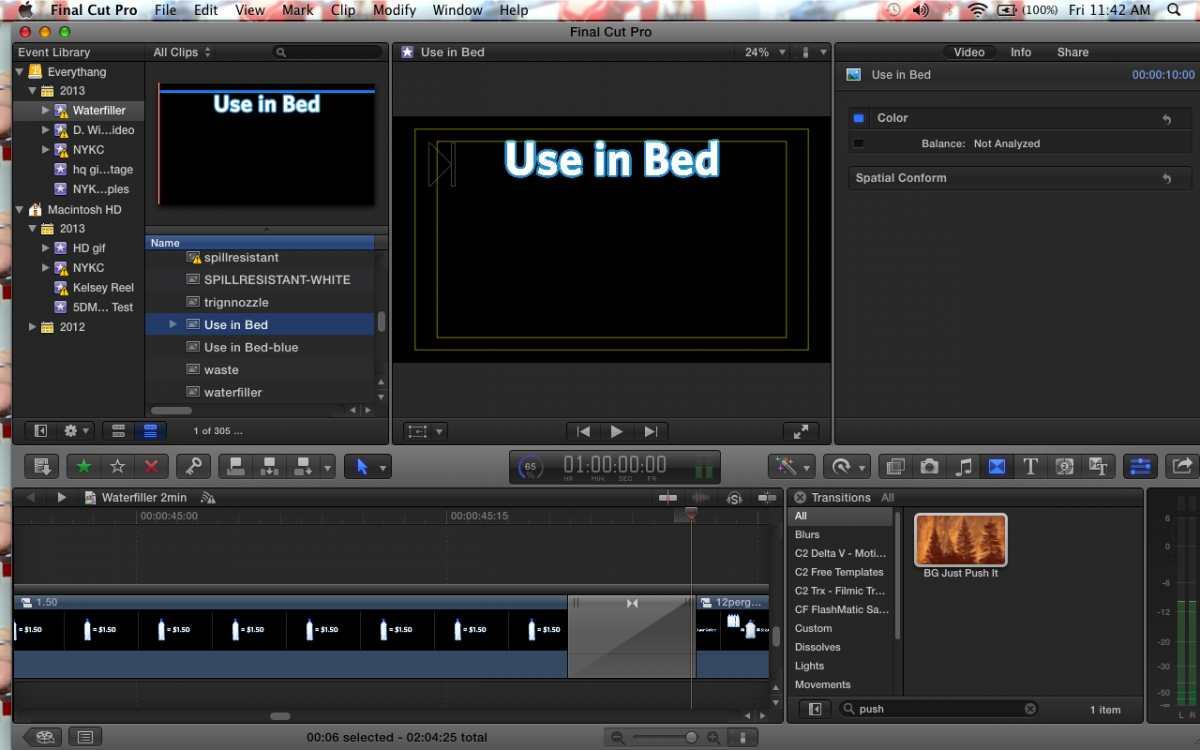
I posted a screen shot below. I have no idea what to call this. It's the automatic black grouping things that attaches clips together. Is there a way to disable this feature or delete the black incasing without deleting all the clips or dragging them out of it and moving everything around. REALLY annoying when it does this and I need to go back and change something. See my timeline below.
Please Log in to join the conversation.

21 Jun 2013 16:14 #27565
by screendor
Replied by screendor on topic Black Encasing Automatically Grouping Clips??????
You've placed the clips in a "Secondary Storyline," as indicated by the black band/box at the top. This can happen automatically/inadvertently when you add a transition to connected clips. Use the command "Lift from Storyline" to turn them back into plain connected clips.
It takes a while to get the hang of the magnetic timeline and its strengths and weaknesses.
It takes a while to get the hang of the magnetic timeline and its strengths and weaknesses.
Please Log in to join the conversation.
21 Jun 2013 16:17 #27566
by ilewis
Replied by ilewis on topic Black Encasing Automatically Grouping Clips??????
Thanks Bud. I recently upgraded from a Pro X version that didn't have this feature and it has been driving me insane on account that it was hard to troubleshoot without knowing what to call it.
Please Log in to join the conversation.
