


- Posts: 65
- Thank you received: 1
3 Post Moderation Rule for New Boarders (25 Jan 2021)
New boarders will have their posts moderated - Don't worry if you cannot see your post immediately.
Canon C100 progressive Footage in FCPX
20 Jun 2013 11:48 #27499
by Michi
Canon C100 progressive Footage in FCPX was created by Michi
Hello fcp.co-community
I need some advise concerning Canon C100 footage in FCPX:
So i imported the files from two shoots with my Canon C100 into FCPX, both times i recorded in 25PFS. I know FCPX does not recognize the MTS-files as progressive, so I set them to progressive manually in the inspector. So far so good. Thing is now: the MTS-files from the first shooting day were changed without a problem to progressive in FCPX, but not those from the second shooting day. From those 52 clips only 6 were set to progressive. I tried it several times, but FCPX seems not willing to accept the changes. Can anyone familiar with this issue point me to a solution?
Cheers
I need some advise concerning Canon C100 footage in FCPX:
So i imported the files from two shoots with my Canon C100 into FCPX, both times i recorded in 25PFS. I know FCPX does not recognize the MTS-files as progressive, so I set them to progressive manually in the inspector. So far so good. Thing is now: the MTS-files from the first shooting day were changed without a problem to progressive in FCPX, but not those from the second shooting day. From those 52 clips only 6 were set to progressive. I tried it several times, but FCPX seems not willing to accept the changes. Can anyone familiar with this issue point me to a solution?
Cheers
Please Log in to join the conversation.
- Tom Wolsky
-

- Offline
- Moderator
-

20 Jun 2013 14:03 #27506
by Tom Wolsky
Replied by Tom Wolsky on topic Canon C100 progressive Footage in FCPX
"I know FCPX does not recognize the MTS-files as progressive"
You know that how? The camera records in these frame rates: Frame rates of 60i, PF30, PF24, 24p, 50i, and 25p. Which one did you use?
You know that how? The camera records in these frame rates: Frame rates of 60i, PF30, PF24, 24p, 50i, and 25p. Which one did you use?
Please Log in to join the conversation.
20 Jun 2013 14:52 #27516
by Michi
Replied by Michi on topic Canon C100 progressive Footage in FCPX
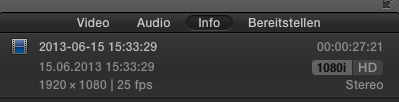
The MTS-Files from the C100 are not recognized as progressive in FCPX when recorded in 25PF (there is no 25p on the C100, only 24p). When importing directly from the SD-Card to FCPX the files are interpreted as interlaced (see attached pic).
This wouldn't be a big deal if changing the field dominance to progressive would work properly. But it does not, at least not for me (in FCPX 10.0.8 on a late 2011 MBP)....
This wouldn't be a big deal if changing the field dominance to progressive would work properly. But it does not, at least not for me (in FCPX 10.0.8 on a late 2011 MBP)....
Please Log in to join the conversation.
- Tom Wolsky
-
- Offline
- Moderator
-
20 Jun 2013 15:01 - 20 Jun 2013 15:03 #27517
by Tom Wolsky
Replied by Tom Wolsky on topic Canon C100 progressive Footage in FCPX
I took the frame rates off the Canon web site. There's no such thing as 25PF. There's only PF30 and PF24, which are interlaced formats. What's that supposed to mean?
Just to add, if you're video actually is progressive, changing it from interlaced to progressive will make no difference to the video. It only makes a difference if the project is set to interlaced rather than progressive.
Just to add, if you're video actually is progressive, changing it from interlaced to progressive will make no difference to the video. It only makes a difference if the project is set to interlaced rather than progressive.
Last edit: 20 Jun 2013 15:03 by Tom Wolsky.
Please Log in to join the conversation.
20 Jun 2013 15:05 #27518
by Michi
Replied by Michi on topic Canon C100 progressive Footage in FCPX
OK, my FCPX seems to be a bit moody. Just tried to change the field dominance again and guess what: after failing for about ten times, now it worked... Don't know what was different this time - maybe it's just a bug?
Please Log in to join the conversation.
20 Jun 2013 15:43 #27520
by Michi
I know for sure there is such a thing as 25PF (or PF25), as I can set it in my camera. In the C100-manual it's described as progressive recording in an interlaced container.
Didn't know that, but will try it out. Thanks for the advise.
Replied by Michi on topic Canon C100 progressive Footage in FCPX
Tom Wolsky wrote: I took the frame rates off the Canon web site. There's no such thing as 25PF. There's only PF30 and PF24, which are interlaced formats. What's that supposed to mean?
I know for sure there is such a thing as 25PF (or PF25), as I can set it in my camera. In the C100-manual it's described as progressive recording in an interlaced container.
Tom Wolsky wrote: Just to add, if you're video actually is progressive, changing it from interlaced to progressive will make no difference to the video. It only makes a difference if the project is set to interlaced rather than progressive.
Didn't know that, but will try it out. Thanks for the advise.
Please Log in to join the conversation.

20 Jun 2013 18:06 - 20 Jun 2013 18:07 #27526
by BenB
Replied by BenB on topic Canon C100 progressive Footage in FCPX
25PF is in the end ingested as interlaced (from what I understand of that camera). Like how Panny faked it in the original DVX-100, shoot 24p, get 60i with flagged frames. Why do camera makers do this today? Make 24p simply 24p, geezum!
Last edit: 20 Jun 2013 18:07 by BenB.
Please Log in to join the conversation.
20 Jun 2013 23:54 - 20 Jun 2013 23:58 #27549
by Michi
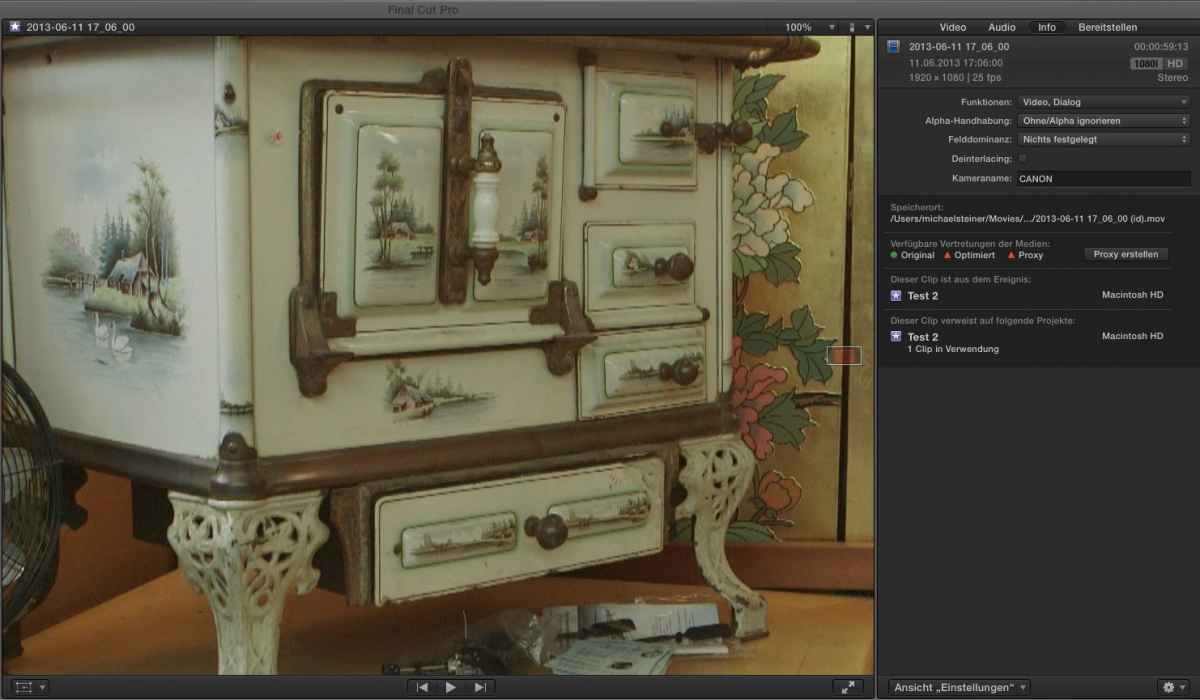
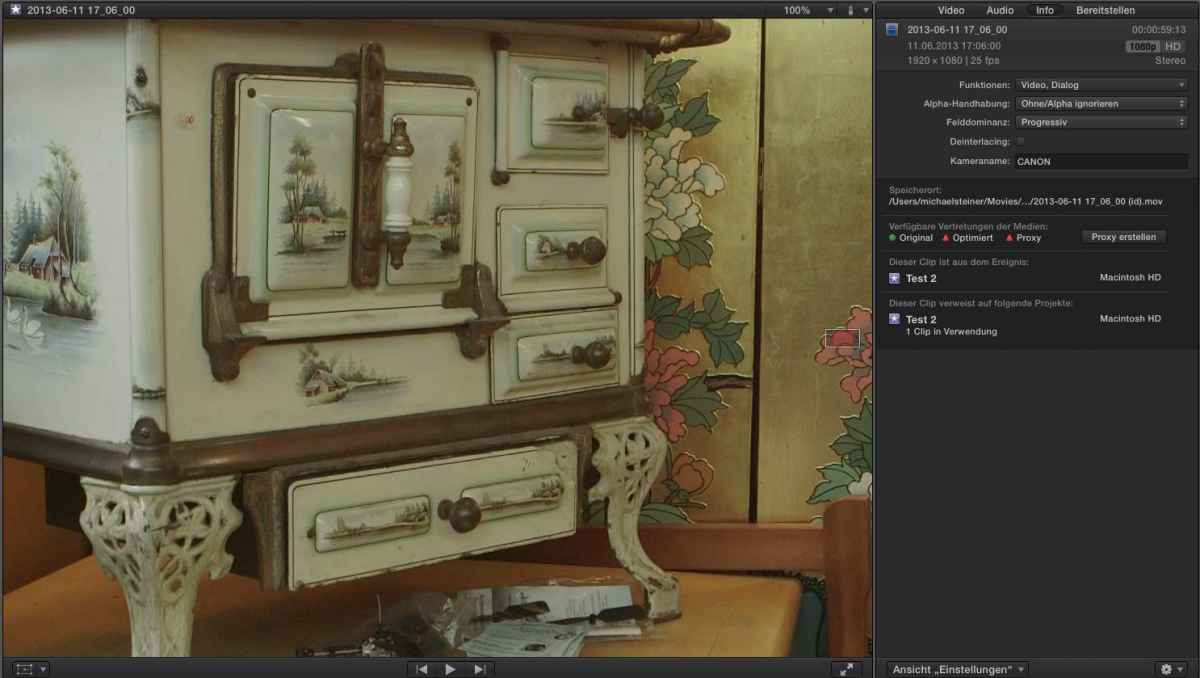
I still think it's only a wrong interpretation by FCPX. When you open the files directly from the "Original Media"-Folder, they look good. It's only inside FCPX that this issue exists.
But in FCPX there is a degrade in picture-quality if you don't manually change the field dominance to progressive (I'm only talking about C100-Footage recorded in PF25 - but look at the attached pics...). The footage will also be jittery when the project is exported (doesn't matter if the project is set to 1080p25).
Anyway - someone from FCPX contacted me in regard to this issue, so let's hope they can fix it.
Cheers
Replied by Michi on topic Canon C100 progressive Footage in FCPX
BenB wrote: 25PF is in the end ingested as interlaced (from what I understand of that camera). Like how Panny faked it in the original DVX-100, shoot 24p, get 60i with flagged frames. Why do camera makers do this today? Make 24p simply 24p, geezum!
I still think it's only a wrong interpretation by FCPX. When you open the files directly from the "Original Media"-Folder, they look good. It's only inside FCPX that this issue exists.
But in FCPX there is a degrade in picture-quality if you don't manually change the field dominance to progressive (I'm only talking about C100-Footage recorded in PF25 - but look at the attached pics...). The footage will also be jittery when the project is exported (doesn't matter if the project is set to 1080p25).
Anyway - someone from FCPX contacted me in regard to this issue, so let's hope they can fix it.
Cheers
Last edit: 20 Jun 2013 23:58 by Michi.
Please Log in to join the conversation.
- Diogo Morais
-

- Offline
- New Member
-

Less
More
- Posts: 4
- Thank you received: 0
06 Sep 2013 12:14 #30839
by Diogo Morais
Replied by Diogo Morais on topic Canon C100 progressive Footage in FCPX
Anyway - someone from FCPX contacted me in regard to this issue, so let's hope they can fix it.
 . Yeah.
I'm having the same problem with that, sometimes it works, sometimes it don't hopefully in the next 10.1.0.
. Yeah.I'm having the same problem with that, sometimes it works, sometimes it don't hopefully in the next 10.1.0.
Please Log in to join the conversation.
- Tom Wolsky
-
- Offline
- Moderator
-
06 Sep 2013 12:42 #30844
by Tom Wolsky
Replied by Tom Wolsky on topic Canon C100 progressive Footage in FCPX
I have no idea what Canon is doing, but 25PF is ridiculous. As Ben explained it's actually an interlaced format used to emulate film pulldown. This may be necessary going from 29.97 to emulate 24 with pulldown, but it's totally pointless to do this with 25fps media. If there is such a ridiculous interlaced format on the camera, it really should never be used.
Please Log in to join the conversation.
- ronny courtens
-

- Offline
- Moderator
-
Less
More
- Posts: 4455
- Thank you received: 962
06 Sep 2013 15:46 #30859
by ronny courtens
Replied by ronny courtens on topic Canon C100 progressive Footage in FCPX
The Canon C100 only records 24p in native 23.98. The other framerates (30PF, 25PF) are PsF and recorded in an interlaced wrapper. This is a major flaw in this camera, especially because Canon's PsF mode is what we call "benign" PsF which means it does not include the correct flags to tell external applications that this is in fact an interlaced wrapper and should be recognized as progressive video.
This will not change in any version of FCPX, simply because it's not an FCPX problem. We have the same issues with this lousy format in Avid. It's up to Canon to finally get their act together and provide cameras that shoot real progressive frames instead of faked ones, or at least have their PsF wrappers contain the correct information so external applications can recognize it.
End of rant
- Ronny
This will not change in any version of FCPX, simply because it's not an FCPX problem. We have the same issues with this lousy format in Avid. It's up to Canon to finally get their act together and provide cameras that shoot real progressive frames instead of faked ones, or at least have their PsF wrappers contain the correct information so external applications can recognize it.
End of rant
- Ronny
Please Log in to join the conversation.
06 Sep 2013 15:47 #30860
by Michi
My current workaround to avoid this issue is to use "ClipWrap". It's a 50$ App you can buy on the Appstore that rewraps the .MTS-Files to .mov-Files and fixes this interlace/progressive thing. Once rewrapped, the files recorded at 25PF are and stay progressive. It's a step more (actually two, since I have to import from Card through the Canon ImportUtility), but at least I can work in FCPX now without problems.
Replied by Michi on topic Canon C100 progressive Footage in FCPX
Diogo Morais wrote: I'm having the same problem with that, sometimes it works, sometimes it don't hopefully in the next 10.1.0.
My current workaround to avoid this issue is to use "ClipWrap". It's a 50$ App you can buy on the Appstore that rewraps the .MTS-Files to .mov-Files and fixes this interlace/progressive thing. Once rewrapped, the files recorded at 25PF are and stay progressive. It's a step more (actually two, since I have to import from Card through the Canon ImportUtility), but at least I can work in FCPX now without problems.
Please Log in to join the conversation.
- ronny courtens
-
- Offline
- Moderator
-
Less
More
- Posts: 4455
- Thank you received: 962
06 Sep 2013 15:55 #30861
by ronny courtens
Replied by ronny courtens on topic Canon C100 progressive Footage in FCPX
There should be no workarounds for such a simple problem, Canon should fix this!
I suggest anyone having this issue to contact Canon and post feedback. Maybe, just maybe, one day they will start listening to their customers :whistle: Just look at how long we are already having issues with importing files from their DSLR stuff just because their import plugin does not work properly. And not only in FCPX but in every NLE. This is getting ridiculous.
- Ronny
I suggest anyone having this issue to contact Canon and post feedback. Maybe, just maybe, one day they will start listening to their customers :whistle: Just look at how long we are already having issues with importing files from their DSLR stuff just because their import plugin does not work properly. And not only in FCPX but in every NLE. This is getting ridiculous.
- Ronny
Please Log in to join the conversation.
- Chris Wilby
-
- Offline
- Junior Member
-

Less
More
- Posts: 25
- Thank you received: 0
06 Sep 2013 19:05 #30867
by Chris Wilby
Replied by Chris Wilby on topic Canon C100 progressive Footage in FCPX
Well said Ronny!
Please Log in to join the conversation.
