


- Posts: 4
- Thank you received: 0
3 Post Moderation Rule for New Boarders (25 Jan 2021)
New boarders will have their posts moderated - Don't worry if you cannot see your post immediately.
Indexing Files instead of import?
- Q. Shepard
-
 Topic Author
- Offline
- New Member
-

Less
More
09 Jun 2013 18:39 - 09 Jun 2013 18:44 #27021
by Q. Shepard
Indexing Files instead of import? was created by Q. Shepard
Hey people
Im farely new to Final Cut Pro, i've made about 3 videos with it
I just transferred to it from using Adobe Premiere CS6
Im getting over the little things I dont like about Final Cut and starting to use it more as my main video editor
One thing I have a complaint about is how Final Cut handles importing files
When FCP imports files, it seems to make a copy of the file to store somewhere, instead of indexing the file's original location on the computer (Like Adobe Premiere Pro CS6 does)
Is there a way I can make it so it stops doing this and index files instead for importing ?
Its causing me to lose ALOT of Harddrive space, I was at 150+ last night, now im down to about 9...
Im farely new to Final Cut Pro, i've made about 3 videos with it
I just transferred to it from using Adobe Premiere CS6
Im getting over the little things I dont like about Final Cut and starting to use it more as my main video editor
One thing I have a complaint about is how Final Cut handles importing files
When FCP imports files, it seems to make a copy of the file to store somewhere, instead of indexing the file's original location on the computer (Like Adobe Premiere Pro CS6 does)
Is there a way I can make it so it stops doing this and index files instead for importing ?
Its causing me to lose ALOT of Harddrive space, I was at 150+ last night, now im down to about 9...
Last edit: 09 Jun 2013 18:44 by Q. Shepard.
Please Log in to join the conversation.
- Tom Wolsky
-

- Offline
- Moderator
-

09 Jun 2013 20:06 #27022
by Tom Wolsky
Replied by Tom Wolsky on topic Indexing Files instead of import?
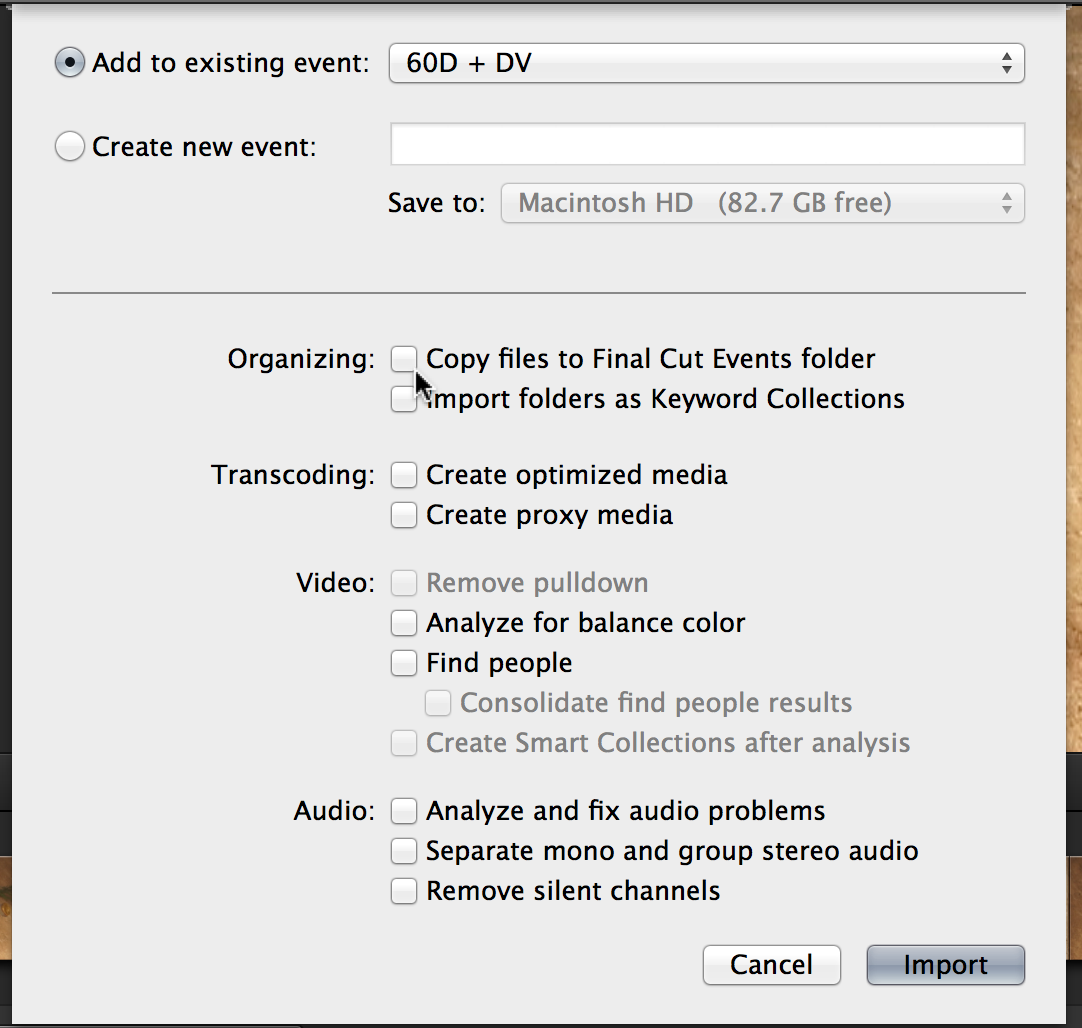
Uncheck copy files to event in the import dialog.
Please Log in to join the conversation.
- kyletron2000
-
- Offline
- Senior Member
-

Less
More
- Posts: 79
- Thank you received: 15
10 Jun 2013 00:36 #27026
by kyletron2000
Replied by kyletron2000 on topic Indexing Files instead of import?
Also, if you import by dragging files from the Finder into an event, make sure you have "Copy files to Final Cut Events folder" deselected there as well. Those are the default preferences for import and will apply to clips that are dragged from the Finder into FCP X.

Please Log in to join the conversation.
- cinemaloha
-
- Offline
- Elite Member
-

Less
More
- Posts: 163
- Thank you received: 36
10 Jun 2013 15:10 #27047
by cinemaloha
Since you're fairly new to FCPX, I'd recommend watching tutorials on AskVideo.com ( www.askvideo.com/cart/coupon/13summersch...mpaign=newsletter289 ). There's an article on fcp.co's main page & it's $15 a month. You can access other videos too, not just FCPX. There's Motion 5 videos among many others. Give it a shot so you'll know more about the intricate details of FCPX.
Replied by cinemaloha on topic Indexing Files instead of import?
Q. Shepard wrote: Hey people
Im farely new to Final Cut Pro, i've made about 3 videos with it
I just transferred to it from using Adobe Premiere CS6
Im getting over the little things I dont like about Final Cut and starting to use it more as my main video editor
One thing I have a complaint about is how Final Cut handles importing files
When FCP imports files, it seems to make a copy of the file to store somewhere, instead of indexing the file's original location on the computer (Like Adobe Premiere Pro CS6 does)
Is there a way I can make it so it stops doing this and index files instead for importing ?
Its causing me to lose ALOT of Harddrive space, I was at 150+ last night, now im down to about 9...
Since you're fairly new to FCPX, I'd recommend watching tutorials on AskVideo.com ( www.askvideo.com/cart/coupon/13summersch...mpaign=newsletter289 ). There's an article on fcp.co's main page & it's $15 a month. You can access other videos too, not just FCPX. There's Motion 5 videos among many others. Give it a shot so you'll know more about the intricate details of FCPX.
Please Log in to join the conversation.
- Q. Shepard
-
Topic Author
- Offline
- New Member
-
Less
More
- Posts: 4
- Thank you received: 0
10 Jun 2013 19:28 #27064
by Q. Shepard
Replied by Q. Shepard on topic Indexing Files instead of import?
I feel like an idiot now lol
I had that turned off, but I guess I had to restart the program for it to work
OK, now another question
Where does Final Cut store the videos that I previously imported ?
I want to delete those files to free up a good 100+ gb
and I just added those hub tutorials to my favorites!
Im gonna check out the paid tutorials when I feel I need them, right now I need to
learn the ins and outs first
I had that turned off, but I guess I had to restart the program for it to work
OK, now another question
Where does Final Cut store the videos that I previously imported ?
I want to delete those files to free up a good 100+ gb
and I just added those hub tutorials to my favorites!
Im gonna check out the paid tutorials when I feel I need them, right now I need to
learn the ins and outs first
Please Log in to join the conversation.

10 Jun 2013 20:51 #27090
by BenB
Replied by BenB on topic Indexing Files instead of import?
Um, the paid "course" is exactly what you need right now. It covers all the basics, step by step, exactly the stuff you're asking about. There is even one I did that talks about media and how it is handled, where it is stored, etc.
Final Cut Events and Final Cut Projects are where everything is.
On the OS drive they are in your Movies folder.
On all other drives they are at the root level.
You can right-click any Event or Project inside FCP X's library, and select, "Move To Trash".
Final Cut Events and Final Cut Projects are where everything is.
On the OS drive they are in your Movies folder.
On all other drives they are at the root level.
You can right-click any Event or Project inside FCP X's library, and select, "Move To Trash".
Please Log in to join the conversation.
