


- Posts: 582
- Thank you received: 5
3 Post Moderation Rule for New Boarders (25 Jan 2021)
New boarders will have their posts moderated - Don't worry if you cannot see your post immediately.
Edit mode and finished mode are different
03 Jun 2013 22:21 #26757
by Neguah
Edit mode and finished mode are different was created by Neguah
In FCPX timeline, the clips ends at 5.12.00. When I move my cursor it turns to the blank adjustment(with this L on the left side). I´m adjusting the song to the frame.
But after sharing the movie, the clips doesn´t end until aprox. 5.12.30, or something. It certainly doesn´t end 5.12.00. WHY?
But after sharing the movie, the clips doesn´t end until aprox. 5.12.30, or something. It certainly doesn´t end 5.12.00. WHY?
Please Log in to join the conversation.
04 Jun 2013 00:15 #26759
by Overturf
Replied by Overturf on topic Edit mode and finished mode are different
Hey Neguah,
you probably have a blank clip at the end that should be removed? Maybe you can post a screenshot of your timeline for further examination?
you probably have a blank clip at the end that should be removed? Maybe you can post a screenshot of your timeline for further examination?
Please Log in to join the conversation.
04 Jun 2013 05:47 #26762
by Neguah
Here ya go:
www.flickr.com/photos/96533652@N08/8945323906/
I can´t figure out why it´s on the second in my timeline, but after sharing it´s not. Doesn´t make sense. Have gone through my timeline, and there´s no blank clips. Only at the end, but it´s camouflaged with a "fade to color".
Replied by Neguah on topic Edit mode and finished mode are different
Overturf wrote: Hey Neguah,
you probably have a blank clip at the end that should be removed? Maybe you can post a screenshot of your timeline for further examination?
Here ya go:
www.flickr.com/photos/96533652@N08/8945323906/
I can´t figure out why it´s on the second in my timeline, but after sharing it´s not. Doesn´t make sense. Have gone through my timeline, and there´s no blank clips. Only at the end, but it´s camouflaged with a "fade to color".
Please Log in to join the conversation.
04 Jun 2013 08:49 #26769
by Overturf
Replied by Overturf on topic Edit mode and finished mode are different
Are you editing with optimized footage? I mean, did you hook "optimize media" on import or later?
Please Log in to join the conversation.
04 Jun 2013 10:02 #26771
by Neguah
No, I´m not using optimized media, I´m only hook proxy. Optimized takes to much space.
Does this time difference happen when using optimized media?
Replied by Neguah on topic Edit mode and finished mode are different
Overturf wrote: Are you editing with optimized footage? I mean, did you hook "optimize media" on import or later?
No, I´m not using optimized media, I´m only hook proxy. Optimized takes to much space.
Does this time difference happen when using optimized media?
Please Log in to join the conversation.
04 Jun 2013 11:34 #26776
by Overturf
Replied by Overturf on topic Edit mode and finished mode are different
I don't know very much about the technical side of this but have heard that some codecs are not as good for precise editing as others. So my suggestion would be to try and optimize at least the one clip that is troubling you - or the one before and after the edit point. Maybe it helps - and if it doesn't just trash that optimized media again.
Please Log in to join the conversation.
04 Jun 2013 11:36 #26777
by Overturf
Replied by Overturf on topic Edit mode and finished mode are different
On a side note: if optimized media takes too much space go and buy a bigger drive. Sounds like you're running out of space anyway which might cause really weird system behavior. Drive space is cheap - and it's especially cheap in comparison to all the hassle you might run into when space gets low...
Please Log in to join the conversation.
04 Jun 2013 13:28 #26788
by Neguah
Of course, I can always by another drive.
What codec? Codec from my camera when transferring? Or codec when sharing?
It looks like the different is growing throughout the film.
Replied by Neguah on topic Edit mode and finished mode are different
Overturf wrote: I don't know very much about the technical side of this but have heard that some codecs are not as good for precise editing as others. So my suggestion would be to try and optimize at least the one clip that is troubling you - or the one before and after the edit point. Maybe it helps - and if it doesn't just trash that optimized media again.
Of course, I can always by another drive.
What codec? Codec from my camera when transferring? Or codec when sharing?
It looks like the different is growing throughout the film.
Please Log in to join the conversation.

04 Jun 2013 13:36 #26791
by BenB
Replied by BenB on topic Edit mode and finished mode are different
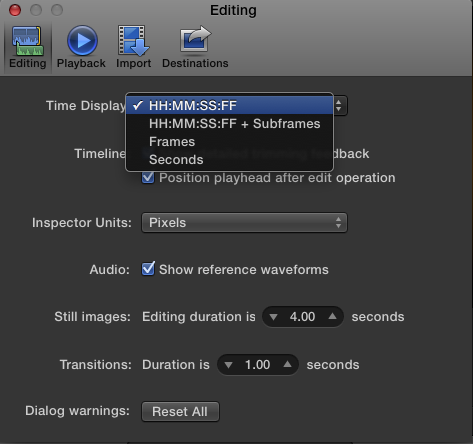
To in to Preferences and verify what you have the timecode format set to?
Please Log in to join the conversation.
04 Jun 2013 13:58 #26795
by Neguah
Replied by Neguah on topic Edit mode and finished mode are different
I did not get that. Can you please explain better?BenB wrote: To in to Preferences and verify what you have the timecode format set to?
Please Log in to join the conversation.
04 Jun 2013 14:31 #26799
by Neguah
Replied by Neguah on topic Edit mode and finished mode are different
I can ad that I shoot in 1080p, but edit in 720p. Does that have anything to do with the difference?
Please Log in to join the conversation.
04 Jun 2013 14:43 #26800
by Neguah
Replied by Neguah on topic Edit mode and finished mode are different
And can you also tell me why FCPX says that the file is 655mb when sharing, and when I look at info of the finished file(QuickTime) it says its just below 300mb? Is it shrinking?
Please Log in to join the conversation.
05 Jun 2013 08:50 #26823
by Overturf
Replied by Overturf on topic Edit mode and finished mode are different
The codec you originally shot in might be hard to edit. Please try optimized media and tell us if that makes a difference in the output.
Please Log in to join the conversation.
05 Jun 2013 09:42 #26824
by Neguah
Replied by Neguah on topic Edit mode and finished mode are different
I optimized the clip before the blank adjustment. Didn´t help.
However, there´s almost no difference before this clip, and the only difference is seconds. The blank adjustment fits perfectly to my music.
Just check out my tread in "Made in Final Cut Pro". Have postet the film there.
However, there´s almost no difference before this clip, and the only difference is seconds. The blank adjustment fits perfectly to my music.
Just check out my tread in "Made in Final Cut Pro". Have postet the film there.
Please Log in to join the conversation.
05 Jun 2013 15:02 - 05 Jun 2013 15:03 #26835
by BenB
Replied by BenB on topic Edit mode and finished mode are different
Where did this media originally come from, what camera make and model?
What is that "Blank Adjustment" clip actually? Is that an "Adjustment Layer" clip? Why would it be sitting in the primary storyline instead of a gap clip?
This is what I was asking about originally.
What is that "Blank Adjustment" clip actually? Is that an "Adjustment Layer" clip? Why would it be sitting in the primary storyline instead of a gap clip?
This is what I was asking about originally.
Last edit: 05 Jun 2013 15:03 by BenB.
Please Log in to join the conversation.
05 Jun 2013 15:33 #26839
by Neguah
Timecode is the first one.
It comes from Canon 5D mk3.
Gap clip?
I needed both an adjustment and a black clip. Therefor a adjustment layer.
Replied by Neguah on topic Edit mode and finished mode are different
BenB wrote: Where did this media originally come from, what camera make and model?
What is that "Blank Adjustment" clip actually? Is that an "Adjustment Layer" clip? Why would it be sitting in the primary storyline instead of a gap clip?
This is what I was asking about originally.
Timecode is the first one.
It comes from Canon 5D mk3.
Gap clip?
I needed both an adjustment and a black clip. Therefor a adjustment layer.
Please Log in to join the conversation.
