


- Posts: 175
- Thank you received: 5
3 Post Moderation Rule for New Boarders (25 Jan 2021)
New boarders will have their posts moderated - Don't worry if you cannot see your post immediately.
XDCAM USB Drive Export - Help!
- CBlakeston
-
 Topic Author
- Offline
- Elite Member
-

Less
More
03 Jun 2013 12:59 #26725
by CBlakeston
XDCAM USB Drive Export - Help! was created by CBlakeston
Hi Everyone. So, I have a timeline that I'm trying to export to a USB XDCAM Optical Drive.
I've installed the Sony Content Browser 2,0 / XDCAM Software Driver.
I've figured out the kinda not very well documented way of exporting to XDCAM (Share button, master file, xdcam HD 35MB, open with content browser exporter (point dialogue box at 'content browser exporter' App in the Application folder)
So, it renders the file, opens the content browser exported App and then.... this.
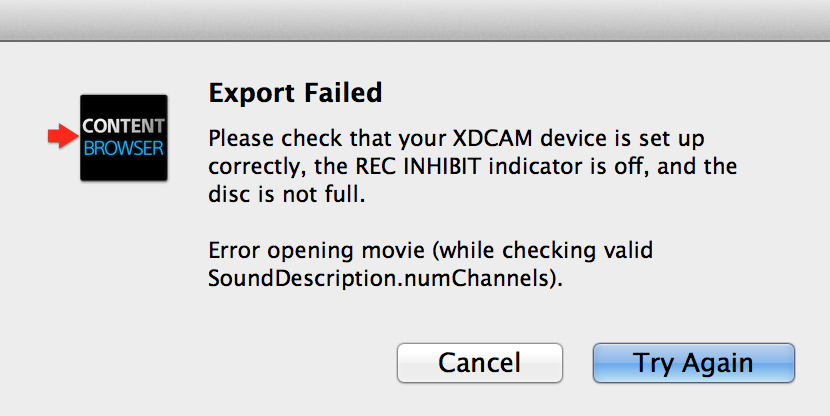
I'm guessing the problem is something to do with roles and audio tracks? But i've exported the timeline as a ProRes clip, imported that back into an new event, started a new timeline - and tried to export that (which should now only have two stereo tracks) and that doesn't work either.
Can anyone advise?
I've installed the Sony Content Browser 2,0 / XDCAM Software Driver.
I've figured out the kinda not very well documented way of exporting to XDCAM (Share button, master file, xdcam HD 35MB, open with content browser exporter (point dialogue box at 'content browser exporter' App in the Application folder)
So, it renders the file, opens the content browser exported App and then.... this.
I'm guessing the problem is something to do with roles and audio tracks? But i've exported the timeline as a ProRes clip, imported that back into an new event, started a new timeline - and tried to export that (which should now only have two stereo tracks) and that doesn't work either.
Can anyone advise?
Please Log in to join the conversation.
- CBlakeston
-
Topic Author
- Offline
- Elite Member
-
Less
More
- Posts: 175
- Thank you received: 5
03 Jun 2013 13:00 #26726
by CBlakeston
Replied by CBlakeston on topic XDCAM USB Drive Export - Help!
Oh, and i've checked the XDCAM Disc is formatted, ect 
Please Log in to join the conversation.
- CBlakeston
-
Topic Author
- Offline
- Elite Member
-
Less
More
- Posts: 175
- Thank you received: 5
03 Jun 2013 14:23 #26736
by CBlakeston
Replied by CBlakeston on topic XDCAM USB Drive Export - Help!
Update: So, if I import an XDCAM clip from the content browser, I can export the same clip back. The issue is clearly with whatever XDCAM files FCPX is making?
Please Log in to join the conversation.

05 Dec 2013 13:08 - 05 Dec 2013 13:08 #35167
by Amoasei
Replied by Amoasei on topic XDCAM USB Drive Export - Help!
Hi!
I have the same problem here, with a PDWu1 USB drive. The solution (belive it or not) is not so easy.
After install the drivers for 10.8 (my case) or 10.7 (I test and worked well), reinstall the 3.00 version. When you try to reinstall the old version, ignore the warning and force installation.
After this, restart your mac, and you can read and write inside de Clip Folder in XDcam disk via finder.
I used the software find in this sony site: www.servicesplus.sel.sony.com/sony-software.aspx
for my USB model: www.servicesplus.sel.sony.com/sony-software-model-PDWU1.aspx
Good luck
I have the same problem here, with a PDWu1 USB drive. The solution (belive it or not) is not so easy.
After install the drivers for 10.8 (my case) or 10.7 (I test and worked well), reinstall the 3.00 version. When you try to reinstall the old version, ignore the warning and force installation.
After this, restart your mac, and you can read and write inside de Clip Folder in XDcam disk via finder.
I used the software find in this sony site: www.servicesplus.sel.sony.com/sony-software.aspx
for my USB model: www.servicesplus.sel.sony.com/sony-software-model-PDWU1.aspx
Good luck
Last edit: 05 Dec 2013 13:08 by Amoasei.
Please Log in to join the conversation.
- CBlakeston
-
Topic Author
- Offline
- Elite Member
-
Less
More
- Posts: 175
- Thank you received: 5
05 Dec 2013 15:55 #35178
by CBlakeston
Replied by CBlakeston on topic XDCAM USB Drive Export - Help!
Many thanks. I'll give that a go. For the project in question I think I exported prores, imported that into a separate Avid system and exported to XDCAM disc that way. It would be great it if did work propey out kf FCPX though. Thanks again.
Please Log in to join the conversation.
05 Dec 2013 16:59 #35179
by Amoasei
Replied by Amoasei on topic XDCAM USB Drive Export - Help!
To "final" export any project, to delivery a broadcast channel, actually I use de Premiere CC. The premiere has a Loudness Radar plugin (Buit-in) to audio monitoring, and the automatic settings for XDCAM format works great for MXF Op1a 50MB output (for brazilian broadcast TVs).
Please Log in to join the conversation.
