


- Posts: 11
- Thank you received: 0
3 Post Moderation Rule for New Boarders (25 Jan 2021)
New boarders will have their posts moderated - Don't worry if you cannot see your post immediately.
Compound Clip vs. Synchronized Clip
- filmgarage
-
 Topic Author
- Offline
- New Member
-

Less
More
30 May 2013 22:25 - 03 Jun 2013 12:01 #26566
by filmgarage
Compound Clip vs. Synchronized Clip was created by filmgarage
I am puzzled about the difference between a Synchronized Clip and a Compound Clip in FCPX.
If I sync two clips together with the "Synchronize clips" command I end up with a new source clip.
However, when I open this clip in the timeline it can be tweaked just like a compound clip.
In earlier versions of FCPX I think I noticed they would be synced together in a compound clip and look like that too.
If I sync clips manually they do end up looking like Compound Clips and, more problematic, I cannot change the timecode of the compound clip. When audio and video is melted together as a synchronized clip I can adjust the timecode easily!
Anyone having an idea how to turn a compound clip into a synchronized clip?
If I sync two clips together with the "Synchronize clips" command I end up with a new source clip.
However, when I open this clip in the timeline it can be tweaked just like a compound clip.
In earlier versions of FCPX I think I noticed they would be synced together in a compound clip and look like that too.
If I sync clips manually they do end up looking like Compound Clips and, more problematic, I cannot change the timecode of the compound clip. When audio and video is melted together as a synchronized clip I can adjust the timecode easily!
Anyone having an idea how to turn a compound clip into a synchronized clip?
Last edit: 03 Jun 2013 12:01 by filmgarage.
Please Log in to join the conversation.

31 May 2013 00:59 - 31 May 2013 00:59 #26568
by BenB
Replied by BenB on topic Compound Clip vs. Synchronized Clip
A Compound Clip is a container holding other independent clips inside of it, created manually, with no effort to "synchronize" anything in any way.
A Sync Clip is a contain holding other independent clips inside of it, created automatically, by FCP looking at audio waveforms and synchronizing the clips together.
The creation of each is different, the result physically looks and works the same way. Depends on what your needs are.
What is your goal in changing timecode?
A Sync Clip is a contain holding other independent clips inside of it, created automatically, by FCP looking at audio waveforms and synchronizing the clips together.
The creation of each is different, the result physically looks and works the same way. Depends on what your needs are.
What is your goal in changing timecode?
Last edit: 31 May 2013 00:59 by BenB.
Please Log in to join the conversation.
- filmgarage
-
Topic Author
- Offline
- New Member
-
Less
More
- Posts: 11
- Thank you received: 0
31 May 2013 09:37 #26598
by filmgarage
Replied by filmgarage on topic Compound Clip vs. Synchronized Clip
We manually synced some footage and now I want the sync (compound) clips to have timecode that corresponds with the original footage that the director has been spotting. It would help tremendously if we can find footage based on the timecode of the clips. That is why... But unfortunately the "Starting timecode" is greyed out when I edit the settings of a compound clip...
Please Log in to join the conversation.
31 May 2013 15:09 #26620
by BenB
Replied by BenB on topic Compound Clip vs. Synchronized Clip
Can't change the starting TC of clips. Fill out the feedback form. I've asked before for Alt TC and/or a Starting TC setting for CC's and Syncs.
One alternative, not elegant, is to open the original clip into it's own timeline (right-click, Open In Timeilne). Then drop in your audio clip, manually sync, mute the audio channel(s) you don't want to use.
One alternative, not elegant, is to open the original clip into it's own timeline (right-click, Open In Timeilne). Then drop in your audio clip, manually sync, mute the audio channel(s) you don't want to use.
Please Log in to join the conversation.
- filmgarage
-
Topic Author
- Offline
- New Member
-
Less
More
- Posts: 11
- Thank you received: 0
03 Jun 2013 11:55 - 03 Jun 2013 11:59 #26718
by filmgarage
Replied by filmgarage on topic Compound Clip vs. Synchronized Clip
Well, now it's getting interesting!!!
I already noticed some time ago that clips can be opened in their own timeline (and can be edited as well). So you can easily fix audio sync or even remove parts of a clip definitely without 'rejecting' them by rating them.
I noticed the similarities but I never noticed that they do differ in some ways. Actually, all clips are compound clips (master clips, synchronized clips and off course compound clips). If you open them in the timeline, the timeline even displays the compound clip icon:

And to take it one step further, even projects are in a way the same as compound clips. You can read this article about it:
daredreamermag.com/2013/02/28/a-radical-...r-final-cut-x-users/
So in a way all clips, compound clips, and projects are technically the same!!!
They are like matroska puppets. Or like the concept of 'a box in a box in a box, etc....'
From now on let me refer to all clips, synchronized clips, compound clips, and projects as 'superclips', because they are fundamentally the same !!!
That said it would make sense if I could change the timecode of all 'superclips'. But no, I can't!
Apple engineers have chosen to disable some features for some 'superclips':
(There may be more differences, but these are the ones that I am aware of and that matter to me)
For source clips the 'edit compound clip settings' menu is unavailable.
Hence, you cannot change the timecode or any other basic settings.
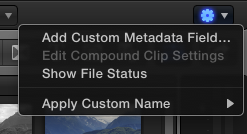
For compound clips the 'edit compound clip settings' menu is available, of course.
Unfortunately the timecode box in the settings menu is greyed out and you cannot change it!!!

For clips that have been synchronized by FCPX the 'edit compound clip settings' menu is available and on top of that you can edit the timecode.
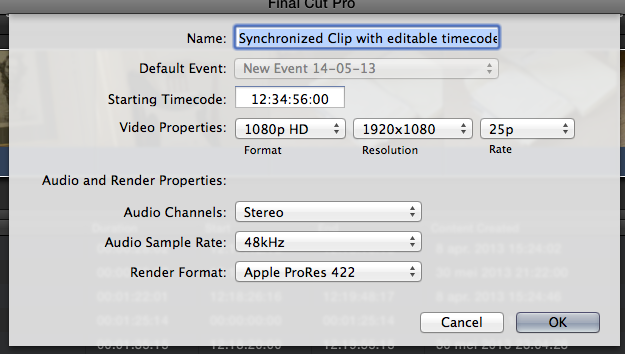
If I could choose, I would not like to have the all these features available at all times.
Please Apple, let me do this!!!
But hey: in a way there is an easy way to do this already!
Here is the workaround:
From now on you can simply duplicate the 'Empty Superclip' in your event (Command-D) if you need a new compound clip with all features available.
I hope this may help other editors!
It sure made me understand a lot more of the inner workings of FCPX...
If you find anything that I missed or didn't explain clearly please react to this topic!
I already noticed some time ago that clips can be opened in their own timeline (and can be edited as well). So you can easily fix audio sync or even remove parts of a clip definitely without 'rejecting' them by rating them.
I noticed the similarities but I never noticed that they do differ in some ways. Actually, all clips are compound clips (master clips, synchronized clips and off course compound clips). If you open them in the timeline, the timeline even displays the compound clip icon:
And to take it one step further, even projects are in a way the same as compound clips. You can read this article about it:
daredreamermag.com/2013/02/28/a-radical-...r-final-cut-x-users/
So in a way all clips, compound clips, and projects are technically the same!!!
They are like matroska puppets. Or like the concept of 'a box in a box in a box, etc....'
From now on let me refer to all clips, synchronized clips, compound clips, and projects as 'superclips', because they are fundamentally the same !!!
That said it would make sense if I could change the timecode of all 'superclips'. But no, I can't!
Apple engineers have chosen to disable some features for some 'superclips':
(There may be more differences, but these are the ones that I am aware of and that matter to me)
For source clips the 'edit compound clip settings' menu is unavailable.
Hence, you cannot change the timecode or any other basic settings.
For compound clips the 'edit compound clip settings' menu is available, of course.
Unfortunately the timecode box in the settings menu is greyed out and you cannot change it!!!
For clips that have been synchronized by FCPX the 'edit compound clip settings' menu is available and on top of that you can edit the timecode.
If I could choose, I would not like to have the all these features available at all times.
Please Apple, let me do this!!!
But hey: in a way there is an easy way to do this already!
Here is the workaround:
- Just take any video file and an audio file (they do not need to have any relation whatsoever!)
- Have FCPX synchronize the two, don't worry about the result!
- Rename the empty Synchronized clip to "Empty Superclip" or whatever name you think is appropriate and useful.
From now on you can simply duplicate the 'Empty Superclip' in your event (Command-D) if you need a new compound clip with all features available.
- First edit or paste your new clips inside the new Superclip.
- Next delete the old files inside the Superclip so only your new content remains.
- Do not delete the old temp footage in the Superclip or all these the "superpower" is gone!
I hope this may help other editors!
It sure made me understand a lot more of the inner workings of FCPX...
If you find anything that I missed or didn't explain clearly please react to this topic!
Last edit: 03 Jun 2013 11:59 by filmgarage.
Please Log in to join the conversation.
03 Jun 2013 12:50 #26723
by BenB
Replied by BenB on topic Compound Clip vs. Synchronized Clip
If your clips are not related, as in sharing the same audio for actual sync'ing, simply make a Compound Clip, not a Sync Clip.
The concept is Timelines. Every element has it's own Timeline. Even graphics, photos, audio only clips, etc. Once you understand that, and that there are four types of Clip Containers (Compound, Sync, Multicam, Project), the rest is pretty simple to figure out.
The concept is Timelines. Every element has it's own Timeline. Even graphics, photos, audio only clips, etc. Once you understand that, and that there are four types of Clip Containers (Compound, Sync, Multicam, Project), the rest is pretty simple to figure out.
Please Log in to join the conversation.
- filmgarage
-
Topic Author
- Offline
- New Member
-
Less
More
- Posts: 11
- Thank you received: 0
03 Jun 2013 13:31 #26730
by filmgarage
Replied by filmgarage on topic Compound Clip vs. Synchronized Clip
Hi Ben,
Indeed, they all have their own timelines.
What I was trying to show is that by turning them into Synchronized clips in stead of Compound Clips you will be able to change the timecode!
If you synchronize audio and video manually as a Compound Clip you won't be able to change the timecode.
You can even change the timecode of source files like this!
Creating a sync clip from unrelated clips is just a way to achieve this.
Sorry if my poor english makes it difficult to understand...
Indeed, they all have their own timelines.
What I was trying to show is that by turning them into Synchronized clips in stead of Compound Clips you will be able to change the timecode!
If you synchronize audio and video manually as a Compound Clip you won't be able to change the timecode.
You can even change the timecode of source files like this!
Creating a sync clip from unrelated clips is just a way to achieve this.
Sorry if my poor english makes it difficult to understand...
Please Log in to join the conversation.
03 Jun 2013 14:33 #26738
by BenB
Replied by BenB on topic Compound Clip vs. Synchronized Clip
OK, you're talking about after the initial creation, yes.
Please Log in to join the conversation.
15 Sep 2013 05:33 #31185
by fmateojr
Replied by fmateojr on topic Compound Clip vs. Synchronized Clip
I made the mistake of key wording some clips before I synchronized the audio. Is there any way to get the keywords onto the new synced clips?
Please Log in to join the conversation.
