


- Posts: 136
- Thank you received: 0
3 Post Moderation Rule for New Boarders (25 Jan 2021)
New boarders will have their posts moderated - Don't worry if you cannot see your post immediately.
Trouble with MultiCam
- youngeddie
-
 Topic Author
- Offline
- Premium Member
-

Less
More
30 May 2013 18:03 #26551
by youngeddie
Trouble with MultiCam was created by youngeddie
Hello!
I've used MultiCam in the past with great results. But now... for some reason no matter which method I use (Automatic, Match Marker, etc.) I get a really long empty space with one clip on each end. (see attachment)
Can someone please tell me how to get these clips to behave?
My work around is to make a MultiCam clip using one clip, then drag the other clip in and match it up. This is okay, but I'd just like to figure out what I'm doing wrong.
Thanks so much! Eddie
I've used MultiCam in the past with great results. But now... for some reason no matter which method I use (Automatic, Match Marker, etc.) I get a really long empty space with one clip on each end. (see attachment)
Can someone please tell me how to get these clips to behave?
My work around is to make a MultiCam clip using one clip, then drag the other clip in and match it up. This is okay, but I'd just like to figure out what I'm doing wrong.
Thanks so much! Eddie

Please Log in to join the conversation.
- Tom Wolsky
-

- Offline
- Moderator
-

30 May 2013 18:10 #26552
by Tom Wolsky
Replied by Tom Wolsky on topic Trouble with MultiCam
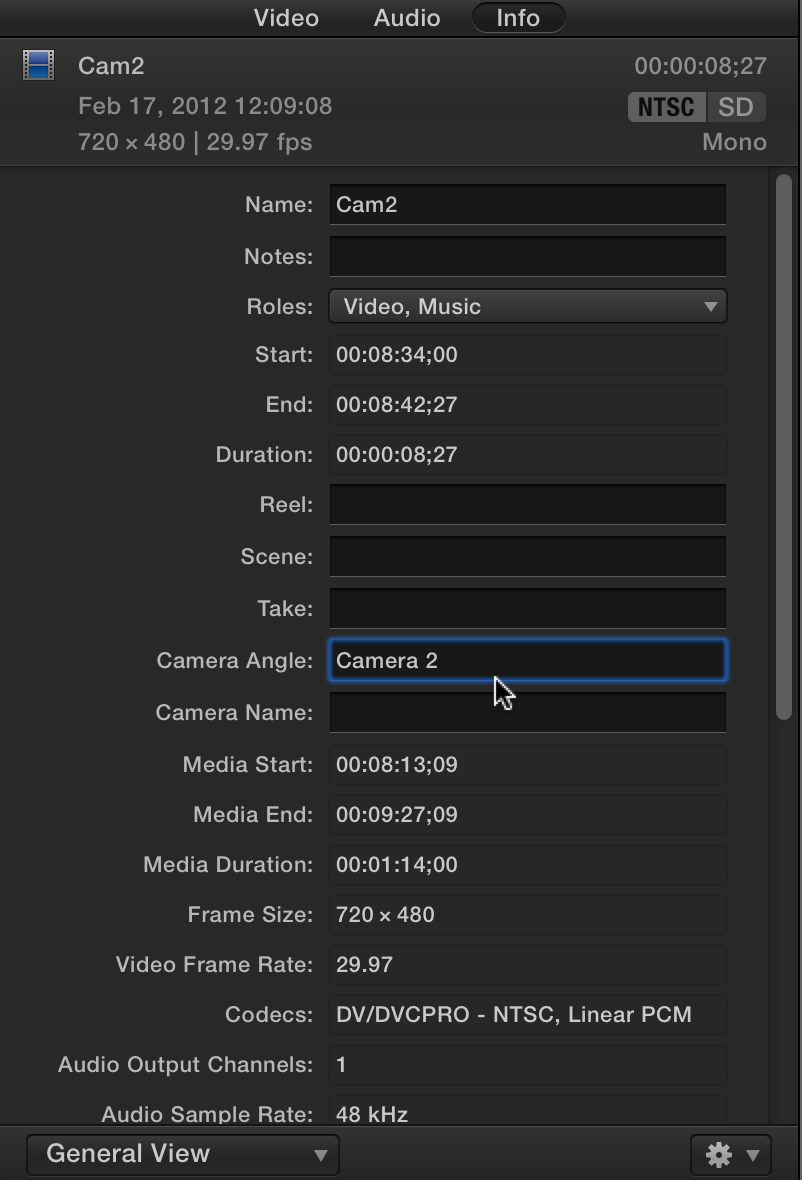
See if assigning distinct angle numbers to each camera before you make the multicam clip helps.
Please Log in to join the conversation.
- youngeddie
-
Topic Author
- Offline
- Premium Member
-
Less
More
- Posts: 136
- Thank you received: 0
30 May 2013 18:27 #26553
by youngeddie
Replied by youngeddie on topic Trouble with MultiCam
Thanks Tom,
My clips are called, "E-2" and "S-2" (excluding the parentheses).
Can you suggest a better way to name them?
Thanks very much, Eddie
My clips are called, "E-2" and "S-2" (excluding the parentheses).
Can you suggest a better way to name them?
Thanks very much, Eddie
Please Log in to join the conversation.
- Tom Wolsky
-
- Offline
- Moderator
-
30 May 2013 18:42 #26554
by Tom Wolsky
Replied by Tom Wolsky on topic Trouble with MultiCam
Change the angle number. Info inspector general view
Please Log in to join the conversation.
- youngeddie
-
Topic Author
- Offline
- Premium Member
-
Less
More
- Posts: 136
- Thank you received: 0
30 May 2013 20:13 #26563
by youngeddie
Replied by youngeddie on topic Trouble with MultiCam
That did the trick!!
Thanks Tom!!!
Eddie
Thanks Tom!!!
Eddie
Please Log in to join the conversation.
