


3 Post Moderation Rule for New Boarders (25 Jan 2021)
New boarders will have their posts moderated - Don't worry if you cannot see your post immediately.
Move project section to different project

30 May 2013 15:34 #26541
by Gretta
Move project section to different project was created by Gretta
What's the workflow to move parts of one project to another (existing) project? Open P1, select, copy, open P2, place playhead, paste?
Or should I create a compound clip and cut the parts I want from the browser viewer into the project, then break apart?
This is not a situation for duplicating the sequence (project) and re-editing, this is bits and pieces that I am totally reconfiguring into new project.
I wish I could see the 'project' in the viewer window like the compound clips.
Or should I create a compound clip and cut the parts I want from the browser viewer into the project, then break apart?
This is not a situation for duplicating the sequence (project) and re-editing, this is bits and pieces that I am totally reconfiguring into new project.
I wish I could see the 'project' in the viewer window like the compound clips.
Please Log in to join the conversation.


30 May 2013 15:54 #26543
by alven
Replied by alven on topic Move project section to different project
I have stumbled upon the same situation recently, and I think the compund clip is the easiest way to go about it, it will be easy just to drag it into a new project.
Please Log in to join the conversation.

31 May 2013 01:10 #26571
by BenB
Replied by BenB on topic Move project section to different project
Both ways work, and neither is right or wrong. Just which way works best for you and your situation.
Here's another alternative. If you're doing this for a whole new Project, for management purposes, create a new Event. When you make those CCs, and the CC creation dialog window pops up, assign them to that new Event so you can access them all together for working in the new Project.
What exactly do you mean by "...see the project in the viewer window like the compound clips." No clue what that means.
Here's another alternative. If you're doing this for a whole new Project, for management purposes, create a new Event. When you make those CCs, and the CC creation dialog window pops up, assign them to that new Event so you can access them all together for working in the new Project.
What exactly do you mean by "...see the project in the viewer window like the compound clips." No clue what that means.
Please Log in to join the conversation.
31 May 2013 04:00 #26584
by Gretta
Replied by Gretta on topic Move project section to different project
Thanks so much. Yes, that new event makes sense. A continual wrapping of brain around a way of working that is NOT based on film editing, that's the hangup, and also the adventure!
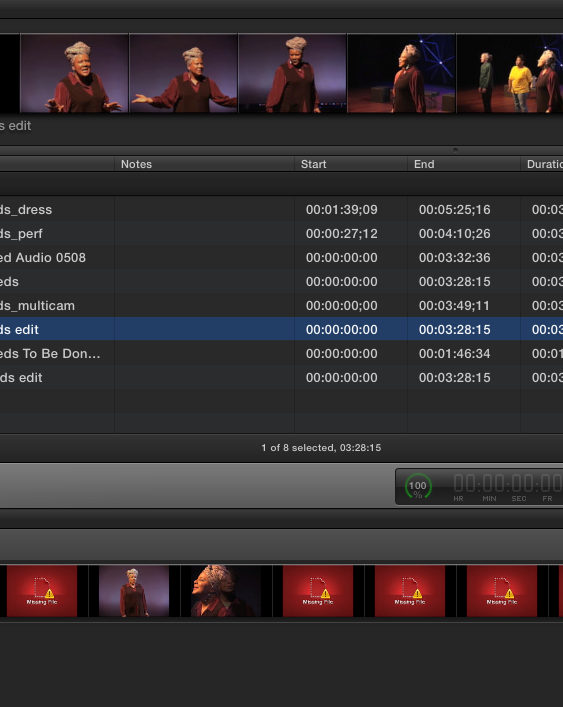
Again, I had forgotten that I don't have to open a project ; that I can play it in the project library window. What I meant by viewer window is the upper one in this screenshot, not the lower, project library to directly select and edit.BenB wrote: What exactly do you mean by "...see the project in the viewer window like the compound clips." No clue what that means.
Please Log in to join the conversation.
31 May 2013 08:43 #26593
by BenB
Replied by BenB on topic Move project section to different project
That's not the Viewer, that is the Event Browser, where you browse media held in Events. Which is the same basic preview function as previewing projects in the Project Library.
Please Log in to join the conversation.
