


3 Post Moderation Rule for New Boarders (25 Jan 2021)
New boarders will have their posts moderated - Don't worry if you cannot see your post immediately.
FCP X & Motion Creating New "Motion Templates" Folder

25 May 2013 09:24 #26297
by BenB
FCP X & Motion Creating New "Motion Templates" Folder was created by BenB
Working in Motion tonight, I noticed when I went to save an FCP X template, most of my Categories were missing. When I went into FCP X, noticed the same thing. Went to the Finder, and there is a new "Motion Templates" folder. I now have TWO identical "Motion Templates" folders. One is my original with everything inside it as normal. The second one has only my paid for third party stuff in it. When I delete this new one, launch either FCP X or Motion 5, they recreate this new one. This is really odd. Filled out feedback form. Wondering if anyone else is seeing this. Nothing has changed on my system at all.
In this screen shot, the one highlighted in yellow is my original. I highlight it so I can get to it faster visually. It has never given me problems before tonight, but out of the blue, BANG!
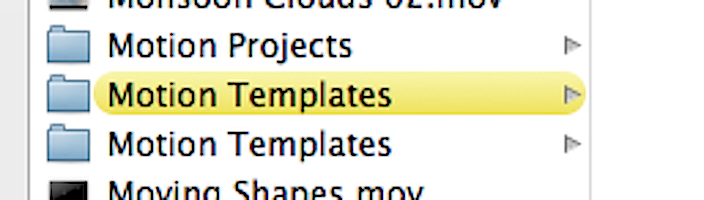
In this screen shot, the one highlighted in yellow is my original. I highlight it so I can get to it faster visually. It has never given me problems before tonight, but out of the blue, BANG!
Please Log in to join the conversation.
- Nervebroke
-

- Offline
- Elite Member
-

Less
More
- Posts: 177
- Thank you received: 12
25 May 2013 18:18 #26306
by Nervebroke
Replied by Nervebroke on topic FCP X & Motion Creating New "Motion Templates" Folder
I played around in Motion last night after I got your Text in Video plug in. After reading this I checked my motion templates folder. Mine only shows one.
Please Log in to join the conversation.
- kyletron2000
-
- Offline
- Senior Member
-

Less
More
- Posts: 79
- Thank you received: 15
25 May 2013 19:10 #26309
by kyletron2000
Replied by kyletron2000 on topic FCP X & Motion Creating New "Motion Templates" Folder
I have noticed weird things going on within the folder too. I don't understand too much about .localized files/folders, but that's why some templates are installed in separate folders with the same name. If you right click > Get Info on one of those folders, you will either see something like "Motion Templates.localized" or even "719CAB34-291B-4BC2-9CCD-A6E1EE66B4B7.localized." I'm a neat freak when it comes to directory organization so this annoys me, but I don't mess with it. Can you still access those templates within FCP X and Motion?
A good example of this is "Andy's Effects." They come free with FxFactory and I've noticed that there are 4 (yes, four) different "Andy's Effects" folders within ~/Movies/Motion Templates/Effects. If you right click > Get Info on one of those folders, you get the weird letters/numbers.localized name.
A good example of this is "Andy's Effects." They come free with FxFactory and I've noticed that there are 4 (yes, four) different "Andy's Effects" folders within ~/Movies/Motion Templates/Effects. If you right click > Get Info on one of those folders, you get the weird letters/numbers.localized name.
Please Log in to join the conversation.
- Andreas Kiel
-
- Offline
- Platinum Member
-

Less
More
- Posts: 1077
- Thank you received: 189
26 May 2013 07:03 - 26 May 2013 07:16 #26328
by Andreas Kiel
Replied by Andreas Kiel on topic FCP X & Motion Creating New "Motion Templates" Folder
Hey guys,
That's the way it works.
And as more or less anybody here says: you have to think different with FCPX and you have to understand.
So any template you create by your own will be saved in your user folder (the folder path is plain text for the OS and you see the same except the ".localized" extension) Creating a folder manually in Finder won't create the ".localized" extension. There may be 2 different which will look the same.
Any third party template installers may store their templates with an UUID and an displayed file name (so the folder path you see is different from that what the OS sees and maybe does search for). They may use the user folder or the global folder in "/Library/Application Support/Final Cut Pro/Templates.localized/..."
So in my opinion you always should move a new template (you created by your own) to the right location in "/Library/Application Support/Final Cut Pro/Templates.localized/..." without using it a first time in FCPX and with FCP X closed.
This will make file structure clean, confusing small, backups easier and all user on the machine happy.
my 2cents
Andreas
That's the way it works.
And as more or less anybody here says: you have to think different with FCPX and you have to understand.
So any template you create by your own will be saved in your user folder (the folder path is plain text for the OS and you see the same except the ".localized" extension) Creating a folder manually in Finder won't create the ".localized" extension. There may be 2 different which will look the same.
Any third party template installers may store their templates with an UUID and an displayed file name (so the folder path you see is different from that what the OS sees and maybe does search for). They may use the user folder or the global folder in "/Library/Application Support/Final Cut Pro/Templates.localized/..."
So in my opinion you always should move a new template (you created by your own) to the right location in "/Library/Application Support/Final Cut Pro/Templates.localized/..." without using it a first time in FCPX and with FCP X closed.
This will make file structure clean, confusing small, backups easier and all user on the machine happy.
my 2cents
Andreas
Last edit: 26 May 2013 07:16 by Andreas Kiel.
Please Log in to join the conversation.
26 May 2013 07:21 #26330
by wdevn
LLAP,
James
Taipei, Taiwan
Replied by wdevn on topic FCP X & Motion Creating New "Motion Templates" Folder
Hi Andreas, in my setup I only see the following:
/Library/Application Support/Final Cut Pro/Layouts
and
/Library/Application Support/Final Cut Pro/Command Sets
no .../Templates.localized / ...
and I have 3rd part plug-ins and a few via FX Factory...
Hmmm
/Library/Application Support/Final Cut Pro/Layouts
and
/Library/Application Support/Final Cut Pro/Command Sets
no .../Templates.localized / ...
and I have 3rd part plug-ins and a few via FX Factory...
Hmmm
LLAP,
James
Taipei, Taiwan
Please Log in to join the conversation.
- Andreas Kiel
-
- Offline
- Platinum Member
-
Less
More
- Posts: 1077
- Thank you received: 189
26 May 2013 12:41 #26336
by Andreas Kiel
Replied by Andreas Kiel on topic FCP X & Motion Creating New "Motion Templates" Folder
Hi James,
I didn't mean that the "/Library/Application Support/Final Cut Pro/Templates.localized/..." do exist in any case. They could be there or not.
It's just better if they do and you can organize your templates in a structured way.
I case you are not familiar with Terminal I've created a little ugly app.
www.spherico.com/filmtools/xTemplateStru...emplateStructure.dmg
It creates a file/folder structure you could/should use for your templates.
-Andreas
I didn't mean that the "/Library/Application Support/Final Cut Pro/Templates.localized/..." do exist in any case. They could be there or not.
It's just better if they do and you can organize your templates in a structured way.
I case you are not familiar with Terminal I've created a little ugly app.
www.spherico.com/filmtools/xTemplateStru...emplateStructure.dmg
It creates a file/folder structure you could/should use for your templates.
-Andreas
Please Log in to join the conversation.
27 May 2013 21:20 #26428
by BenB
Replied by BenB on topic FCP X & Motion Creating New "Motion Templates" Folder
The two folder in my screen shot were both created by the FCP X/Motion 5 apps themselves. I never crated a folder manually, nor had I ever changed anything manually. So no, this is not how it is supposed to work. Once Motion/FCP creates that Motion Templates folder, it should not simply change on it's own. And both of those in my screen shot are .localized. Something in the system glitched.
I copied the contents from the older folder to the newer one, deleted the older one, seems to run fine now.
But it does trouble me quite a bit that this actually happened. Very unstable.
I copied the contents from the older folder to the newer one, deleted the older one, seems to run fine now.
But it does trouble me quite a bit that this actually happened. Very unstable.
Please Log in to join the conversation.
