


- Posts: 379
- Thank you received: 6
3 Post Moderation Rule for New Boarders (25 Jan 2021)
New boarders will have their posts moderated - Don't worry if you cannot see your post immediately.
Tilder key for moving clips
- Marc Lucas
-
 Topic Author
- Offline
- Platinum Member
-

Less
More
24 May 2013 09:43 #26244
by Marc Lucas
Tilder key for moving clips was created by Marc Lucas
When FCPX allowed you to select the Position key then press the tilder key to move it did that affect the key commands settings? Tried it on on e set of CC and didn't work (Position Tool was OK but when I pressed the Tilder key I just got nothing) however I changed to the default set and it worked. Can't remember this happening.
Please Log in to join the conversation.
- Tom Wolsky
-

- Offline
- Moderator
-

24 May 2013 12:47 #26250
by Tom Wolsky
Replied by Tom Wolsky on topic Tilder key for moving clips
I think this was introduced in 10.0.6. The tilde key was included in the default keyboard layout. If you're using a custom layout you would have to add it in. You might also want to add in some of my favorites Control-Opt-1 through 6, which were added in 10.0.7 I think and select the six timeline clip appearances.
Please Log in to join the conversation.
- Marc Lucas
-
Topic Author
- Offline
- Platinum Member
-
Less
More
- Posts: 379
- Thank you received: 6
24 May 2013 15:20 #26257
by Marc Lucas
Replied by Marc Lucas on topic Tilder key for moving clips
Yeah I knew it was introduced then and can get it working with a CC set other than the default but not on a certain one. I think this is a fundamental floor in the whole CC situation because as they introduce more CC commands like the Timeline height one you have to keep making additional CC sets why can't you just add to the one you have already (current one you are using) it obviously gets to the point where you have to remember all the previous ones you have included.
Please Log in to join the conversation.
- Tom Wolsky
-
- Offline
- Moderator
-
24 May 2013 15:44 #26259
by Tom Wolsky
Replied by Tom Wolsky on topic Tilder key for moving clips
You don't have to keep making new ones. I keep adding the new shortcuts to my original keyboard layout. As tilde was added, I added that to it. You don't have to go back to the default and start from there.
Please Log in to join the conversation.

25 May 2013 08:51 #26294
by Seanus
Sean Lander - Editing since 1982 - AVID 1991 - FCP 1999 - FCPX 2011
Replied by Seanus on topic Tilder key for moving clips
Correct. I found I didn't have the new Colour Correction hot keys so I just added them to my custom set. I prefer this to The update just wiping out custom key commands I might have set before.
Sean Lander - Editing since 1982 - AVID 1991 - FCP 1999 - FCPX 2011
Please Log in to join the conversation.
- Marc Lucas
-
Topic Author
- Offline
- Platinum Member
-
Less
More
- Posts: 379
- Thank you received: 6
27 May 2013 11:52 #26419
by Marc Lucas
Replied by Marc Lucas on topic Tilder key for moving clips
So when FCPX updates the newly available commands can be seen in the Key board manager and you just have to remap which keys you want to map them to?
Please Log in to join the conversation.
27 May 2013 11:56 #26420
by Seanus
Sean Lander - Editing since 1982 - AVID 1991 - FCP 1999 - FCPX 2011
Replied by Seanus on topic Tilder key for moving clips
Yes that's correct. You use the default keyboard to see the new shortcuts then switch back to your custom set and add them in.
Sean Lander - Editing since 1982 - AVID 1991 - FCP 1999 - FCPX 2011
Please Log in to join the conversation.
- Marc Lucas
-
Topic Author
- Offline
- Platinum Member
-
Less
More
- Posts: 379
- Thank you received: 6
30 May 2013 11:48 #26525
by Marc Lucas
Replied by Marc Lucas on topic Tilder key for moving clips
What is the tidle key function called where you can move a clip after selecting the 'P' key?
Please Log in to join the conversation.
30 May 2013 11:56 #26526
by Seanus
Sean Lander - Editing since 1982 - AVID 1991 - FCP 1999 - FCPX 2011
Replied by Seanus on topic Tilder key for moving clips
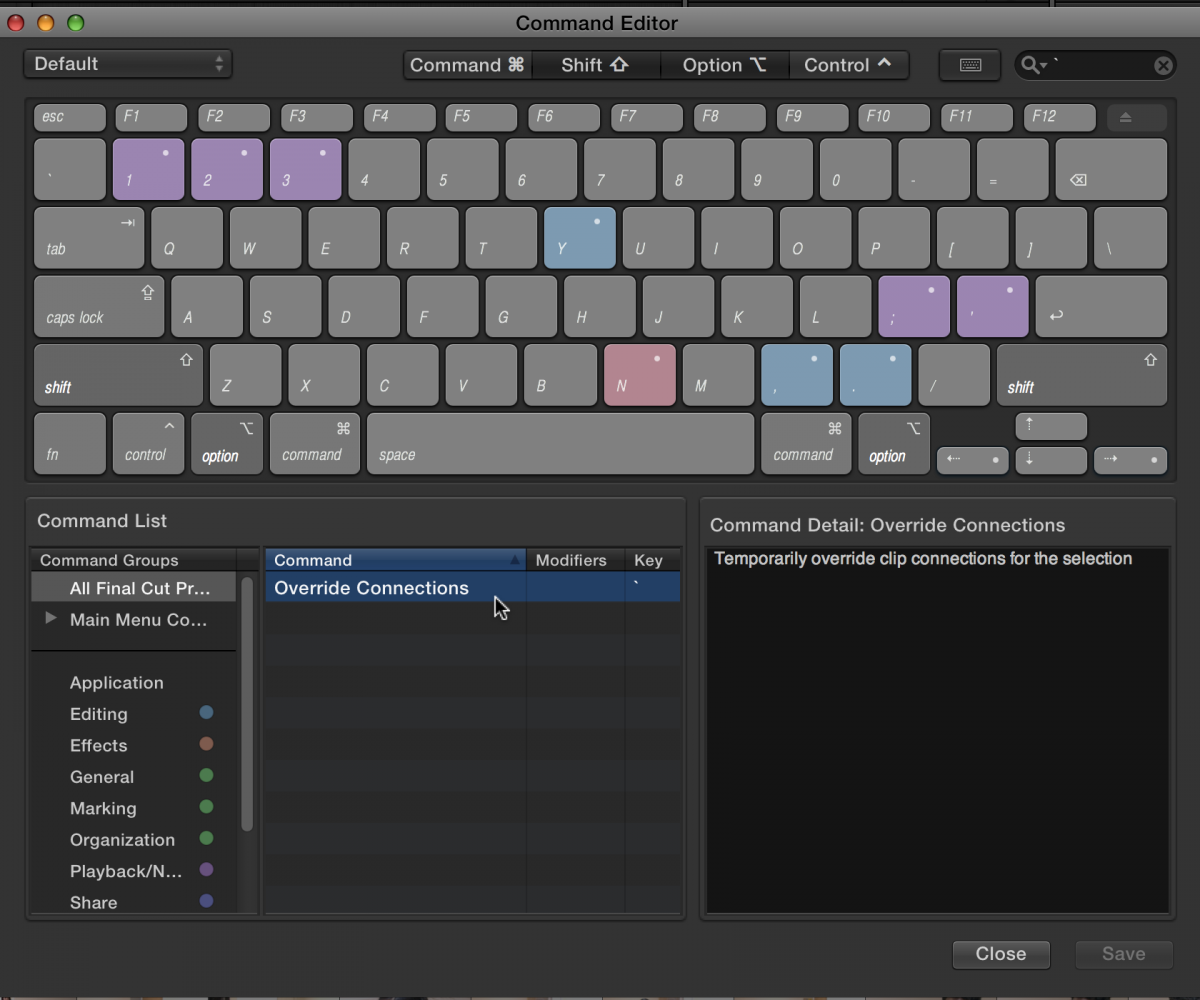
Don't understand. The TILDE key just allows you to move clips without their connected clips following along.
Sean Lander - Editing since 1982 - AVID 1991 - FCP 1999 - FCPX 2011
Please Log in to join the conversation.
- Marc Lucas
-
Topic Author
- Offline
- Platinum Member
-
Less
More
- Posts: 379
- Thank you received: 6
30 May 2013 12:09 #26528
by Marc Lucas
Replied by Marc Lucas on topic Tilder key for moving clips
If I am the default Key command set I can press the 'P' key then the tidle key and the function works fine, however if I use a custom CC set that I have been adding to it doesn't work.
This has also happened to a college aswell.
dl.dropboxusercontent.com/u/2003727/Tilde_Key.zip
This has also happened to a college aswell.
dl.dropboxusercontent.com/u/2003727/Tilde_Key.zip
Please Log in to join the conversation.
- Tom Wolsky
-
- Offline
- Moderator
-
30 May 2013 13:05 #26534
by Tom Wolsky
Replied by Tom Wolsky on topic Tilder key for moving clips
Has the tilde key been added to the custom keyboard layout? When FCP adds a new keyboard shortcut it's added to the default keyboard layout. It cannot be automatically added to every custom keyboard layout, that has to be added by the user.
Please Log in to join the conversation.
- Marc Lucas
-
Topic Author
- Offline
- Platinum Member
-
Less
More
- Posts: 379
- Thank you received: 6
30 May 2013 13:12 #26535
by Marc Lucas
Replied by Marc Lucas on topic Tilder key for moving clips
No Tom
How do you do that then?
Thats why I was asking for the name of its function to map it to its new function.
How do you do that then?
Thats why I was asking for the name of its function to map it to its new function.
Please Log in to join the conversation.
- Tom Wolsky
-
- Offline
- Moderator
-
30 May 2013 13:23 #26536
by Tom Wolsky
Replied by Tom Wolsky on topic Tilder key for moving clips
Override Connections
Please Log in to join the conversation.
- Marc Lucas
-
Topic Author
- Offline
- Platinum Member
-
Less
More
- Posts: 379
- Thank you received: 6
30 May 2013 14:16 #26539
by Marc Lucas
Replied by Marc Lucas on topic Tilder key for moving clips
Ah OK
I was looking for a command that was already there to 'Override' sorted now, thanks!
I was looking for a command that was already there to 'Override' sorted now, thanks!
Please Log in to join the conversation.
