


- Posts: 35
- Thank you received: 0
3 Post Moderation Rule for New Boarders (25 Jan 2021)
New boarders will have their posts moderated - Don't worry if you cannot see your post immediately.
Connected clips and Transitions?
23 May 2013 14:34 - 23 May 2013 14:39 #26199
by Marcusb
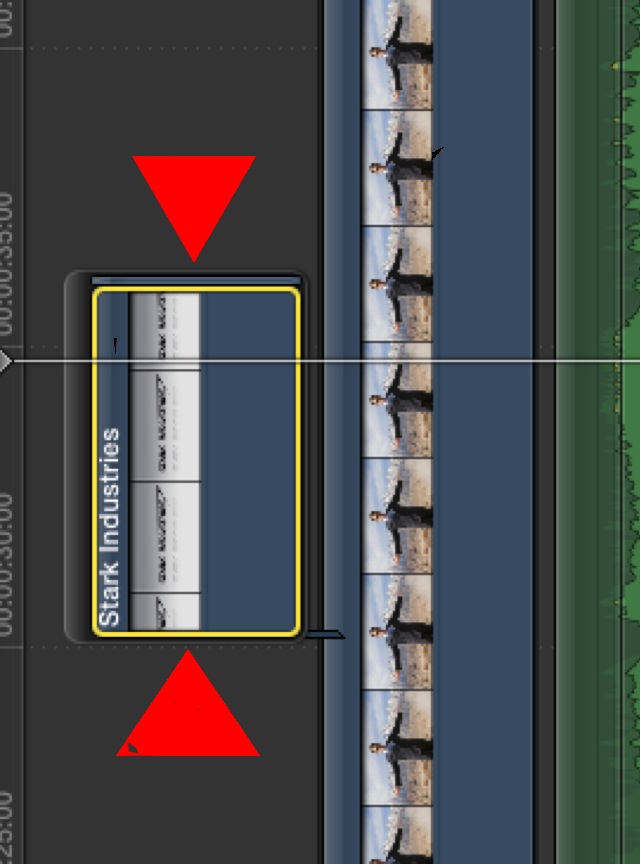
Question: In FCPX, can you use a "Transition" before or after in a connecting clip? If so, how?
I have an image in the Timeline/primary clip, (using the Ken Burns affect) and want to use a "Transition" to a Connected clip ( at the red triangles) above it, and then have another "Transition" back to my Timeline/primary clip ...
Is this possible? If so, please tell me how?
Thank you so much!
Connected clips and Transitions? was created by Marcusb
Question: In FCPX, can you use a "Transition" before or after in a connecting clip? If so, how?
I have an image in the Timeline/primary clip, (using the Ken Burns affect) and want to use a "Transition" to a Connected clip ( at the red triangles) above it, and then have another "Transition" back to my Timeline/primary clip ...
Is this possible? If so, please tell me how?
Thank you so much!
Last edit: 23 May 2013 14:39 by Marcusb.
Please Log in to join the conversation.

23 May 2013 14:41 - 23 May 2013 14:44 #26200
by BenB
Replied by BenB on topic Connected clips and Transitions?
Yes, very possible. A connected clip must be inside of a Secondary Storyline to have transitions (which yours already is). When you attempt to add a transition to a connected clip, FCP automatically puts it into a Secondary Storyline for you.
Select the clip, Command-T. This puts the default transition (whatever you have that set to) on the head and tail of the clip.
Or just drag (or double-click) a transition onto a whole connected clip.
To only do the head or tail of a connected clip, select either the In or just the Out point, double-click the Transition in the Browser.
You can also just drag a transition onto just the head or tail of a connected clip, too.
In your screen shot, I can also see a frame or two of some other clip after the main clip in that Secondary Storyline. Be sure to zoom in and clean that up before you try to add transitions.
Select the clip, Command-T. This puts the default transition (whatever you have that set to) on the head and tail of the clip.
Or just drag (or double-click) a transition onto a whole connected clip.
To only do the head or tail of a connected clip, select either the In or just the Out point, double-click the Transition in the Browser.
You can also just drag a transition onto just the head or tail of a connected clip, too.
In your screen shot, I can also see a frame or two of some other clip after the main clip in that Secondary Storyline. Be sure to zoom in and clean that up before you try to add transitions.
Last edit: 23 May 2013 14:44 by BenB.
Please Log in to join the conversation.
- Tom Wolsky
-

- Offline
- Moderator
-

23 May 2013 14:42 #26201
by Tom Wolsky
Replied by Tom Wolsky on topic Connected clips and Transitions?
Select the edit point at the begging or end of the connected clip and apply the transition.
Please Log in to join the conversation.
23 May 2013 14:53 #26202
by Marcusb
Replied by Marcusb on topic Connected clips and Transitions?
Hey BenB and Tom,
Thank you guys so much! Wow, it worked!
BenB, I really appreciate the time you took to explain this. I also cleaned up the end as you mentioned, and it looks and works perfectly!
Thank you guys so much! Wow, it worked!
BenB, I really appreciate the time you took to explain this. I also cleaned up the end as you mentioned, and it looks and works perfectly!
Please Log in to join the conversation.
