


- Posts: 5
- Thank you received: 0
3 Post Moderation Rule for New Boarders (25 Jan 2021)
New boarders will have their posts moderated - Don't worry if you cannot see your post immediately.
Rendering issue with titles/anything over main footage in FCP 10.0.8
Less
More
22 May 2013 06:34 #26138
by eggyisme
Hey FCP community,
I am having trouble with exporting my footage. The issue that I am running into is that I cannot export the video with the section below:
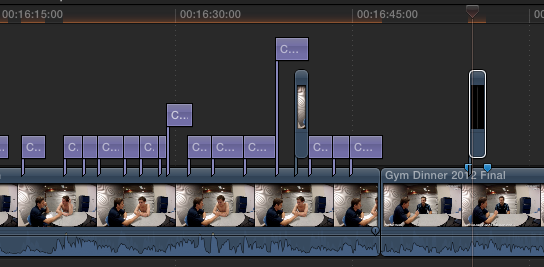
Note that the rendering is not over the footage, but over the titles/image
I have turned off background rendering, deleted my render files, copied it into a new project, verified/repaired my disk permissions, relinked the footage into the project. I was able to export the footage (20 mins) without this section in it.
Any suggestions?
Specs:
MacBook Pro
Mac OS X 10.7.5
2 GHz Intel Core i7
8GB DDR3
Over 100GB free space
Final Cut Pro
10.0.8
I am having trouble with exporting my footage. The issue that I am running into is that I cannot export the video with the section below:
Note that the rendering is not over the footage, but over the titles/image
I have turned off background rendering, deleted my render files, copied it into a new project, verified/repaired my disk permissions, relinked the footage into the project. I was able to export the footage (20 mins) without this section in it.
Any suggestions?
Specs:
MacBook Pro
Mac OS X 10.7.5
2 GHz Intel Core i7
8GB DDR3
Over 100GB free space
Final Cut Pro
10.0.8
Please Log in to join the conversation.
- TrixTrax9000
-

- Offline
- Platinum Member
-

Less
More
- Posts: 1213
- Thank you received: 142
22 May 2013 08:11 #26142
by TrixTrax9000
Replied by TrixTrax9000 on topic Rendering issue with titles/anything over main footage in FCP 10.0.8
If the problem is with rendering the titles, what are they? Part of the packaged titles that came with FCPX 10.0.8 or some aftermarket titles? Just curious...
Please Log in to join the conversation.

22 May 2013 13:56 #26151
by anickt
Replied by anickt on topic Rendering issue with titles/anything over main footage in FCP 10.0.8
One possibility - try verifying your fonts in Font Book. FCP X doesn't like funky fonts....
Please Log in to join the conversation.
Less
More
- Posts: 5
- Thank you received: 0
23 May 2013 05:43 - 23 May 2013 05:44 #26189
by eggyisme
Definitely the packaged titles - using the Custom Title. I will try using another one tonight and report back.
The black square where the playhead is, is a black 10x10 image that I stretched over the top of the video.
Using Candara with normal formatting and Helvetica with oblique formatting, with the Normal attributes. Both validate fine in Font Book.
Replied by eggyisme on topic Rendering issue with titles/anything over main footage in FCP 10.0.8
TrixTrax9000 wrote: If the problem is with rendering the titles, what are they? Part of the packaged titles that came with FCPX 10.0.8 or some aftermarket titles? Just curious...
Definitely the packaged titles - using the Custom Title. I will try using another one tonight and report back.
The black square where the playhead is, is a black 10x10 image that I stretched over the top of the video.
anickt wrote: One possibility - try verifying your fonts in Font Book. FCP X doesn't like funky fonts....
Using Candara with normal formatting and Helvetica with oblique formatting, with the Normal attributes. Both validate fine in Font Book.
Last edit: 23 May 2013 05:44 by eggyisme. Reason: spacing
Please Log in to join the conversation.
23 May 2013 12:23 #26195
by tpayton
Replied by tpayton on topic Rendering issue with titles/anything over main footage in FCP 10.0.8
As you can gather by our responses, this is not normal, or reproducible behavior so there must be something corrupt in that section. I would paste that section in to a new project and begin eliminating elements one by one and exporting until you find the culprit.
Also it is possible with any file that it may look just fine or even be verified as okay and yet still be corrupt.
I'm confident you'll find it pretty quick.
Also it is possible with any file that it may look just fine or even be verified as okay and yet still be corrupt.
I'm confident you'll find it pretty quick.
Please Log in to join the conversation.

23 May 2013 12:28 #26196
by BenB
Replied by BenB on topic Rendering issue with titles/anything over main footage in FCP 10.0.8
When you say you can't export, exactly what happens when you try to?
Please Log in to join the conversation.

27 May 2013 04:12 #26412
by swester
Replied by swester on topic Rendering issue with titles/anything over main footage in FCP 10.0.8
This sounds similar to a problem I've been having with a project - it seems like as soon as I put anything beyond a basic title in, FCP X goes to hell. Random freezing, doesn't want to export. I lost this project almost entirely due to the crashing upon launch, but thankfully found a backup version from before I had put any titles in.
I find it baffling and endlessly that FCP X cannot seem to play well with fonts...it's a core component. I have no font book validation issues and have trashed preferences many times.
I'm banging my head on the wall with this, and thankfully this isn't for a professional project.
I find it baffling and endlessly that FCP X cannot seem to play well with fonts...it's a core component. I have no font book validation issues and have trashed preferences many times.
I'm banging my head on the wall with this, and thankfully this isn't for a professional project.
Please Log in to join the conversation.
28 May 2013 23:27 #26454
by tpayton
Replied by tpayton on topic Rendering issue with titles/anything over main footage in FCP 10.0.8
I deal with hundreds of fonts all our shop. Actually about 2200 in our library. We use Font Agent Pro for management. Corrupted fonts or font cache's will freak out ANY app. Typically it is the Font Cache and not the font itself.
I have yet to have any problem with FCPX and fonts and we use a many different non-standard fonts and completed many projects over the past couple of years.
If you want me to check out your project I'll be glad to take a look at it. Contact me through my company web site onecreative.net. Just send a contact and I'll get the message.
I have yet to have any problem with FCPX and fonts and we use a many different non-standard fonts and completed many projects over the past couple of years.
If you want me to check out your project I'll be glad to take a look at it. Contact me through my company web site onecreative.net. Just send a contact and I'll get the message.
Please Log in to join the conversation.
Less
More
- Posts: 5
- Thank you received: 0
24 Jun 2013 00:38 #27636
by eggyisme
Replied by eggyisme on topic Rendering issue with titles/anything over main footage in FCP 10.0.8
Finally figured it out (joy!).
So I was using the Custom Title in my project for all of these, and applying styles over the top of them. As soon as I changed them to Basic Title the issue went away.
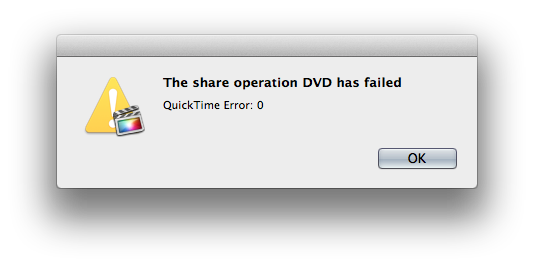
I received this error when exporting it to a DVD:
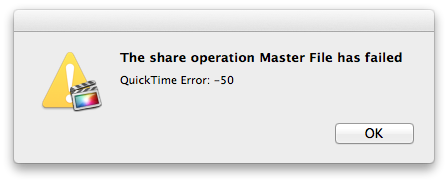
... and this error when exporting to a Master File:
Yeah, I just figured it out. I changed the title from 'Custom Title' to 'Basic Title'
Thanks for the offer, figured it out though
Thanks for the help all. Now I can finish the project off
So I was using the Custom Title in my project for all of these, and applying styles over the top of them. As soon as I changed them to Basic Title the issue went away.
BenB wrote: When you say you can't export, exactly what happens when you try to?
I received this error when exporting it to a DVD:
... and this error when exporting to a Master File:
swester wrote: This sounds similar to a problem I've been having with a project - it seems like as soon as I put anything beyond a basic title in, FCP X goes to hell. Random freezing, doesn't want to export.
Yeah, I just figured it out. I changed the title from 'Custom Title' to 'Basic Title'
tpayton wrote: If you want me to check out your project I'll be glad to take a look at it. Contact me through my company web site onecreative.net. Just send a contact and I'll get the message.
Thanks for the offer, figured it out though
Thanks for the help all. Now I can finish the project off
Please Log in to join the conversation.
24 Jun 2013 00:57 #27637
by BenB
Replied by BenB on topic Rendering issue with titles/anything over main footage in FCP 10.0.8
Try duplicating the project, then doing a replace edit of the Basic titles to Custom titles. Just curious to see what that does.
Please report this to the FCP feedback page, also!
Please report this to the FCP feedback page, also!
Please Log in to join the conversation.
