


- Posts: 66
- Thank you received: 2
3 Post Moderation Rule for New Boarders (25 Jan 2021)
New boarders will have their posts moderated - Don't worry if you cannot see your post immediately.
Just a Lovely Apple Error MEssage
22 May 2013 06:07 #26136
by pwillis
Just a Lovely Apple Error MEssage was created by pwillis
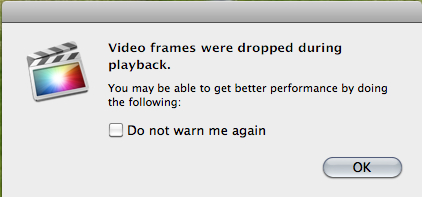
The beach ball of death . . . spinning, spinning, spinning (get's a coffee, comes back) still spinning and then finally . . . this?
Any idea? Apple doesn't seem to know.
Any idea? Apple doesn't seem to know.
Please Log in to join the conversation.

22 May 2013 06:31 #26137
by wdevn
LLAP,
James
Taipei, Taiwan
Replied by wdevn on topic Just a Lovely Apple Error MEssage
I've gotten this error message a few times before. It doesn't give any clue of what the error may be.
I guess we should just make a guess?
I guess we should just make a guess?
LLAP,
James
Taipei, Taiwan
Please Log in to join the conversation.
22 May 2013 06:41 #26139
by pwillis
Replied by pwillis on topic Just a Lovely Apple Error MEssage
LOL! That's where I'm at . . . Guessing!
Please Log in to join the conversation.
- TrixTrax9000
-

- Offline
- Platinum Member
-

Less
More
- Posts: 1213
- Thank you received: 142
22 May 2013 08:09 #26141
by TrixTrax9000
Replied by TrixTrax9000 on topic Just a Lovely Apple Error MEssage
I think it's when your compound clips, effects & other tweaks are too much for your cpu, ram etc, to keep up with during normal playback. But once you export the project all the frames will be there.
Perhaps it's Apple's way of telling you to buy a newer machine... ?
Perhaps it's Apple's way of telling you to buy a newer machine... ?
Please Log in to join the conversation.
22 May 2013 12:32 #26146
by pwillis
Replied by pwillis on topic Just a Lovely Apple Error MEssage
Hey Trix,
Actually, I'd just imported a small amount of new footage. No transitions or effects, just a straight import. I'm just in the process of freeing up some room on my internal drive. I had 14 gig remaining at the time of the import. I'll see what happens. If there's any change I'll post it.
Actually, I'd just imported a small amount of new footage. No transitions or effects, just a straight import. I'm just in the process of freeing up some room on my internal drive. I had 14 gig remaining at the time of the import. I'll see what happens. If there's any change I'll post it.
Please Log in to join the conversation.
22 May 2013 12:42 #26147
by pwillis
Replied by pwillis on topic Just a Lovely Apple Error MEssage
Well, that didn't seem to help. The footage I imported was from my iPhone. Should this make any difference? Is there a conversion process that this could be being slowed down by? There is rendering going on in the background but seriously, it's been doing this for 3 days now and it keeps saying it's at 3%.
Please Log in to join the conversation.
- Tom Wolsky
-

- Offline
- Moderator
-

22 May 2013 12:45 - 22 May 2013 12:46 #26149
by Tom Wolsky
Replied by Tom Wolsky on topic Just a Lovely Apple Error MEssage
"Should this make any difference?"
Absolutely. iPhone video is not in a production format, surprise, surprise. It absolutely needs to be optimized. What drive is holding this media? How's it connected? How much free space on it? How big and how much space on the system drive?
Absolutely. iPhone video is not in a production format, surprise, surprise. It absolutely needs to be optimized. What drive is holding this media? How's it connected? How much free space on it? How big and how much space on the system drive?
Last edit: 22 May 2013 12:46 by Tom Wolsky.
Please Log in to join the conversation.
22 May 2013 13:40 #26150
by pwillis
Replied by pwillis on topic Just a Lovely Apple Error MEssage
Why am I not surprised? For this project it's okay I guess. Just importing some home movie stuff . For other, more important work related things I wouldn't be importing from an iPhone unless there was incredible footage taken by sheer accident LOL!
The drive is 2 TB internal but there's only 50 gig remaining. Using an iMac i7 processor with 8 gigs of ram. In the past, HD footage has been imported with no issue.
The drive is 2 TB internal but there's only 50 gig remaining. Using an iMac i7 processor with 8 gigs of ram. In the past, HD footage has been imported with no issue.
Please Log in to join the conversation.

22 May 2013 15:12 #26157
by BenB
Replied by BenB on topic Just a Lovely Apple Error MEssage
You need to fee up space on that drive. 10-15% of total capacity as free space is pretty much mandatory for your system to operate properly. Below that, I've seen the strangest symptoms. 2000 x .15 = 300, so you need to clear that drive out so you have about 300 MB free space. You'll see things improve then.
Please Log in to join the conversation.
- TrixTrax9000
-
- Offline
- Platinum Member
-
Less
More
- Posts: 1213
- Thank you received: 142
22 May 2013 19:52 #26162
by TrixTrax9000
Replied by TrixTrax9000 on topic Just a Lovely Apple Error MEssage
Also, to really get the screaming fast performance, don't forget that 2 drives changes everything. Your system drive with your OS & FCPX, then your external drive (FireWire or ThunderBolt) with all your media & project files, that's the drive FCPX reads & writes to.
Only then can you really enjoy FCPX for all it has to offer...

Only then can you really enjoy FCPX for all it has to offer...
Please Log in to join the conversation.
27 May 2013 04:39 #26413
by pwillis
Replied by pwillis on topic Just a Lovely Apple Error MEssage
Sorry for the delay getting back here. It's been nuts!
Based on your responses, I've obviously got some work to do rearranging and freeing up some space. In actuality, My 2TB external drives are USB 3.0 only. I have some older Firewire drives but they're only 400's and I find the conversion rate out of my iMac (from 800 to 400) messes things up.
Something else I've just noticed is that my Motion/FCPX Plugins seem to be getting installed on both the internal and the external drives but I can't quite figure out the reason why or why one get's put on the external whereas another gets dropped onto the internal. FCP likes to make "Event" and "Project" folders on all my drives too. Is this similar to the Digidesign Database idea where ProTools puts those folders on all available drives?
Based on your responses, I've obviously got some work to do rearranging and freeing up some space. In actuality, My 2TB external drives are USB 3.0 only. I have some older Firewire drives but they're only 400's and I find the conversion rate out of my iMac (from 800 to 400) messes things up.
Something else I've just noticed is that my Motion/FCPX Plugins seem to be getting installed on both the internal and the external drives but I can't quite figure out the reason why or why one get's put on the external whereas another gets dropped onto the internal. FCP likes to make "Event" and "Project" folders on all my drives too. Is this similar to the Digidesign Database idea where ProTools puts those folders on all available drives?
Please Log in to join the conversation.
