


- Posts: 25
- Thank you received: 0
3 Post Moderation Rule for New Boarders (25 Jan 2021)
New boarders will have their posts moderated - Don't worry if you cannot see your post immediately.
trying to put FCPX footage into Logic Pro 9.......
21 May 2013 04:36 #26069
by scottk23
trying to put FCPX footage into Logic Pro 9....... was created by scottk23
Im having a rough time trying to figure this out. i came across something called XML import/export. It says that with XML you can import/export into third party accessories.
the thing is i have been able to get one short film into logic pro 9 without a problem. it was saved as .mov and i have no idea how to do that with my other footage.
help?
the thing is i have been able to get one short film into logic pro 9 without a problem. it was saved as .mov and i have no idea how to do that with my other footage.
help?
Please Log in to join the conversation.

21 May 2013 06:06 #26071
by BenB
Replied by BenB on topic trying to put FCPX footage into Logic Pro 9.......
Can't XML from FCPX to Logic Pro. You can export a QT video file and use that as the video track in Logic Pro. You can export audio Roles as individual Stems and import those into Logic Pro as normal AIFF files. There is no really smooth workflow between the two, though.
Please Log in to join the conversation.
- Mark Dobson
-

- Offline
- Junior Member
-

Less
More
- Posts: 22
- Thank you received: 2
21 May 2013 09:16 #26073
by Mark Dobson
Replied by Mark Dobson on topic trying to put FCPX footage into Logic Pro 9.......
So what are the chances of the next major FCPX upgrade providing a direct round tripping link with an updated Logic Pro?
I'd find that most useful.
I'd find that most useful.
Please Log in to join the conversation.
21 May 2013 12:44 - 21 May 2013 12:58 #26085
by BenB
Replied by BenB on topic trying to put FCPX footage into Logic Pro 9.......
A few months back Apple had a job posting on their site for a "senior audio software programmer" (or was it "...engineer"?) to "maintain existing infrastructure" and develop audio processing for "applications such as Final Cut Pro X". Yes, those are direct quotes. The posting came down within about 3 or 4 days as I remember.
I also told at NAB Show 2013 that Apple is in fact working on an audio solution for FCP X users, but if that is inside FCP X or an updated Logic Pro or a whole new app, this rep didn't know for sure. I would "speculate" that we will hear something towards the end of this year, realistically.
As someone who is a composer and sound engineer, who fell in to video editing from doing music scores for film and recording/mixing audio for video, the sooner the better for me.
I also told at NAB Show 2013 that Apple is in fact working on an audio solution for FCP X users, but if that is inside FCP X or an updated Logic Pro or a whole new app, this rep didn't know for sure. I would "speculate" that we will hear something towards the end of this year, realistically.
As someone who is a composer and sound engineer, who fell in to video editing from doing music scores for film and recording/mixing audio for video, the sooner the better for me.
Last edit: 21 May 2013 12:58 by BenB.
Please Log in to join the conversation.
21 May 2013 13:55 #26091
by scottk23
Replied by scottk23 on topic trying to put FCPX footage into Logic Pro 9.......
wouldnt it make sense that they are compatible together because theyre both apple products?? thats odd.
but i was able to get some footage into Logic Pro without a problem, the thing is i can't figure out how i did it. The file is saved as .mov im assuming thats quicktime.
any ideas?
but i was able to get some footage into Logic Pro without a problem, the thing is i can't figure out how i did it. The file is saved as .mov im assuming thats quicktime.
any ideas?
Please Log in to join the conversation.
21 May 2013 14:31 #26093
by Krzysztof
Replied by Krzysztof on topic trying to put FCPX footage into Logic Pro 9.......
Hello
This is the way i do it..
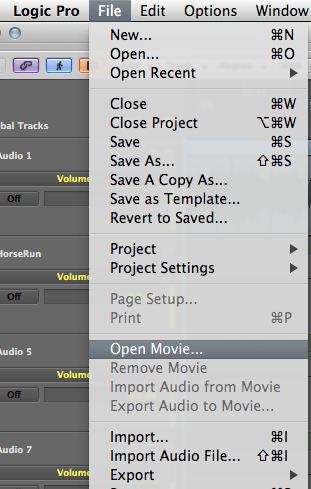
K
This is the way i do it..
K
Please Log in to join the conversation.
21 May 2013 14:41 #26094
by BenB
Replied by BenB on topic trying to put FCPX footage into Logic Pro 9.......
Apple has to make them talk to each other, and Logic hasn't been updated since before FCP X was released.
In Logic Pro, go to File > Open Movie.
This will open the selected movie into a floating window. Close that window if you desire.
Open the Global Tracks section (top of the track headers column). You will now have a Video Track. Your video track will be there.
I actually have an article coming out soon about taking media from FCP X into Logic and back.
In Logic Pro, go to File > Open Movie.
This will open the selected movie into a floating window. Close that window if you desire.
Open the Global Tracks section (top of the track headers column). You will now have a Video Track. Your video track will be there.
I actually have an article coming out soon about taking media from FCP X into Logic and back.
Please Log in to join the conversation.
21 May 2013 16:10 #26099
by scottk23
Replied by scottk23 on topic trying to put FCPX footage into Logic Pro 9.......
yes, ive gotten that far already. the window pops up and i go to the folder with my project in it. but it wont allow me to click on it. i can see the file i want but it isn't clickable.
Please Log in to join the conversation.
21 May 2013 16:41 #26100
by BenB
Replied by BenB on topic trying to put FCPX footage into Logic Pro 9.......
What codec did you export as?
Please Log in to join the conversation.
21 May 2013 16:53 #26101
by scottk23
Replied by scottk23 on topic trying to put FCPX footage into Logic Pro 9.......
h.264
Please Log in to join the conversation.
21 May 2013 17:47 #26103
by BenB
Replied by BenB on topic trying to put FCPX footage into Logic Pro 9.......
Works for me. I assume you're not trying to import a second movie, cause you can only import one. So it won't let you select your .mov file? What is the frame size and frame rate and duration? That's odd.
Please Log in to join the conversation.
21 May 2013 17:50 #26104
by scottk23
Replied by scottk23 on topic trying to put FCPX footage into Logic Pro 9.......
heres the thing, it isn't a .mov file. a previous project was an .mov file, i dont know how i got to that. i have no idea how to save it as a .mov file.
FCPX saves everything for you so im not sure how i would be able to save it differently.
FCPX saves everything for you so im not sure how i would be able to save it differently.
Please Log in to join the conversation.
- kyletron2000
-
- Offline
- Senior Member
-

Less
More
- Posts: 79
- Thank you received: 15
21 May 2013 23:34 #26117
by kyletron2000
Replied by kyletron2000 on topic trying to put FCPX footage into Logic Pro 9.......
Just export as ProRes. As long as you're working from a quick enough drive, you should be fine. ProRes files are always QuickTime.
@ Ben: I actually have used Logic for my voiceover and song edits. It is a little clunky, but audio is really a medium that works better for me using tracks. Especially when scoring or making different, shorter versions of a song. You can't really cut a song precisely on the beats using FCP X. I do really hope they introduce FCPXML import/export to Logic soon. It would really help my workflow.
@ Ben: I actually have used Logic for my voiceover and song edits. It is a little clunky, but audio is really a medium that works better for me using tracks. Especially when scoring or making different, shorter versions of a song. You can't really cut a song precisely on the beats using FCP X. I do really hope they introduce FCPXML import/export to Logic soon. It would really help my workflow.
Please Log in to join the conversation.
21 May 2013 23:53 #26122
by BenB
Replied by BenB on topic trying to put FCPX footage into Logic Pro 9.......
I do all of my VO work in FCP X now. WAY easier and faster than either STP or Logic. But my music work is always done in Logic.
www.fcproxuniversity.com/FCPro_X_Univers...pdated_11_11_12.html
www.macprovideo.com/hub/final-cut/fcp-x-...-editing-short-takes
www.macprovideo.com/hub/final-cut/fcp-x-...diting-long-projects
www.fcproxuniversity.com/FCPro_X_Univers...pdated_11_11_12.html
www.macprovideo.com/hub/final-cut/fcp-x-...-editing-short-takes
www.macprovideo.com/hub/final-cut/fcp-x-...diting-long-projects
Please Log in to join the conversation.
- kyletron2000
-
- Offline
- Senior Member
-
Less
More
- Posts: 79
- Thank you received: 15
22 May 2013 00:32 #26126
by kyletron2000
Replied by kyletron2000 on topic trying to put FCPX footage into Logic Pro 9.......
I have used FCP X for rough VO. It is really convenient and easy. However, one of the main reasons I do my recording in Logic is the strip silence feature. I prefer it to using a noise gate when I'm doing spoken word. When I'm recording in my room, it can get really noisy when someone is watching a movie or listening to music on the surround system downstairs (I try to record when this isn't happening, but sometimes...  ). You can really hear it in the quiet parts. I can hit Ctrl-X for strip silence, set my threshold and tolerance levels appropriately and hit enter. Done. Then I can go in and use automation to get the really obvious level changes smoothed out. Then EQ (if needed) and limiter/compressor. Take recording is easier for me than in FCP X. And then when it comes to dialogue, I use iZotope RX. I can set it up as the external sample editor in Logic and send a region directly to RX, save it, and it's updated in Logic automatically.
FCP X either needs vital features integrated, or we need FCPXML import/export capability in Logic. So far, audio is really the only true weak point I see in FCP X. It satisfies my video editing needs. I just don't use it for the more advanced audio features because they aren't really there yet.
). You can really hear it in the quiet parts. I can hit Ctrl-X for strip silence, set my threshold and tolerance levels appropriately and hit enter. Done. Then I can go in and use automation to get the really obvious level changes smoothed out. Then EQ (if needed) and limiter/compressor. Take recording is easier for me than in FCP X. And then when it comes to dialogue, I use iZotope RX. I can set it up as the external sample editor in Logic and send a region directly to RX, save it, and it's updated in Logic automatically.FCP X either needs vital features integrated, or we need FCPXML import/export capability in Logic. So far, audio is really the only true weak point I see in FCP X. It satisfies my video editing needs. I just don't use it for the more advanced audio features because they aren't really there yet.
Please Log in to join the conversation.
22 May 2013 00:53 #26128
by pwillis
Replied by pwillis on topic trying to put FCPX footage into Logic Pro 9.......
I find it incredibly frustrating that Apple can make two great products yet they're not complimentary to one another. For me personally, that was one (of many) reasons why I made the jump to ProTools. Using PT I can open pretty much any file I want to and the issue of (Kyle's) strip silence is as simple as selecting the waveform and muting it in PT. Not helpful to you I know. What Kyle said about tempo slicing etc. with FCPX is definitely an issue for me. It's not precise enough and I still find the "zooming" features of FCPX a little archaic when trying to zoom in for a precision edit.
Anyway, I sense I'm missing something here (because BenB hasn't mentioned it and if Ben doesn't mention it well then . . . it's probably for a good reason :lol: ) but, can you not just re-export your clip in FCPX using the "export" function and save it as a .mov (Quicktime) file and then import it into Logic?
Anyway, I sense I'm missing something here (because BenB hasn't mentioned it and if Ben doesn't mention it well then . . . it's probably for a good reason :lol: ) but, can you not just re-export your clip in FCPX using the "export" function and save it as a .mov (Quicktime) file and then import it into Logic?
Please Log in to join the conversation.
22 May 2013 02:19 #26133
by BenB
Replied by BenB on topic trying to put FCPX footage into Logic Pro 9.......
Yes you can.
As for noise, I'm in a professional studio environment, so TV's playing in the next room are not an issue. But, I can use iZotope RX in FCP X, also.
As for noise, I'm in a professional studio environment, so TV's playing in the next room are not an issue. But, I can use iZotope RX in FCP X, also.
Please Log in to join the conversation.
22 May 2013 02:57 #26135
by pwillis
Replied by pwillis on topic trying to put FCPX footage into Logic Pro 9.......
Even within a home studio environment, a little isolation goes a long way. You may be surprised what a baffle here, a chunk of foam there and the odd blanket can do. If you can't manage to get good isolation I find the Waves NS-1 is great for getting rid of unwanted BG noise within reason. It's not a perfect fix but . . . all of these plugins including the Isotope and Oxford N/R's have their drawbacks. There's no magical way to do it (yet). 
Please Log in to join the conversation.
22 May 2013 15:07 #26155
by BenB
Replied by BenB on topic trying to put FCPX footage into Logic Pro 9.......
I use a
Reflexion Filter
for doing work on-location, and I swear by it. I've tried out the Reflexion knockoffs, but nothing works at well.
Please Log in to join the conversation.
- kyletron2000
-
- Offline
- Senior Member
-
Less
More
- Posts: 79
- Thank you received: 15
22 May 2013 20:12 #26164
by kyletron2000
Replied by kyletron2000 on topic trying to put FCPX footage into Logic Pro 9.......
Ah, I actually only use RX for live audio and dialogue, not voiceover work. When you have any unexpected sounds happening right in the middle of a good take, I don't like to let that ruin the whole thing. So RX comes in handy most of the time. There are some situations where it's almost unsalvageable and I'll want to record a new take (or not use it  ).
).
Strip silence is a lifesaver, though. The noises I'm talking about aren't loud enough to hear when I'm not talking, but they are there when it's supposed to be silent. So strip silence takes care of that nicely for me.
Don't get me wrong, I'm not saying you can't use RX in FCP X, but it's not as seamless as in Logic in my experience. You still either need to export that section to use spectral repair and then re-import. Unless I'm missing something. I know you can use some of the RX components in FCP X as an effect, but not the "offline" components like spectral repair and such. You can't even use RX that way in Logic. But Logic and RX do work round-trip.
What's your workflow like with FCP X / RX, Ben?
).Strip silence is a lifesaver, though. The noises I'm talking about aren't loud enough to hear when I'm not talking, but they are there when it's supposed to be silent. So strip silence takes care of that nicely for me.
Don't get me wrong, I'm not saying you can't use RX in FCP X, but it's not as seamless as in Logic in my experience. You still either need to export that section to use spectral repair and then re-import. Unless I'm missing something. I know you can use some of the RX components in FCP X as an effect, but not the "offline" components like spectral repair and such. You can't even use RX that way in Logic. But Logic and RX do work round-trip.
What's your workflow like with FCP X / RX, Ben?
Please Log in to join the conversation.
