


- Posts: 48
- Thank you received: 1
3 Post Moderation Rule for New Boarders (25 Jan 2021)
New boarders will have their posts moderated - Don't worry if you cannot see your post immediately.
What am I doing wrong?
12 May 2013 02:35 #25703
by jgutta23
What am I doing wrong? was created by jgutta23
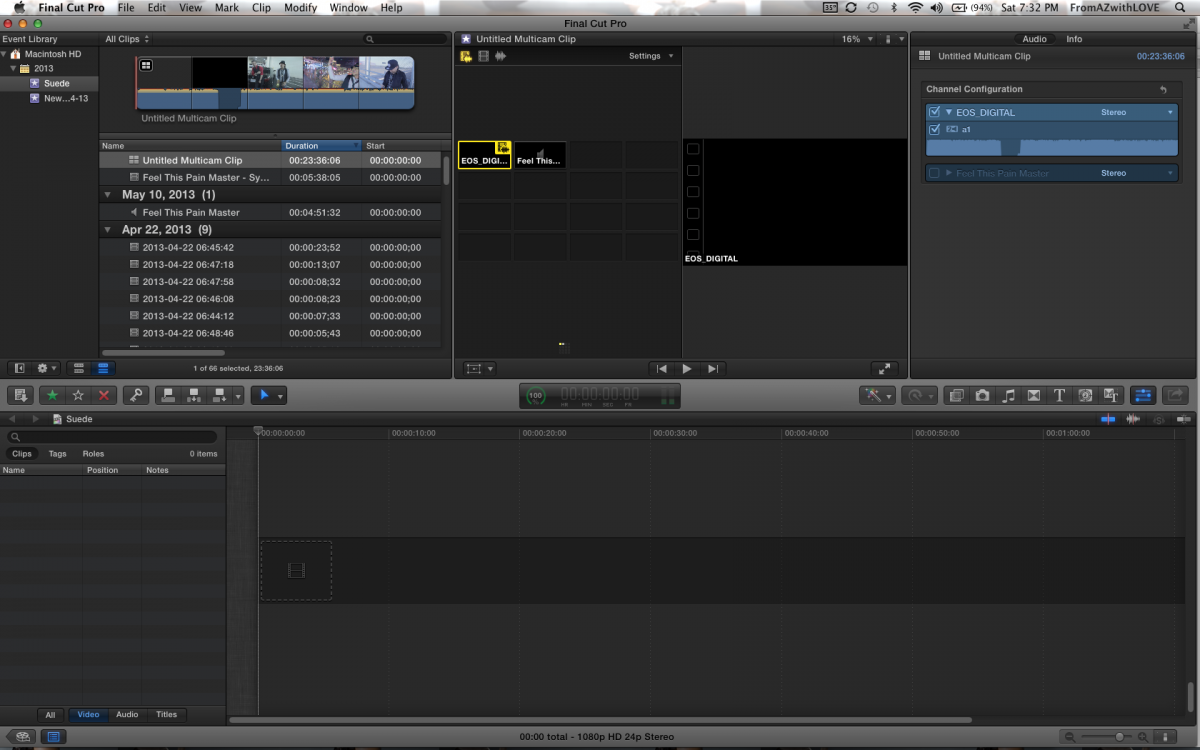
I'm trying to edit a music video using multicam. But the angles aren't separated. I have like 8 different clips I wanna use but it's just one. I'm on 10.0.8.
Please Log in to join the conversation.
- ronny courtens
-

- Offline
- Moderator
-

Less
More
- Posts: 4455
- Thank you received: 962
12 May 2013 08:04 - 12 May 2013 08:48 #25711
by ronny courtens
Replied by ronny courtens on topic What am I doing wrong?
To avoid any problems with angles it is best to assign a unique angle number (or name) to every clip that you want to use as a different angle in your multicam. You do this before you create the multicam clip.
I guess all your different video takes have been recorded with the same camera (EOS)? If this is the case they all have the same camera name and when you use Automatic angle creation when creating your multicam clip FCPX will assume that all these video clips belong to the same angle.
So how do you solve this?
1. Delete the existing multi clip.
2. In the Event Library select the clip that you want to use as your first Angle and go to the Inspector > Info tab. Set your View options to Extended View (bottom left of the Inspector). Now you will see the Camera Angle entry box. In that box enter a name that is meaningful to you ("Angle 1", "Wide Shot" or anything that makes sense).
3. Do the same with the other clips, but enter a different name for each of them in the Camera Angle entry box ("Angle 2", Close Up", "Master Audio" or whatever).
4. Now create a new Multi clip. All clips that have been assigned different Angle names will appear as separate Angles in your multiclip.
Note: there is also a way to do this without assigning Angle names to the clips first. Select the clips, create a New Multiclip and in the multclip window that opens set Angle Assembly to "Clips". Each different clip will be assigned a different Angle, even though they have the same camera name.
Although this seems a faster way, this is only useful if none of your clips are "spanned". E.g. if during one of the takes you stop the camera and start again you will have two separate clips for that take that should be in the same Angle in your mutliclip. But setting Angle Assembly to "Clips" when creating the multiclip would put them in different angles, unnecessarily complicating your multi cam workflow.
That's why the most secure way to assign correct Angles to your multicam clips is to assign them manually in the inspector, before creating the multi clip.
I guess all your different video takes have been recorded with the same camera (EOS)? If this is the case they all have the same camera name and when you use Automatic angle creation when creating your multicam clip FCPX will assume that all these video clips belong to the same angle.
So how do you solve this?
1. Delete the existing multi clip.
2. In the Event Library select the clip that you want to use as your first Angle and go to the Inspector > Info tab. Set your View options to Extended View (bottom left of the Inspector). Now you will see the Camera Angle entry box. In that box enter a name that is meaningful to you ("Angle 1", "Wide Shot" or anything that makes sense).
3. Do the same with the other clips, but enter a different name for each of them in the Camera Angle entry box ("Angle 2", Close Up", "Master Audio" or whatever).
4. Now create a new Multi clip. All clips that have been assigned different Angle names will appear as separate Angles in your multiclip.
Note: there is also a way to do this without assigning Angle names to the clips first. Select the clips, create a New Multiclip and in the multclip window that opens set Angle Assembly to "Clips". Each different clip will be assigned a different Angle, even though they have the same camera name.
Although this seems a faster way, this is only useful if none of your clips are "spanned". E.g. if during one of the takes you stop the camera and start again you will have two separate clips for that take that should be in the same Angle in your mutliclip. But setting Angle Assembly to "Clips" when creating the multiclip would put them in different angles, unnecessarily complicating your multi cam workflow.
That's why the most secure way to assign correct Angles to your multicam clips is to assign them manually in the inspector, before creating the multi clip.
Last edit: 12 May 2013 08:48 by ronny courtens.
Please Log in to join the conversation.
