


- Posts: 56
- Thank you received: 1
3 Post Moderation Rule for New Boarders (25 Jan 2021)
New boarders will have their posts moderated - Don't worry if you cannot see your post immediately.
Big Problem
- JFilmmaker1
-
 Topic Author
- Offline
- Senior Member
-

Less
More
06 May 2013 17:25 #25419
by JFilmmaker1
Big Problem was created by JFilmmaker1
Hi,
I have a really big problem. To start out I opened FCPX everything's good. It loads my events and projects. I go and I click one of the hard drives in the event viewer and BAM! My drive that is connected to eSATA is gone and only my internal drives show up. But my project (that was located on my connected eSATA drive that disappeared) is still loaded in the timeline with the clips intact. I go to play the clips and it doesn't play. I restart the computer and it does the same exact thing as stated above. So then I trash my prefs and open it. It still does it again! And then it says Final Cut Pro Cannot Save Your Project "Continue" or "Cancel" Not sure what's going on here. Any help would be greatly appreciated because it's a very important project.
Thanks,
I have a really big problem. To start out I opened FCPX everything's good. It loads my events and projects. I go and I click one of the hard drives in the event viewer and BAM! My drive that is connected to eSATA is gone and only my internal drives show up. But my project (that was located on my connected eSATA drive that disappeared) is still loaded in the timeline with the clips intact. I go to play the clips and it doesn't play. I restart the computer and it does the same exact thing as stated above. So then I trash my prefs and open it. It still does it again! And then it says Final Cut Pro Cannot Save Your Project "Continue" or "Cancel" Not sure what's going on here. Any help would be greatly appreciated because it's a very important project.
Thanks,
Please Log in to join the conversation.
- Tom Wolsky
-

- Offline
- Moderator
-

06 May 2013 18:19 #25420
by Tom Wolsky
Replied by Tom Wolsky on topic Big Problem
"My drive that is connected to eSATA"
What drive? How is it formatted? Post a screen shot of the root level.
What drive? How is it formatted? Post a screen shot of the root level.
Please Log in to join the conversation.
- JFilmmaker1
-
Topic Author
- Offline
- Senior Member
-
Less
More
- Posts: 56
- Thank you received: 1
07 May 2013 17:43 - 07 May 2013 17:52 #25463
by JFilmmaker1
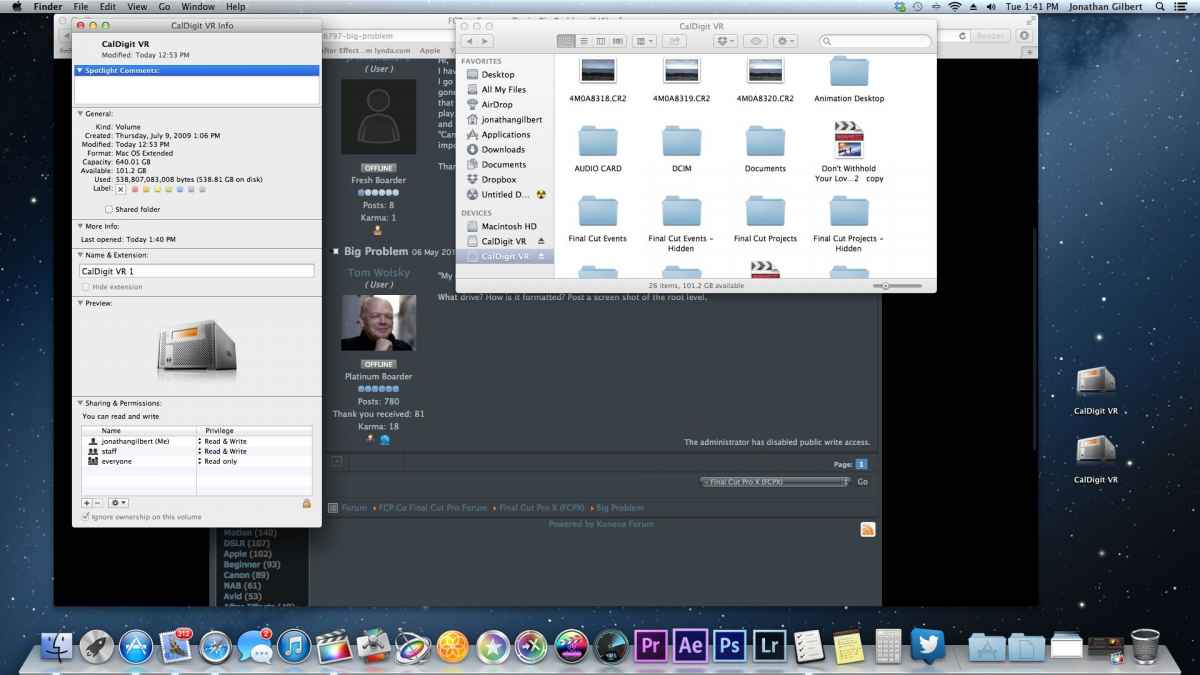
Replied by JFilmmaker1 on topic Big Problem
Last edit: 07 May 2013 17:52 by JFilmmaker1.
Please Log in to join the conversation.
- Tom Wolsky
-
- Offline
- Moderator
-
07 May 2013 20:25 #25467
by Tom Wolsky
Replied by Tom Wolsky on topic Big Problem
Start by renaming the folder called DCIM. It makes the application think the drive is a camera drive. There may be others, but this is the most likely cause.
Please Log in to join the conversation.
