


- Posts: 39
- Thank you received: 3
3 Post Moderation Rule for New Boarders (25 Jan 2021)
New boarders will have their posts moderated - Don't worry if you cannot see your post immediately.
Missing Camera after closing and reopening project.
29 Apr 2013 11:05 #25134
by vordio
Missing Camera after closing and reopening project. was created by vordio
I imported clips from a shoot (Using import from an XDCAM archive stored on another hard drive).
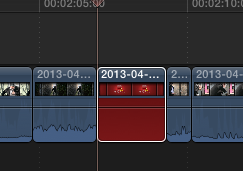
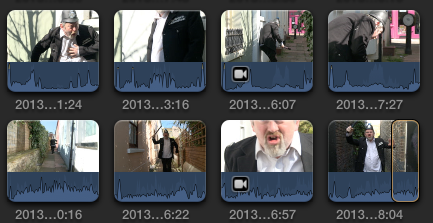
All 121 clips seemed to import fine but after closing and reopening FCP X, 3 clips claim "Missing Camera" and have camera icon on.
These 'missing' clips do actually appear to be in the event folder and play OK straight from preview in the folder, but FCP X claims they are not there.
If I open import again and navigate to the XDCAM archive, the missing clips reappear immediately WITHOUT importing anything. This appears to fix the problem, but camera icon still there and if I close & open FCP X again, the same issue happens again.
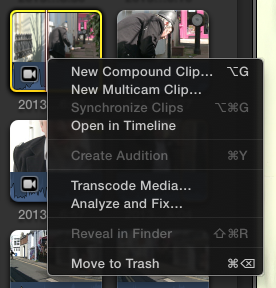
There is no option on menu to either reveal in finder or relink media for these missing clips.
Also, if I export the XML, the offending 3 clips have assets with NO src attribute.
<asset id="r44" name="2013-04-27 10:06:07" uid="D145D334CBFC40037A40CE67B9159E25" projectRef="r4" start="819198000/25000s" duration="853000/25000s" hasVideo="1" hasAudio="1" audioSources="1" audioChannels="2" audioRate="48000">
What is going on? How can I fix this? Is this a known bug? Is there a workaround?
All 121 clips seemed to import fine but after closing and reopening FCP X, 3 clips claim "Missing Camera" and have camera icon on.
These 'missing' clips do actually appear to be in the event folder and play OK straight from preview in the folder, but FCP X claims they are not there.
If I open import again and navigate to the XDCAM archive, the missing clips reappear immediately WITHOUT importing anything. This appears to fix the problem, but camera icon still there and if I close & open FCP X again, the same issue happens again.
There is no option on menu to either reveal in finder or relink media for these missing clips.
Also, if I export the XML, the offending 3 clips have assets with NO src attribute.
<asset id="r44" name="2013-04-27 10:06:07" uid="D145D334CBFC40037A40CE67B9159E25" projectRef="r4" start="819198000/25000s" duration="853000/25000s" hasVideo="1" hasAudio="1" audioSources="1" audioChannels="2" audioRate="48000">
What is going on? How can I fix this? Is this a known bug? Is there a workaround?

Please Log in to join the conversation.
- Tom Wolsky
-

- Offline
- Moderator
-

29 Apr 2013 11:52 #25137
by Tom Wolsky
Replied by Tom Wolsky on topic Missing Camera after closing and reopening project.
I've seen this happen in other formats as well.
When you open the archive, and then close import, if you use reveal in finder where does the application go to?
You might try removing the files from the original media folder, from the event browser, and from the project, and try reimporting them from the card or archive.
When you open the archive, and then close import, if you use reveal in finder where does the application go to?
You might try removing the files from the original media folder, from the event browser, and from the project, and try reimporting them from the card or archive.
Please Log in to join the conversation.
29 Apr 2013 12:16 #25140
by vordio
Replied by vordio on topic Missing Camera after closing and reopening project.
Weirdly, now after about 3 close and reopens, opening import camera archive is no longer fixing the missing clip. It stays missing now.
However, I did try what you suggested before this stopped working and there was no reveal in finder option. It was greyed out.
The only thing I have done that might have changed anything is to reimport into a completely new event the same footage to see if any more went missing, but they didn't. I haven't used anything from the new event. Not sure why this might affect a different event.
However, I did try what you suggested before this stopped working and there was no reveal in finder option. It was greyed out.
The only thing I have done that might have changed anything is to reimport into a completely new event the same footage to see if any more went missing, but they didn't. I haven't used anything from the new event. Not sure why this might affect a different event.
Please Log in to join the conversation.
- Tom Wolsky
-
- Offline
- Moderator
-
29 Apr 2013 12:31 #25141
by Tom Wolsky
Replied by Tom Wolsky on topic Missing Camera after closing and reopening project.
Did you trash the clips from original media, browser, and project and reimport? I take it you did edit with the clips even though there was a problem with them.
Please Log in to join the conversation.
29 Apr 2013 12:33 #25142
by vordio
Replied by vordio on topic Missing Camera after closing and reopening project.
Also, this made me think about how to relink clips to a different event.
Now that I have created a new event from a new import without missing camera, I would like to relink all the broken events referenced in my rough edit to the clips in the new working event.
I don't want to have to reedit just because of some missing clips.
Is this possible? Then I can just delete the clips in the broken event.
Now that I have created a new event from a new import without missing camera, I would like to relink all the broken events referenced in my rough edit to the clips in the new working event.
I don't want to have to reedit just because of some missing clips.
Is this possible? Then I can just delete the clips in the broken event.
Please Log in to join the conversation.
29 Apr 2013 12:37 #25144
by vordio
I reimported but into a completely new event (without problem). I have decided that actually I want each day's shoot (or source of materials i.e. music/effects) in it's own event. Long term this seems a better strategy as I can span drives for bigger projects involving a lot of shoots/footage/materials.
Replied by vordio on topic Missing Camera after closing and reopening project.
Tom Wolsky wrote: Did you trash the clips from original media, browser, and project and reimport? I take it you did edit with the clips even though there was a problem with them.
I reimported but into a completely new event (without problem). I have decided that actually I want each day's shoot (or source of materials i.e. music/effects) in it's own event. Long term this seems a better strategy as I can span drives for bigger projects involving a lot of shoots/footage/materials.
Please Log in to join the conversation.
- Tom Wolsky
-
- Offline
- Moderator
-
29 Apr 2013 12:55 #25146
by Tom Wolsky
Replied by Tom Wolsky on topic Missing Camera after closing and reopening project.
Organize event files might do what you want,
Please Log in to join the conversation.
29 Apr 2013 13:08 #25147
by vordio
Actually, someone on a different forum just gave me a great tip and the best way to reorganise after changing storage strategy. After looking at this "modify event references" I discovered that if you have multiple events with the same footage, you can reorder the list, dragging the new preferred ones to the top. I can do this for all my projects as I revisit them, applying my new strategy.
Replied by vordio on topic Missing Camera after closing and reopening project.
Tom Wolsky wrote: Organize event files might do what you want,
Actually, someone on a different forum just gave me a great tip and the best way to reorganise after changing storage strategy. After looking at this "modify event references" I discovered that if you have multiple events with the same footage, you can reorder the list, dragging the new preferred ones to the top. I can do this for all my projects as I revisit them, applying my new strategy.
Luis Sequeira1 wrote: Copy your clips to the new event and then from the project library click on your project and in the Inspector click on "Modify Event References". In the window that appears move the new event to the top, so any reference to a clip that exists in more than one event will refer to the copy in the new event.
Please Log in to join the conversation.
29 Apr 2013 13:12 #25148
by vordio
Replied by vordio on topic Missing Camera after closing and reopening project.
Tom,
Thanks for all your help.
In case this info might be useful to you, I also make a tool called Vordio, that extracts and transcodes all the audio from FCP X to build a Reaper Audio project for sound post. I got frustrated by FCP X's lack of audio export options when I had trouble with a big project and other broken tools, so made a new one that did exactly what I wanted!
Take a look here..
vordio.net/guide/
John
Thanks for all your help.
In case this info might be useful to you, I also make a tool called Vordio, that extracts and transcodes all the audio from FCP X to build a Reaper Audio project for sound post. I got frustrated by FCP X's lack of audio export options when I had trouble with a big project and other broken tools, so made a new one that did exactly what I wanted!
Take a look here..
vordio.net/guide/
John
Please Log in to join the conversation.
