


3 Post Moderation Rule for New Boarders (25 Jan 2021)
New boarders will have their posts moderated - Don't worry if you cannot see your post immediately.
Share plist file defaults to open with a Compressor preset


27 Apr 2013 04:21 - 27 Apr 2013 04:24 #25056
by dgwvideo
Creating history....one edit at a time !
Working yesterday when FCPX suddenly crashed and upon restarting, the last 4 hours of my edits were completely gone. Tried the backup project to no avail. Prior to the crash I noticed that the + sign to zoom in the timeline did not work. The - sign to zoom out worked fine. After I re-edited the project, all was well, so I assume some effect or particular animated title may have been the cause. Still don't know why the backup project was also missing the data.
Lesson learned here is that once something begins to not function normally within the program, immediately close the project and exit FCPX before it does it abruptly.
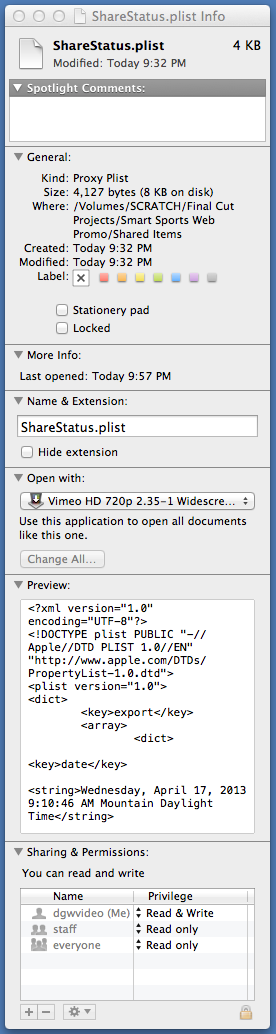
Now for the topic issue (which may be related) - I noticed that the ShareStatus.plist file in my projects Shared Items directory is defaulted to open with a Vimeo HD compressor preset. This preset exists on my system, but how it got associated with the share status preference file is beyond me. The project works fine anyway and the shared items do as well. No icons next to the project in the library.
Here is a screenshot of the get info data. Does anyone know what this preference file should normally open with? FCPX is ghosted out if I try to browse to it.
OS ML 10.8.3 FCPX 10.0.8 64GB 12 CORE MAC PRO
Lesson learned here is that once something begins to not function normally within the program, immediately close the project and exit FCPX before it does it abruptly.
Now for the topic issue (which may be related) - I noticed that the ShareStatus.plist file in my projects Shared Items directory is defaulted to open with a Vimeo HD compressor preset. This preset exists on my system, but how it got associated with the share status preference file is beyond me. The project works fine anyway and the shared items do as well. No icons next to the project in the library.
Here is a screenshot of the get info data. Does anyone know what this preference file should normally open with? FCPX is ghosted out if I try to browse to it.
OS ML 10.8.3 FCPX 10.0.8 64GB 12 CORE MAC PRO
Creating history....one edit at a time !
Last edit: 27 Apr 2013 04:24 by dgwvideo.
Please Log in to join the conversation.


