


- Posts: 164
- Thank you received: 0
3 Post Moderation Rule for New Boarders (25 Jan 2021)
New boarders will have their posts moderated - Don't worry if you cannot see your post immediately.
Multicam Edit
26 Apr 2013 13:33 #25002
by Neil P
Multicam Edit was created by Neil P
Hi team,
I'm doing a multicam edit (two views) and synching the two cameras through Plural eyes but the footage is running very slowly/juddery when viewing and doing edit. Is there anything that I can do to make it run at nornal speed. Combined footage is around 40 mins long in total.
Many thanks in anticipation of speedy responces
Neil
I'm doing a multicam edit (two views) and synching the two cameras through Plural eyes but the footage is running very slowly/juddery when viewing and doing edit. Is there anything that I can do to make it run at nornal speed. Combined footage is around 40 mins long in total.
Many thanks in anticipation of speedy responces
Neil
Please Log in to join the conversation.
- jjsanderson
-

- Offline
- Elite Member
-

26 Apr 2013 14:35 #25014
by jjsanderson
Replied by jjsanderson on topic Multicam Edit
Sounds like system performance is letting you down, which could be many things. If you're on an older Mac or a dual-core model, it may be that you system can't quite handle two streams of whatever codec you're using. Or it could be drive-related, if your disks can't keep up.
Things to try (or at least tell us more about):
- Thunderbolt, SATA, USB3 and Firewire800 are all preferable to USB2 for this sort of thing, in descending order. Multiple streams eat disk bandwidth.
- 'Optimised media' can make life easier on your CPU or GPU if your original material is H.264, AVCHD or similar, but it's also larger and requires more disk bandwidth.
- Proxy media, with playback set to Proxy, can significantly ease both disk and CPU/GPU bandwidth issues. You just have to remember to switch back before exporting.
- You might find it useful to split the media between drives, so not everything is coming from one disk.
On my 2008 8-core Mac Pro / ATI5800 I can playback about four streams of AVCHD/H.264 without too much suffering, via eSATA. A mid-range 2011 iMac started to complain at 3 streams, and needed everything transcoded to ProRes for comfortable performance (working off FW800 drives).
All of this is in the manual, in the section about multicam editing.
Things to try (or at least tell us more about):
- Thunderbolt, SATA, USB3 and Firewire800 are all preferable to USB2 for this sort of thing, in descending order. Multiple streams eat disk bandwidth.
- 'Optimised media' can make life easier on your CPU or GPU if your original material is H.264, AVCHD or similar, but it's also larger and requires more disk bandwidth.
- Proxy media, with playback set to Proxy, can significantly ease both disk and CPU/GPU bandwidth issues. You just have to remember to switch back before exporting.
- You might find it useful to split the media between drives, so not everything is coming from one disk.
On my 2008 8-core Mac Pro / ATI5800 I can playback about four streams of AVCHD/H.264 without too much suffering, via eSATA. A mid-range 2011 iMac started to complain at 3 streams, and needed everything transcoded to ProRes for comfortable performance (working off FW800 drives).
All of this is in the manual, in the section about multicam editing.
Please Log in to join the conversation.
26 Apr 2013 15:59 #25025
by Neil P
Replied by Neil P on topic Multicam Edit
thanks, I'll check these suggestions out
Neil
Neil
Please Log in to join the conversation.
- Sincity202
-
- Offline
- New Member
-

Less
More
- Posts: 2
- Thank you received: 0
26 Apr 2013 17:46 #25032
by Sincity202
Replied by Sincity202 on topic Multicam Edit
hi there guys, i love this site use it for everything.
i am an amateur filmmaker. and i have been doing well so far. but i have a little problem here. i shot a video with two different cameras and i want to match them up so that they look the same, can any one help me with this, is there any plugin, or any thing i can do to rematch the clips for (FCPX)
i am an amateur filmmaker. and i have been doing well so far. but i have a little problem here. i shot a video with two different cameras and i want to match them up so that they look the same, can any one help me with this, is there any plugin, or any thing i can do to rematch the clips for (FCPX)
Please Log in to join the conversation.

26 Apr 2013 20:02 #25038
by BenB
Replied by BenB on topic Multicam Edit
If it was two cameras running at the same time, you can sync them and use the Multicam clip editing solution in FCP X.
If it was one camera, and it shot two different takes, you'll have to manually edit them in together, as human actors don't do the same thing the same way with the same timing twice.
If it was one camera, and it shot two different takes, you'll have to manually edit them in together, as human actors don't do the same thing the same way with the same timing twice.
Please Log in to join the conversation.
- Sincity202
-
- Offline
- New Member
-
Less
More
- Posts: 2
- Thank you received: 0
26 Apr 2013 20:41 #25040
by Sincity202
Replied by Sincity202 on topic Multicam Edit
thanks
does this work for the for color correcting the clips to give them the same look as if they had the same camera setting?
does this work for the for color correcting the clips to give them the same look as if they had the same camera setting?
Please Log in to join the conversation.
27 Apr 2013 06:25 #25063
by Soundwise
There is a "Match Color" feature under the Color settings in the Inspector.
Replied by Soundwise on topic Multicam Edit
Sincity202 wrote: thanks
does this work for the for color correcting the clips to give them the same look as if they had the same camera setting?
There is a "Match Color" feature under the Color settings in the Inspector.
Please Log in to join the conversation.
27 Apr 2013 06:49 #25064
by Neil P
Replied by Neil P on topic Multicam Edit
I'm working off a Macbook pro - Processor 2.8 GHz Intel Core i7 and the footage is coming from a 2tb Drobo harddrive so I presume the footage is split .
I think it's linked by usb 2 so maybe I need to upgrade ?
re - "Proxy media, with playback set to Proxy, can significantly ease both disk and CPU/GPU bandwidth issues. You just have to remember to switch back before exporting."
Sorry this is so basic but how do I alter the proxy media as stated above ?
thanx
Neil
I think it's linked by usb 2 so maybe I need to upgrade ?
re - "Proxy media, with playback set to Proxy, can significantly ease both disk and CPU/GPU bandwidth issues. You just have to remember to switch back before exporting."
Sorry this is so basic but how do I alter the proxy media as stated above ?
thanx
Neil
Please Log in to join the conversation.
- jjsanderson
-
- Offline
- Elite Member
-
27 Apr 2013 21:12 #25077
by jjsanderson
Bingo - that's your problem. Some Drobos can be pretty quick, but a basic one accessed over USB2 is likely to be far too slow to edit on. Certainly too slow for multiple streams. They make sensible backup drives, but they're not media drives. You'll do much better with a FireWire 800 drive, your MacBook's internal drive, or a USB3 drive if your Mac supports that (depends how recent it is).
The Proxy workflow is: right-click clips in the Event browser and pick 'Transcode Media…'. Then in FCPX Preferences→Editing→Playback→Use Proxy Media. There's a good section in the manual about proxy workflows.
However, I think even Proxy will be too much for smooth playback over USB2. It really does stink as an edit drive connection. Sorry!
Replied by jjsanderson on topic Multicam Edit
Neil P wrote: I'm working off a Macbook pro - Processor 2.8 GHz Intel Core i7 and the footage is coming from a 2tb Drobo harddrive so I presume the footage is split .
I think it's linked by usb 2 so maybe I need to upgrade ?
Bingo - that's your problem. Some Drobos can be pretty quick, but a basic one accessed over USB2 is likely to be far too slow to edit on. Certainly too slow for multiple streams. They make sensible backup drives, but they're not media drives. You'll do much better with a FireWire 800 drive, your MacBook's internal drive, or a USB3 drive if your Mac supports that (depends how recent it is).
The Proxy workflow is: right-click clips in the Event browser and pick 'Transcode Media…'. Then in FCPX Preferences→Editing→Playback→Use Proxy Media. There's a good section in the manual about proxy workflows.
However, I think even Proxy will be too much for smooth playback over USB2. It really does stink as an edit drive connection. Sorry!
Please Log in to join the conversation.
28 Apr 2013 07:06 #25089
by Neil P
Replied by Neil P on topic Multicam Edit
I've just acquired a FireWire 800 lead so I'll connect it up and let you know if things improve,
THanks for your help.
Neil
THanks for your help.
Neil
Please Log in to join the conversation.
- jjsanderson
-
- Offline
- Elite Member
-
28 Apr 2013 07:43 - 28 Apr 2013 07:45 #25090
by jjsanderson
You might find BlackMagic's disk speed test app useful. Chances are your Drobo will still be rather slow over FW800, but test and find out.
Replied by jjsanderson on topic Multicam Edit
Neil P wrote: I've just acquired a FireWire 800 lead so I'll connect it up and let you know if things improve,
You might find BlackMagic's disk speed test app useful. Chances are your Drobo will still be rather slow over FW800, but test and find out.
Last edit: 28 Apr 2013 07:45 by jjsanderson. Reason: Wrong URL. Insufficient coffee.
Please Log in to join the conversation.
29 Apr 2013 13:49 #25151
by Neil P
Replied by Neil P on topic Multicam Edit
It's still to slow through firewire 800.
I've tried to create proxy media to work with but I'm not sure if I've down this properly as my files have all gone red (see screen grab)
Can I change my footage half way through and edit to proxy media ?
I use a mac so I went...
File - Transcode Media _ creat proxy files- then I click "ok"
nothing seems to happen though (unless it's working in the background and is going to take ages ?)
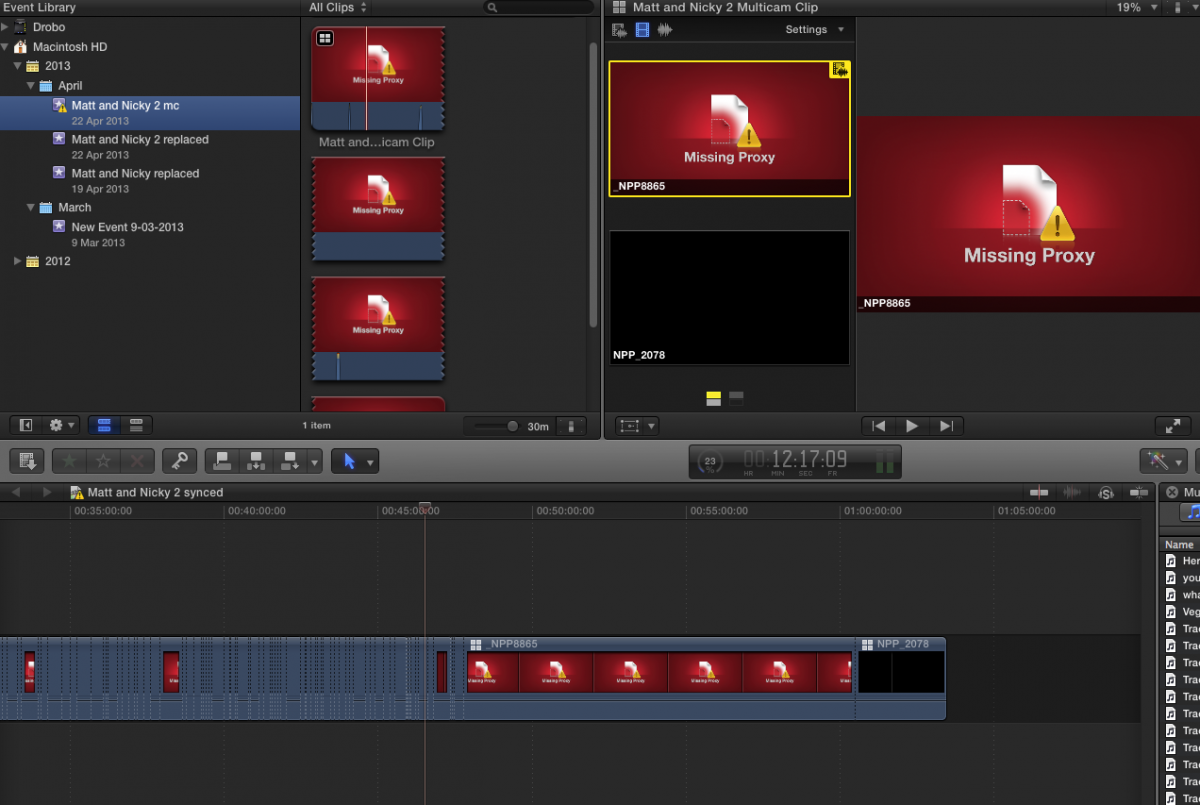
Any ideas ?
I'm also thinking of buying a Mac mini 2.3GHz quad-core Intel Core i7 with OS X Server
Originally released October 2012
4GB memory
Dual 1TB hard drives
Thunderbolt port (up to 10 Gbps)
HDMI port supports multichannel audio output
Intel HD Graphics 4000
will that help ?
I've tried to create proxy media to work with but I'm not sure if I've down this properly as my files have all gone red (see screen grab)
Can I change my footage half way through and edit to proxy media ?
I use a mac so I went...
File - Transcode Media _ creat proxy files- then I click "ok"
nothing seems to happen though (unless it's working in the background and is going to take ages ?)
Any ideas ?
I'm also thinking of buying a Mac mini 2.3GHz quad-core Intel Core i7 with OS X Server
Originally released October 2012
4GB memory
Dual 1TB hard drives
Thunderbolt port (up to 10 Gbps)
HDMI port supports multichannel audio output
Intel HD Graphics 4000
will that help ?
Please Log in to join the conversation.
- jjsanderson
-
- Offline
- Elite Member
-
29 Apr 2013 15:20 #25158
by jjsanderson
Replied by jjsanderson on topic Multicam Edit
Next to the timecode display in the centre of your display you'll see a little spinner. Click that and you'll find the background task window - and yes, transcoding to Proxy happens in the background. Once complete, the clips will automatically relink.
Try the disk speed test app I linked to, it'll tell you what sort of drive performance you're getting. Some Drobo models will only push about 20Mb/sec or so, which is very slow (some models are much faster, but you haven't mentioned which model yours is).
There's no point changing your Mac if your problem lies, as I suspect, with your disk bandwidth. Work that problem first.
It's well worth reading the FCPX manual on Proxy files and workflows. Help → Final Cut Pro X Help.
Try the disk speed test app I linked to, it'll tell you what sort of drive performance you're getting. Some Drobo models will only push about 20Mb/sec or so, which is very slow (some models are much faster, but you haven't mentioned which model yours is).
There's no point changing your Mac if your problem lies, as I suspect, with your disk bandwidth. Work that problem first.
It's well worth reading the FCPX manual on Proxy files and workflows. Help → Final Cut Pro X Help.
Please Log in to join the conversation.
29 Apr 2013 15:48 #25160
by Neil P
Replied by Neil P on topic Multicam Edit
Hi JJ
Thanks, yes the proxy files are changing in the background. I have them now (it's taking a while as I thought it might)
I have noticed though that the synch multi cam edt was imported into my mac hard drive file so it seems to be running slow from my Mac.
So you know I have a mac book Pro, 2.8 GHz Intel Core i7, memory 8 GB 1333 MHz DDR3, Intel HD Graphics 3000 512 MB
Is that big enough ?
Neil
Thanks, yes the proxy files are changing in the background. I have them now (it's taking a while as I thought it might)
I have noticed though that the synch multi cam edt was imported into my mac hard drive file so it seems to be running slow from my Mac.
So you know I have a mac book Pro, 2.8 GHz Intel Core i7, memory 8 GB 1333 MHz DDR3, Intel HD Graphics 3000 512 MB
Is that big enough ?
Neil
Please Log in to join the conversation.
- jjsanderson
-
- Offline
- Elite Member
-
29 Apr 2013 18:45 #25172
by jjsanderson
Replied by jjsanderson on topic Multicam Edit
Make sure the test app is targeting the right drive. You might want to test your internal and Drobo separately, for comparison.
A 2.8GHz i7 is pretty quick - I have a 2010-vintage 2.66GHz i7 MacBook Pro myself, and it's fairly happy running FCPX. However, mine's a 15" and has a discrete graphics card. The integrated graphics on yours will, on occasion, prove slow - but that should be more things like filters and effects than simple playback.
A 2.8GHz i7 is pretty quick - I have a 2010-vintage 2.66GHz i7 MacBook Pro myself, and it's fairly happy running FCPX. However, mine's a 15" and has a discrete graphics card. The integrated graphics on yours will, on occasion, prove slow - but that should be more things like filters and effects than simple playback.
Please Log in to join the conversation.
01 May 2013 19:52 #25255
by Neil P
Replied by Neil P on topic Multicam Edit
I've need to import some more footage much of which I'll need to edit in multi cam. I now know that this will slow down my computers performance so I'll need to transcode the files to Proxy media during import.
My question is...
should I import from both Create Optimized media and Create Proxy media. Or just proxy media. And if imported as just proxy media will I be able to transcode back to optimized easily after edit is done ?
Quick answer much appriciated
Thanks
Neil
My question is...
should I import from both Create Optimized media and Create Proxy media. Or just proxy media. And if imported as just proxy media will I be able to transcode back to optimized easily after edit is done ?
Quick answer much appriciated
Thanks
Neil
Please Log in to join the conversation.
02 May 2013 05:38 #25287
by marchyman
Replied by marchyman on topic Multicam Edit
Import alway imports your original media (or a link to your original media if you are not copying the media to your event). In addition to importing your original media you can generate optimized and/or proxy media. You don't have to do that at import time. You can later generate optimized and/or proxy media. When to do it is a matter of best meeting the needs of your workflow. What will work best for you.
There is no conversion back to original media. When your preferences are set to use proxy media that is what will be used. Before exporting your project change your preferences to not use proxy media. The system will then use either your original media or optimized media (if it exists).
If you click both options at import you will get three sets of media. 1) original (or a link to the original), 2) optimized, and 3) proxy. Which one to use is a function of your current FCPX preferences.
There is no conversion back to original media. When your preferences are set to use proxy media that is what will be used. Before exporting your project change your preferences to not use proxy media. The system will then use either your original media or optimized media (if it exists).
If you click both options at import you will get three sets of media. 1) original (or a link to the original), 2) optimized, and 3) proxy. Which one to use is a function of your current FCPX preferences.
Please Log in to join the conversation.
02 May 2013 07:06 #25290
by Neil P
Replied by Neil P on topic Multicam Edit
"If you click both options at import you will get three sets of media. 1) original (or a link to the original), 2) optimized, and 3) proxy. Which one to use is a function of your current FCPX preferences. "
So if I import in both optimized and proxy I can switch from one to the other in FCPX Preferences depending on how my how my computer, hardrive is preforming. ie if things are running slow in Optimised (say in a multicam edit). I can then switch to proxy to edit and switch back to Optimized before sending to compressor etc ?
Does that make sense ?
Neil
So if I import in both optimized and proxy I can switch from one to the other in FCPX Preferences depending on how my how my computer, hardrive is preforming. ie if things are running slow in Optimised (say in a multicam edit). I can then switch to proxy to edit and switch back to Optimized before sending to compressor etc ?
Does that make sense ?
Neil
Please Log in to join the conversation.

02 May 2013 10:33 #25291
by Overturf
Replied by Overturf on topic Multicam Edit
Neil,
that is correct. Switch to proxy while editing to reduce the workload on your mac. Then BEFORE exporting your final movie, switch back to optimised. Then all is fine.
that is correct. Switch to proxy while editing to reduce the workload on your mac. Then BEFORE exporting your final movie, switch back to optimised. Then all is fine.
Please Log in to join the conversation.
