


- Posts: 44
- Thank you received: 10
3 Post Moderation Rule for New Boarders (25 Jan 2021)
New boarders will have their posts moderated - Don't worry if you cannot see your post immediately.
FCPX - "The share operation Master File has failed" error -1
24 Apr 2013 19:27 - 24 Apr 2013 19:56 #24937
by ateale
Hi guys,
I am in quite the middle of quite a serious situation.
I have a deadline this friday, and fcpx 10.0.8 is doing it's best to bugger me.
On a Macbook Air 1.8 i7 - 4GB RAM, 256GB internal SSD
G-Tech G-RAID 6TG RAID - Thunderbolt
Mac OS 10.8.3
Plugins: Neat Video Denoise and Core Melt Lock & Load (latest versions installed - to fix random green/magenta flash frame issue from previous months).
We are in the last days of a project for a 60 minute video - 1080/24p Pro Res
Last friday we tried to export the video out to show as a work in progress but keep running into a:
"The share operation Master File has failed"
"The operation could not be completed because an error occured creating frame 3876 (error -1)"
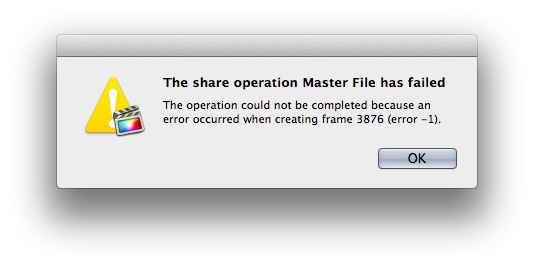
When I check these random frame numbers in the edit it is just a clip, Pro Res, with no effects.
I have the whole project as 6 separate timelines / compound clips - and have tried to break them down even further into 5 minute clips to see if that removes the issue - but with no success.
The Console log shows a few errors, the main one that appears when that error i mentioned pops up is:
Final Cut Pro[5168]: 'Unexpected image class: (null)' in new_FFAssetVideoStream_NewImageAtTime_IMP line 101
Final Cut Pro[5168]: ack! unable to obtain input image!
A related issue is also that I can't seem to render anything - anything that is rendered is forgotten/lost by fcpx - if i close fcpx and open it the timeline has an orange bar again over the majority of the material in the timeline.
I have been using fcpx now since late last year and had only ever seen this error once on a video of 6 minutes with only some colour correction and a few stabilisations with Lock and Load.
This current project has a few places where i have used Neat Video denoise.
The denoise plugin needs to be rendered to play back in the timeline - but the renders are lost eventually.
I have tried deleting all render files and copying/duplicating events and projects.
Nothing is working.
I'd appreciate any ideas to help get us over the line or kill this bug.
Many thanks in advance!
Adam
I am in quite the middle of quite a serious situation.
I have a deadline this friday, and fcpx 10.0.8 is doing it's best to bugger me.
On a Macbook Air 1.8 i7 - 4GB RAM, 256GB internal SSD
G-Tech G-RAID 6TG RAID - Thunderbolt
Mac OS 10.8.3
Plugins: Neat Video Denoise and Core Melt Lock & Load (latest versions installed - to fix random green/magenta flash frame issue from previous months).
We are in the last days of a project for a 60 minute video - 1080/24p Pro Res
Last friday we tried to export the video out to show as a work in progress but keep running into a:
"The share operation Master File has failed"
"The operation could not be completed because an error occured creating frame 3876 (error -1)"
When I check these random frame numbers in the edit it is just a clip, Pro Res, with no effects.
I have the whole project as 6 separate timelines / compound clips - and have tried to break them down even further into 5 minute clips to see if that removes the issue - but with no success.
The Console log shows a few errors, the main one that appears when that error i mentioned pops up is:
Final Cut Pro[5168]: 'Unexpected image class: (null)' in new_FFAssetVideoStream_NewImageAtTime_IMP line 101
Final Cut Pro[5168]: ack! unable to obtain input image!
A related issue is also that I can't seem to render anything - anything that is rendered is forgotten/lost by fcpx - if i close fcpx and open it the timeline has an orange bar again over the majority of the material in the timeline.
I have been using fcpx now since late last year and had only ever seen this error once on a video of 6 minutes with only some colour correction and a few stabilisations with Lock and Load.
This current project has a few places where i have used Neat Video denoise.
The denoise plugin needs to be rendered to play back in the timeline - but the renders are lost eventually.
I have tried deleting all render files and copying/duplicating events and projects.
Nothing is working.
I'd appreciate any ideas to help get us over the line or kill this bug.
Many thanks in advance!
Adam
Last edit: 24 Apr 2013 19:56 by ateale. Reason: typo on OS version
Please Log in to join the conversation.
- Tom Wolsky
-

- Offline
- Moderator
-

24 Apr 2013 21:35 #24941
by Tom Wolsky
Replied by Tom Wolsky on topic FCPX - "The share operation Master File has failed" error -1
Try copying and pasting into a new project on the G-Tech. Does it always fail at the same frame? Try replacing the shot.
If you try to export the same project with the Neat effect, does it still fail?
If you try to export the same project with the Neat effect, does it still fail?
Please Log in to join the conversation.
24 Apr 2013 21:55 #24942
by ateale
Replied by ateale on topic FCPX - "The share operation Master File has failed" error -1
Hi Tom thanks for your suggestion.
Unfortunately any copying/moving material/events/projects doesn't seem to help.
And the error frame is always random - most of the time it references a frame that is a clip with no effects on it.
I have a feeling that all of my trouble is involving the neat image reduce noise filter with it's temporal radius setting. - besides being incredibly slow to render (but what an amazing result) i'm thinking that is causing a lot of the headache in general.
Currently disabling sections of each 10 minute segment, rendering it, and exporting it.
Will be here all night!
Unfortunately any copying/moving material/events/projects doesn't seem to help.
And the error frame is always random - most of the time it references a frame that is a clip with no effects on it.
I have a feeling that all of my trouble is involving the neat image reduce noise filter with it's temporal radius setting. - besides being incredibly slow to render (but what an amazing result) i'm thinking that is causing a lot of the headache in general.
Currently disabling sections of each 10 minute segment, rendering it, and exporting it.
Will be here all night!
Please Log in to join the conversation.
- Chris Weagel
-

- Offline
- New Member
-

Less
More
- Posts: 1
- Thank you received: 0
24 Apr 2013 22:01 #24943
by Chris Weagel
Replied by Chris Weagel on topic FCPX - "The share operation Master File has failed" error -1
I received the same error earlier this week. Exporting out sections of the timeline as ProRes, then importing them and stringing them together worked.
Chris
Chris
Please Log in to join the conversation.

25 Apr 2013 02:58 #24948
by rickytin
Replied by rickytin on topic FCPX - "The share operation Master File has failed" error -1
Today I open a project in FCPX 10.0.8 that it was created in FCP X 10.0.7 to do some text changes and FCP X crash a lot and it didn't let me export. My problem was the plugins Core Melt Lock & Load, I delete the plugin from the different clips and then reinstall the plugin and added the plugin to the clips and now I don't have a problem with FCP X.
Try also Compressor Repair and Preference Manager from Digital Rebellion.
Try also Compressor Repair and Preference Manager from Digital Rebellion.
Please Log in to join the conversation.
