


- Posts: 16
- Thank you received: 0
3 Post Moderation Rule for New Boarders (25 Jan 2021)
New boarders will have their posts moderated - Don't worry if you cannot see your post immediately.
Incompatible File Error -- attempting to "relink' event media
24 Apr 2013 10:07 - 24 Apr 2013 10:10 #24915
by Terraform
Immediate Issue / Question
I have an "incompatible file error" when attempting to relink media to my event...
The file is in the timeline (inside of a compound clip) and displays and plays correctly....
It is also in my "original media" folder in the EVENTS folder as well as in my High Quality Media inside of my Transcoded Media Folder (albiet the file in my transcoded file folder has is appended like so -- MVI_9150 (fcp1).mov).
When I attempt to have FCPX link any of the files (original, original with appended (fcp1) or transcoded appended and not), the relink is unsuccessful and the warning / error is displayed... (see below pic)
Any idea's / suggestions?
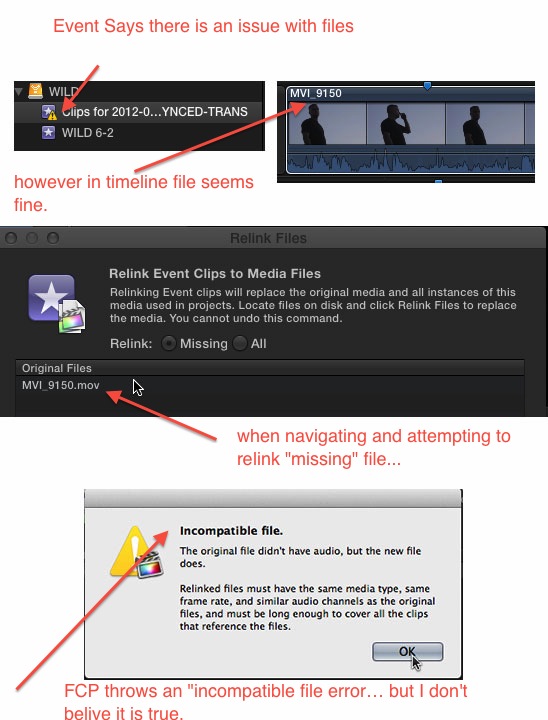
Back story
I thought it may be helpful to explain why I am having these issues and what I am attempting to do.
I posted a question about a month back
www.fcp.co/forum/4-final-cut-pro-x-fcpx/...footage-intact#22777
BenB was kind enough to make a mini Tutorial on how to do what I was attempting to do.
www.fcproxuniversity.com/FCPro_X_Univers...kup_or_Transfer.html
While this worked pretty good I had the next issue which was now how do I import my PROJECTS connected to that event without duplicating media ect...
First I tried simply "duplicating" the project onto the new HD but for whatever reason that didn't work (it would not find the "copied" event on the new drive...) so I then Duplicated with USED CLIPS (selected Multicam... +) and linked it to the project file (using the drop down) on the new HD... and that worked!!!
Next I tried to import another project in the saem way that was linked to the same event as the first... but this time I got the dreaded warning triangle....
<><><><><><><><><><><><><><>
What I am going for in the end...
I have too many event / project files and they are improperly organized.
I need to have them organized with all the files OPTIMIZED and on one drive.
I foolishly started using FCPX before I understood exactly how it saves and organizes files.
BUT now I have several compound / MC files that include two video tracks synced with PluralEyes for the Audio (which was separate) AND THEN I have voice over translations of the footage. I do not want to loose the Voice Over Translations of the footage as the dialog is not in my native tongue so it is very important that I keep all projects intact...
I would ultimately like to have all files in one place, optimized and I would also like to have all of my EVENTS merged into a SINGLE event. I only have 8 days of footage (I would like each project file to represent 1 day) and I would like the single event to represent that shooting period (ie.... WILD-JULY-2012) and each project file to reference that single event synced, and complete with voiceover translations for each day (ie... WILD-JULY08-2012) This way I can properly review / edit / organize that footage from that shoot.
any suggestions are most appreciated.
thanks!
I have an "incompatible file error" when attempting to relink media to my event...
The file is in the timeline (inside of a compound clip) and displays and plays correctly....
It is also in my "original media" folder in the EVENTS folder as well as in my High Quality Media inside of my Transcoded Media Folder (albiet the file in my transcoded file folder has is appended like so -- MVI_9150 (fcp1).mov).
When I attempt to have FCPX link any of the files (original, original with appended (fcp1) or transcoded appended and not), the relink is unsuccessful and the warning / error is displayed... (see below pic)
Any idea's / suggestions?
Back story
I thought it may be helpful to explain why I am having these issues and what I am attempting to do.
I posted a question about a month back
www.fcp.co/forum/4-final-cut-pro-x-fcpx/...footage-intact#22777
BenB was kind enough to make a mini Tutorial on how to do what I was attempting to do.
www.fcproxuniversity.com/FCPro_X_Univers...kup_or_Transfer.html
While this worked pretty good I had the next issue which was now how do I import my PROJECTS connected to that event without duplicating media ect...
First I tried simply "duplicating" the project onto the new HD but for whatever reason that didn't work (it would not find the "copied" event on the new drive...) so I then Duplicated with USED CLIPS (selected Multicam... +) and linked it to the project file (using the drop down) on the new HD... and that worked!!!
Next I tried to import another project in the saem way that was linked to the same event as the first... but this time I got the dreaded warning triangle....
<><><><><><><><><><><><><><>
What I am going for in the end...
I have too many event / project files and they are improperly organized.
I need to have them organized with all the files OPTIMIZED and on one drive.
I foolishly started using FCPX before I understood exactly how it saves and organizes files.
BUT now I have several compound / MC files that include two video tracks synced with PluralEyes for the Audio (which was separate) AND THEN I have voice over translations of the footage. I do not want to loose the Voice Over Translations of the footage as the dialog is not in my native tongue so it is very important that I keep all projects intact...
I would ultimately like to have all files in one place, optimized and I would also like to have all of my EVENTS merged into a SINGLE event. I only have 8 days of footage (I would like each project file to represent 1 day) and I would like the single event to represent that shooting period (ie.... WILD-JULY-2012) and each project file to reference that single event synced, and complete with voiceover translations for each day (ie... WILD-JULY08-2012) This way I can properly review / edit / organize that footage from that shoot.
any suggestions are most appreciated.
thanks!
Last edit: 24 Apr 2013 10:10 by Terraform.
Please Log in to join the conversation.
26 Apr 2013 14:40 #25016
by Terraform
Replied by Terraform on topic Incompatible File Error -- attempting to "relink' event media
anyone have any ideas? :whistle:
thx
thx
Please Log in to join the conversation.
- cinemaloha
-

- Offline
- Elite Member
-

Less
More
- Posts: 163
- Thank you received: 36
27 Apr 2013 19:18 #25074
by cinemaloha
Replied by cinemaloha on topic Incompatible File Error -- attempting to "relink' event media
Try this:
1. Copy all your original media onto an external drive.
2. Duplicate project only.
3. Relink event & project files using the original media from external drive.
Hope it works. I know that FCPX is now database driven so when the pointers to the original media are broken, it gets confused. Let me know what happens.
1. Copy all your original media onto an external drive.
2. Duplicate project only.
3. Relink event & project files using the original media from external drive.
Hope it works. I know that FCPX is now database driven so when the pointers to the original media are broken, it gets confused. Let me know what happens.
Please Log in to join the conversation.
