


3 Post Moderation Rule for New Boarders (25 Jan 2021)
New boarders will have their posts moderated - Don't worry if you cannot see your post immediately.
Finder Dock & FCP X Scrub issues!
- finalbug.net
-
 Topic Author
- Offline
- Platinum Member
-

- Absence of Quality is the essence of squareness.
Less
More
23 Apr 2013 19:29 #24896
by finalbug.net
Finder Dock & FCP X Scrub issues! was created by finalbug.net
Not quite sure where to put this one. It does also effect FCP X so I am putting it in here.
Dock weirdness. I have some weird dock issues & more. My dock is disappearing. And I am not talking about oh I turned on the hide/show function in the system preferences!
I have my dock down at the bottom of my screen. When I mouse down the dock does not appear. The cursor also changes shape! Usually the cursor should be a little arrow pointing to 10 O´Clock. Down at the bottom of the screen when trying to find the dock the arrow point upwards to 12 O´Clock! If I mouse over menus the submenu do not appear automatically. I have to use the arrow keys to navigate the into sub menus! And sure in FCP X my scrubbing does not work!
Any body got any ideas. I have the Activity monitor to kill the dock and it helped but the problem is back. It is weird but I have now realised that I can not live without skimming. :woohoo:
I recently connected a Magic track Pad and installed a demo version of The Touch!
Ideas anybody?
Dock weirdness. I have some weird dock issues & more. My dock is disappearing. And I am not talking about oh I turned on the hide/show function in the system preferences!
I have my dock down at the bottom of my screen. When I mouse down the dock does not appear. The cursor also changes shape! Usually the cursor should be a little arrow pointing to 10 O´Clock. Down at the bottom of the screen when trying to find the dock the arrow point upwards to 12 O´Clock! If I mouse over menus the submenu do not appear automatically. I have to use the arrow keys to navigate the into sub menus! And sure in FCP X my scrubbing does not work!
Any body got any ideas. I have the Activity monitor to kill the dock and it helped but the problem is back. It is weird but I have now realised that I can not live without skimming. :woohoo:
I recently connected a Magic track Pad and installed a demo version of The Touch!
Ideas anybody?
Please Log in to join the conversation.

24 Apr 2013 18:35 #24934
by dgwvideo
Creating history....one edit at a time !
Replied by dgwvideo on topic Finder Dock & FCP X Scrub issues!
I would try uninstalling the Touch Software and removing the Magic Track Pad (at least to test if it is the culprit). You might also try moving your dock to either side of the display rather than placing it at the bottom. This might allow you to work easier on your timeline (assuming the trackpad isn't the issue).
Creating history....one edit at a time !
Please Log in to join the conversation.

25 Apr 2013 05:16 - 25 Apr 2013 05:18 #24952
by Bobbyco
Replied by Bobbyco on topic Finder Dock & FCP X Scrub issues!
paurray, are you using FCPX in full screen mode? I've had the dock disappear when using full screen and I have to hit Esc, to get the dock. Then I can usually go back to full screen. I'm not using The Touch.
Can't recall for sure, but I think it's happened to me with Apples Aperture 3 app as well.
Can't recall for sure, but I think it's happened to me with Apples Aperture 3 app as well.
Last edit: 25 Apr 2013 05:18 by Bobbyco. Reason: Sorry for the handle reference typo.
Please Log in to join the conversation.
- finalbug.net
-
Topic Author
- Offline
- Platinum Member
-
- Absence of Quality is the essence of squareness.
26 Apr 2013 09:15 #24983
by finalbug.net
Replied by finalbug.net on topic Finder Dock & FCP X Scrub issues!
hi dgwvideo
I have tried all of your suggestions but to no avail.
I wrote to The Touch what seems like over 48 hours ago but no response. Pity really.
hi Bobbyco
My full screen mode is definitely broken in FCP X
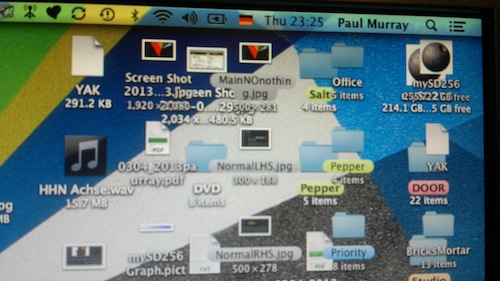
Also sometimes have a desktop that looks like I am seeing double.
If I make a screen shot it shows me an empty desktop.
The only way I can prove that I am not completely batty is by making a photo with my phone! :blink:
I have created a new user which initially looks good
Will be editing on Monday and will test further!!!
At the moment I am wondering if it is related to me installing “Path Finder” recently!
cocoatech.com/pathfinder/
Path Finder is an alternative finder system which is perhaps somehow getting in the way!
I have tried all of your suggestions but to no avail.
I wrote to The Touch what seems like over 48 hours ago but no response. Pity really.
hi Bobbyco
My full screen mode is definitely broken in FCP X
Also sometimes have a desktop that looks like I am seeing double.
If I make a screen shot it shows me an empty desktop.
The only way I can prove that I am not completely batty is by making a photo with my phone! :blink:
I have created a new user which initially looks good
Will be editing on Monday and will test further!!!
At the moment I am wondering if it is related to me installing “Path Finder” recently!
cocoatech.com/pathfinder/
Path Finder is an alternative finder system which is perhaps somehow getting in the way!
Please Log in to join the conversation.
26 Apr 2013 12:27 #24992
by tpayton
Replied by tpayton on topic Finder Dock & FCP X Scrub issues!
This doesn't sound like a fcpx specific issue, but an OS level issue. I would create a new partition on your HD. Install the OS on that and then see if it persists.
Please Log in to join the conversation.
- finalbug.net
-
Topic Author
- Offline
- Platinum Member
-
- Absence of Quality is the essence of squareness.
26 Apr 2013 14:27 #25012
by finalbug.net
Replied by finalbug.net on topic Finder Dock & FCP X Scrub issues!
Yeah I am aware of this possibility. But trying to avoid it.
Some suggested that it might be my sound device from another forum. But that was not it either.
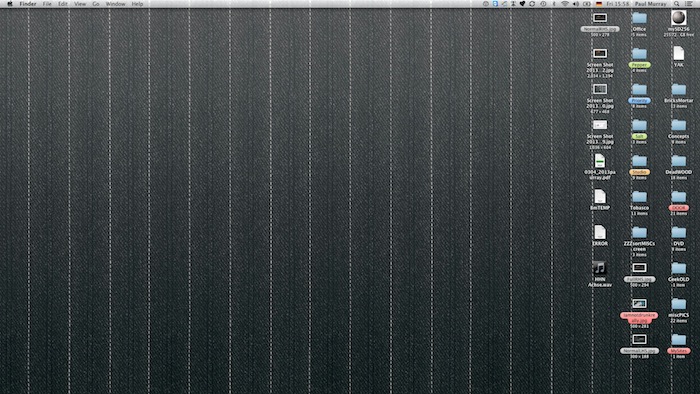
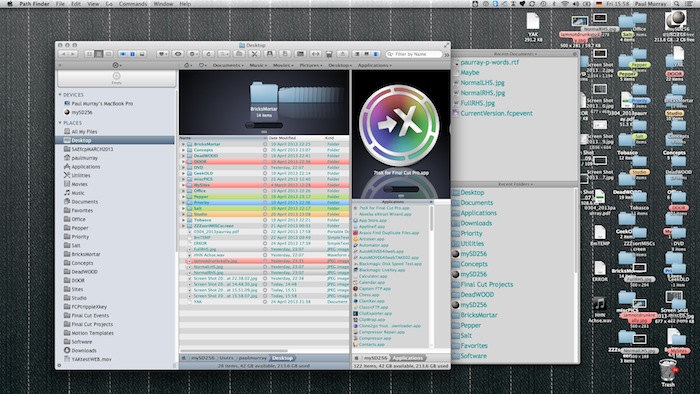
What I am noticing is this.
Screen shot 1 : with no Path Finder open
Screen shot 2 : with Path Finder open
to make a contribution....
Some suggested that it might be my sound device from another forum. But that was not it either.
What I am noticing is this.
Screen shot 1 : with no Path Finder open
Screen shot 2 : with Path Finder open
to make a contribution....
Please Log in to join the conversation.
- Marc Lucas
-

- Offline
- Platinum Member
-
Less
More
- Posts: 379
- Thank you received: 6
26 Apr 2013 14:35 #25015
by Marc Lucas
Replied by Marc Lucas on topic Finder Dock & FCP X Scrub issues!
I had this problem with my Dock recently whether it is connected to FCPX I'm not sure but it did happen after the 10.0.8 update.

Please Log in to join the conversation.
- finalbug.net
-
Topic Author
- Offline
- Platinum Member
-
- Absence of Quality is the essence of squareness.
26 Apr 2013 14:55 #25018
by finalbug.net
Replied by finalbug.net on topic Finder Dock & FCP X Scrub issues!
Thanks Marc
Could be the same. You never Know.
I had something similar with weird names for programs turning up in the Dock.
eg finally get the dock to appear and then see something like FCP X///////////////////X above the program icon!!
Not finding anything online.
Presently waiting for Cocoatech Support (Path Finder) to say something!!!
Could be the same. You never Know.
I had something similar with weird names for programs turning up in the Dock.
eg finally get the dock to appear and then see something like FCP X///////////////////X above the program icon!!
Not finding anything online.
Presently waiting for Cocoatech Support (Path Finder) to say something!!!
Please Log in to join the conversation.
- kyletron2000
-

- Offline
- Senior Member
-

Less
More
- Posts: 79
- Thank you received: 15
27 Apr 2013 01:57 #25053
by kyletron2000
Replied by kyletron2000 on topic Finder Dock & FCP X Scrub issues!
PathFinder is actually a "haxie" that injects itself into Finder.app. You may have an incompatibility issue. Try uninstalling it. I recommend
XtraFinder
if you want similar features (it's free, too).
Please Log in to join the conversation.
