


- Posts: 7
- Thank you received: 0
3 Post Moderation Rule for New Boarders (25 Jan 2021)
New boarders will have their posts moderated - Don't worry if you cannot see your post immediately.
Is this corrupted renders?
20 Apr 2013 15:24 #24774
by BC
Is this corrupted renders? was created by BC
Hi,
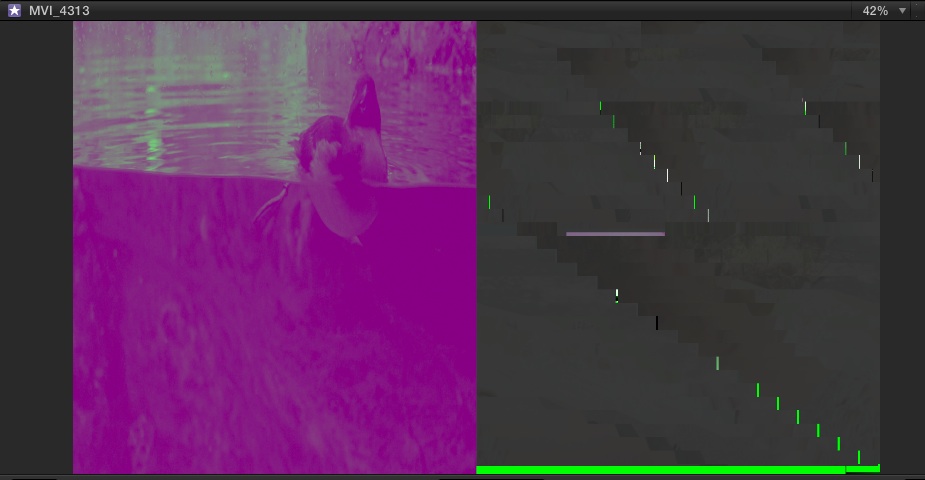
I've been exploring and learning FCP X over the last few days and I've run into an odd problem. My video will randomly get distorted and torn - see attachment for screen grab of the viewer. I'm sure there's an official term for what's happening but I don't know what it is.
It's happened twice now. First time I left to import and transcode to optimized media overnight. In the morning everything looked as you see in the attachment. The second time I just dropped a music track (drag and drop from finder) after rendering FCP X displayed the video like in the screen grab.
Quick hit info:
- I'm on 10.0.8
- Shows up this way in the event and project viewer
- Source files and the FCP Event folder are located on an external HD connected by USB 2.0
- Quitting and restarting does nothing, it opens with the broken video
- I exported the project with the broken video - the resulting .m4v looks normal
Anyone seen this before? I wasn't sure how to describe the problem, so searching for solutions has been difficult. The fact that the export looked correct leads me to think it's the renders that are broken. Does that sound right? If this is a common occurrence, do you have any suggestions on fixing?
Thanks to the FCPX hive mind in advance.
Brian
I've been exploring and learning FCP X over the last few days and I've run into an odd problem. My video will randomly get distorted and torn - see attachment for screen grab of the viewer. I'm sure there's an official term for what's happening but I don't know what it is.
It's happened twice now. First time I left to import and transcode to optimized media overnight. In the morning everything looked as you see in the attachment. The second time I just dropped a music track (drag and drop from finder) after rendering FCP X displayed the video like in the screen grab.
Quick hit info:
- I'm on 10.0.8
- Shows up this way in the event and project viewer
- Source files and the FCP Event folder are located on an external HD connected by USB 2.0
- Quitting and restarting does nothing, it opens with the broken video
- I exported the project with the broken video - the resulting .m4v looks normal
Anyone seen this before? I wasn't sure how to describe the problem, so searching for solutions has been difficult. The fact that the export looked correct leads me to think it's the renders that are broken. Does that sound right? If this is a common occurrence, do you have any suggestions on fixing?
Thanks to the FCPX hive mind in advance.
Brian
Please Log in to join the conversation.

20 Apr 2013 20:48 #24784
by BenB
Replied by BenB on topic Is this corrupted renders?
First of all, USB 2.0 is going to give you headaches for video editing.
Second, what specific Mac model are you on, what year? I'd like to pin down what GPU you've got and how much RAM.
Be sure you're copy of FCP X is up to date.
What format/codec is the original file? Where did it come from?
Second, what specific Mac model are you on, what year? I'd like to pin down what GPU you've got and how much RAM.
Be sure you're copy of FCP X is up to date.
What format/codec is the original file? Where did it come from?
Please Log in to join the conversation.
20 Apr 2013 21:24 #24787
by BC
Replied by BC on topic Is this corrupted renders?
Hi,
I dug a bit deeper and it looks like it's might be an external monitor problem.
This person's video is exactly what I'm seeing.
So, to clarify the problem I'm seeing... Video looks and plays fine on my screen, the problem is when the program window or viewer (Window > Show Viewer on Second Display) is on the external monitor.
Still don't really know what to call or classify this problem.
Alright, to answer the specs questions:
I'm on a macbook 6,1 with 2.26 C2D with 8GB RAM. It has NVIDIA 9400M for GPU. I know that's not optimal specs, but would it affect display on the second monitor?
Ran Software Update just to make sure, but no updates and I'm on 10.0.8
Original files came from Canon DSLR, h.264 @ approx 45 Mbits/s. Transcoded on FCPX import to optimized.
External monitor is an Acer S231HL
I dug a bit deeper and it looks like it's might be an external monitor problem.
This person's video is exactly what I'm seeing.
So, to clarify the problem I'm seeing... Video looks and plays fine on my screen, the problem is when the program window or viewer (Window > Show Viewer on Second Display) is on the external monitor.
Still don't really know what to call or classify this problem.
Alright, to answer the specs questions:
I'm on a macbook 6,1 with 2.26 C2D with 8GB RAM. It has NVIDIA 9400M for GPU. I know that's not optimal specs, but would it affect display on the second monitor?
Ran Software Update just to make sure, but no updates and I'm on 10.0.8
Original files came from Canon DSLR, h.264 @ approx 45 Mbits/s. Transcoded on FCPX import to optimized.
External monitor is an Acer S231HL
Please Log in to join the conversation.
21 Apr 2013 00:56 #24792
by BenB
Replied by BenB on topic Is this corrupted renders?
Then it is the link between that monitor and the laptop. Try plugging another monitor in. You aren't using any sort of adapters to go out to that monitor, eh? Something like a Matrox box might help out. Take some of the stress off of that GPU trying to run two monitors by itself.
You may also want to change the refresh rate of whatever setting you're using in System Prefs.
You may also want to change the refresh rate of whatever setting you're using in System Prefs.
Please Log in to join the conversation.
21 Apr 2013 13:45 #24807
by BC
Replied by BC on topic Is this corrupted renders?
As far as adapter there is a mini display to hdmi in the mix. I've never seen this type of broken video before using the combo of computer > adapter > monitor. And that includes using premiere pro and after effects CS5.
There's no oddities when I put the event browser window on external monitor. It's just the video preview window.
P.S. I changed the external monitor to every resolution and refresh rate it'll support and it's the same story. Current settings are 1920x1080 @ 60hz.
Random theory: could FCPX be using so much gpu that there's not enough left to push a second monitor? CS5 doesn't use the 9400m gpu.
There's no oddities when I put the event browser window on external monitor. It's just the video preview window.
P.S. I changed the external monitor to every resolution and refresh rate it'll support and it's the same story. Current settings are 1920x1080 @ 60hz.
Random theory: could FCPX be using so much gpu that there's not enough left to push a second monitor? CS5 doesn't use the 9400m gpu.
Please Log in to join the conversation.
21 Apr 2013 17:52 #24809
by BenB
Replied by BenB on topic Is this corrupted renders?
That could be. I run a 15" rMBP via HDMI to projectors all the time, and never had a problem. Can you try it with a different brand and/or model monitor?
Please Log in to join the conversation.
22 Apr 2013 17:56 #24854
by BC
Replied by BC on topic Is this corrupted renders?
I don't have another monitor other than plugging into the TV.
But...possibly the gremlins who broke it have fixed it? I ran it all day yesterday on the external monitor with no problems. Gonna keep an eye on it and see what happens—see if it breaks again. I wish I could be of more help to anyone who finds this thread in the future.
There were three variables, so I can't pinpoint which one or combo did the trick.
- Restarted the computer (I did that earlier, so can't be confident that it did anything this time)
- Non-FCPX or display Software Updates
- Downloaded AirParrot trial. Mirroring the screen required display driver download and restart. <--- this is the only thing that had the potential to affect anything FCP related, but I'm still highly doubtful.
I'm throwing my arms up (in a good way this time) on the issue.
But...possibly the gremlins who broke it have fixed it? I ran it all day yesterday on the external monitor with no problems. Gonna keep an eye on it and see what happens—see if it breaks again. I wish I could be of more help to anyone who finds this thread in the future.
There were three variables, so I can't pinpoint which one or combo did the trick.
- Restarted the computer (I did that earlier, so can't be confident that it did anything this time)
- Non-FCPX or display Software Updates
- Downloaded AirParrot trial. Mirroring the screen required display driver download and restart. <--- this is the only thing that had the potential to affect anything FCP related, but I'm still highly doubtful.
I'm throwing my arms up (in a good way this time) on the issue.
Please Log in to join the conversation.
29 Jul 2013 17:30 - 29 Jul 2013 17:33 #29188
by Kenzmyth
Replied by Kenzmyth on topic Is this corrupted renders?
I have been using FCPX for a couple of years with an iMac 27" OS 10.6.8, 2.93 GHz Intel Core i7
16GB, ATI Radeon HD 5750.
I used a 20" Apple Display as a second display until about a year ago when I bought a ViewSonic 27" monitor.
Everything has worked just fine until today.
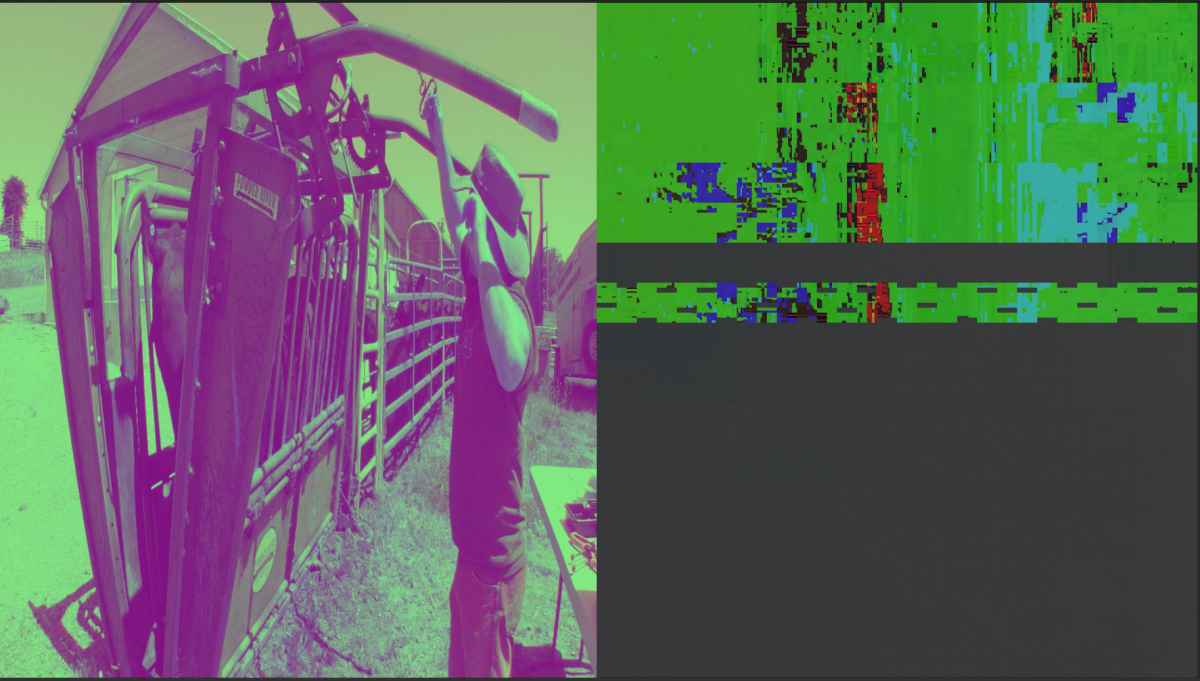
The viewer or canvas window on the ViewSonic displays a "corrupted" image when in Second Display mode in FCPX.
When the viewer is returned to the default position in the main screen it views normally. When I assign the event window to the ViewSonic it displays normally.All other application screens view normally on the ViewSonic.
I have restarted the application and the computer zapping the PRAM with no change.
My assumption is that there is some code curruption in the viewer display when assigned to a second monitor.
Any thoughts?
16GB, ATI Radeon HD 5750.
I used a 20" Apple Display as a second display until about a year ago when I bought a ViewSonic 27" monitor.
Everything has worked just fine until today.
The viewer or canvas window on the ViewSonic displays a "corrupted" image when in Second Display mode in FCPX.
When the viewer is returned to the default position in the main screen it views normally. When I assign the event window to the ViewSonic it displays normally.All other application screens view normally on the ViewSonic.
I have restarted the application and the computer zapping the PRAM with no change.
My assumption is that there is some code curruption in the viewer display when assigned to a second monitor.
Any thoughts?
Last edit: 29 Jul 2013 17:33 by Kenzmyth. Reason: attachment did not load
Please Log in to join the conversation.
29 Jul 2013 17:55 #29191
by BC
Replied by BC on topic Is this corrupted renders?
Well, I wish I could help. It seemed to fix itself. I switched to placing the viewer on the laptop screen and everything else on the external monitor just as part of my work setup. I was curious to see if the "fix" was holding and it's not.
Video on the external is broken again. This time there was no series of restarts or other magic that will get it going again.
To possibly take one more thing out of the mix, I was using an HDMI connection to the monitor (through an adapter) now I'm on a VGA connection (through an adapter) and I'm still having the problem.
Looking at your specs the only thing we have in common (besides FCPX) is being on OSX 10.6.8.
Good luck.
Video on the external is broken again. This time there was no series of restarts or other magic that will get it going again.
To possibly take one more thing out of the mix, I was using an HDMI connection to the monitor (through an adapter) now I'm on a VGA connection (through an adapter) and I'm still having the problem.
Looking at your specs the only thing we have in common (besides FCPX) is being on OSX 10.6.8.
Good luck.
Please Log in to join the conversation.
29 Jul 2013 18:15 #29192
by Kenzmyth
Replied by Kenzmyth on topic Is this corrupted renders?
Thanks for the reply. I threw away all the plist items for FCPX, rebooted and no change. The perplexing thing is that I have not recently updated any software or made any hardware changes. This craziness just popped up yesterday. Of course, we all know that there are many surreptitious gremlins in the machines that crawl in and crawl out. Curious that no one from Apple or FCPX has replied to similar reports any where.
As an experiment, I moved the main FCPX Browser window to the ViewSonic and set Show Viewers to the Second Display(now my iMac 27") and there is NO corruption of the Viewer window on my iMac screen.
I then returned the main browser window to my iMac, reverted to the default with the Viewer in the main window, reset the Viewer to the Second Monitor Display and an uncorrupted still of a clip in the event window showed up.
Once I scrubbed across the event clip it reverted to the corrupt version.
Curiouser and curiouser...
As an experiment, I moved the main FCPX Browser window to the ViewSonic and set Show Viewers to the Second Display(now my iMac 27") and there is NO corruption of the Viewer window on my iMac screen.
I then returned the main browser window to my iMac, reverted to the default with the Viewer in the main window, reset the Viewer to the Second Monitor Display and an uncorrupted still of a clip in the event window showed up.
Once I scrubbed across the event clip it reverted to the corrupt version.
Curiouser and curiouser...
Please Log in to join the conversation.
29 Jul 2013 18:35 #29196
by Kenzmyth
Replied by Kenzmyth on topic Is this corrupted renders?
UPDATE!
While fiddling with the on screen controls for the Viewer window while in the Second Monitor mode, I clicked on the full screen arrows in the bottom right corner and the image reverted to a normal appearance. When I escaped the full screen mode by clicking the ESC key it remained "normal". No Corruption. I did notice that there seemed to be two separate clips displayed when the corrupt screen was active. This may have been a "feature" of using the Video Color adjustment tool "Match Color", which seemed balky the last time I used it... TWO DAYS AGO!
Maybe I just overloaded the circuits and... ka-blooey!
At any rate, all is now well.
Cheers,
While fiddling with the on screen controls for the Viewer window while in the Second Monitor mode, I clicked on the full screen arrows in the bottom right corner and the image reverted to a normal appearance. When I escaped the full screen mode by clicking the ESC key it remained "normal". No Corruption. I did notice that there seemed to be two separate clips displayed when the corrupt screen was active. This may have been a "feature" of using the Video Color adjustment tool "Match Color", which seemed balky the last time I used it... TWO DAYS AGO!
Maybe I just overloaded the circuits and... ka-blooey!
At any rate, all is now well.
Cheers,
Please Log in to join the conversation.
