


- Posts: 59
- Thank you received: 1
3 Post Moderation Rule for New Boarders (25 Jan 2021)
New boarders will have their posts moderated - Don't worry if you cannot see your post immediately.
Sync several clips in separated clips
19 Apr 2013 13:58 #24700
by frandu
Sync several clips in separated clips was created by frandu
Hello,
I have a question: I am trying to sync several Canon 5D Mark II footage with several Zoom H4N audio files (4 channels). Since there's a lot of clips, when I try to sync I get a single clip with everything synced.
Can I force FCPX to separate this clips in several clips synched?
Thank you
I have a question: I am trying to sync several Canon 5D Mark II footage with several Zoom H4N audio files (4 channels). Since there's a lot of clips, when I try to sync I get a single clip with everything synced.
Can I force FCPX to separate this clips in several clips synched?
Thank you
Please Log in to join the conversation.

19 Apr 2013 15:57 #24707
by BenB
Replied by BenB on topic Sync several clips in separated clips
Not really clear about why they all have to be one long ass clip to start with. But I'll assume there is a good reason for that. So, here's what I'd do, right off the top of my head. Both techniques very simple, very fast, very easy.
1- Take that one long ass sync clip, and create Keyword ranges, or Favorite ranges and change the name of each Fav range to something descriptive.
2- Create a Folder, name it, and put all of those keyword collections inside of it.
OR
1- Create a Smart Collection based on Clip type and text to isolate that Sync Clip into it's own collection.
2- Create Favorite Ranges for each segment you want separated out.
3- Rename those Fav ranges (Browser, List view) with descriptive names.
4- Change the Browser filter (top left) to Favorites Only.
1- Take that one long ass sync clip, and create Keyword ranges, or Favorite ranges and change the name of each Fav range to something descriptive.
2- Create a Folder, name it, and put all of those keyword collections inside of it.
OR
1- Create a Smart Collection based on Clip type and text to isolate that Sync Clip into it's own collection.
2- Create Favorite Ranges for each segment you want separated out.
3- Rename those Fav ranges (Browser, List view) with descriptive names.
4- Change the Browser filter (top left) to Favorites Only.
Please Log in to join the conversation.
19 Apr 2013 17:42 #24713
by frandu
Replied by frandu on topic Sync several clips in separated clips
Hello all,
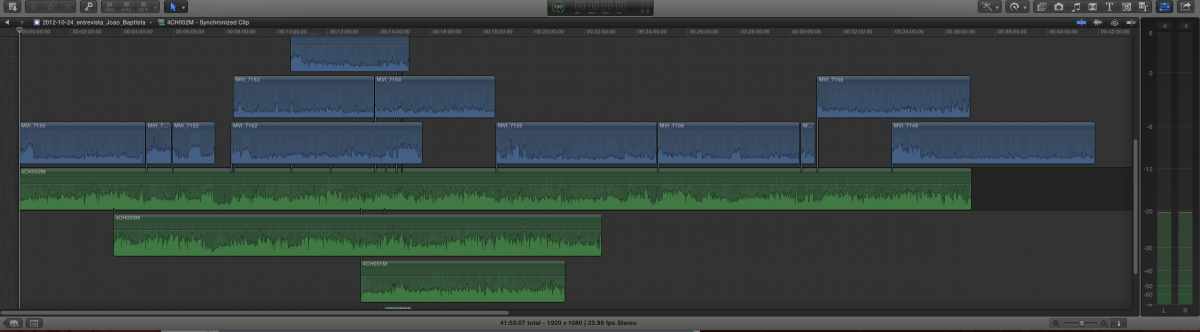
Please see image attached and help me understand what's going on. I simply can't sync my footage, recorded in 5D Mark II and the audio with Zoom H4N. Somehow I receive this confused syncronized clip. Note that there were 1 camera only, but the sync result I receive 2 videos above one!
I'm new to FCPX and I am trying to figured it... Do I have to do something BEFORE sync?
Please see image attached and help me understand what's going on. I simply can't sync my footage, recorded in 5D Mark II and the audio with Zoom H4N. Somehow I receive this confused syncronized clip. Note that there were 1 camera only, but the sync result I receive 2 videos above one!
I'm new to FCPX and I am trying to figured it... Do I have to do something BEFORE sync?
Please Log in to join the conversation.
19 Apr 2013 20:02 - 19 Apr 2013 20:06 #24718
by BenB
Replied by BenB on topic Sync several clips in separated clips
So you're syncing 12 video clips with 3 audio clips?
How clear is the audio on all of these?
Are you configuring your audio channels BEFORE you sync them all together?
help.apple.com/finalcutpro/mac/10.0.6/#verc1fabc30
How clear is the audio on all of these?
Are you configuring your audio channels BEFORE you sync them all together?
help.apple.com/finalcutpro/mac/10.0.6/#verc1fabc30
Last edit: 19 Apr 2013 20:06 by BenB.
Please Log in to join the conversation.
20 Apr 2013 02:30 #24743
by frandu
Replied by frandu on topic Sync several clips in separated clips
Hi BenB,
The clips comes from an interview I shot. It's about 1 hour of footage in several clips due to 5d recording limitations. The audio are 3 in 4 channels.
I can assure that the áudios are clear.
I've read that FCPX can only sync a small number of clips, is it correct? I really can't understand whist FCPX did in my project. The sync is completely nonsense...
The clips comes from an interview I shot. It's about 1 hour of footage in several clips due to 5d recording limitations. The audio are 3 in 4 channels.
I can assure that the áudios are clear.
I've read that FCPX can only sync a small number of clips, is it correct? I really can't understand whist FCPX did in my project. The sync is completely nonsense...
Please Log in to join the conversation.
20 Apr 2013 02:57 #24748
by BenB
Replied by BenB on topic Sync several clips in separated clips
Is each channel a different microphone on a different person?
Do all those folks come through clearly on the camera's audio?
The multichannel audio is what worries me specifically. Why so many channels on each audio clip? Just to be very clear.
Do all those folks come through clearly on the camera's audio?
The multichannel audio is what worries me specifically. Why so many channels on each audio clip? Just to be very clear.
Please Log in to join the conversation.
