


3 Post Moderation Rule for New Boarders (25 Jan 2021)
New boarders will have their posts moderated - Don't worry if you cannot see your post immediately.
HELP! Audio components, Synchronized vs Multicam Clips


I´m editing an indie movie and I decided to do it in FCP 10.0.8. I have 1 XDCAM camera (recording audio embedded with the video) and 4 channels of external audio. So I added all the camera names, reels, shots and takes, then I batch renames everything inside FCPx and started to sync the audio.
I had 2 options: synchronize clips or create Multicam Clips. As I have 1 camera and 6 audios, synchronize clips was the obvious choice, but looks like it was the wrong one and I found out very late.
Here is an example of the files...

What I have done:
I select the all audio channels and the video for one take, right click, synchronize clips. A new clip is created in my Event, then I right click on the clip and select "Open in timeline" to check if everything is ok, it has all the 4 external audio channels and the the video file with embedded audio.

If I open the inspector and go to the audio tab I only have two options in the Channel Configurator and those are: Storyline and Connected. Both are stereo and the Connected doesn´t show every single channel, they are "mixed down" to stereo.
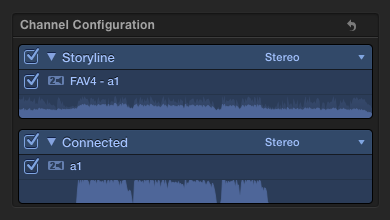
I made all the work until today, when I realized that the Connected Channel Configurator wasn´t showing all the clips. So I search the web for solutions (didn´t find anything important, I added camera angle and name to the audio but it didn´t work) and later I did a little test, and instead of selecting Synchronize I chose Multicam Clip and it work, it did what I needed. The Channel Configurator shows every single audio and when I expand audio components they are all there in the timeline.
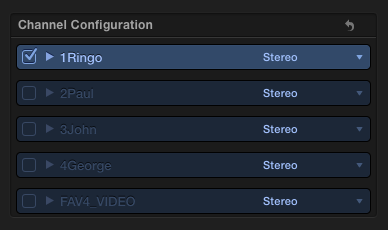
Here it is the Multicam clip first and the Synchronized clip second with the expanded audio components

Does any of you know if I have done something wrong while creating the synchronized clips? Is this the normal behaviour? Is there any way to fix this fast or I will have to create multi cams for all my 2500 (500 videos, 2000 audios) clips again?
Thank you so much for your help!
PS: Sorry if there are any misspellings or is not very clear, english is not my native language.
PS2: I love to use screenshots.
--
Matias Canelson
www.canelson.us
Please Log in to join the conversation.

You know, you can switch the Connected audio clip from Stereo to multiple mono channels, too.
Please Log in to join the conversation.
--
Matias Canelson
www.canelson.us
Please Log in to join the conversation.
But I have to open the clips in the timeline to check if the sync is right (many, many times is off by 1 frame which creates that weird reverb sound).BenB wrote: I'd just highlight the Sync Clip in the Browser, then look at the channels in the Inspector from there, not open it into a timeline at all.
I switched the Connected clips to mono to test, but it doesn't fix this problem it keeps "mixing down" (¿?) all the connected clips to two channels instead of showing all the independent connected channels as multicam does.BenB wrote: You know, you can switch the Connected audio clip from Stereo to multiple mono channels, too.
I still don't understand if I'm doing it wrong or if it's so obvious that I can't see it.
--
Matias Canelson
www.canelson.us
Please Log in to join the conversation.
1) Multcam audio can´t be detached or breaked apart. So I´ll have to check if X2Pro Audio Convert supports multicam audio and how it handles it, ASAP!
2) This is a bug since 10.0.6, there was a (super tedious) workaround ...
--
Matias Canelson
www.canelson.us
Please Log in to join the conversation.

If you organized the audio as roles then you can try to just export audio roles to see if they come out separately.
Please Log in to join the conversation.
1) Select all audio tracks, right click > Synchronize clips.
2) Select the new synchronized audio clip and select the video clip, right click > Synchronize clips.
3) The new file has the video and all the independent audio tracks (had to switch two stereo to four mono) available to expand and trim, enable/disable.

(Technically they should be 4 stereos, because the original files for this test are stereo, but I´m working with mono files for the movie, so no problem for me)
Thanks!
PS: While trying this, I found that I can use my already made Synchronized clips. I have to create a new synchornized clip just for the audio, open the old broken ones, replace the old audio with the new one and now they have the independent channels (only work for clips in the Event browser. Clips already used in compounds or projects must be updated individually).
--
Matias Canelson
www.canelson.us
Please Log in to join the conversation.
Not the proper workflow. In a multicam clip, or a sync clip, you want to right-click it in a Project timeline and chose "Expand Audio Components". Select the video portion to configure the channels. Select each audio channel to work on it independently in the Inspector (trim, keyframe, effects). Here I've set keyframes (with the Range tool) and trimmed the In/Out points of each channel separately.

Please Log in to join the conversation.

Canelson, I'll try this method maybe, but it's really pain in the ass

Please Log in to join the conversation.
And I was also specifically addressing his not being able to detach the audio in a Multiclip, as I quoted, showing how it works with expanding audio "components" instead, which I don't see mentioned for his multicam clip.
Please Log in to join the conversation.
Still got in the inspector, the audio track from storyline and one audio track for all connected audio tracks.

I can work without audio components for now. But Feedback sent

Please Log in to join the conversation.
If your audioperson can't supply you with polyfiles you can batch mono audiofiles to polyfiles with a software like Wave Agent .
Please Log in to join the conversation.
Pazu wrote: Canelson, your method doesn't work for me :'(
Still got in the inspector, the audio track from storyline and one audio track for all connected audio tracks.
I can work without audio components for now. But Feedback sent
I had the same problem at work. When I tested with some files I had at home it worked, but with the files I have at work it didn't work.
Finally I tried the workaround again (looks like I did something wrong the first time) and it worked, so I had to resync everything again. Was a loooong night but I have audio components in my event now.
PS: If the workaround doesn't work for you, after you open the audio only synced clip in the timeline, select the first audio channel, lift it from the primary storyline, now select all the audios and break apart. Then you can sync it to the video.
--
Matias Canelson
www.canelson.us
Please Log in to join the conversation.
Please Log in to join the conversation.
--
Matias Canelson
www.canelson.us
Please Log in to join the conversation.
The event browser with the files I used to sync and the synchronized clips by step.

This is the wrong one: if I select all the audio AND the video and synchronize them together
This is if I select only the audios and synchronize them together

This is how it look like after I open the file created in the previous step and break apart first the 1st channel and later all the other channels, look how the name changed in the "timeline".
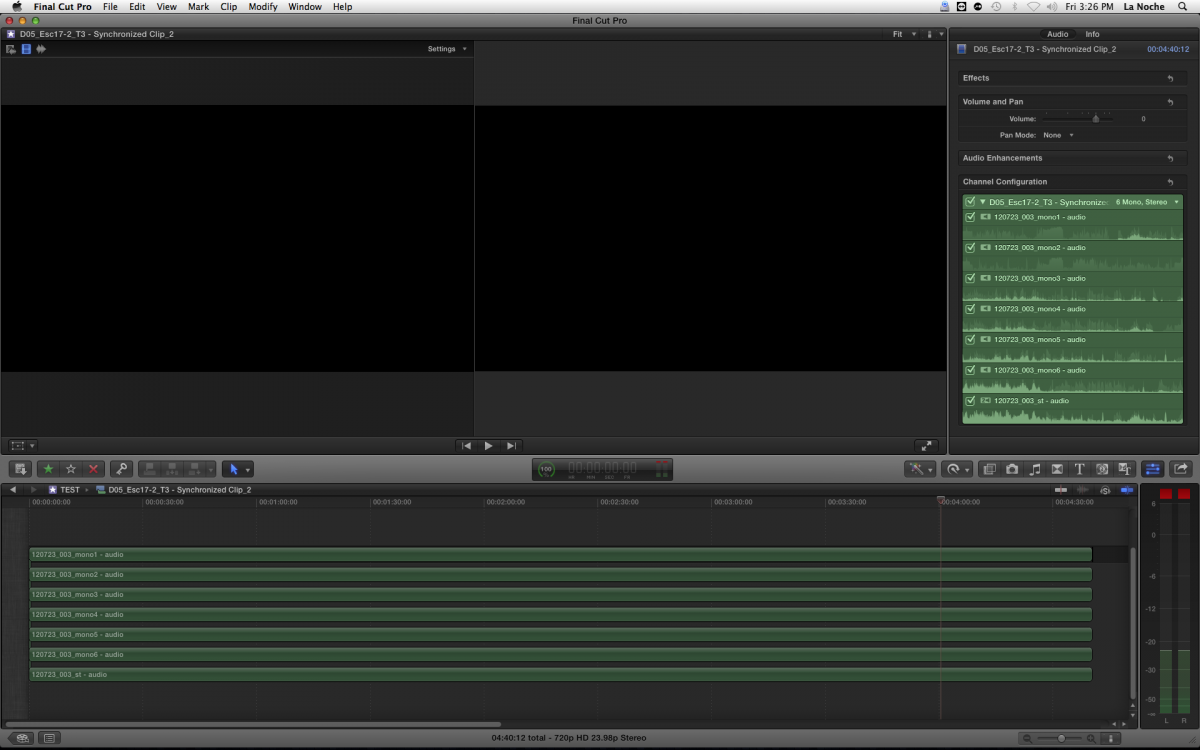
When I sync the good synchronized audio (from the previous step) with the video
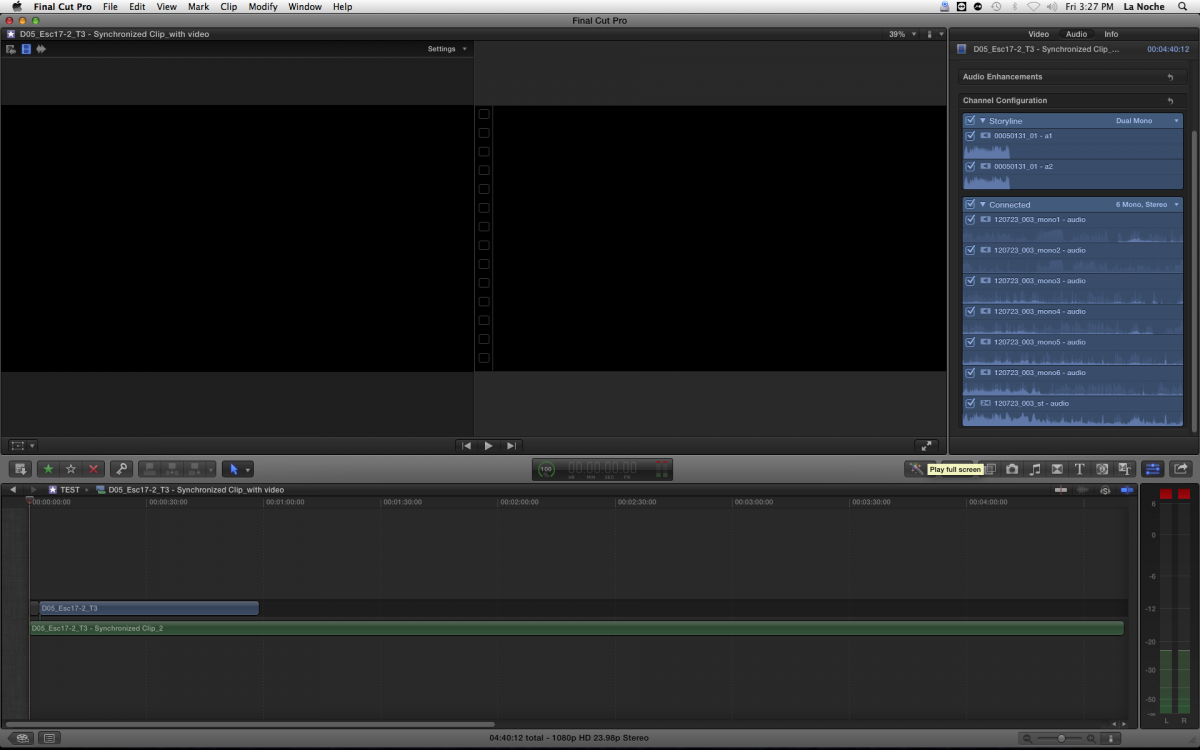
This is how it looks like if I send the clip to the timeline and expand audio components.

Hope it help!
--
Matias Canelson
www.canelson.us
Please Log in to join the conversation.
One problem solved right now :silly:
Please Log in to join the conversation.
Please Log in to join the conversation.
Please Log in to join the conversation.
