


- Posts: 59
- Thank you received: 1
3 Post Moderation Rule for New Boarders (25 Jan 2021)
New boarders will have their posts moderated - Don't worry if you cannot see your post immediately.
Documentary footage to be edited in FCPX
12 Apr 2013 16:38 #24294
by frandu
Documentary footage to be edited in FCPX was created by frandu
Hello guys, I'm new to the Forum.
I have a question that maybe you can help me solve it. I am a ex-FCP7 editor, moving in to the FCPX slowly.
I am editing a full feature documentary and I received several (more than 200!) VHS to transcode. That's my dilemma, now I have 3TB of captured VHS, that is being transcoded to MOV, codec Photo-JPEG. I do have a long road in capturing VHS and I was wondering if there is another solution to solve this issue of disk space.
Note that I am capturing thru EasyCap Viewer.
Thank you,
Frandu
I have a question that maybe you can help me solve it. I am a ex-FCP7 editor, moving in to the FCPX slowly.
I am editing a full feature documentary and I received several (more than 200!) VHS to transcode. That's my dilemma, now I have 3TB of captured VHS, that is being transcoded to MOV, codec Photo-JPEG. I do have a long road in capturing VHS and I was wondering if there is another solution to solve this issue of disk space.
Note that I am capturing thru EasyCap Viewer.
Thank you,
Frandu
Please Log in to join the conversation.

12 Apr 2013 16:51 #24297
by BenB
Replied by BenB on topic Documentary footage to be edited in FCPX
Why use Photo-JPEG? Why not the native DV-NTSC? Why not capture with FCP 7? 200+ tapes are going to take up a lot of drive space, and I'd just plop down the bucks for a new drive to put it all on.
Please Log in to join the conversation.
12 Apr 2013 17:22 #24301
by frandu
Replied by frandu on topic Documentary footage to be edited in FCPX
Thank you BenB.
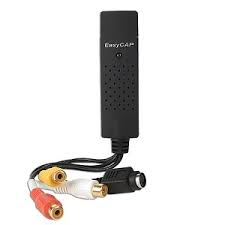
But still, how can I capture thru FCP7 with the Easycap? See the photo attached.
When I try to log and capture in FCP7 it doesn't work. My option is to stick with the Easycap Viewer that gives me the option of Photo-JPEG...
I doing a test converting my Photo-JPEG with Mpegstreamclip to DV PAL (I'm not working with NTSC) to see if it works well.
Best,
Frandu
But still, how can I capture thru FCP7 with the Easycap? See the photo attached.
When I try to log and capture in FCP7 it doesn't work. My option is to stick with the Easycap Viewer that gives me the option of Photo-JPEG...
I doing a test converting my Photo-JPEG with Mpegstreamclip to DV PAL (I'm not working with NTSC) to see if it works well.
Best,
Frandu
Please Log in to join the conversation.


14 Apr 2013 04:18 #24369
by dgwvideo
Creating history....one edit at a time !
Replied by dgwvideo on topic Documentary footage to be edited in FCPX
I can't tell from your picture, but how does that device connect to your computer? Is the top of that a usb or firewire port?
Creating history....one edit at a time !
Please Log in to join the conversation.
14 Apr 2013 04:36 #24373
by BenB
Replied by BenB on topic Documentary footage to be edited in FCPX
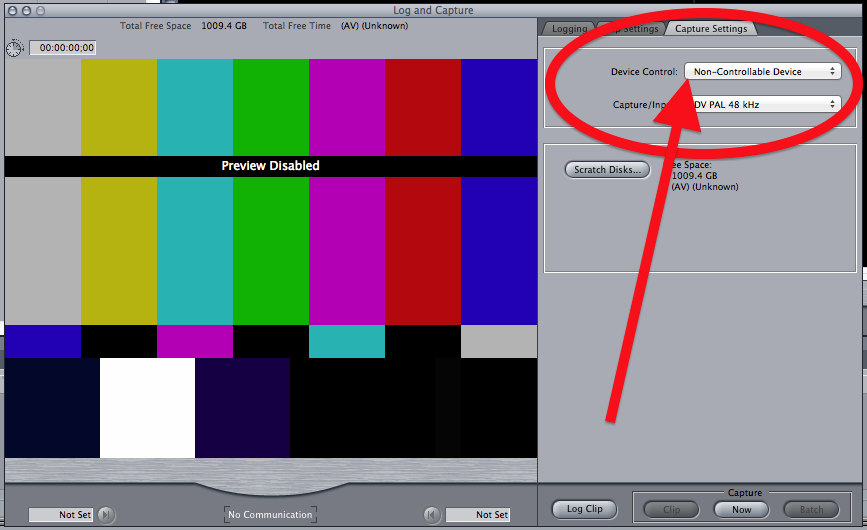
You'd need to set FCP 7 to "Non-Controllable Device" and it should work just fine. Then you don't have to transcode, thus avoid losing one generation of quality loss.
Please Log in to join the conversation.
14 Apr 2013 06:58 #24378
by cgbier
Replied by cgbier on topic Documentary footage to be edited in FCPX
You know anyone with a consumer DV camcorder with a dubbing function - VHS > camera (RCA) > Mac (Firewire). That way you can capture directly to DV PAL. No generation loss with MPEG Streamclip.
Please Log in to join the conversation.
14 Apr 2013 14:52 - 14 Apr 2013 14:55 #24393
by BenB
Replied by BenB on topic Documentary footage to be edited in FCPX
The device you're using should work with FCP 7, I've used similar devices with it before. But what cgbier says works really well, also. Either way, non-controllable device will be necessary, and you'll only be able to use the Capture Now method of manually starting and stopping things.
Last edit: 14 Apr 2013 14:55 by BenB.
Please Log in to join the conversation.
15 Apr 2013 13:32 #24451
by frandu
Replied by frandu on topic Documentary footage to be edited in FCPX
Thank you very much all of you.
Unfortunately, trying in FCP7, all I can get is a NO COMMUNICATION with the device. I don't have a VHS camera, so I'm using a VHS player and connection the RCA in the Easycap and then in the USB of my Mac.
So far, the only way to capture this tapes is by Easycap Viewer.
Unfortunately, trying in FCP7, all I can get is a NO COMMUNICATION with the device. I don't have a VHS camera, so I'm using a VHS player and connection the RCA in the Easycap and then in the USB of my Mac.
So far, the only way to capture this tapes is by Easycap Viewer.
Please Log in to join the conversation.
15 Apr 2013 13:49 #24453
by dgwvideo
Creating history....one edit at a time !
Replied by dgwvideo on topic Documentary footage to be edited in FCPX
I have experience with firewire capture devices on legacy fcp, but not USB. As I recall, it was necessary to connect the capture device BEFORE you start FCP in order for the program to recognize your device. This was certainly the case in FCP 6.06 and I would expect also in 7. So you might give that a try before giving up.
Consider buying an inexpensive bi-directional firewire DV converter such as this one available from B&H.
www.bhphotovideo.com/bnh/controller/home...&is=REG&Q=&A=details
If you want to spend more, you can get higher end models, but this will do the job for you nicely.
Consider buying an inexpensive bi-directional firewire DV converter such as this one available from B&H.
www.bhphotovideo.com/bnh/controller/home...&is=REG&Q=&A=details
If you want to spend more, you can get higher end models, but this will do the job for you nicely.
Creating history....one edit at a time !
Please Log in to join the conversation.
- Karsten Schlüter
-

- Offline
- Moderator
-

Less
More
- Posts: 3790
- Thank you received: 718
15 Apr 2013 13:55 #24454
by Karsten Schlüter
if google/amazon is correct, this super-cheap (15$) device is a) Windows only, b) as all usb grabbers needs 'drivers' - you don't get for MacOS, c) converts to mpeg2 - which should be the last choice if you go from analogue-source to digital.
you need a different grabber ...
elgato offers Mac-supported ones ......
Replied by Karsten Schlüter on topic Documentary footage to be edited in FCPX
frandu wrote: … how can I capture thru FCP7 with the Easycap?…
if google/amazon is correct, this super-cheap (15$) device is a) Windows only, b) as all usb grabbers needs 'drivers' - you don't get for MacOS, c) converts to mpeg2 - which should be the last choice if you go from analogue-source to digital.
you need a different grabber ...
elgato offers Mac-supported ones ......
Please Log in to join the conversation.
15 Apr 2013 14:43 #24457
by frandu
Replied by frandu on topic Documentary footage to be edited in FCPX
Thank you Karsten!
So If I buy this item from Elgato: www.elgato.com/elgato/int/mainmenu/produ...ure/product1.en.html
Should I see improvements in image and better decoding? Because I noticed that it is still USB, but it comes with a software to capture. Pretty much the same with Easycap, but not so cheap...
So If I buy this item from Elgato: www.elgato.com/elgato/int/mainmenu/produ...ure/product1.en.html
Should I see improvements in image and better decoding? Because I noticed that it is still USB, but it comes with a software to capture. Pretty much the same with Easycap, but not so cheap...
Please Log in to join the conversation.
- Karsten Schlüter
-
- Offline
- Moderator
-
Less
More
- Posts: 3790
- Thank you received: 718
15 Apr 2013 17:02 #24465
by Karsten Schlüter
well, Mac equipment is always a lil' extra
I usually make no comments upon 'quality' - if your workflow delivers for your needs, ok. no device will create marvel from VHS tapes ...
for best-practice, you would need an ext. time-base-corrector, clean the players head every hour, etc etc .... digitizing is a full-time job!
the cap-thingie converts - afaik - to mp2, so, you have to demux + convert again to make it editable.
the elgato-stick converts straight to h264 ........
Replied by Karsten Schlüter on topic Documentary footage to be edited in FCPX
frandu wrote: … Pretty much the same with Easycap, but not so cheap...
well, Mac equipment is always a lil' extra
I usually make no comments upon 'quality' - if your workflow delivers for your needs, ok. no device will create marvel from VHS tapes ...
for best-practice, you would need an ext. time-base-corrector, clean the players head every hour, etc etc .... digitizing is a full-time job!
the cap-thingie converts - afaik - to mp2, so, you have to demux + convert again to make it editable.
the elgato-stick converts straight to h264 ........
Please Log in to join the conversation.
15 Apr 2013 20:14 #24480
by frandu
Replied by frandu on topic Documentary footage to be edited in FCPX
Thank you all for your help.
I just ordered the ELGATO capture device. I was noticing some hiccups during the Easycap's capture and some sync issues.
I hope I can capture thru FCP7 in a better way. That sad thing is that FCPX can't do that....
I just ordered the ELGATO capture device. I was noticing some hiccups during the Easycap's capture and some sync issues.
I hope I can capture thru FCP7 in a better way. That sad thing is that FCPX can't do that....
Please Log in to join the conversation.
