


- Posts: 38
- Thank you received: 4
3 Post Moderation Rule for New Boarders (25 Jan 2021)
New boarders will have their posts moderated - Don't worry if you cannot see your post immediately.
Help getting rid of old habits...
10 Apr 2013 02:52 #24160
by athanc
Help getting rid of old habits... was created by athanc
Hey community,
I have an issue with FCPX that I'm hoping you can help me with. I've been using FCPX since launch and I've never looked back. My problem now is having me miss the days of FCP7 and their referenced media file system.
I have a project going on in a timeline and I've been working on it all week. One of the video files have been used several times in the timeline from different I/O points. However, this file in particular is somehow corrupt. I'm not sure what the actual problem with it is, but it seems like FCPX isn't reading it properly.
The file was recorded with some PVR capture device and it was packaged as an MP4. I brought it into FCPX and it didn't read it properly. I edited it in the timeline anyways. I've transcoded that MP4 to a MOV in H.264 using an external application and now the video plays back properly.
Is there any way to replace my old footage with the new clip, preserving all the edits in the timeline? In FCP7 it was a matter of simply replacing the file with the new on wherever it was stored but with the new event managing reference stuff, I'm afraid to try it out and have a hunch that there's a preferred method that'll get the job done.
Thanks, knights of the forums.
-Athanc
I have an issue with FCPX that I'm hoping you can help me with. I've been using FCPX since launch and I've never looked back. My problem now is having me miss the days of FCP7 and their referenced media file system.
I have a project going on in a timeline and I've been working on it all week. One of the video files have been used several times in the timeline from different I/O points. However, this file in particular is somehow corrupt. I'm not sure what the actual problem with it is, but it seems like FCPX isn't reading it properly.
The file was recorded with some PVR capture device and it was packaged as an MP4. I brought it into FCPX and it didn't read it properly. I edited it in the timeline anyways. I've transcoded that MP4 to a MOV in H.264 using an external application and now the video plays back properly.
Is there any way to replace my old footage with the new clip, preserving all the edits in the timeline? In FCP7 it was a matter of simply replacing the file with the new on wherever it was stored but with the new event managing reference stuff, I'm afraid to try it out and have a hunch that there's a preferred method that'll get the job done.
Thanks, knights of the forums.
-Athanc
Please Log in to join the conversation.
- Scrubelicious
-

- Offline
- Platinum Member
-

Less
More
- Posts: 1228
- Thank you received: 114
10 Apr 2013 07:41 - 10 Apr 2013 07:42 #24167
by Scrubelicious
Replied by Scrubelicious on topic Help getting rid of old habits...
Yes you can by replacing the clip in the timeline with the following:
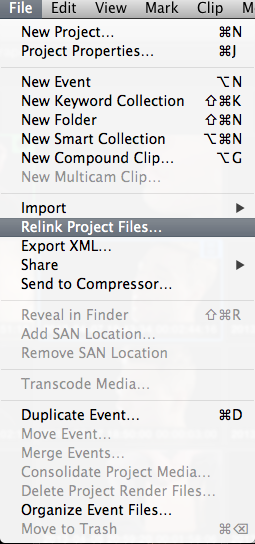
Select the clip in the timeline and then go to File - Relink Project Files
What has happened to me before Disclaimer you try this on your own risk! a file got corrupted when moving a complete Project and Event to another workstation. All I did was deleted the bad file. Which made all the edits in the project offline. Reimported the clip and it relinked all the clips in the project.
Clip has to be in the same name and time.
Select the clip in the timeline and then go to File - Relink Project Files
What has happened to me before Disclaimer you try this on your own risk! a file got corrupted when moving a complete Project and Event to another workstation. All I did was deleted the bad file. Which made all the edits in the project offline. Reimported the clip and it relinked all the clips in the project.
Clip has to be in the same name and time.
Last edit: 10 Apr 2013 07:42 by Scrubelicious.
Please Log in to join the conversation.
