


3 Post Moderation Rule for New Boarders (25 Jan 2021)
New boarders will have their posts moderated - Don't worry if you cannot see your post immediately.
Stretching video
- Starfox
-
 Topic Author
- Offline
- Senior Member
-

- Music, Djing, Music production, fitness. ◄◄ rewind ► play ▌▌pause ■ Stop ►► fast forward
Less
More
01 Apr 2013 22:16 #23582
by Starfox
Stretching video was created by Starfox
Hey guys,
I dont use fcp to often, i usually use logic pro i work with audio mainly, anyway i am putting together a video for a mix and for one part i need to stretch a video clip so instead of playing for 2 seconds it will play for 6, but obviously slowed down by doing so.
How do i do this?
Thanks
I dont use fcp to often, i usually use logic pro i work with audio mainly, anyway i am putting together a video for a mix and for one part i need to stretch a video clip so instead of playing for 2 seconds it will play for 6, but obviously slowed down by doing so.
How do i do this?
Thanks
Please Log in to join the conversation.

01 Apr 2013 22:54 #23583
by Seanus
Sean Lander - Editing since 1982 - AVID 1991 - FCP 1999 - FCPX 2011
Replied by Seanus on topic Stretching video
Use the retiming tool, it's on the tool bench area and looks like this.
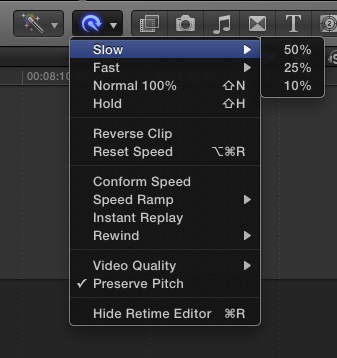
Select a slow speed like 25% and then adjust the length of the clip in the project to make it closer to six seconds. I imagine that would be around 33%
Select a slow speed like 25% and then adjust the length of the clip in the project to make it closer to six seconds. I imagine that would be around 33%
Sean Lander - Editing since 1982 - AVID 1991 - FCP 1999 - FCPX 2011
Please Log in to join the conversation.
