


- Posts: 52
- Thank you received: 1
3 Post Moderation Rule for New Boarders (25 Jan 2021)
New boarders will have their posts moderated - Don't worry if you cannot see your post immediately.
Selecting effects browser crashes fcpx or selects photo browser.
31 Mar 2013 20:56 #23516
by Krzysztof
Hello
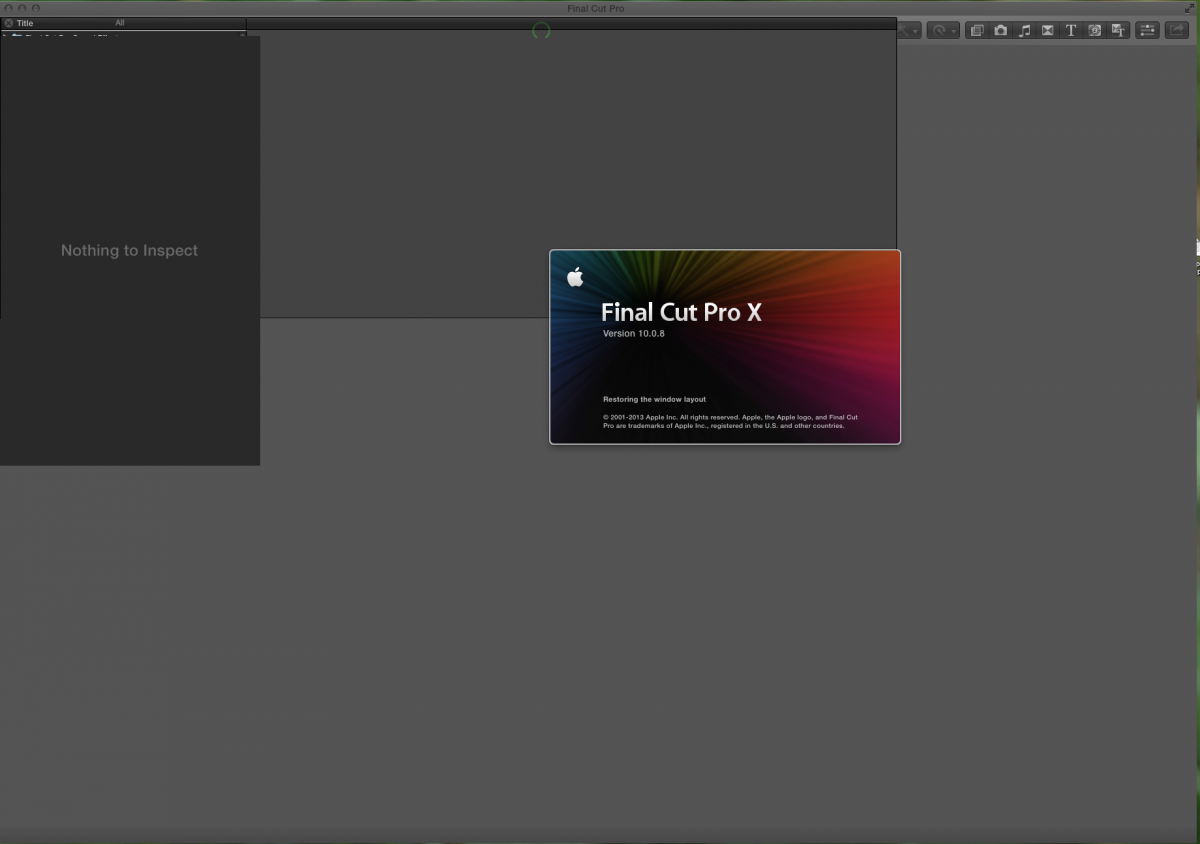
I am having odd behaviour regarding the effect browser crashing FCPX and/or not even being able to be selected. It is intermittent in it's behaviour, alternating between full FCPX crashes or having the photo browser becoming available when selecting the effects browser. Sometimes it does indeed work, mostly not. I am also still having a startup problem whereby the main window is 'scrambled" with different elements of the GUI being displayed incorrectly.
I have searched the apple forums without success, though the trashing of FCPX's prefs and layouts solves the startup problem.....until the next startup.
I have also heard there being a reference to Audio Units Validation causing trouble for some...nothing to add to this solution right now....maybe others have some insight.
I am up to date on all software and i am running an 8 core machine with plenty of ram and a ATI Radeon HD 5870 as well as a GT120. (multi monitor setup.....)
Any assistance would be appreciated.
regards
Krzysztof
I am having odd behaviour regarding the effect browser crashing FCPX and/or not even being able to be selected. It is intermittent in it's behaviour, alternating between full FCPX crashes or having the photo browser becoming available when selecting the effects browser. Sometimes it does indeed work, mostly not. I am also still having a startup problem whereby the main window is 'scrambled" with different elements of the GUI being displayed incorrectly.
I have searched the apple forums without success, though the trashing of FCPX's prefs and layouts solves the startup problem.....until the next startup.
I have also heard there being a reference to Audio Units Validation causing trouble for some...nothing to add to this solution right now....maybe others have some insight.
I am up to date on all software and i am running an 8 core machine with plenty of ram and a ATI Radeon HD 5870 as well as a GT120. (multi monitor setup.....)
Any assistance would be appreciated.
regards
Krzysztof
Please Log in to join the conversation.

31 Mar 2013 22:03 #23520
by BenB
Replied by BenB on topic Selecting effects browser crashes fcpx or selects photo browser.
Get "FCS Remover" from Digital Rebellion (free), use it to wipe FCP X totally. Do NOT check the box for Shared Content, though.
Launch the App Store, Purchases section, install FCP X.
See if that helps.
Launch the App Store, Purchases section, install FCP X.
See if that helps.
Please Log in to join the conversation.
01 Apr 2013 15:04 #23556
by Krzysztof
Hello Ben
So far so good-ish. The app started up on first go and for the most part all is functioning correctly. There is still the issue with the effects browser not showing up when initially clicked. To get the effects browser showing i click to one of the other options (transition, generators....) and click back to the effects. That usually engages the effects browser. Odd that i am the only one seemingly having this issue......
Regards
Krzysztof
Replied by Krzysztof on topic Selecting effects browser crashes fcpx or selects photo browser.
BenB wrote: Get "FCS Remover" from Digital Rebellion (free), use it to wipe FCP X totally. Do NOT check the box for Shared Content, though.
Launch the App Store, Purchases section, install FCP X.
See if that helps.
Hello Ben
So far so good-ish. The app started up on first go and for the most part all is functioning correctly. There is still the issue with the effects browser not showing up when initially clicked. To get the effects browser showing i click to one of the other options (transition, generators....) and click back to the effects. That usually engages the effects browser. Odd that i am the only one seemingly having this issue......
Regards
Krzysztof
Please Log in to join the conversation.
01 Apr 2013 15:06 - 01 Apr 2013 15:07 #23557
by BenB
Replied by BenB on topic Selecting effects browser crashes fcpx or selects photo browser.
I'd try deleting all render files in all Events and Projects, update to the latest versions of all third party plugins.
What version of the OS and FCP X are you running?
What third party plugins do you have? Specifically any audio plugins?
I'm working with someone else on another forum who is getting warnings about some Native Instruments AU plugin giving a warning and not letting FCP X launch.
What version of the OS and FCP X are you running?
What third party plugins do you have? Specifically any audio plugins?
I'm working with someone else on another forum who is getting warnings about some Native Instruments AU plugin giving a warning and not letting FCP X launch.
Last edit: 01 Apr 2013 15:07 by BenB.
Please Log in to join the conversation.

01 Apr 2013 21:19 #23579
by Seanus
Sean Lander - Editing since 1982 - AVID 1991 - FCP 1999 - FCPX 2011
Replied by Seanus on topic Selecting effects browser crashes fcpx or selects photo browser.
Have you tried hiding all the effects from FCP X to see if it becomes more stable?
Just drop the Effects folder in the Motion Templates folder into a new folder with a name like Effects OFF.
Just drop the Effects folder in the Motion Templates folder into a new folder with a name like Effects OFF.
Sean Lander - Editing since 1982 - AVID 1991 - FCP 1999 - FCPX 2011
Please Log in to join the conversation.
01 Apr 2013 22:56 #23584
by Krzysztof
Replied by Krzysztof on topic Selecting effects browser crashes fcpx or selects photo browser.
Hello Ben
All software is up to date, including all of the audio and video plugins. There are no AU being used on the edit i am presently working on, and all of the ones on my system have passed AU validation on Logic Pro.
I have recently received a response from the FCPX team and we are in the process of tracking down the problem. I am wondering if the issue might be connected to the multi display set up i am currently using....? Doubtful, but FCPX does get 'stuck" on the splash screen when it reaches "Restoring the window layout" Aside from that,when FCPX is up and running it's a dream to work with.
regards
Krzysztof
All software is up to date, including all of the audio and video plugins. There are no AU being used on the edit i am presently working on, and all of the ones on my system have passed AU validation on Logic Pro.
I have recently received a response from the FCPX team and we are in the process of tracking down the problem. I am wondering if the issue might be connected to the multi display set up i am currently using....? Doubtful, but FCPX does get 'stuck" on the splash screen when it reaches "Restoring the window layout" Aside from that,when FCPX is up and running it's a dream to work with.
regards
Krzysztof
Please Log in to join the conversation.
01 Apr 2013 23:27 #23586
by BenB
Replied by BenB on topic Selecting effects browser crashes fcpx or selects photo browser.
Oh, that bug again. Are you running both monitors off of one graphics card, or two? What is that card (or cards)?
Please Log in to join the conversation.
02 Apr 2013 01:37 #23588
by Krzysztof
Replied by Krzysztof on topic Selecting effects browser crashes fcpx or selects photo browser.
Hello Ben
Say it's not so.....
ATI 5870-27" Dell
Used for main window
NVIDIA GT 120-2 x 20" Samsung
Used for Events
Regards
Krzysztof
Say it's not so.....
ATI 5870-27" Dell
Used for main window
NVIDIA GT 120-2 x 20" Samsung
Used for Events
Regards
Krzysztof
Please Log in to join the conversation.
02 Apr 2013 02:04 #23590
by BenB
Replied by BenB on topic Selecting effects browser crashes fcpx or selects photo browser.
That's not odd, so I'm not sure. This is a typical place for FCP to hang on launch. Let me think about this...
Please Log in to join the conversation.
02 Apr 2013 11:32 #23607
by Krzysztof
Replied by Krzysztof on topic Selecting effects browser crashes fcpx or selects photo browser.
Hello
Firstly i would like to thank all those who have chimed in on the issues we are having ....much appreciated.
Secondly, a work around has been found. Initially we tried moving the video cards into different pcie slots. This produced no change in the scrambled window results. So the thought was, very simply indeed, to return all the open windows back to the main window upon closing the application, thereby removing any potential confusion for FCPX. This seems to work. Thankfully FCPX does not have the option for opening multiple windows....makes reengaging the layout sufficiently straight forward.
Regards
Krzysztof
and thanks again.
Firstly i would like to thank all those who have chimed in on the issues we are having ....much appreciated.
Secondly, a work around has been found. Initially we tried moving the video cards into different pcie slots. This produced no change in the scrambled window results. So the thought was, very simply indeed, to return all the open windows back to the main window upon closing the application, thereby removing any potential confusion for FCPX. This seems to work. Thankfully FCPX does not have the option for opening multiple windows....makes reengaging the layout sufficiently straight forward.
Regards
Krzysztof
and thanks again.
Please Log in to join the conversation.
03 Apr 2013 02:16 - 03 Apr 2013 14:57 #23658
by Krzysztof
Replied by Krzysztof on topic Selecting effects browser crashes fcpx or selects photo browser.
Looks like an audio unit that used the Juce 2.0.6 framework was to blame. It was removed and Fcpx seemingly works as it should. This plugin was not a source of difficulty in the previous incarnation of FCPX.
Regards
K
For those wondering which AU plugins were at fault:
uHe plugins will load, but selecting them will crash FCPX www.u-he.com/cms/
Argotlunar plugin which is the plugin using the Juce Framework will cause fcpx to scramble the display, remain "stuck" on the splash screen and not recall preferences.
Great little plugin though.... argotlunar.info/
K
Regards
K
For those wondering which AU plugins were at fault:
uHe plugins will load, but selecting them will crash FCPX www.u-he.com/cms/
Argotlunar plugin which is the plugin using the Juce Framework will cause fcpx to scramble the display, remain "stuck" on the splash screen and not recall preferences.
Great little plugin though.... argotlunar.info/
K
Last edit: 03 Apr 2013 14:57 by Krzysztof. Reason: Additional information
Please Log in to join the conversation.

20 Jul 2014 11:43 - 20 Jul 2014 12:08 #50236
by rayofla
Replied by rayofla on topic Selecting effects browser crashes fcpx or selects photo browser.
The key phrase here is 'Audio Units Validation' or 'Plugin's' was my problem. I have a solution... I think.
youtube.com/watch?v=XYtioSIvQdU
Thank you for that tidbit of info, Krzysztof. It help to resolve my problem.
-Ray
youtube.com/watch?v=XYtioSIvQdU
Thank you for that tidbit of info, Krzysztof. It help to resolve my problem.
-Ray
Last edit: 20 Jul 2014 12:08 by rayofla.
Please Log in to join the conversation.
13 Aug 2014 18:34 #51265
by carambo
Replied by carambo on topic Selecting effects browser crashes fcpx or selects photo browser.
Wahouuuu !!! It's been 2 years that I struggle to make FCPX work normally ! Since the beginning of my story with FCPX, something was wrong : windows issues, media bay with strange behavior and crash all the time ! I uninstalled dozens of time, crashed my prefs each time I use FCPX otherwise it didn't work, remove the effect folder, regularly disable each plugin to check which one was the source of the problem, etc...A NIGHTMARE ! I spent hours on forum etc..and I never figure out it could be a AU plugin. I am a musician using Logic every day with many plugins of course, and making videos also every day, and I have many plugins from Rob Papen, and Predator is my favorite actually. Couldn't believe what I read here, but it's true, I just removed Predator and FCPX is now running like I never experienced ! No issue at all and my media bay is full now, incredible. Don't understand why Predator and not Subboom or other 64bit plugins from Rob Papen, I just emailed him to inform of the issue, we'll see..Anyway many thanks for you all for the tip
Please Log in to join the conversation.

14 Aug 2014 14:38 #51303
by alex4D
Replied by alex4D on topic Selecting effects browser crashes fcpx or selects photo browser.
Just saw this thread - it reminded me of
a post on an audio forum
:
Looks like a flaw in the Audio Unit Validation Tool.
@Alex4D
Trackspacer v2.0.4 AU for Logic crashes Final Cut Pro X 10.1.2.
I know, why is FCP even mentioned on KVR? I wouldn't use Trackspacer in FCP anyway, but that's not an option. FCP makes every AU available and just having it in my Components folder (for use with Logic Pro) will crash FCP every time the Effects Browser is clicked.
Looks like a flaw in the Audio Unit Validation Tool.
@Alex4D
Please Log in to join the conversation.
14 Aug 2014 23:23 #51319
by carambo
Replied by carambo on topic Selecting effects browser crashes fcpx or selects photo browser.
Actually to be precise it is PredatorFX causing the issue, not Predator itself.
Please Log in to join the conversation.
