


- Thank you received: 0
3 Post Moderation Rule for New Boarders (25 Jan 2021)
New boarders will have their posts moderated - Don't worry if you cannot see your post immediately.
Problem with multi cam clip creation
-
 Topic Author
- New Member
-

Less
More
29 Mar 2013 04:58 #23370
by
Problem with multi cam clip creation was created by
First time this problem occurred with creating a multicam clip in FCPX: after I create the multicam clip, Clip #2's audio within the clip sounds as if the audio is coming from either the internal mic camera, as opposed to the wireless mic, or is being captured by the wireless mic of Clip #1. Yet the original Clip #2's audio being used to create the multicam clip is perfect! I've tried reimporting both clips from the two cameras, restarting, nothing works! I've been spinning my wheels for several hours!
Anyone ever experience this?
Anyone ever experience this?
Please Log in to join the conversation.
-
Topic Author
- New Member
-
Less
More
- Thank you received: 0
29 Mar 2013 04:59 #23371
by
Replied by on topic Problem with multi cam clip creation
If I can't use multicam clip, what is next best way to edit this job??
Please Log in to join the conversation.


29 Mar 2013 05:49 #23374
by BenB
Replied by BenB on topic Problem with multi cam clip creation
Did you check to see if Noise Reduction or some other audio correction function has been activated?
Please Log in to join the conversation.

29 Mar 2013 08:22 - 29 Mar 2013 08:26 #23376
by Seanus
Sean Lander - Editing since 1982 - AVID 1991 - FCP 1999 - FCPX 2011
Replied by Seanus on topic Problem with multi cam clip creation
You've definitely selected which clip's audio is to be used in the Multiclip timeline?
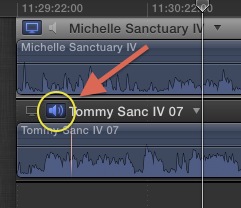
Sean Lander - Editing since 1982 - AVID 1991 - FCP 1999 - FCPX 2011
Last edit: 29 Mar 2013 08:26 by Seanus.
Please Log in to join the conversation.
- Tom Wolsky
-

- Offline
- Moderator
-

29 Mar 2013 13:44 #23388
by Tom Wolsky
Replied by Tom Wolsky on topic Problem with multi cam clip creation
Use the expand audio components function and check which tracks are active.
Please Log in to join the conversation.
- peteramwiggins
-

- Offline
- Administrator
-

- The Administrator :)
Less
More
- Posts: 1049
- Thank you received: 404
02 May 2013 01:36 #25282
by peteramwiggins
Administrator
Replied by peteramwiggins on topic Problem with multi cam clip creation
Harry,
Please fix your email as it keeps bouncing. Ill have to delete you as a user otherwise.
Peter
Please fix your email as it keeps bouncing. Ill have to delete you as a user otherwise.
Peter
Administrator
Please Log in to join the conversation.
