


- Posts: 2
- Thank you received: 0
3 Post Moderation Rule for New Boarders (25 Jan 2021)
New boarders will have their posts moderated - Don't worry if you cannot see your post immediately.
Annotations
- Michael Couture
-
 Topic Author
- Offline
- New Member
-

Less
More
20 Mar 2013 14:28 #22921
by Michael Couture
Annotations was created by Michael Couture
Anyone know if annotations can be turned off when exporting a project to ProRes from FCP X?
I know you can delete what's in each of the headings when exporting, but that doesn't really delete them because when I check annotations in ProRes with (command J), they appear.
I can delete the annotations in QT7 and save the file but when I re-open it, the annotations have miraculously returned.
I know you can delete what's in each of the headings when exporting, but that doesn't really delete them because when I check annotations in ProRes with (command J), they appear.
I can delete the annotations in QT7 and save the file but when I re-open it, the annotations have miraculously returned.
Please Log in to join the conversation.

20 Mar 2013 16:37 #22926
by BenB
Replied by BenB on topic Annotations
Annotations? I'm not sure what that is. What specifically are you seeing on the screen?
Please Log in to join the conversation.
- Michael Couture
-
Topic Author
- Offline
- New Member
-
Less
More
- Posts: 2
- Thank you received: 0
20 Mar 2013 17:46 #22929
by Michael Couture
Replied by Michael Couture on topic Annotations
When you open a QT ProRes file and hit command J, a properties window opens. I've attached a screenshot of the bottom portion showing annotations. This is metadata but I don't want it included when I send the file. As I indicated, you can delete and re-save but that doesn't delete the annotations.
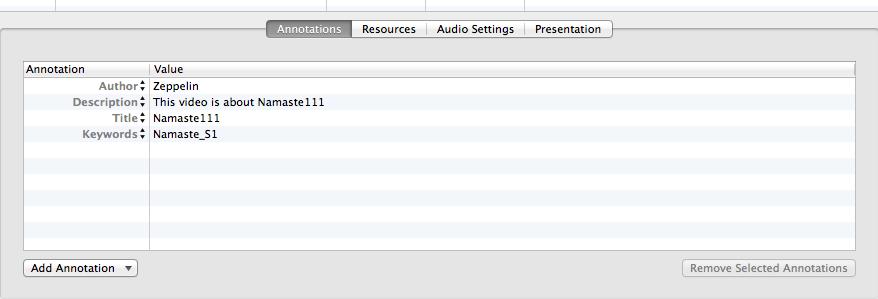
Please Log in to join the conversation.
20 Mar 2013 22:52 #22940
by FCPGuy
manuals.info.apple.com/en/quicktime7userguide.pdf or google removing annotations in QT 7 will show you some apps that will do this for you.
Replied by FCPGuy on topic Annotations
Michael Couture wrote: When you open a QT ProRes file and hit command J, a properties window opens. I've attached a screenshot of the bottom portion showing annotations. This is metadata but I don't want it included when I send the file. As I indicated, you can delete and re-save but that doesn't delete the annotations.
manuals.info.apple.com/en/quicktime7userguide.pdf or google removing annotations in QT 7 will show you some apps that will do this for you.
Please Log in to join the conversation.
21 Mar 2013 21:14 - 21 Mar 2013 21:16 #22974
by BenB
Replied by BenB on topic Annotations
It works, just not like you'd think.
In the Project Library, highlight the project.
Go to the Inspector, the Share section.
You'll see blue metadata place holders. You have to remove those. They fill out data no matter what you do in the export window.
Then export, open in QT Player, you'll see the annotations are gone.
In QT Pro to remove Annotations, you have to highlight the metadata titles, on the left side (not the metadata content on the right side), then click the "Remove Selected Annotations" button. Simply deleting the "content" in the right side fields won't do it.
In the Project Library, highlight the project.
Go to the Inspector, the Share section.
You'll see blue metadata place holders. You have to remove those. They fill out data no matter what you do in the export window.
Then export, open in QT Player, you'll see the annotations are gone.
In QT Pro to remove Annotations, you have to highlight the metadata titles, on the left side (not the metadata content on the right side), then click the "Remove Selected Annotations" button. Simply deleting the "content" in the right side fields won't do it.
Last edit: 21 Mar 2013 21:16 by BenB.
Please Log in to join the conversation.
