


- Posts: 582
- Thank you received: 5
3 Post Moderation Rule for New Boarders (25 Jan 2021)
New boarders will have their posts moderated - Don't worry if you cannot see your post immediately.
Is it something wrong with my color board?
16 Mar 2013 08:59 #22734
by Neguah
Is it something wrong with my color board? was created by Neguah
In my color board, I don´t see the percentage grades(or what to call it), which explains what the levels are for(global, shadow, midtone and highlights). Like this:
splicevine.com/july-color-correction/fcpx-color-board/
How to I get that?
I have 10.0.7
How to I get that?
I have 10.0.7
Please Log in to join the conversation.

16 Mar 2013 09:15 #22737
by Jimmyfinn
Replied by Jimmyfinn on topic Is it something wrong with my color board?
Rescale the project window to make it smaller.
This will reveal the percentage controls in the Colour board
This will reveal the percentage controls in the Colour board
Please Log in to join the conversation.
16 Mar 2013 09:30 - 16 Mar 2013 09:41 #22738
by Neguah
Replied by Neguah on topic Is it something wrong with my color board?
Don´t know if I found the project window, but I rescaled timeline, including the effect window(draged it down). I got more room under the color board, but no percentage revealed.
Sorry, I had to have the FCPX window in full screen in order to get that.
My bad!
Sorry, I had to have the FCPX window in full screen in order to get that.
My bad!
Last edit: 16 Mar 2013 09:41 by Neguah.
Please Log in to join the conversation.
16 Mar 2013 10:18 #22739
by Jimmyfinn
Replied by Jimmyfinn on topic Is it something wrong with my color board?
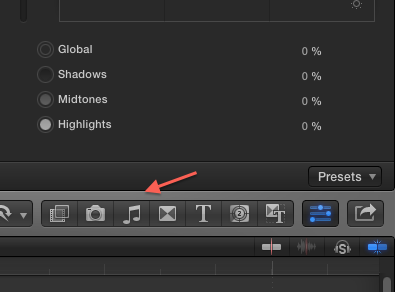
You need to drag down from here until the Percentages appear.
Please Log in to join the conversation.
16 Mar 2013 10:21 #22740
by Neguah
Replied by Neguah on topic Is it something wrong with my color board?
I know, I did that, but I didn´t have the FCPX window in full screen. The percentage only appears when I have the window in full screen.
Thanks for your help!
Thanks for your help!
Please Log in to join the conversation.

16 Mar 2013 13:09 #22748
by BenB
Replied by BenB on topic Is it something wrong with my color board?
What Mac are you using?
What is the resolution of your monitor set to?
They will in fact show up even if you're not in Full Screen mode.
Sounds like you need to up the resolution of your monitor.
What is the resolution of your monitor set to?
They will in fact show up even if you're not in Full Screen mode.
Sounds like you need to up the resolution of your monitor.
Please Log in to join the conversation.
17 Mar 2013 09:32 #22782
by Neguah
Replied by Neguah on topic Is it something wrong with my color board?
I´m using Macbook Pro, 2.5GHz.
Resolution is 1280x800.
Resolution is 1280x800.
Please Log in to join the conversation.

17 Mar 2013 13:48 #22788
by anickt
Replied by anickt on topic Is it something wrong with my color board?
Default resolution on my MBP is 1440 X 900.
Maybe that has something to do with it?
Maybe that has something to do with it?
Please Log in to join the conversation.
17 Mar 2013 14:47 #22792
by BenB
Replied by BenB on topic Is it something wrong with my color board?
Bump up your resolution, for sure.
Please Log in to join the conversation.
17 Mar 2013 15:27 #22798
by Neguah
Replied by Neguah on topic Is it something wrong with my color board?
1280x800 is as high I can go. Perhaps limitations in my video card.
Please Log in to join the conversation.
17 Mar 2013 17:48 #22803
by Jimmyfinn
Replied by Jimmyfinn on topic Is it something wrong with my color board?
Check either you Mac Model number again or the Display settings.
This says a MBP 2.5ghz should run at 1440x900
www.everymac.com/systems/apple/macbook_p...08-penryn-specs.html
This says a MBP 2.5ghz should run at 1440x900
www.everymac.com/systems/apple/macbook_p...08-penryn-specs.html
Please Log in to join the conversation.
