


- Posts: 6
- Thank you received: 0
3 Post Moderation Rule for New Boarders (25 Jan 2021)
New boarders will have their posts moderated - Don't worry if you cannot see your post immediately.
Clips are either saying "Missing Camera" or are blank.
14 Mar 2013 13:21 #22602
by mr tom
Clips are either saying "Missing Camera" or are blank. was created by mr tom
I'm having a bit of an issue in trying to sort out a bit of a messy project made by my colleague. He's started an edit, his laptop got full, I moved the footage to an XHD and now FCP is throwing a wobbler. I'm trying to recover this without having to redo the entire edit.
Background:
My colleague was making a first run of an edit, with footage coming from 3 cameras (3 different types of camera - SONY EX1, NEX7 and D5). I'm not sure how he imported them, but they ended up in his Event Browser with some as QT movs and some as No Data.
Problem:
In the timeline some of the media has a red "Missing Camera" sign, and some show no image at all (see attached screenshot).
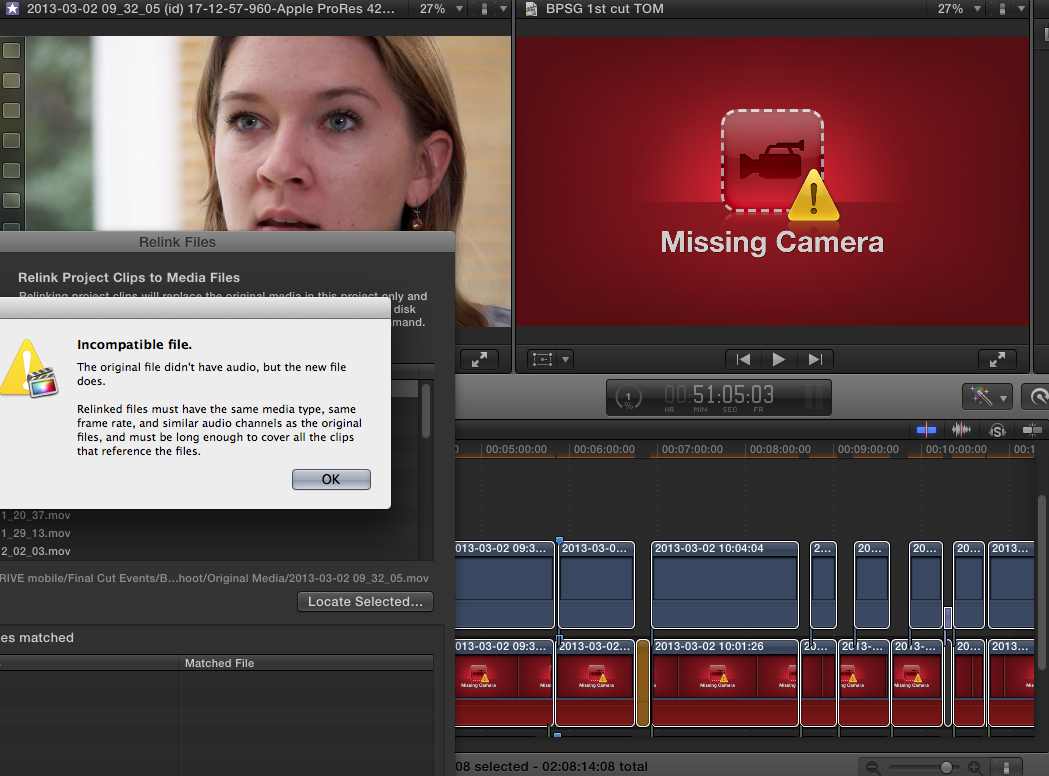
I was hoping it was simply a case of relinking the files to their destination on the XHD but when I've tried to do that I get a dialogue box saying the files are incompatible. They are the same files.
I've tried taking all the files and putting them through Compressor to make ProRes Proxy versions to test with, so that at least I could be sure I had a standard file type but again it's saying the files are incompatible.
I'm sure I've been barking up the wrong tree, so could someone point me in the right direction?
Happy to provide more info, of course. Thanks
Background:
My colleague was making a first run of an edit, with footage coming from 3 cameras (3 different types of camera - SONY EX1, NEX7 and D5). I'm not sure how he imported them, but they ended up in his Event Browser with some as QT movs and some as No Data.
Problem:
In the timeline some of the media has a red "Missing Camera" sign, and some show no image at all (see attached screenshot).
I was hoping it was simply a case of relinking the files to their destination on the XHD but when I've tried to do that I get a dialogue box saying the files are incompatible. They are the same files.
I've tried taking all the files and putting them through Compressor to make ProRes Proxy versions to test with, so that at least I could be sure I had a standard file type but again it's saying the files are incompatible.
I'm sure I've been barking up the wrong tree, so could someone point me in the right direction?
Happy to provide more info, of course. Thanks
Please Log in to join the conversation.

14 Mar 2013 14:21 #22609
by BenB
Replied by BenB on topic Clips are either saying "Missing Camera" or are blank.
You should move Events and Projects inside FCP X, not in the Finder. This is a known bug at the moment when moving things in the Finder.
Please Log in to join the conversation.


14 Mar 2013 14:24 #22610
by waternyc
Replied by waternyc on topic Clips are either saying "Missing Camera" or are blank.
Maybe you should just spend your time redoing the project, and fill in the media that is missing with a new event. May save you lots of time and trouble and guarantee a stable project.
Assuming that you've tried everything else already.
Assuming that you've tried everything else already.
Please Log in to join the conversation.
14 Mar 2013 14:37 #22622
by mr tom
Thanks waternyc.
I fear you may be right, though I'm not experienced enough to know if I have tried everything else already. Are there any obvious things to try that I've not mentioned?
Thanks BenB
If this is a bug related to moving files around in Finder then it would have gone wrong at some point as the original files were on different drives. That is an annoying bug!
Replied by mr tom on topic Clips are either saying "Missing Camera" or are blank.
waternyc wrote: Maybe you should just spend your time redoing the project, and fill in the media that is missing with a new event. May save you lots of time and trouble and guarantee a stable project.
Assuming that you've tried everything else already.
Thanks waternyc.
I fear you may be right, though I'm not experienced enough to know if I have tried everything else already. Are there any obvious things to try that I've not mentioned?
Thanks BenB
If this is a bug related to moving files around in Finder then it would have gone wrong at some point as the original files were on different drives. That is an annoying bug!
Please Log in to join the conversation.
