


- Posts: 16
- Thank you received: 0
3 Post Moderation Rule for New Boarders (25 Jan 2021)
New boarders will have their posts moderated - Don't worry if you cannot see your post immediately.
FCPX Keeps Changing My 24p Footage To 29.97p Automatically. Should I Edit Like That Or Force 24p?
05 Mar 2013 03:32 #22156
by spartanx
FCPX Keeps Changing My 24p Footage To 29.97p Automatically. Should I Edit Like That Or Force 24p? was created by spartanx
Just got a Canon 550d and trying it out. First time using a decent camera. I set to 24p when shooting as a try out to see how it looks. When I drag the footage into FCPX it automatically changes it to 29.97p. Is there a reason why it would be doing this?
Should I go along with it and edit in 29.97p or should I force it to use 24p by setting the frame rate first when I create the project before adding footage? Currently it is set to automatically choose the frame rate based on the "first clip" added to the project.
I just wondered if there is a reason why it would be changing to 29.97 or whether I should just ignore that and go ahead and force it to 24. Any help would be appreciated.
Should I go along with it and edit in 29.97p or should I force it to use 24p by setting the frame rate first when I create the project before adding footage? Currently it is set to automatically choose the frame rate based on the "first clip" added to the project.
I just wondered if there is a reason why it would be changing to 29.97 or whether I should just ignore that and go ahead and force it to 24. Any help would be appreciated.
Please Log in to join the conversation.
- Karsten Schlüter
-

- Offline
- Moderator
-

Less
More
- Posts: 3790
- Thank you received: 718
05 Mar 2013 07:27 #22169
by Karsten Schlüter
may be too obvious:
but have you set your FCPX projects settings to 24p? ......
Replied by Karsten Schlüter on topic FCPX Keeps Changing My 24p Footage To 29.97p Automatically. Should I Edit Like That Or Force 24p?
spartanx wrote: … When I drag the footage into FCPX it automatically changes it to 29.97p. Is there a reason why it would be doing this?…
may be too obvious:
but have you set your FCPX projects settings to 24p? ......
Please Log in to join the conversation.
- Scrubelicious
-

- Offline
- Platinum Member
-

Less
More
- Posts: 1228
- Thank you received: 114
05 Mar 2013 10:56 - 05 Mar 2013 10:56 #22177
by Scrubelicious
Replied by Scrubelicious on topic FCPX Keeps Changing My 24p Footage To 29.97p Automatically. Should I Edit Like That Or Force 24p?
Make sure your Project settings are set to Use Automatic Settings.
Should look like this.


If you have to set your project to he wanted setting.
From

to

Should look like this.
If you have to set your project to he wanted setting.
From
to
Last edit: 05 Mar 2013 10:56 by Scrubelicious.
Please Log in to join the conversation.
05 Mar 2013 14:15 - 05 Mar 2013 14:26 #22187
by spartanx
Replied by spartanx on topic FCPX Keeps Changing My 24p Footage To 29.97p Automatically. Should I Edit Like That Or Force 24p?
Thanks for the replies guys, but I already know how to set it to 24p. But what I really want to know is, if It's set to automatic and It's coming up as 29.97p when it detects the frame rate of my footage, is there a reason for this? Is my footage somehow not actually 24p even though I set it as that on the camera? Or should I just ignore the auto-detect and set it to 24p anyway manually?
So what I'm asking is not a matter of how to do manually make it 24p, It's a matter of SHOULD I do it? Or is there a reason that It's auto-detecting 29.97p that I'm not aware of that dictates I should leave the setting at that instead of change it?
So what I'm asking is not a matter of how to do manually make it 24p, It's a matter of SHOULD I do it? Or is there a reason that It's auto-detecting 29.97p that I'm not aware of that dictates I should leave the setting at that instead of change it?
Last edit: 05 Mar 2013 14:26 by spartanx.
Please Log in to join the conversation.
- Karsten Schlüter
-
- Offline
- Moderator
-
Less
More
- Posts: 3790
- Thank you received: 718
05 Mar 2013 15:44 #22200
by Karsten Schlüter
could be:
there's some 'weird' format called PsF
en.wikipedia.org/wiki/Progressive_segmented_frame
which records 24p, but stores as 60i .....
no idea, wether your device does that.-
maybe, a detour thru MpegStreamclip could fix it .......
Replied by Karsten Schlüter on topic FCPX Keeps Changing My 24p Footage To 29.97p Automatically. Should I Edit Like That Or Force 24p?
spartanx wrote: … Is my footage somehow not actually 24p even though I set it as that on the camera? …
could be:
there's some 'weird' format called PsF
en.wikipedia.org/wiki/Progressive_segmented_frame
which records 24p, but stores as 60i .....
no idea, wether your device does that.-
maybe, a detour thru MpegStreamclip could fix it .......
Please Log in to join the conversation.
05 Mar 2013 19:54 #22211
by spartanx
Replied by spartanx on topic FCPX Keeps Changing My 24p Footage To 29.97p Automatically. Should I Edit Like That Or Force 24p?
Thanks again for the response. Well I am just using a Canon 550d so from what I read at the link you provided it doesn't look like something I'd expect that camera to have. I also can't find any information relating that format to the 550d.
I tried copy and pasting the timeline into a new project that I'd set to 24p, which I know is probably something I am not "supposed" to do, but to be honest it still looks okay and I can't really see any difference. In fact, it appears, if anything, to be slightly better looking. But this could just be psychological I guess.
So at this point I am wondering should I just go ahead and edit in 24p or 29.97.. Or should I try the MpegStreamclip (not that I know what it is, but I can look it up) thing that you mention? To be honest I don't see any problem with the footage in a 24p project but there may be something that I'm missing that I might not be able to notice now, but might notice later when my eye gets better. I am just using a decent camera for the first time in my life so I am not accustomed to such things.
I tried copy and pasting the timeline into a new project that I'd set to 24p, which I know is probably something I am not "supposed" to do, but to be honest it still looks okay and I can't really see any difference. In fact, it appears, if anything, to be slightly better looking. But this could just be psychological I guess.
So at this point I am wondering should I just go ahead and edit in 24p or 29.97.. Or should I try the MpegStreamclip (not that I know what it is, but I can look it up) thing that you mention? To be honest I don't see any problem with the footage in a 24p project but there may be something that I'm missing that I might not be able to notice now, but might notice later when my eye gets better. I am just using a decent camera for the first time in my life so I am not accustomed to such things.
Please Log in to join the conversation.

06 Mar 2013 03:07 #22217
by canelson
--
Matias Canelson
www.canelson.us
Replied by canelson on topic FCPX Keeps Changing My 24p Footage To 29.97p Automatically. Should I Edit Like That Or Force 24p?
I have a Canon 550D (aka T2i), tomorrow I could test if I have the same issues as you do or send you a file from my camera to you. Let me know!
--
Matias Canelson
www.canelson.us
Please Log in to join the conversation.
- Karsten Schlüter
-
- Offline
- Moderator
-
Less
More
- Posts: 3790
- Thank you received: 718
06 Mar 2013 06:45 #22220
by Karsten Schlüter
drag an original file from your cam onto
iMediaHUD
www.iffmpeg.com/styled-6/index.html
which is free analysing tool ...
post the result here .......
Replied by Karsten Schlüter on topic FCPX Keeps Changing My 24p Footage To 29.97p Automatically. Should I Edit Like That Or Force 24p?
spartanx wrote: … I also can't find any information relating that format to the 550d.…
drag an original file from your cam onto
iMediaHUD
www.iffmpeg.com/styled-6/index.html
which is free analysing tool ...
post the result here .......
Please Log in to join the conversation.
06 Mar 2013 12:10 #22225
by spartanx
Replied by spartanx on topic FCPX Keeps Changing My 24p Footage To 29.97p Automatically. Should I Edit Like That Or Force 24p?
Canelson - Thanks a lot, I'd appreciate that a lot. It's not really a problem exactly, because the footage looks fine edited in 24p. But It's just more of a dilemma where I don't know what I should do. Should I just go on the fact that it looks fine, or is there something I'm missing down the line? Even if It's not a problem and I just go ahead and keep editing in 24p it would also be interesting and useful to know the cause I guess.
Karsten - That's interesting, I will try it!
Karsten - That's interesting, I will try it!
Please Log in to join the conversation.
06 Mar 2013 12:14 #22226
by spartanx
Replied by spartanx on topic FCPX Keeps Changing My 24p Footage To 29.97p Automatically. Should I Edit Like That Or Force 24p?
PS - The result is it says 29.970fps so I guess it is 29.97. I am not sure why though, when I set my camera to record 24p?!
The other strange thing is that it does still seem to look a bit better edited in 24p (because I went ahead and did that already). I can't explain why because I am no expert and I have just started doing this.
The only thing is that a green flash for one frame occurs once throughout each timeline (which I easily removed and once taken out looks fine again). I guess that has something to do with the missing frames??
The other strange thing is that it does still seem to look a bit better edited in 24p (because I went ahead and did that already). I can't explain why because I am no expert and I have just started doing this.
The only thing is that a green flash for one frame occurs once throughout each timeline (which I easily removed and once taken out looks fine again). I guess that has something to do with the missing frames??
Please Log in to join the conversation.
06 Mar 2013 12:28 - 06 Mar 2013 14:49 #22228
by canelson
--
Matias Canelson
www.canelson.us
Replied by canelson on topic FCPX Keeps Changing My 24p Footage To 29.97p Automatically. Should I Edit Like That Or Force 24p?
I've uploaded some test files recorded with my Canon T2i with the PAL and NTSC settings at all speeds and HD frame sizes for you to try, here is the link >
dl.dropbox.com/u/32428/CanonT2i_Media_FCPxs.zip
If you import them in FCPx, they should look like this:
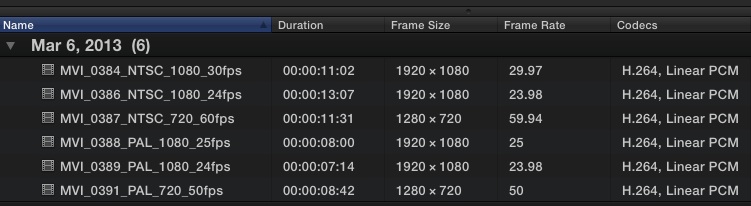
As you can see, my FCPx reads the files just fine by frame size and frame rate. I created Projects using this media and everything was fine. Keep in mind that tha camera says it records in 30fps but in reality the file is 29,97 fps; and when it says 24fps it really records in 23,98fps.
Are you using FCPx 10.0.7?
dl.dropbox.com/u/32428/CanonT2i_Media_FCPxs.zip
If you import them in FCPx, they should look like this:
As you can see, my FCPx reads the files just fine by frame size and frame rate. I created Projects using this media and everything was fine. Keep in mind that tha camera says it records in 30fps but in reality the file is 29,97 fps; and when it says 24fps it really records in 23,98fps.
Are you using FCPx 10.0.7?
--
Matias Canelson
www.canelson.us
Last edit: 06 Mar 2013 14:49 by canelson. Reason: Added link to download files
Please Log in to join the conversation.
06 Mar 2013 12:49 #22230
by spartanx
Replied by spartanx on topic FCPX Keeps Changing My 24p Footage To 29.97p Automatically. Should I Edit Like That Or Force 24p?
Canelson - Thanks a lot. Yeah, as above, I realized that It's not FCP that's for sure. Because the files ARE 29.97fps, that's why It's reading them as that. However, why they are 29.97fps when I set my camera to 24 is now the mystery!
Please Log in to join the conversation.
