


- Posts: 6
- Thank you received: 0
3 Post Moderation Rule for New Boarders (25 Jan 2021)
New boarders will have their posts moderated - Don't worry if you cannot see your post immediately.
Screenflow to Final Cut Pro X?
02 Mar 2013 22:14 #21992
by Foxy
Screenflow to Final Cut Pro X? was created by Foxy
After taking a screen video from Screenflow and exporting it, I import it to FCPX because it has a lot more options to work with. The problem is that, the video I took from Screenflow is crisp clear, it's perfect. Then as soon as I upload it to FCPX to edit, the quality is SO bad. What are the best export options in Screenflow so when I upload it to FCXP, it's still crisp clear?
Please Log in to join the conversation.
- Tom Wolsky
-

- Offline
- Moderator
-

02 Mar 2013 22:42 #21994
by Tom Wolsky
Replied by Tom Wolsky on topic Screenflow to Final Cut Pro X?
In Screenflow you can make a video any aspect ratio and size you want and can export in a number of different codecs. In FCP you work in standard video frame resolutions rendering to high quality codecs.
So, what's the exact specs of your Screenflow media? What are the project proerpties you're working in.
So, what's the exact specs of your Screenflow media? What are the project proerpties you're working in.
Please Log in to join the conversation.
02 Mar 2013 22:49 #21995
by Foxy
Replied by Foxy on topic Screenflow to Final Cut Pro X?
I'm sorry what do you mean by project properties? I'm sort of new at this. Everything is just on default, I used it straight away with no modifications when I downloaded it. I just record and stop record and then export it. The export settings I use are Web - High, scaled at 1280 x 720, and I export it to the Apple Intermediate Codec is that helps.
Please Log in to join the conversation.

02 Mar 2013 23:49 #21996
by cgbier
Replied by cgbier on topic Screenflow to Final Cut Pro X?
You also need to set the same properties in FCP for import. I assume you're using the FCP preset of 1080. Change that to 720.
Please Log in to join the conversation.

03 Mar 2013 00:05 #21997
by cseeman
Replied by cseeman on topic Screenflow to Final Cut Pro X?
Generally I'd recommend exporting at least ProResLT. Given the potential for detail you may even consider ProRes HQ. I leave everything full computer screen frame size when exporting out of ScreenFlow and do resize, crop, additional pan&scan in FCPX.
Keep in mind the Viewer in FCPX is scaling the image in most cases (like certain MBP Retina screen resolutions) so you may not be seeing the full resolution.
Keep in mind the Viewer in FCPX is scaling the image in most cases (like certain MBP Retina screen resolutions) so you may not be seeing the full resolution.
Please Log in to join the conversation.
03 Mar 2013 01:38 #21998
by Foxy
Replied by Foxy on topic Screenflow to Final Cut Pro X?
I don't have the option to export it to ProResLT or ProRes HQ on Screenflow and I have changed the preset on FCPX to 720p and the video is still blurry..
Please Log in to join the conversation.

03 Mar 2013 02:06 #22000
by BenB
Replied by BenB on topic Screenflow to Final Cut Pro X?
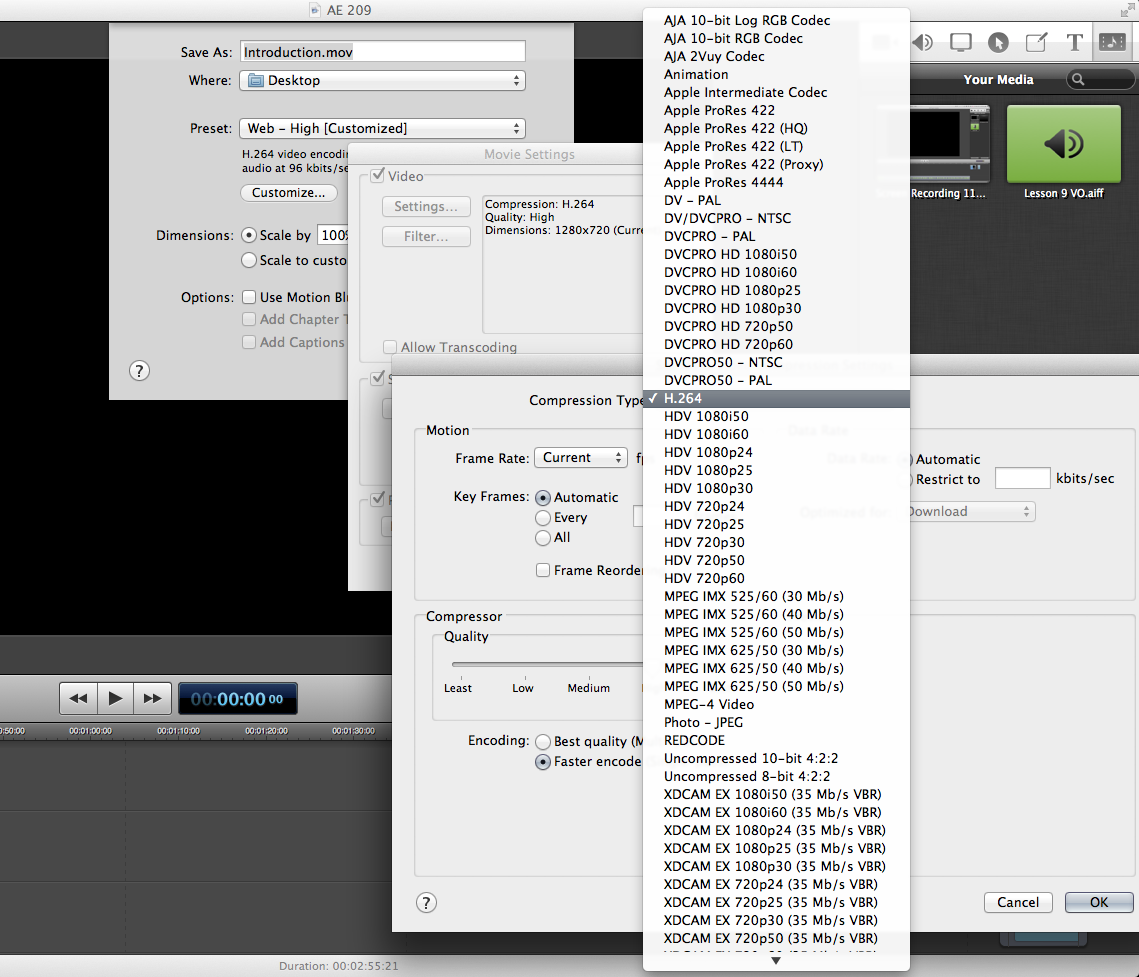
You can export any flavor of ProRes from ScreenFlow, any codec in the Quicktime library. Keep it ProRes 422. Also, I have a 1080x720 plain color graphic. I open that in QT Player, use it as a guide to resize my application screen. Then record.
In ScreenFlow, I set up for that size frame size. Edit, etc, and rarely need to go to FCP. When I need to, I got ProRes 422. I've never had image quality issues.
In ScreenFlow, I set up for that size frame size. Edit, etc, and rarely need to go to FCP. When I need to, I got ProRes 422. I've never had image quality issues.
Please Log in to join the conversation.
03 Mar 2013 02:22 #22004
by Foxy
Replied by Foxy on topic Screenflow to Final Cut Pro X?
So how do I export to ProRes 422 from Screenflow?
I go to file -> export -> customize -> settings and in the compression type menu, the only options I have are animation, apple intermediate codec, DV - PAL, DV/DVCPRO - NTSC, DVCPRO - PAL, DVCPRO50 - NTSC, DVCPRO50 - PAL, H.264, MPEG-4 video and JPEG - photo.
I go to file -> export -> customize -> settings and in the compression type menu, the only options I have are animation, apple intermediate codec, DV - PAL, DV/DVCPRO - NTSC, DVCPRO - PAL, DVCPRO50 - NTSC, DVCPRO50 - PAL, H.264, MPEG-4 video and JPEG - photo.
Please Log in to join the conversation.
03 Mar 2013 02:26 #22005
by BenB
Replied by BenB on topic Screenflow to Final Cut Pro X?
Please Log in to join the conversation.
03 Mar 2013 02:57 #22007
by cgbier
Replied by cgbier on topic Screenflow to Final Cut Pro X?
Did you download the extra content and codecs after you bought FCP? They are in that package.
Please Log in to join the conversation.
03 Mar 2013 03:51 #22010
by Foxy
Replied by Foxy on topic Screenflow to Final Cut Pro X?
Oh I figured out why, I don't have the latest version of Screenflow, so I just updated now and converted it to ProRes Alpha and the quality is MUCH MUCH better. Thank you everyone for the help!
Please Log in to join the conversation.
03 Mar 2013 07:22 - 03 Mar 2013 07:22 #22011
by BenB
Replied by BenB on topic Screenflow to Final Cut Pro X?
ProRes Alpha is "ProRes 4444" and makes HUGE files that make your computer work harder. Use ProRes 422, files not any larger than they need to be, computer doesn't have to work as hard, export goes much faster.
Last edit: 03 Mar 2013 07:22 by BenB.
Please Log in to join the conversation.
- Karsten Schlüter
-

- Offline
- Moderator
-
Less
More
- Posts: 3790
- Thank you received: 718
03 Mar 2013 09:46 #22012
by Karsten Schlüter
to feed my curiosity:
What options do you miss in Screenflow?
Its built-in editor offers 'all' features, I would expect from a screen-grabbed tutorial, from zoom-in/out, highlight, to audio editing, narration, titles, keys-in-use, to pic-in-pic .....
ok, a bit 'tricky' to handle, if you're used to FCPX, but no rocket-science ...... :lol:
Replied by Karsten Schlüter on topic Screenflow to Final Cut Pro X?
Foxy wrote: … Screenflow … import it to FCPX because it has a lot more options to work with.…
to feed my curiosity:
What options do you miss in Screenflow?
Its built-in editor offers 'all'
features, I would expect from a screen-grabbed tutorial, from zoom-in/out, highlight, to audio editing, narration, titles, keys-in-use, to pic-in-pic .....ok, a bit 'tricky' to handle, if you're used to FCPX, but no rocket-science ...... :lol:
Please Log in to join the conversation.
03 Mar 2013 12:38 #22019
by BenB
Replied by BenB on topic Screenflow to Final Cut Pro X?
Also, in ScreenFlow you can resize the mouse cursor, do callouts way easier, zooming in doesn't lose any image quality, etc. I almost never go to FCP X for screen capture work. ScreenFlow has far superior tools for that than FCP X. Especially the latest version.
Please Log in to join the conversation.
