


- Posts: 10
- Thank you received: 0
3 Post Moderation Rule for New Boarders (25 Jan 2021)
New boarders will have their posts moderated - Don't worry if you cannot see your post immediately.
Detach music track
24 Feb 2013 16:25 #21661
by Tancamb
Detach music track was created by Tancamb
I am an amateur editor editing some action shots with music. I just cut the song track into 2 and overlapped head and tail with fades to pull the musical climax forward in the piece. No problem. Except that now the beginning of the 2nd track seems attached to a video clip which I want to move (there is a vertical arrow indenting the bottom edge of the video clip, directly above it). I have tried dragging the video clip to a new position and the music comes with it. If I "cut" the clip (in order to paste elsewhere) the music deletes too. I tried "breaking apart clip items" but all that seems to do is remove the fader/keyframe actions I added to make the transition work
Please help - I cannot find anything addressing this in the Help pages.
Thanks.
Please help - I cannot find anything addressing this in the Help pages.
Thanks.
Please Log in to join the conversation.
- Tom Wolsky
-

- Offline
- Moderator
-

24 Feb 2013 16:30 #21662
by Tom Wolsky
Replied by Tom Wolsky on topic Detach music track
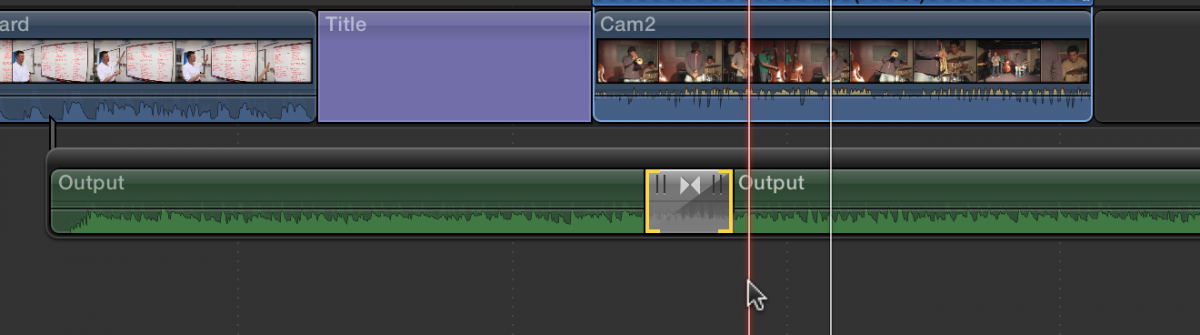
Select the two music clips that cross fade and use Cmd-G to make then a secondary storyline. The connection to the storyline will be at the head of the first piece of music.
Please Log in to join the conversation.
24 Feb 2013 16:45 - 24 Feb 2013 16:46 #21663
by Tancamb
Replied by Tancamb on topic Detach music track
Thank you Tom. Unfortunately, I just get the little "sorry that doesn't compute" honk, when I try that.
I did manage to make Option-G work - making it a compound clip detached from that clip, but as soon as I broke it apart again, it attached to the orginal clip in its new position.
So, THEN, I tried applying Command-G to the compounded clip - this worked!
Thanks again!
I did manage to make Option-G work - making it a compound clip detached from that clip, but as soon as I broke it apart again, it attached to the orginal clip in its new position.
So, THEN, I tried applying Command-G to the compounded clip - this worked!
Thanks again!
Last edit: 24 Feb 2013 16:46 by Tancamb.
Please Log in to join the conversation.
- Tom Wolsky
-
- Offline
- Moderator
-
24 Feb 2013 16:52 - 24 Feb 2013 16:54 #21664
by Tom Wolsky
Replied by Tom Wolsky on topic Detach music track
I should have realized the music tracks weren't in line with each other. A compound clip will have the same effect. You don't have to make it a secondary once it's compounded.
You can cross fade in line music with a transition and that will make a secondary.
You can cross fade in line music with a transition and that will make a secondary.
Last edit: 24 Feb 2013 16:54 by Tom Wolsky.
Please Log in to join the conversation.
24 Feb 2013 16:55 #21665
by Tancamb
Replied by Tancamb on topic Detach music track
What do you mean by "not in line", Tom? They were overlapping with the fades overlapping - I didn't use an effect, I did it manually using key frames and the slider.
You do need to apply Command G to the compound clip if you think you might ever break it apart again, because the moment you do it attaches itself again - in the wrong place!
You do need to apply Command G to the compound clip if you think you might ever break it apart again, because the moment you do it attaches itself again - in the wrong place!
Please Log in to join the conversation.
- Tom Wolsky
-
- Offline
- Moderator
-
24 Feb 2013 17:02 #21666
by Tom Wolsky
Replied by Tom Wolsky on topic Detach music track
Like this
Please Log in to join the conversation.
24 Feb 2013 17:20 #21667
by Tancamb
Replied by Tancamb on topic Detach music track
Good to know I could have just used a cross-fade effect, but I wanted to blend the clips together manually - and that is what got me in trouble. Good to know about compounding music clips and about secondary line. Learning as I go, hoping I will remember everything the next time!
Please Log in to join the conversation.
