


- Posts: 4
- Thank you received: 0
3 Post Moderation Rule for New Boarders (25 Jan 2021)
New boarders will have their posts moderated - Don't worry if you cannot see your post immediately.
Importing
- Tom Wolsky
-

- Offline
- Moderator
-

15 Feb 2013 20:01 #21400
by Tom Wolsky
Replied by Tom Wolsky on topic Importing
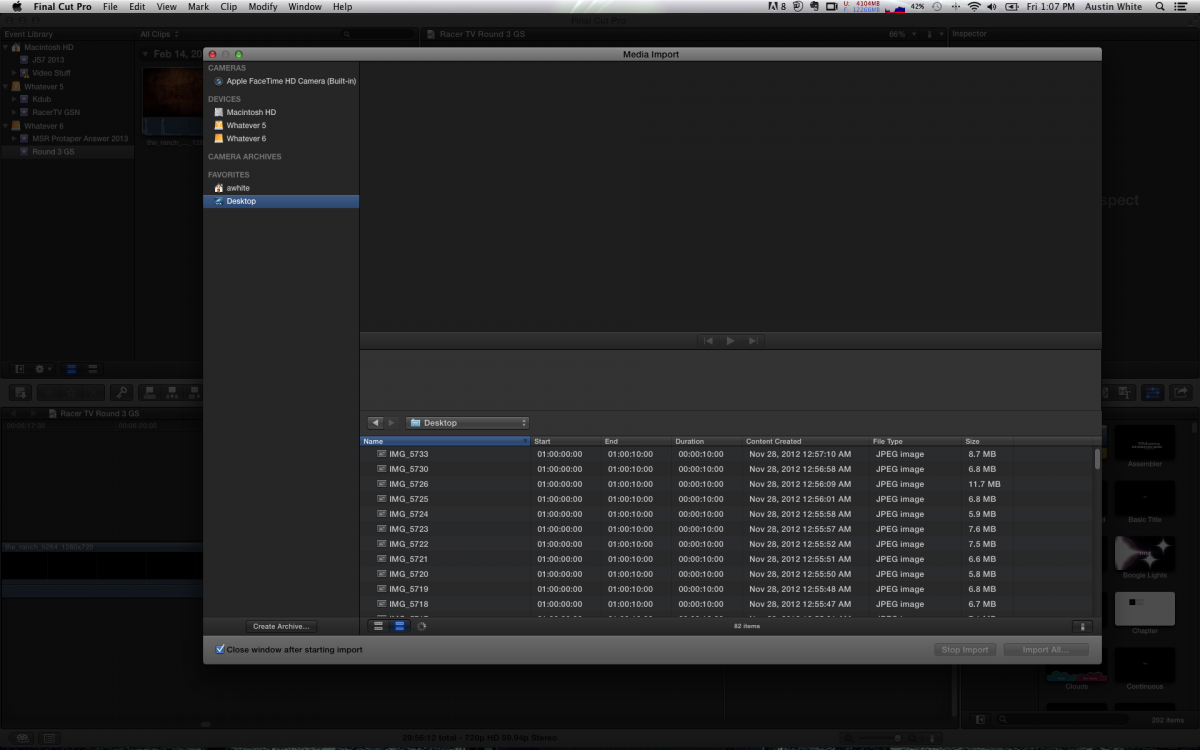
Can you post a screen shot of what you're seeing? On the desktop in the import window I see folders and files, some are grayed out, others are not.
Please Log in to join the conversation.
- Tom Wolsky
-
- Offline
- Moderator
-
15 Feb 2013 20:14 #21402
by Tom Wolsky
Replied by Tom Wolsky on topic Importing
Are all those images inside a folder? There is probably some folder that is being read as a camera archive because the window has opened into camera import function.
Please Log in to join the conversation.
- Tom Wolsky
-
- Offline
- Moderator
-
15 Feb 2013 20:26 - 15 Feb 2013 20:38 #21404
by Tom Wolsky
Replied by Tom Wolsky on topic Importing
Is there a folder on the desktop with a name like Video or Private or DCIM or something the application will interpret as a camera archive? You're not trying to import using the camera import function are you?
If there is something open like this
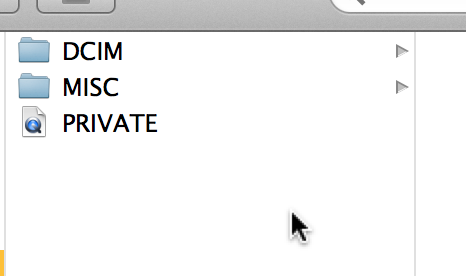
FCP will see it as a camera and open everything on the desktop in camera import mode. Put this stuff in a folder and it should be hidden from the application. Do this with the application closed.
If there is something open like this
FCP will see it as a camera and open everything on the desktop in camera import mode. Put this stuff in a folder and it should be hidden from the application. Do this with the application closed.
Last edit: 15 Feb 2013 20:38 by Tom Wolsky.
Please Log in to join the conversation.
