- Posts: 197
- Thank you received: 27
3 Post Moderation Rule for New Boarders (25 Jan 2021)
New boarders will have their posts moderated - Don't worry if you cannot see your post immediately.
Help - Fading in a timeline with a masked clip
15 Feb 2013 16:28 #21377
by smg669
Help - Fading in a timeline with a masked clip was created by smg669
Hi. I've got a simple project of a talking head shot on a white BG. There are some bits along the edges of the camera shot that need to be masked out.
So, I dropped a white Custom Solid Generator on the Primary Storyline. Then I added the camera clips as Connected clips. Then I masked them (and colour corrected them). All was fine. Now I just need to add a simple 20 frame fade up/down from 2 second black slates at the top and tail of the piece.
I approached this as i would in FCP7 (or AE) - I dropped a black Custom Solid Generator as an attached clip on top of the white BG and the camera clip. Then I tried to add a dissolve to it to fade in from black.
But when I do that, the mask that I placed on the camera clip becomes visible midway through the dissolve. That seems wrong to me. I'm sure there are other ways to do this (and I'd be happy to hear suggestions).
Here is how the timeline looks:

Here is what the camera clip looks like when masked without the white BG underneath:

Here is what the shot looks like in the middle of that dissolve:

So, I dropped a white Custom Solid Generator on the Primary Storyline. Then I added the camera clips as Connected clips. Then I masked them (and colour corrected them). All was fine. Now I just need to add a simple 20 frame fade up/down from 2 second black slates at the top and tail of the piece.
I approached this as i would in FCP7 (or AE) - I dropped a black Custom Solid Generator as an attached clip on top of the white BG and the camera clip. Then I tried to add a dissolve to it to fade in from black.
But when I do that, the mask that I placed on the camera clip becomes visible midway through the dissolve. That seems wrong to me. I'm sure there are other ways to do this (and I'd be happy to hear suggestions).
Here is how the timeline looks:
Here is what the camera clip looks like when masked without the white BG underneath:
Here is what the shot looks like in the middle of that dissolve:
Please Log in to join the conversation.
15 Feb 2013 16:42 #21378
by smg669
Replied by smg669 on topic Help - Fading in a timeline with a masked clip
I just tried making a compound clip of the two layers (the white BG and the edited camera clips) and dissolving from a gap clip and that didn't work either - still can see that mask. 
Please Log in to join the conversation.


15 Feb 2013 17:00 #21379
by Jimmyfinn
Replied by Jimmyfinn on topic Help - Fading in a timeline with a masked clip
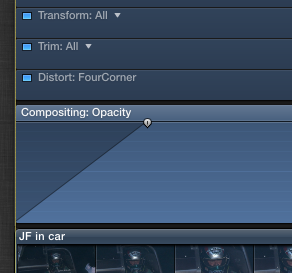
Ctrl + V the compound clip and use the Opacity handles to create the fades.
Please Log in to join the conversation.
15 Feb 2013 17:05 - 15 Feb 2013 17:07 #21381
by smg669
I just tried that - thanks for your input. It does not work. The mask is visible in the middle of the opacity ramp-up.

Replied by smg669 on topic Help - Fading in a timeline with a masked clip
Jimmyfinn wrote: Ctrl + V the compound clip and use the Opacity handles to create the fades.
I just tried that - thanks for your input. It does not work. The mask is visible in the middle of the opacity ramp-up.
Last edit: 15 Feb 2013 17:07 by smg669.
Please Log in to join the conversation.
15 Feb 2013 17:25 #21384
by Jimmyfinn
Replied by Jimmyfinn on topic Help - Fading in a timeline with a masked clip
Are both the whites in the talking head and the generator of similar luminance values?
Please Log in to join the conversation.
15 Feb 2013 17:27 - 15 Feb 2013 17:29 #21386
by smg669
I've used an eyedropper tool across the entire clip and all of the samples I took of the white (both from the BG and the colour corrected camera clip) are at RBC 255/255/255.
Here is a grab of the final masked/ corrected shot:

Replied by smg669 on topic Help - Fading in a timeline with a masked clip
Jimmyfinn wrote: Are both the whites in the talking head and the generator of similar luminance values?
I've used an eyedropper tool across the entire clip and all of the samples I took of the white (both from the BG and the colour corrected camera clip) are at RBC 255/255/255.
Here is a grab of the final masked/ corrected shot:
Last edit: 15 Feb 2013 17:29 by smg669.
Please Log in to join the conversation.

15 Feb 2013 22:49 #21414
by plysat
Can't sleep? Try this: fcpxpert.net ;-)
Replied by plysat on topic Help - Fading in a timeline with a masked clip
Make the generator and camera clips into a compound clip and use the opacity fade handle to fade it in.
Can't sleep? Try this: fcpxpert.net ;-)
Please Log in to join the conversation.
16 Feb 2013 00:48 #21417
by smg669
See my post 3 up from yours. I tried dropping the whole mess into a compound clip and ramping up the opacity. It didn't work.
Replied by smg669 on topic Help - Fading in a timeline with a masked clip
plysat wrote: Make the generator and camera clips into a compound clip and use the opacity fade handle to fade it in.
See my post 3 up from yours. I tried dropping the whole mess into a compound clip and ramping up the opacity. It didn't work.
Please Log in to join the conversation.
16 Feb 2013 01:39 #21419
by plysat
Oops. :oops:
Can't sleep? Try this: fcpxpert.net ;-)
Replied by plysat on topic Help - Fading in a timeline with a masked clip
smg669 wrote:
plysat wrote: Make the generator and camera clips into a compound clip and use the opacity fade handle to fade it in.
See my post 3 up from yours. I tried dropping the whole mess into a compound clip and ramping up the opacity. It didn't work.
Oops. :oops:
Can't sleep? Try this: fcpxpert.net ;-)
Please Log in to join the conversation.
-

- New Member
-

Less
More
- Thank you received: 0
16 Feb 2013 09:12 #21429
by
Replied by on topic Help - Fading in a timeline with a masked clip
Not really and ideal solution, but often when i get things like this i usually render that complete clip out with the bg, then import it back in and replace the original clip. You shouldn't get any problems that way.
Please Log in to join the conversation.
16 Feb 2013 12:04 - 16 Feb 2013 12:05 #21430
by Dave_EP
Replied by Dave_EP on topic Help - Fading in a timeline with a masked clip
You are fading the compound clip in the project, and not the clips within the compound right ?
There should be ZERO opacity changes within the compound clip itself.
To make sure of this, reset all the opacity stuff on the clips themselves within the compound clip.
I've seen this before and it's always been a problem with effects applied on the clips.
There should be ZERO opacity changes within the compound clip itself.
To make sure of this, reset all the opacity stuff on the clips themselves within the compound clip.
I've seen this before and it's always been a problem with effects applied on the clips.
Last edit: 16 Feb 2013 12:05 by Dave_EP.
Please Log in to join the conversation.

16 Feb 2013 13:05 #21431
by anickt
Replied by anickt on topic Help - Fading in a timeline with a masked clip
Add a luma key to the talent clip instead of masking it.
Please Log in to join the conversation.
16 Feb 2013 13:10 #21432
by smg669
Yeah, I've thought of this. And I know that this will work. I'm avoiding doing it because it's just wrong. I shouldn't have to do that with a modern editing application. Because, in my opinion, what's happening here is a bug. Logically that mask should not be showing up.
Replied by smg669 on topic Help - Fading in a timeline with a masked clip
matthewcarlin wrote: Not really and ideal solution, but often when i get things like this i usually render that complete clip out with the bg, then import it back in and replace the original clip. You shouldn't get any problems that way.
Yeah, I've thought of this. And I know that this will work. I'm avoiding doing it because it's just wrong. I shouldn't have to do that with a modern editing application. Because, in my opinion, what's happening here is a bug. Logically that mask should not be showing up.
Please Log in to join the conversation.
16 Feb 2013 13:12 #21433
by smg669
Yes, there are no opacity or dissolves happening inside the compound clip. The only thing that's in there is the mask and the colour correction.
Replied by smg669 on topic Help - Fading in a timeline with a masked clip
Dave_EP wrote: You are fading the compound clip in the project, and not the clips within the compound right ?
There should be ZERO opacity changes within the compound clip itself.
To make sure of this, reset all the opacity stuff on the clips themselves within the compound clip.
I've seen this before and it's always been a problem with effects applied on the clips.
Yes, there are no opacity or dissolves happening inside the compound clip. The only thing that's in there is the mask and the colour correction.
Please Log in to join the conversation.
16 Feb 2013 13:14 #21434
by smg669
There's garbage along the edges of the camera shots - the white backdrop does not go edge to edge. So, even if I did a luma key I would still have to do a garbage matte.
Replied by smg669 on topic Help - Fading in a timeline with a masked clip
anickt wrote: Add a luma key to the talent clip instead of masking it.
There's garbage along the edges of the camera shots - the white backdrop does not go edge to edge. So, even if I did a luma key I would still have to do a garbage matte.
Please Log in to join the conversation.
16 Feb 2013 16:24 - 16 Feb 2013 16:24 #21437
by Jimmyfinn
Replied by Jimmyfinn on topic Help - Fading in a timeline with a masked clip
I've recreated the scenario you are describing and can't get same result.
Opacity fades on a compound clip work as does the Fade out of a generator.
It sounds lame but it may be worth trashing the Preference files for X and see if that has any effect. Also what filter are you using to mask the talking head?
Opacity fades on a compound clip work as does the Fade out of a generator.
It sounds lame but it may be worth trashing the Preference files for X and see if that has any effect. Also what filter are you using to mask the talking head?
Last edit: 16 Feb 2013 16:24 by Jimmyfinn.
Please Log in to join the conversation.
16 Feb 2013 21:02 #21441
by Seanus
Sean Lander - Editing since 1982 - AVID 1991 - FCP 1999 - FCPX 2011
Replied by Seanus on topic Help - Fading in a timeline with a masked clip
Could it have anything to do,with the colour values? Is 255 showing as 100 on the waveform monitor or is it appearing as superwhite? Just thinking maybe FCP X is clamping the level of the Generator when doing the transition as its a graphic.
Out of interest instead of using the generator try sampling a bit of the same shot with the crop tool then blow it up to fill the frame and try that.
Out of interest instead of using the generator try sampling a bit of the same shot with the crop tool then blow it up to fill the frame and try that.
Sean Lander - Editing since 1982 - AVID 1991 - FCP 1999 - FCPX 2011
Please Log in to join the conversation.
19 Feb 2013 20:37 #21526
by smg669
Replied by smg669 on topic Help - Fading in a timeline with a masked clip
Still not having luck. I was using the "Mask" effect from the "Keying" section of effects. I also tried it with the "crop" tool in the video inspector. Same results.
If anyone is interested in trying it out themselves, I have zipped up a sample clip in an event/project. Please feel free to download it and figure out where (if) I went wrong:
we.tl/seqs57sQ45
Thanks for any assistance.
S
If anyone is interested in trying it out themselves, I have zipped up a sample clip in an event/project. Please feel free to download it and figure out where (if) I went wrong:
we.tl/seqs57sQ45
Thanks for any assistance.
S
Please Log in to join the conversation.