


- Posts: 222
- Thank you received: 3
3 Post Moderation Rule for New Boarders (25 Jan 2021)
New boarders will have their posts moderated - Don't worry if you cannot see your post immediately.
Changing parameters of a dropbox?
11 Feb 2013 02:15 #21168
by Rbelfi
Changing parameters of a dropbox? was created by Rbelfi
I've published a template from Motion to FCPX since FCPX seems to handle the graphics heavy template better ( my graphics card isn't idle). In motion I'm able to adjust the paramaters of a photo placed into a dropbox so that my desired portion of the photo is showing. Using the same template published in FCPX I can only place the photo into the dropbox, but I don't see anywhere were I can adjust the center point or the dimensions?
Does anyone have any ideas?
Thanks in advance,
Rob
Does anyone have any ideas?
Thanks in advance,
Rob
Please Log in to join the conversation.

11 Feb 2013 18:00 #21184
by BenB
Replied by BenB on topic Changing parameters of a dropbox?
In Motion, you have to Publish those parameters.
Please Log in to join the conversation.
11 Feb 2013 18:12 #21187
by Rbelfi
Replied by Rbelfi on topic Changing parameters of a dropbox?
I selected the publish paramaters for FCPX section, is there an option for selecting which paramaters you'd like published? I'm not at my editing computer until tonight and will have to check then.
Please Log in to join the conversation.
11 Feb 2013 18:18 #21189
by BenB
Replied by BenB on topic Changing parameters of a dropbox?
In "Motion" you have to manually "publish" the specific parameters you want to have show up in FCP X. They don't just automatically show up in FCP X.
Please Log in to join the conversation.
11 Feb 2013 18:53 #21190
by Rbelfi
Replied by Rbelfi on topic Changing parameters of a dropbox?
I figured they would all publish by default, this was my first time trying this process. I'll have to look at my project again later this evening.
Thanks for your help.
Thanks for your help.
Please Log in to join the conversation.
11 Feb 2013 19:03 #21191
by BenB
Replied by BenB on topic Changing parameters of a dropbox?
Yep, nothing is published by default.
Please Log in to join the conversation.
12 Feb 2013 00:54 #21201
by Rbelfi
Replied by Rbelfi on topic Changing parameters of a dropbox?
Ben,
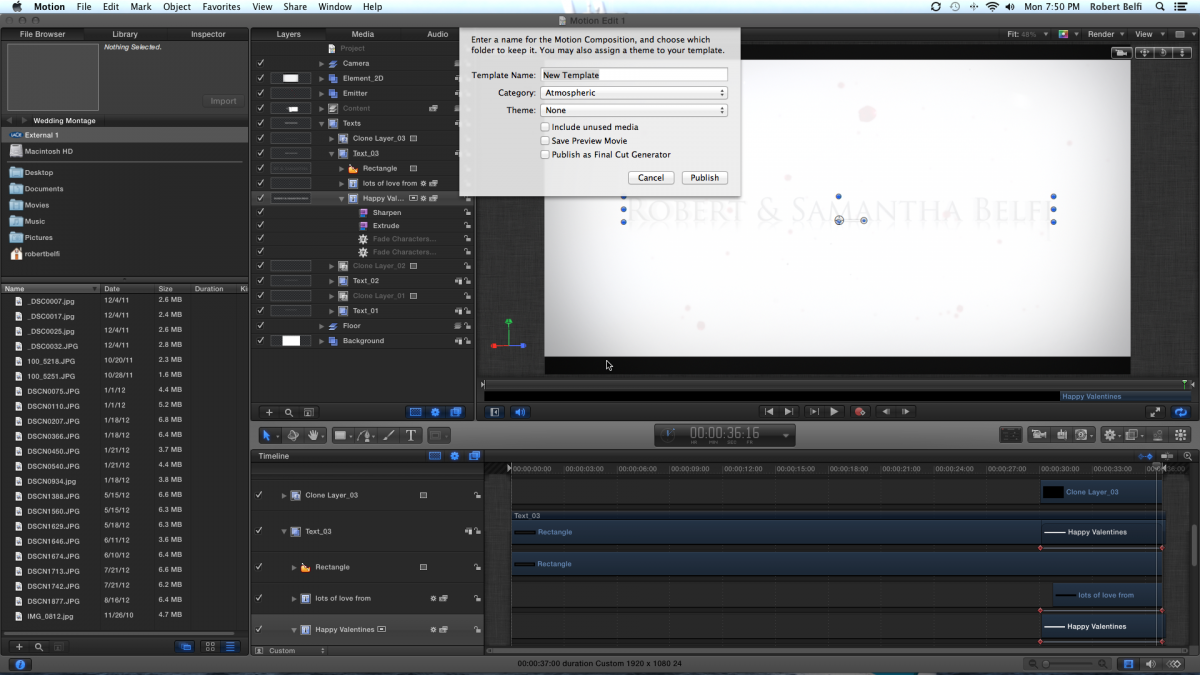
I only saw these options available when publishing the template. I choose all three the original time, should there be one or more I shouldn't be checking off?
Thanks,
Rob
I only saw these options available when publishing the template. I choose all three the original time, should there be one or more I shouldn't be checking off?
Thanks,
Rob
Please Log in to join the conversation.
12 Feb 2013 02:02 - 12 Feb 2013 02:04 #21205
by BenB
Replied by BenB on topic Changing parameters of a dropbox?
Give it a name, assign it a category. I have a category in each template browser called "Ben's Custom". Then only check "Publish as FCP Generator". Don't check the other two.
But that won't publish the "parameters".
In the Motion project, highlight the appropriate layer, go to the appropriate section of the Inspector and set those to publish.
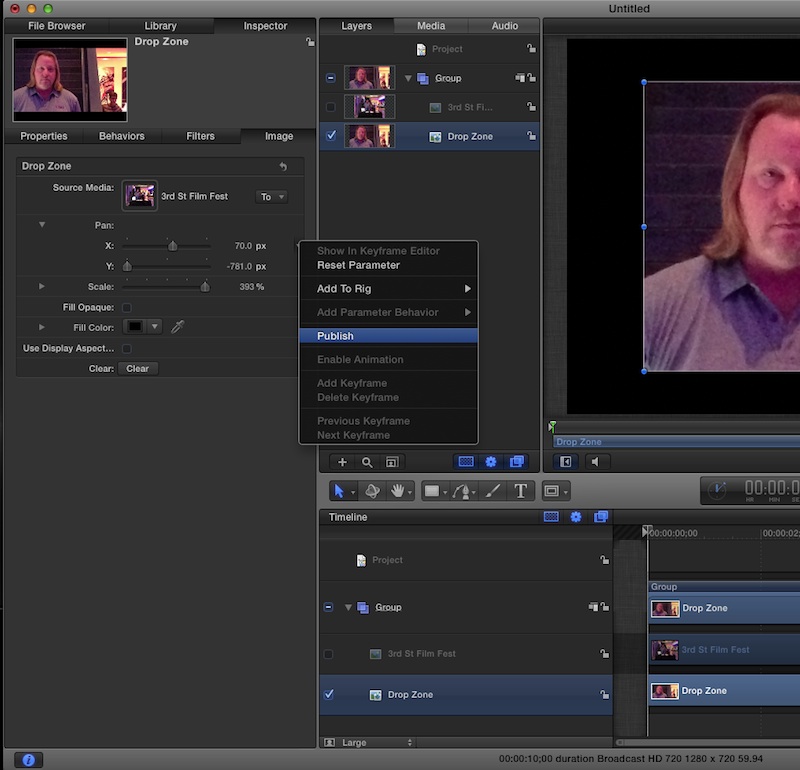
In your case, for a Drop Zone, go to the Image tab and publish the Pan and Scale parameters via the Animation Menu (far right of the parameter name, arrowhead the appears when you mouse over it), or simply right-click on the parameter name (Pan), and choose Publish.
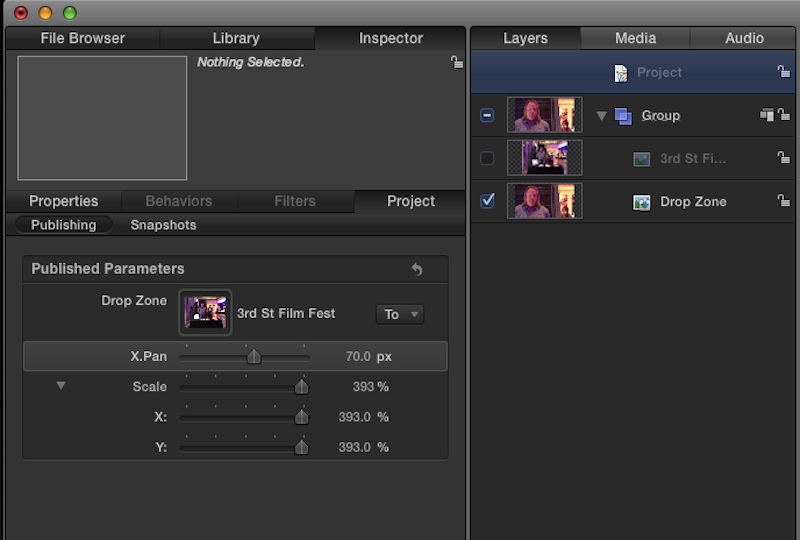
Then you can go to the Project layer, to the Project tab. This shows the parameters that you've published. You can rename any published parameters if you'd like. Or just leave them as they are. Also, what these published parameters are set to here when you Save the project, will be the defaults when it is applied in FCP X.
But that won't publish the "parameters".
In the Motion project, highlight the appropriate layer, go to the appropriate section of the Inspector and set those to publish.
In your case, for a Drop Zone, go to the Image tab and publish the Pan and Scale parameters via the Animation Menu (far right of the parameter name, arrowhead the appears when you mouse over it), or simply right-click on the parameter name (Pan), and choose Publish.
Then you can go to the Project layer, to the Project tab. This shows the parameters that you've published. You can rename any published parameters if you'd like. Or just leave them as they are. Also, what these published parameters are set to here when you Save the project, will be the defaults when it is applied in FCP X.
Last edit: 12 Feb 2013 02:04 by BenB.
Please Log in to join the conversation.
12 Feb 2013 02:42 #21207
by Rbelfi
Replied by Rbelfi on topic Changing parameters of a dropbox?
AHHHH That definitely helps alot. Thanks for the detailed post. I was able to published my desired parameters successfully in FCPX.
Please Log in to join the conversation.
