


- Posts: 3
- Thank you received: 0
3 Post Moderation Rule for New Boarders (25 Jan 2021)
New boarders will have their posts moderated - Don't worry if you cannot see your post immediately.
Aspect 16:9 to 4:3
03 Feb 2013 22:29 #20898
by abdimanan
Aspect 16:9 to 4:3 was created by abdimanan
My name is Abdimanan I am a final cut X user I like the product but it seems it is not complete and basic things are missing or hidden, I am getting problem of aspect ration, some times I got 4:3 clips and when I place it i the time like it seems lleterbox and it can't March the timeline and some times the clips look like out of focused
so how change aspect ration from 61:9 to 4:3 and vice verse
I ma using FCPX 10.0.7
so how change aspect ration from 61:9 to 4:3 and vice verse
I ma using FCPX 10.0.7
Please Log in to join the conversation.

04 Feb 2013 06:33 #20908
by marchyman
Replied by marchyman on topic Aspect 16:9 to 4:3
What is the aspect ratio of your source media? It sounds like you are mixing and matching. The timeline will take the characteristics of the first clip you add unless you manually set it otherwise. You can use ⌘J to look at your current project properties. Once a clip is added to a project you can use the Spacial Conform properties to select how the clip is used.
If you have a 1080p timeline and try to stuff a SD video clip into it with a Spacial Conform of fit or fill you will get a blurry mess. At least I'd get a blurry mess... my SD video is stuff recovered from old VHS tapes that are pretty much a blurry mess to start.
If you have a 1080p timeline and try to stuff a SD video clip into it with a Spacial Conform of fit or fill you will get a blurry mess. At least I'd get a blurry mess... my SD video is stuff recovered from old VHS tapes that are pretty much a blurry mess to start.
Please Log in to join the conversation.
04 Feb 2013 16:58 #20919
by abdimanan
Replied by abdimanan on topic Aspect 16:9 to 4:3
I Set my project properties to set first clip, and my source file is
1080p DH and when I put the time line another clip with SD 4:3 the clip with be blurry and letter boxed so how to to avoid my clips with different properties no to blurry and letter boxed
and how to fix the aspect ratio with no blurry
1080p DH and when I put the time line another clip with SD 4:3 the clip with be blurry and letter boxed so how to to avoid my clips with different properties no to blurry and letter boxed
and how to fix the aspect ratio with no blurry
Please Log in to join the conversation.

04 Feb 2013 18:25 - 04 Feb 2013 18:27 #20923
by BenB
Replied by BenB on topic Aspect 16:9 to 4:3
You're blowing SD frame size up to HD frame size. Any time you enlarge a graphic/image it will lose detail and get blurry. Physics. You can process it in one of the apps around that try to do this, but even they have limitations.
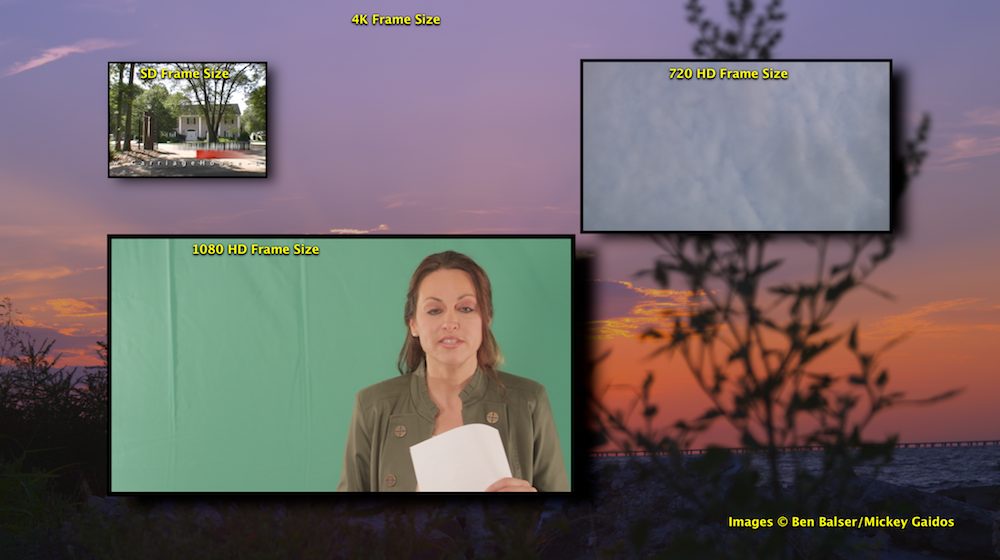
The difference in aspect ratios is the same way. One is a wide rectangle, one is pretty much a square box. To made the SD clip fill the HD rectangle frame size, you'll have to blow it up even larger, making it even more blurry. Physics.
The difference in aspect ratios is the same way. One is a wide rectangle, one is pretty much a square box. To made the SD clip fill the HD rectangle frame size, you'll have to blow it up even larger, making it even more blurry. Physics.
Last edit: 04 Feb 2013 18:27 by BenB.
Please Log in to join the conversation.
