


- Posts: 20
- Thank you received: 0
3 Post Moderation Rule for New Boarders (25 Jan 2021)
New boarders will have their posts moderated - Don't worry if you cannot see your post immediately.
Gamma shift on Youtube and Vimeo
- jefgibbons
-
 Topic Author
- Offline
- Junior Member
-

Less
More
28 Jan 2013 19:28 #20542
by jefgibbons
Gamma shift on Youtube and Vimeo was created by jefgibbons
Hi folks! Just wondering if anyone has figured out this old quirk I've had for a long time. When working on projects in old Premiere Pro, and also now in FCPX, I get a dark gamma shift after uploading to Youtube or Vimeo. The video looks perfect in Quicktime after exporting (same as it does in FCPX) But if I upload it and view it it's darker, or if I view it in VLC it's darker.
Most gamma shift problems I have seen online refer to it changing in Quicktime after export, but my problems seems to be a bit different. Has anyone experienced or figured this out?
Here's a close cropped example where the left is Quicktime, and the right is VLC.
I should mention I am on a calibrated monitor, with the Huey, and I don't know how that factors into video rendering but I thought I'd throw that out there!

Most gamma shift problems I have seen online refer to it changing in Quicktime after export, but my problems seems to be a bit different. Has anyone experienced or figured this out?
Here's a close cropped example where the left is Quicktime, and the right is VLC.
I should mention I am on a calibrated monitor, with the Huey, and I don't know how that factors into video rendering but I thought I'd throw that out there!
Please Log in to join the conversation.
- jefgibbons
-
Topic Author
- Offline
- Junior Member
-
Less
More
- Posts: 20
- Thank you received: 0
28 Jan 2013 21:31 #20545
by jefgibbons
Replied by jefgibbons on topic Gamma shift on Youtube and Vimeo
Okay, it gets weirder! I was really doubting that it could be video card related, but I noticed if I drag the browser to my LCD tv that is hooked up to my Mac Pro, the video shifts in brightness! So I took a screenshot on the LCD TV of a vid in youtube, and then moved it to the LCD monitor and did the same, check out the results! The left pic is the same browser with Youtube on my TV, the right one is on the display. Both are hooked to the same mac pro, the monitor is calibrated, the TV is not, but that should have nothing to do with taking a screenshot!! I have no idea what is going on here but I'd love to hear any thoughts on the matter!
Basically I think I've established that it's just darker on my monitor, but WHY???
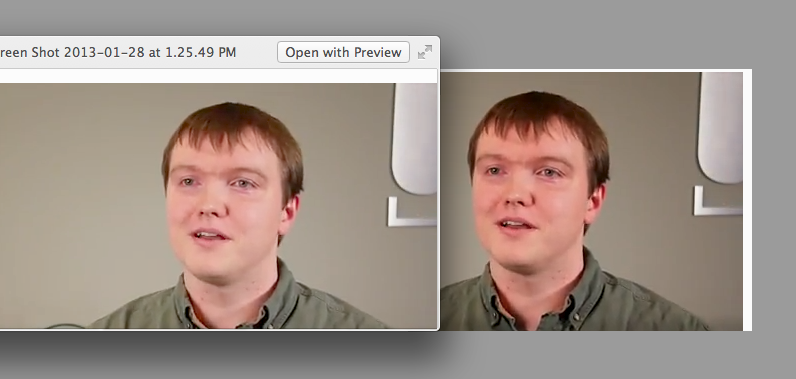
Basically I think I've established that it's just darker on my monitor, but WHY???
Please Log in to join the conversation.

28 Jan 2013 22:22 #20550
by BenB
Replied by BenB on topic Gamma shift on Youtube and Vimeo
Different codecs and platforms, especially online streaming, handle gamma differently. Facts of life. We use broadcast monitors to be film/broadcast safe, but there is never any gaurantee that the viewer at the end of the pipeline will see the same thing.
Please Log in to join the conversation.

28 Jan 2013 22:27 #20553
by pollux
Replied by pollux on topic Gamma shift on Youtube and Vimeo
H264 and HDV based files always look brighter in QuickTime Player. I use VLC player as reference player since what it shows is close to what I see on PC and web
I suspect it's the default gamma in QT player (I could be wrong though)
I suspect it's the default gamma in QT player (I could be wrong though)
Please Log in to join the conversation.
- jefgibbons
-
Topic Author
- Offline
- Junior Member
-
Less
More
- Posts: 20
- Thank you received: 0
28 Jan 2013 22:30 #20555
by jefgibbons
Replied by jefgibbons on topic Gamma shift on Youtube and Vimeo
Thanks Pollux, that's what I first thought, but after testing it on 2 different monitors hooked up to the same computer, I'm thinking it's somehow GPU/calibration related. I should also mention that I have 2 GPUs in this machine... might add something to the mix!
Please Log in to join the conversation.

28 Jan 2013 23:26 #20556
by ddixon
Replied by ddixon on topic Gamma shift on Youtube and Vimeo
I've had the same problem - videos darker on YouTube. I ended up with the somewhat crude workaround of creating a custom Compressor setting that changed the gamma to .95 and/or .90 of the original. However, for me, Vimeo does not do this. Or if it does it's so negligible that it's fine for my use, so I'm using that whenever possible. The original movie exported from FCPX, and the h.264 that I create and upload do NOT show this darkening.
Please Log in to join the conversation.
