


- Posts: 452
- Thank you received: 75
3 Post Moderation Rule for New Boarders (25 Jan 2021)
New boarders will have their posts moderated - Don't worry if you cannot see your post immediately.
What is the best Thunderbolt RAID?
17 Feb 2013 22:31 #21461
by anickt
Replied by anickt on topic What is the best Thunderbolt RAID?
I am using an OWC Qx2 in RAID 5 config through FW800. It's overkill as a backup device really but I use it for other purposes as well. I just happened to have it available. Any drive that's reasonably fast and of sufficient capacity would work.
Please Log in to join the conversation.

18 Feb 2013 01:50 - 18 Feb 2013 01:51 #21469
by BenB
Replied by BenB on topic What is the best Thunderbolt RAID?
As long as the backup has the same capacity that you are backing up, you're fine, period.
Get Carbon Copy Cloner (best deal on the market) and schedule it to do backups every night while you're not working.
Get Carbon Copy Cloner (best deal on the market) and schedule it to do backups every night while you're not working.
Last edit: 18 Feb 2013 01:51 by BenB.
Please Log in to join the conversation.

18 Feb 2013 02:17 #21473
by hcraig
If I understand you correctly, do you mean if I am using a 4 TB RAID as the main source for my media files the back-up drive should also be 4 TB, or larger?
Replied by hcraig on topic What is the best Thunderbolt RAID?
BenB wrote: As long as the backup has the same capacity that you are backing up, you're fine, period.
Get Carbon Copy Cloner (best deal on the market) and schedule it to do backups every night while you're not working.
If I understand you correctly, do you mean if I am using a 4 TB RAID as the main source for my media files the back-up drive should also be 4 TB, or larger?
Please Log in to join the conversation.
18 Feb 2013 03:41 #21474
by BenB
Replied by BenB on topic What is the best Thunderbolt RAID?
Well yeah, its pretty much common sense. If you have 4TB of storage, and only 1TB of backup capacity, you're kind of screwed, eh?
Please Log in to join the conversation.
- TrixTrax9000
-

- Offline
- Platinum Member
-

Less
More
- Posts: 1213
- Thank you received: 142
07 Mar 2013 22:11 #22319
by TrixTrax9000
Replied by TrixTrax9000 on topic What is the best Thunderbolt RAID?
You might find some helpful info here...
jonnyelwyn.co.uk/thunderbolt/which-hardd...y-for-video-editing/
jonnyelwyn.co.uk/thunderbolt/which-hardd...y-for-video-editing/
Please Log in to join the conversation.
07 Mar 2013 23:31 #22324
by hcraig
Thanks for posting the link to jonnyelwyn.co.
Replied by hcraig on topic What is the best Thunderbolt RAID?
TrixTrax9000 wrote: You might find some helpful info here...
jonnyelwyn.co.uk/thunderbolt/which-hardd...y-for-video-editing/
Thanks for posting the link to jonnyelwyn.co.
Please Log in to join the conversation.
- cinemaloha
-
- Offline
- Elite Member
-

Less
More
- Posts: 163
- Thank you received: 36
15 Apr 2013 16:41 - 15 Apr 2013 16:43 #24463
by cinemaloha
Replied by cinemaloha on topic What is the best Thunderbolt RAID?
Ken Stone has a comprehensive write-up on the Pegasus R4 / R6. If you're an editor who wants a plug & play RAID 5 Thunderbolt RAID Array that can provide read/write speeds in the 500 MB/s area, it is well worth the price & peace of mind.
It is next on my purchase list.
www.kenstone.net/fcp_homepage/promise_pegasus_raid_stone.html
It is next on my purchase list.
www.kenstone.net/fcp_homepage/promise_pegasus_raid_stone.html
Last edit: 15 Apr 2013 16:43 by cinemaloha.
Please Log in to join the conversation.
- cinemaloha
-
- Offline
- Elite Member
-
Less
More
- Posts: 163
- Thank you received: 36
18 Apr 2013 23:01 - 18 Apr 2013 23:07 #24672
by cinemaloha
Replied by cinemaloha on topic What is the best Thunderbolt RAID?
BareFeats Website
Originally posted Friday, March 1st, 2013, by rob-ART morgan, mad scientist
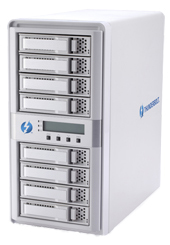
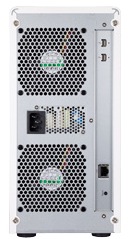
Areca is known for host bus adapters but now they will also be known for Thunderbolt enclosures. The new 8-bay ARC-8050 Thunderbolt RAID enclosure has some compeling features:
"RAID in the box" with support for RAID 0, 1, 1E, 3, 5, 6, 10, 30, 50, 60, or JBOD.
RAID management using the front LCD panel or with browser based RAID manager
Dual Thunderbolt ports which allows for daisy chaining with other Thunderbolt devices
Intelligent cooling fan speed controller
800MHz dual-core ROC with 1GB of on-board DDR3 SDRAM with ECC protection
Accepts both SATA and SAS 3.5" drives (2.5" require an adapter - we used the Sonnet Transposer)
(See the full feature list on the ARC-8050 product page.)
What transfer speeds are possible with the ARECA ARC-8050?
We loaded it up with eight 6Gbps SSDs and connected it to one of the 2012 iMac's Thunderbolt ports. After testing RAID 0 and RAID 5 modes, we loaded it up with eight HDDs and repeated the tests.
GRAPH LEGEND
8 SSDs R0 = Eight 6Gbps SSDs in a RAID 0 configuration
4 SSDs R0 = Four 6Gbps SSDs in a RAID 0 configuration
8 HDDs R0 = Eight 6Gbps HDDs in a RAID 0 configuration
8 SSDs R5 = Eight 6Gbps SSDs in a RAID 5 configuration
8 HDDs R5 = Eight 6Gbps HDDs in a RAID 5 configuration
All configurations, of course, were mounted in the Areca ARC-8050 Thunderbolt enclosure and connected to the 2012 iMac Core i7 (3.4GHz). The SSDs were a mixture of SandForce based synchronous models from two manufacturers (OWC and TransIntl). The HDDs were a mixture of Seagate Barracuda 7200.14 (1TB) and Hitachi Deskstar 7K3000 (2TB) drives.
Using AJA System Test with 16GB test size and 4K frame size, we put it to the stress -- I mean test.
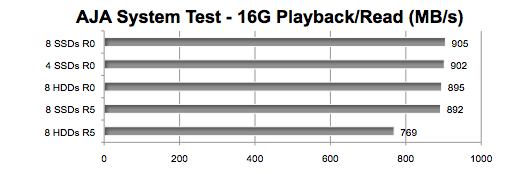
Insight #1: The ARC-8050 posted the fastest transfer speeds of any Thunderbolt multi-drive enclosure we've tested to date.
Insight #2: Like all Thunderbolt devices, the transfer speed of 10 gigabit per second translates to something less than 1000MB/s -- even if you load it up with eight 6Gbps SSDs capable of a combined speed of 4000MB/s. And, as you can see, even with eight 6Gbps HDDs capable of a combined speed exceeding 1200MB/s, they don't come close.
What about small random transfers?
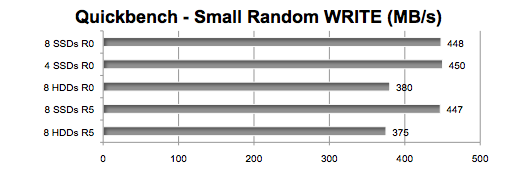
Insight #3: SSDs generally handle small random transactions much faster than HDDs. However, in the case of the ARC-8050, the aggregate random transfers per second is so close, one questions the need for solid state drives.
FINAL THOUGHTS
The Areca ARC-8050 8 bay Thunderbolt RAID storage is a welcome addition to the Thunderbolt "family." It provides speed and versatility.
The price ($1499 empty) seems steep. But then you get a dual-core processor and ECC memory to manage the RAID sets without putting any load on your Mac's CPU. It's also in line with other Thunderbolt multi-bay enclosures like the Promise Pegasus series.
One reality check: Before you get carried away and connect two or more Thunderbolt storage devices to your Mac, be advised that the bandwidth is shared by all devices on the "daisy" chain. Even if you have a Mac with two Thunderbolt ports, the maximum real world throughput with both in use is 1350MB/s. We know. We tried it.
Last edit: 18 Apr 2013 23:07 by cinemaloha.
Please Log in to join the conversation.

19 Apr 2013 14:20 #24702
by innlens
Replied by innlens on topic What is the best Thunderbolt RAID?
Good thread although the Title is different then the discussion.
I have several Thunderbolt and FW800 Raid-0. M favourite is the WD MyBook Studio edition. I use those for 6 years and have yet one fail on me (knock on wood). These are my work disks!
There are two terms we need to discuss:
backup (short-term): backup is data that can be accessed fast, almost immediately. I use single drives for that (I copy the content of my work disks simply into those drives).
archive (long-term): this process is to put data away for future needs, but to get it back takes time. An archive can be slow. I used tapes (DLT) in the SD times. Backing up Betacam SP, miniDV and 16mm printouts was easy on 4GB tapes.
In HD 4 GB are nothing. LTO is an obvious chocie, but IMO too expensive for a small production. I still wait for someone to offer a cloudsolution. It would be great to archive constantly in the background. I am actually looking into an amazonaws account for that.....
Right now I do this for backup and archiving:
- Footage goes on a drive - that drive gets copied into a footage-backup drive at night
- FCPX events go on a different drive. I usually copy all my media INTO the event. This means a third backup of my originial media (but without the original folder structure)
- FCPX events get copied into FCPX drives.
Every year I copy the backup drives (footage and events (formerly capture scratches) onto bigger drives (put 3 1TB backups into one one 3TB drive). It is not an elegant solution and I have a spreadsheet to take care of what is where, but it works and I haven´t lost data in quite some time (when I turned off a SCSI RAID before the workstation.....)
I have several Thunderbolt and FW800 Raid-0. M favourite is the WD MyBook Studio edition. I use those for 6 years and have yet one fail on me (knock on wood). These are my work disks!
There are two terms we need to discuss:
backup (short-term): backup is data that can be accessed fast, almost immediately. I use single drives for that (I copy the content of my work disks simply into those drives).
archive (long-term): this process is to put data away for future needs, but to get it back takes time. An archive can be slow. I used tapes (DLT) in the SD times. Backing up Betacam SP, miniDV and 16mm printouts was easy on 4GB tapes.
In HD 4 GB are nothing. LTO is an obvious chocie, but IMO too expensive for a small production. I still wait for someone to offer a cloudsolution. It would be great to archive constantly in the background. I am actually looking into an amazonaws account for that.....
Right now I do this for backup and archiving:
- Footage goes on a drive - that drive gets copied into a footage-backup drive at night
- FCPX events go on a different drive. I usually copy all my media INTO the event. This means a third backup of my originial media (but without the original folder structure)
- FCPX events get copied into FCPX drives.
Every year I copy the backup drives (footage and events (formerly capture scratches) onto bigger drives (put 3 1TB backups into one one 3TB drive). It is not an elegant solution and I have a spreadsheet to take care of what is where, but it works and I haven´t lost data in quite some time (when I turned off a SCSI RAID before the workstation.....)
Please Log in to join the conversation.
19 Apr 2013 14:37 #24703
by sidderke
Replied by sidderke on topic What is the best Thunderbolt RAID?
Here some very happy users from 3 Pegasus R6 raids. They are really really fast, very user friendly and have been stable without a hickup, running almost constantly for the past 4 months.
Please Log in to join the conversation.
- cinemaloha
-
- Offline
- Elite Member
-
Less
More
- Posts: 163
- Thank you received: 36
10 May 2013 10:09 - 10 May 2013 15:14 #25632
by cinemaloha
Replied by cinemaloha on topic What is the best Thunderbolt RAID?
I just setup my new Pegasus R6 RAID and my initial thought is that they are well worth the money. I found the 12TB on overstock.com for $1,750 + shipping.
I went with the R6 vs the ARC-8050 because of support, reputation, other reviews I found and the ease of use (plug & play and their app's UI is simple).
Promise Utility App

Pegasus R6 Disk Speed Test

Seagate Thunderbolt HDD Dock (for comparison)

I went with the R6 vs the ARC-8050 because of support, reputation, other reviews I found and the ease of use (plug & play and their app's UI is simple).
Promise Utility App
Pegasus R6 Disk Speed Test
Seagate Thunderbolt HDD Dock (for comparison)
Last edit: 10 May 2013 15:14 by cinemaloha.
Please Log in to join the conversation.
25 Aug 2013 19:50 #30382
by hcraig
Replied by hcraig on topic What is the best Thunderbolt RAID?
It's been some time since I responded to this post. Thank you again for all of the great information everyone has shared. I greatly appreciate the feedback.
I'm keeping my media and back-up options open. A RAID might be out of the budget at this time.
If a RAID isn’t being used for editing what is a good USB 3.0 or Thunderbolt single hard drive brand to use with the 2012-2013 iMac and FCP X?
How noisy are the RAIDS?
I'm keeping my media and back-up options open. A RAID might be out of the budget at this time.
If a RAID isn’t being used for editing what is a good USB 3.0 or Thunderbolt single hard drive brand to use with the 2012-2013 iMac and FCP X?
How noisy are the RAIDS?
Please Log in to join the conversation.
25 Aug 2013 22:34 #30386
by Julian
Replied by Julian on topic What is the best Thunderbolt RAID?
I've been using that Seagate dock with the 3TB Barracuda drive and it gets the speeds listed above, around 180MBps read/write. Then I have a Voyager docking station that I use with another 3TB drive for manual versioning backups. I'll just duplicate the event to the backup drive and then for each version of the rough cut I'll just duplicate that to the backup drive.
Has anyone used pro-versioner? I want to automate my backup system but haven't made a decision on what backup system works best.
Has anyone used pro-versioner? I want to automate my backup system but haven't made a decision on what backup system works best.
Please Log in to join the conversation.
26 Aug 2013 00:14 #30388
by hcraig
Hi Julian,
Thanks for posting your feedback.
Are you using - 1. the Seagate External Thunderbolt Adapter or 2. the Seagate GoFlex Desk Thunderbolt Adapter?
I was looking at the Seagate website and they indicate the 3TB Barracuda drive is an internal drive. Does your dock work with an internal drive?
Did you have to daisy chain your drives or perform a separate back-up?
Has anyone else in the thread used this dock / adapter?
Replied by hcraig on topic What is the best Thunderbolt RAID?
Julian wrote: I've been using that Seagate dock with the 3TB Barracuda drive and it gets the speeds listed above, around 180MBps read/write. Then I have a Voyager docking station that I use with another 3TB drive for manual versioning backups. I'll just duplicate the event to the backup drive and then for each version of the rough cut I'll just duplicate that to the backup drive.
Has anyone used pro-versioner? I want to automate my backup system but haven't made a decision on what backup system works best.
Hi Julian,
Thanks for posting your feedback.
Are you using - 1. the Seagate External Thunderbolt Adapter or 2. the Seagate GoFlex Desk Thunderbolt Adapter?
I was looking at the Seagate website and they indicate the 3TB Barracuda drive is an internal drive. Does your dock work with an internal drive?
Did you have to daisy chain your drives or perform a separate back-up?
Has anyone else in the thread used this dock / adapter?
Please Log in to join the conversation.
