


- Posts: 11
- Thank you received: 0
3 Post Moderation Rule for New Boarders (25 Jan 2021)
New boarders will have their posts moderated - Don't worry if you cannot see your post immediately.
Holiday movie in HD for home viewing
21 Jan 2013 14:17 #20212
by ozfrog
Holiday movie in HD for home viewing was created by ozfrog
Hello - new to this forum and rather new to FCP-X.
Previous HD movies were edited in FCP-6, sent to Compressor then burned with iDVD.
The results were OK but not more than that, but suitable for home viewing of holiday footage.
My current movie is about 4H30 in the time line of FCP-X - obviously sending this straight to a DVD burn from the share menu produces the "Too Big" message.
When I try sending the project to Compressor 4.0.2 I cannot find the DVD preset settings that were in my earlier versions (??) Maybe it "sees" my footage is too long so doesn't propose the option?
I thought to cut the FCP-X project up into 3 x 90 minutes subsets and burning them individually to a DVD each, but I can't seem to find a "save to" choice in FCP-X which I suppose would overwrite my full version with a 90 minute segment, and I'd have to reload all my clips, titles effects etc. 3 times - No way thanks.
Anyone who'd rather/ or AND reply by email;
just4Lance@free.fr
Thanks.
Previous HD movies were edited in FCP-6, sent to Compressor then burned with iDVD.
The results were OK but not more than that, but suitable for home viewing of holiday footage.
My current movie is about 4H30 in the time line of FCP-X - obviously sending this straight to a DVD burn from the share menu produces the "Too Big" message.
When I try sending the project to Compressor 4.0.2 I cannot find the DVD preset settings that were in my earlier versions (??) Maybe it "sees" my footage is too long so doesn't propose the option?
I thought to cut the FCP-X project up into 3 x 90 minutes subsets and burning them individually to a DVD each, but I can't seem to find a "save to" choice in FCP-X which I suppose would overwrite my full version with a 90 minute segment, and I'd have to reload all my clips, titles effects etc. 3 times - No way thanks.
Anyone who'd rather/ or AND reply by email;
just4Lance@free.fr
Thanks.
Please Log in to join the conversation.
- Tom Wolsky
-

- Offline
- Moderator
-

21 Jan 2013 14:41 #20213
by Tom Wolsky
Replied by Tom Wolsky on topic Holiday movie in HD for home viewing
"I cannot find the DVD preset settings that were in my earlier versions (??)"
You should see this
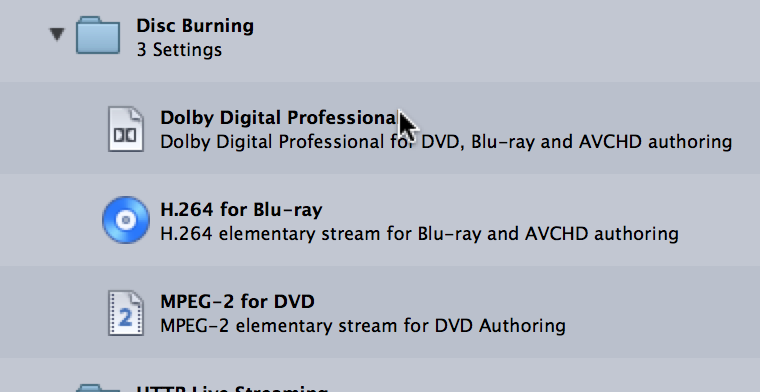
Not sure what the last paragraph means. If you have a four hour project and you want to brake it up into pieces, duplicate the project and delete the sections you don't want. Duplicating is the equivalent of Save As. This is the new paradigm in many Apple apps now, Pages, Preview, etc.
You should see this
Not sure what the last paragraph means. If you have a four hour project and you want to brake it up into pieces, duplicate the project and delete the sections you don't want. Duplicating is the equivalent of Save As. This is the new paradigm in many Apple apps now, Pages, Preview, etc.
Please Log in to join the conversation.
21 Jan 2013 16:34 - 21 Jan 2013 16:37 #20216
by ozfrog
Replied by ozfrog on topic Holiday movie in HD for home viewing
Thanks for the quick reply Tom.
Yes I found the "Dolby Digital Professional" setting in Compressor - dragged that up as usual, gave it a "destination" folder on an external HDD but it kept coming back with a message saying my information was incomplete so I couldn't submit the compression.
There are no length parameters as of old either - one used to able to select options such as;
120 minutes best quality.
Gone
I will go the "duplicate" road as you kindly suggested - probably quicker in the long run.
I remember now - seems "numbers" has the same option instead of "save as" - I should have tweaked that.
Yes I found the "Dolby Digital Professional" setting in Compressor - dragged that up as usual, gave it a "destination" folder on an external HDD but it kept coming back with a message saying my information was incomplete so I couldn't submit the compression.
There are no length parameters as of old either - one used to able to select options such as;
120 minutes best quality.
Gone
I will go the "duplicate" road as you kindly suggested - probably quicker in the long run.
I remember now - seems "numbers" has the same option instead of "save as" - I should have tweaked that.
Last edit: 21 Jan 2013 16:37 by ozfrog. Reason: typo
Please Log in to join the conversation.
23 Jan 2013 17:02 #20289
by ozfrog
Replied by ozfrog on topic Holiday movie in HD for home viewing
For TOM Wolsky. Hi - finally persuaded FCP-X to burn me a DVD using the 4.5 hours of video. The results as far as video goes, were as expected, the audio was non-existent. No sound! I will cut this up into 3 roughly 90 minute segments and burn them individually for better video results and with a bit of luck, some sound. This is being done from the "Share" menu in FCP-X so as to not use Compressor.
Any comments welcome Tom ( or others )
Ozfrog
Any comments welcome Tom ( or others )
Ozfrog
Please Log in to join the conversation.
- Tom Wolsky
-
- Offline
- Moderator
-
23 Jan 2013 17:10 #20290
by Tom Wolsky
Replied by Tom Wolsky on topic Holiday movie in HD for home viewing
You can't make a 4.5 hour DVD.
Make disk images of the three movies. Test them in the DVD player.
Make disk images of the three movies. Test them in the DVD player.
Please Log in to join the conversation.
23 Jan 2013 20:34 #20296
by ozfrog
Replied by ozfrog on topic Holiday movie in HD for home viewing
Hi Tom,
No of course - a 4.5H DVD is impossible I agree, but it would seem FCP-X did as best it could to compress those 4.5 hours into 1 DVD of 4.7Go - nice feat, but with all that compression, the video naturally suffered and there was no sound on the output.
Ill let you know how I get on with the 3 x 90" cut ups.
Ozfrog.
No of course - a 4.5H DVD is impossible I agree, but it would seem FCP-X did as best it could to compress those 4.5 hours into 1 DVD of 4.7Go - nice feat, but with all that compression, the video naturally suffered and there was no sound on the output.
Ill let you know how I get on with the 3 x 90" cut ups.
Ozfrog.
Please Log in to join the conversation.
