




- Posts: 215
- Thank you received: 2
3 Post Moderation Rule for New Boarders (25 Jan 2021)
New boarders will have their posts moderated - Don't worry if you cannot see your post immediately.
Added New Audio To Multicam Edit - Audio Missing On Main Timeline!
15 Jan 2013 18:55 #19964
by Shane M
So I cut a 5 angle multicam of some band performing. I was working with the raw audio from the sound guy, while the audio guy was working on refining the final audio mix. I just wanted to get a head start on editing instead of waiting around for the other guy to be done.
I figured i could just add an angle to the multicam, drop in the final audio mix file and sync it to the other angles. I did this just fine, and deleted the scratch audio...it plays back fine within the multicam clip and all that but it doesnt work when i go back to the main timeline view of the multicam clip!
It says A: (Missing) on all the clips. I have it set to monitor the final audio clip in the multicam but I just cant figure out why its not working?
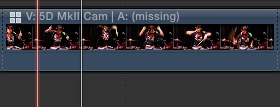
Any help?
Thanks!
I figured i could just add an angle to the multicam, drop in the final audio mix file and sync it to the other angles. I did this just fine, and deleted the scratch audio...it plays back fine within the multicam clip and all that but it doesnt work when i go back to the main timeline view of the multicam clip!
It says A: (Missing) on all the clips. I have it set to monitor the final audio clip in the multicam but I just cant figure out why its not working?
Any help?
Thanks!
Please Log in to join the conversation.
- DSvoboda356
-

- Offline
- Premium Member
-

Less
More
- Posts: 109
- Thank you received: 5
15 Jan 2013 20:25 #19966
by DSvoboda356
Replied by DSvoboda356 on topic Added New Audio To Multicam Edit - Audio Missing On Main Timeline!
try selecting your audio angle within the angle viewer. If that doesnt work maybe creating a compound clip of your multiclip and synchronize it to the mix.
Please Log in to join the conversation.
15 Jan 2013 20:28 #19967
by Shane M
Replied by Shane M on topic Added New Audio To Multicam Edit - Audio Missing On Main Timeline!
yeah I mean i did a work around just manually syncing the audio clip on top of the multicam clip in the timeline...but thats shouldnt be the way it has to be done really...
I think i figured it out now though...i had to enable the new audio track in the inspector....it seems to work now? Its weird that I had to enable that though instead of it being enabled already...
I think i figured it out now though...i had to enable the new audio track in the inspector....it seems to work now? Its weird that I had to enable that though instead of it being enabled already...
Please Log in to join the conversation.
