


- Posts: 1433
- Thank you received: 64
3 Post Moderation Rule for New Boarders (25 Jan 2021)
New boarders will have their posts moderated - Don't worry if you cannot see your post immediately.
Import hiccup from Canon DSLR
- Disproportionate Pictures
-
 Topic Author
- Offline
- Platinum Member
-

Less
More
19 Dec 2012 15:18 - 19 Dec 2012 15:19 #19022
by Disproportionate Pictures
Import hiccup from Canon DSLR was created by Disproportionate Pictures
I'm working on a fairly sizeable job that was shot 3 camera- Canon C300 plus 2 5DMKII.
I've been hit with a bit of a snag. The C300 material imports fine, but with the 5D stuff, I'm getting intermittent issues where when I import a series of clips (import only, not transcode) a file will go all the way thru the import process (the little progress circle in the corner of the clip) then at the end, FCP will come up with a dialogue box that says,
Import Failed
The following clip encountered an error during import and is still referencing media on the camera:
Clip Name: XXXXX
Event: XXXXXX
Original Name: XXXXXX
Volume: XXXXXXX
After I hit "OK" on this dialogue box, things just continue, and after all the clips are imported I'm transcoding them to optimized media anyway. But the issue is that I can't just select a bunch of clip at night and expect them to be done in the morning because this dialogue box stops the import progress.
Any ideas? This is killing me as there are 2 dozen 3 camera interviews to import.
I've been hit with a bit of a snag. The C300 material imports fine, but with the 5D stuff, I'm getting intermittent issues where when I import a series of clips (import only, not transcode) a file will go all the way thru the import process (the little progress circle in the corner of the clip) then at the end, FCP will come up with a dialogue box that says,
Import Failed
The following clip encountered an error during import and is still referencing media on the camera:
Clip Name: XXXXX
Event: XXXXXX
Original Name: XXXXXX
Volume: XXXXXXX
After I hit "OK" on this dialogue box, things just continue, and after all the clips are imported I'm transcoding them to optimized media anyway. But the issue is that I can't just select a bunch of clip at night and expect them to be done in the morning because this dialogue box stops the import progress.
Any ideas? This is killing me as there are 2 dozen 3 camera interviews to import.
Last edit: 19 Dec 2012 15:19 by Disproportionate Pictures.
Please Log in to join the conversation.
- DSvoboda356
-

- Offline
- Premium Member
-

Less
More
- Posts: 109
- Thank you received: 5
19 Dec 2012 16:36 #19023
by DSvoboda356
Replied by DSvoboda356 on topic Import hiccup from Canon DSLR
I have had this same exact issue. I resolved it by removing the move, from outside DCIM folder. I dont like doing that but whatever gets the job done.
Please Log in to join the conversation.

18 Apr 2013 15:43 #24663
by frandu
Replied by frandu on topic Import hiccup from Canon DSLR
I am having the same issue. Are this option to remove the MOV outside de DCIM folder the only way?
Please Log in to join the conversation.

20 Apr 2013 02:56 #24747
by dgwvideo
Creating history....one edit at a time !
Replied by dgwvideo on topic Import hiccup from Canon DSLR
I don't have the answer, but I can tell you that this topic has come up before and I believe I recall reading a couple solutions to it on this forum. Do a good search and maybe you can locate it (although the forum has been revamped some time back and possible those threads could be lost).
ALSO - are you importing directly from camera, or from an archive of the data on a hard drive? I seem to recall the issue had something to do with FCPX believing the camera was either attached or not attached.
ALSO - are you importing directly from camera, or from an archive of the data on a hard drive? I seem to recall the issue had something to do with FCPX believing the camera was either attached or not attached.
Creating history....one edit at a time !
Please Log in to join the conversation.

26 Jun 2013 01:46 - 26 Jun 2013 01:58 #27727
by TraiGuzie
Replied by TraiGuzie on topic Import hiccup from Canon DSLR
Final Cut Pro X treats folders made from straight copies of the camera card as the camera itself plugged into the computer.
I just worked on a Same Day Edit wedding with 4 Canon DSLRs shoot on Friday and I was not able to export anything until it finished "Capturing from Camera" or something like that. It was copying the 140+ gigs already on my desktop. This despite the fact that I had asked it not to copy the files(unchecked everything in the import dialog), as they were already on my computer and after if chose to rename my files to 14 digit inscrutable time/date stamps without asking making any relinking later to be excruciating...
Well I have submitted a bug report to Apple. But I think that I have found a workaround that does not involve dragging the .mov out as like alot of people such as myself would like to keep the camera card info intact.
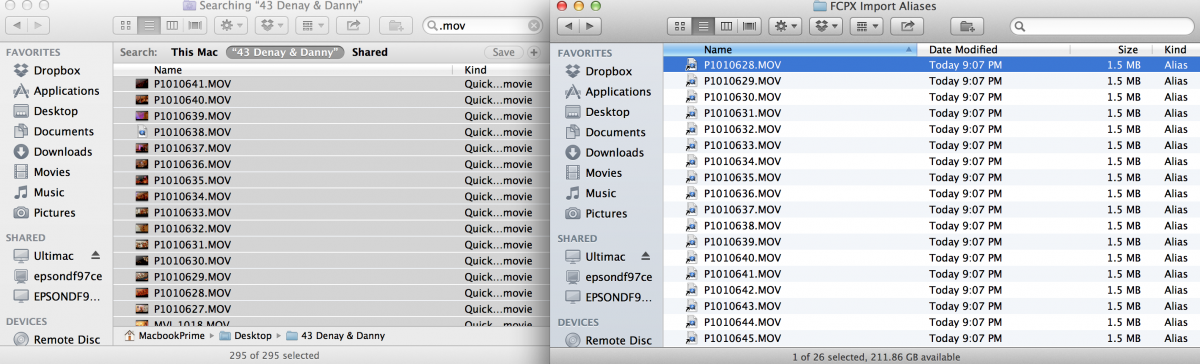
Basically, I created aliases to all the .movs in a separate folder and imported those aliases instead. Workflow:
1. Create a folder named "FCPX Import Aliases"
2. In the folder that contains all your card imports, do a search in the top right search bar for .mov. (You may have to click search whatever your DSLR card folders is named instead of "This Mac" at the top of the finder window)
3. Command-A to select all and Option-Command drag that entire list into the new folder.
4. Aim the FCPX import window at that folder and voila!
I would not trust FCPX to upload any of my footage with the method they are using now, renaming the media files and creating arbitrary sharing rules if it thinks it's still "On the camera."
One of my guys uses a GH2 with .mts files and that doesn't work with this method, so I'm still scheming on that right now. Let me know if anybody wants whatever I find out for that posted here.
I just worked on a Same Day Edit wedding with 4 Canon DSLRs shoot on Friday and I was not able to export anything until it finished "Capturing from Camera" or something like that. It was copying the 140+ gigs already on my desktop. This despite the fact that I had asked it not to copy the files(unchecked everything in the import dialog), as they were already on my computer and after if chose to rename my files to 14 digit inscrutable time/date stamps without asking making any relinking later to be excruciating...
Well I have submitted a bug report to Apple. But I think that I have found a workaround that does not involve dragging the .mov out as like alot of people such as myself would like to keep the camera card info intact.
Basically, I created aliases to all the .movs in a separate folder and imported those aliases instead. Workflow:
1. Create a folder named "FCPX Import Aliases"
2. In the folder that contains all your card imports, do a search in the top right search bar for .mov. (You may have to click search whatever your DSLR card folders is named instead of "This Mac" at the top of the finder window)
3. Command-A to select all and Option-Command drag that entire list into the new folder.
4. Aim the FCPX import window at that folder and voila!
I would not trust FCPX to upload any of my footage with the method they are using now, renaming the media files and creating arbitrary sharing rules if it thinks it's still "On the camera."
One of my guys uses a GH2 with .mts files and that doesn't work with this method, so I'm still scheming on that right now. Let me know if anybody wants whatever I find out for that posted here.
Last edit: 26 Jun 2013 01:58 by TraiGuzie.
Please Log in to join the conversation.
26 Jun 2013 01:59 #27729
by Seanus
Sean Lander - Editing since 1982 - AVID 1991 - FCP 1999 - FCPX 2011
Replied by Seanus on topic Import hiccup from Canon DSLR
I get around this issue by copying my media from the cards to my hard drive with Magic Bullet Grinder.
This way I can also add a timecode track at the same time. Because I shoot everything with the 5D MkII it's been the best money I've spent.
Not sure if the beta of BulletProof can do that, but check it out as it's free at the moment.
www.redgiant.com/products/all/bulletproof/
This way I can also add a timecode track at the same time. Because I shoot everything with the 5D MkII it's been the best money I've spent.
Not sure if the beta of BulletProof can do that, but check it out as it's free at the moment.
www.redgiant.com/products/all/bulletproof/
Sean Lander - Editing since 1982 - AVID 1991 - FCP 1999 - FCPX 2011
Please Log in to join the conversation.
26 Jun 2013 11:17 #27747
by frandu
Replied by frandu on topic Import hiccup from Canon DSLR
My work around is to drag and drop from finder to FCPX all the MOV's. Somehow I can't just import directl from FCPX.
Please Log in to join the conversation.
