


- Posts: 3
- Thank you received: 0
3 Post Moderation Rule for New Boarders (25 Jan 2021)
New boarders will have their posts moderated - Don't worry if you cannot see your post immediately.
Multicam editing stopped working in FCP 10.0.7
19 Dec 2012 01:27 #18986
by piwiaus
Multicam editing stopped working in FCP 10.0.7 was created by piwiaus
I upgraded to 10.0.7 and now the mouse will not show the blade icon when I hover over the multicam view, and no amount of clicking will add a cut between cameras. I'm struggling to find anything I am doing wrong that prevents this working, when I was using it with complete success in the previous version. It's only as assumption at the moment that the problem is 10.0.7 -- can anyone please point me to things I should check that might disable editing within the multicam view that I might have overlooked?
I'm on a MBP using an external 6TB LaCie 2big drive for the FCP files, and no problems with access, playback etc. I am set up for 8 'tracks' in this multi-cam, though at this stage of the project only three are in active use.
Any help greatly appreciated, as I am trying to get the video of a tribute concert finished before year end as a gift for a departing and highly valued teacher.
I'm on a MBP using an external 6TB LaCie 2big drive for the FCP files, and no problems with access, playback etc. I am set up for 8 'tracks' in this multi-cam, though at this stage of the project only three are in active use.
Any help greatly appreciated, as I am trying to get the video of a tribute concert finished before year end as a gift for a departing and highly valued teacher.
Please Log in to join the conversation.
- Tom Wolsky
-

- Offline
- Moderator
-

19 Dec 2012 05:24 #18998
by Tom Wolsky
Replied by Tom Wolsky on topic Multicam editing stopped working in FCP 10.0.7
Can you post a screen shot of the timeline you're cutting in?
Please Log in to join the conversation.
19 Dec 2012 08:34 - 19 Dec 2012 08:37 #19006
by piwiaus
Replied by piwiaus on topic Multicam editing stopped working in FCP 10.0.7
I'll give it a shot -- thanks!
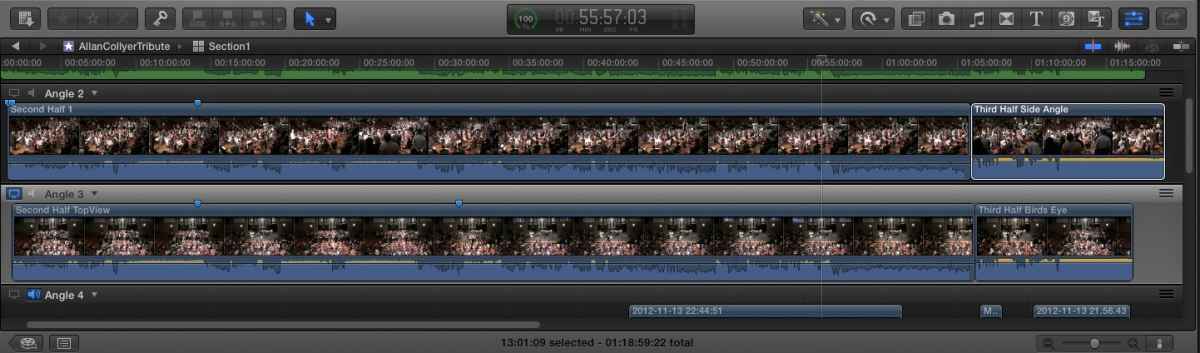
So, there's an audio file at the top (green edge visible), then a couple of fixed cameras with almost continuous shots (other than a card change when they filled up) and then other cameras lower down with intermittent shooting.
So, there's an audio file at the top (green edge visible), then a couple of fixed cameras with almost continuous shots (other than a card change when they filled up) and then other cameras lower down with intermittent shooting.
Last edit: 19 Dec 2012 08:37 by piwiaus. Reason: Added explanation
Please Log in to join the conversation.
- Tom Wolsky
-
- Offline
- Moderator
-
19 Dec 2012 09:02 #19007
by Tom Wolsky
Replied by Tom Wolsky on topic Multicam editing stopped working in FCP 10.0.7
You're not inside a project. You're inside the angle editor. You need to edit the multicam clip into a project. That's where you cut the multicam clip with the angle viewer.
Please Log in to join the conversation.
19 Dec 2012 09:07 #19009
by piwiaus
Replied by piwiaus on topic Multicam editing stopped working in FCP 10.0.7
Ahh, Tom, you are very gracious and gentlemanly. Yes, I was just logging back in to withdraw my problem, and to confess it was a carbon-based issue with the interface between the keyboard and chair. In the ensuing minutes since I last posted, I have remembered that fact at last and actually cut the balance of my set cameras. Sigh.
In my defence, I still don't get the blade icon when I am in the correct timeline view and hover over the angle viewer; but at least clicking edits the shots and the keyboard accelerators are working too.
So the whole storm in a teacup is one of those we classify as "user is an idiot". Thanks for sparing the time to coach a newbie.
In my defence, I still don't get the blade icon when I am in the correct timeline view and hover over the angle viewer; but at least clicking edits the shots and the keyboard accelerators are working too.
So the whole storm in a teacup is one of those we classify as "user is an idiot". Thanks for sparing the time to coach a newbie.
Please Log in to join the conversation.
